


orsin
-
Posts
356 -
Joined
-
Last visited
Content Type
Profiles
Forums
Gallery
Downloads
Store
Everything posted by orsin
-
I am thinking of a city night light solution. I would like to check if anyone tried this before, and what was the result The idea is to use a semi-transparent low polygon box that provides a layer of orange colour near the ground. And set the element to be rendered disregarding light levels. Just like the light on carrier deck. Each single element will cover a small area. Every 30/50 elements can be grouped to be 1 model to be placed to cover the entire road cross/block to simplify the planning. And they can be made destroya ble. Anyone?


-
the only way seems to be reverse engineer the LOD file. Without a tool that is quite difficult. I had a few tries yesterday and managed to delete some nodes. But the model coordinate seem to scramble. Need more understanding of the file structure.
-
is there a way we can have a lower poly model? slowing down a lot when it is running a 11M lod
-
View File WOI P3 Screen Menu This game menu is developed based on Eagle114th's Screen Overhaul template. Credit to Eagle114th. The menu was developed for a super-vanilla mod pack within our team and later become available to the generic SF2 games. Please backup your file before your installation. Installation: Extract the relevant files to SF installation and SF mod folders, overwrite the file if needed. install fonts attached to windows Uninstallation: Overwrite files with backup you made. Submitter orsin Submitted 07/30/2022 Category Menus
- 1 reply
-
- 1
-

-
Hi, I notice UK carrier based aircraft in SF is constantly set to launch from US carriers. Say Buccaneer is set to launch on Forrestal instead of Ark Royal which is not historically correct. Is there any way to restrict the carrier country an aircraft can be launched from?
-

Version 1.1.0
41 downloads
This game menu is developed based on Eagle114th's Screen Overhaul template. Credit to Eagle114th. The menu was developed for a super-vanilla mod pack within our team and later become available to the generic SF2 games. Please backup your file before your installation. Installation: Extract the relevant files to SF installation and SF mod folders, overwrite the file if needed. install fonts attached to windows Uninstallation: Overwrite files with backup you made. -
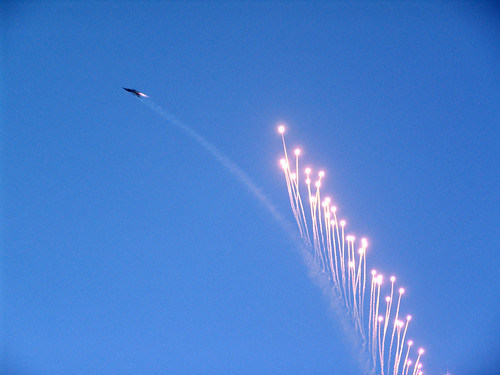 Please read the readme. The purpose of this mod is not improving the visual effect but change the drag coefficient of flare and chaff to make them more realistic.
-
View File Improved Chaff and Flare Effects The purpose of this mod is to improve the chaff and flare effect. The stock effects does not provide realistic drag efficient for both Chaff and Flare. This mod improves these aspects to make combat countermeasure effects a bit real. Installation ----- Extract the files under your SF2 mod main folder and overwrite the file. Submitter orsin Submitted 02/21/2022 Category Effect Mods
- 1 reply
-
- 2
-
-

-
- chaff
- countermeasure
- (and 1 more)
-
Version 1.1.0
638 downloads
The purpose of this mod is to improve the chaff and flare effect. The stock effects does not provide realistic drag efficient for both Chaff and Flare. This mod improves these aspects to make combat countermeasure effects a bit real. Installation ----- Extract the files under your SF2 mod main folder and overwrite the file.- 5 comments
-
- 21
-
-
-
- chaff
- countermeasure
- (and 1 more)
-
AI Remastered - NovaLogic Terrains Tilesets
orsin commented on orsin's file in Tilesets for Terrains
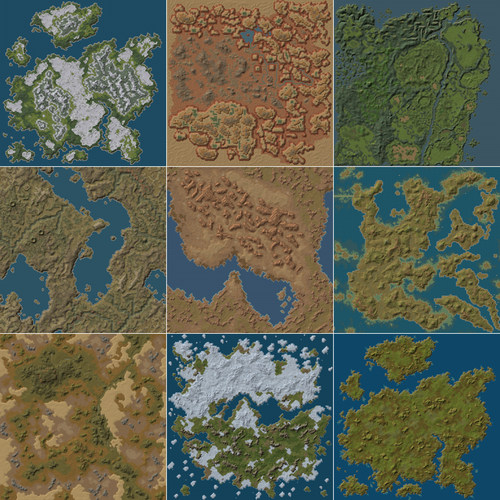 it will take a while to get the suitable de-blur AI so if you have anything new go ahead. No TGA file is touched, only BMP, so should be ok with no impact. Give it a try. so far looks very good and I like Arid much more. Feel free to incorporate in you pack if all good.
-
View File AI Remastered - NovaLogic Terrains Tilesets This is an AI remastered tileset for the great NovaLogic Terrains released by Menrva. This is tilesets only. You will need the full terrain from here to get it working. NovaLogic Terrains - Full Terrains - CombatACE AI zoom tool based on Realesrgan was used in the tileset with GPU computing to reproduce 512 x 512 tilesets with richer details from the original 128 x 128 tilesets. Due to limitation of the AI algorithm, there are still part of terrain remain blured. So the tilesets are all reduced to 256 x 256 to produce a more consistent feel. We have noticed some other AI anti-blur algorithm can produce better results on the new 512 x 512 tile set and may include that in the future release. ----------------------------/Installation/---------------------------------- 0. You must have the NovaLogic Terrains from Menrva. This is a tileset only. Download and install from the link provided above. 1. Backup is a must. this mod will overwrite your existing Novalogic terrain tilesets. Just in case you are not happy with the outcome; 2. extract the Terrains folder under your SF2 mod folder and overwrite the files (about 2950 files) Enjoy! Submitter orsin Submitted 02/05/2022 Category Tilesets for Terrains
-
Version 1.0.0
204 downloads
This is an AI remastered tileset for the great NovaLogic Terrains released by Menrva. This is tilesets only. You will need the full terrain from here to get it working. NovaLogic Terrains - Full Terrains - CombatACE AI zoom tool based on Realesrgan was used in the tileset with GPU computing to reproduce 512 x 512 tilesets with richer details from the original 128 x 128 tilesets. Due to limitation of the AI algorithm, there are still part of terrain remain blured. So the tilesets are all reduced to 256 x 256 to produce a more consistent feel. We have noticed some other AI anti-blur algorithm can produce better results on the new 512 x 512 tile set and may include that in the future release. ----------------------------/Installation/---------------------------------- 0. You must have the NovaLogic Terrains from Menrva. This is a tileset only. Download and install from the link provided above. 1. Backup is a must. this mod will overwrite your existing Novalogic terrain tilesets. Just in case you are not happy with the outcome; 2. extract the Terrains folder under your SF2 mod folder and overwrite the files (about 2950 files) Enjoy! -
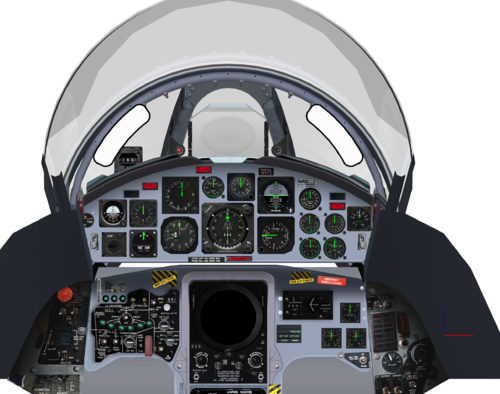
View File F-104 Cockpit Texture Improvement This cockpit repaint is purposed to improve the existing F-104 A/C/G cockpit texture distributed through the F-104 packs available in Combatace. Many improvements took place to make a more unified look of the cockpit and remove some photographic feel of the existing pit texture set installation ------------------------ 1. Locate your F-104 subfolder under your mod/Objects/Aircraft folder 2. Overwrite the files under Cockpit folder. Submitter orsin Submitted 01/08/2022 Category Jet Cockpits
-
Version 1.0.0
229 downloads
This cockpit repaint is purposed to improve the existing F-104 A/C/G cockpit texture distributed through the F-104 packs available in Combatace. Many improvements took place to make a more unified look of the cockpit and remove some photographic feel of the existing pit texture set installation ------------------------ 1. Locate your F-104 subfolder under your mod/Objects/Aircraft folder 2. Overwrite the files under Cockpit folder. -
Hi Menrva, The Mig 25 in this pack contains a cockpit that was created by Centurion-1 back in 12-13. It was almost unusable as most of parts are not working. I have made some modification to both the ini file and the LOD itself. Can I upload it here for inclusion in the next release? Regards, Orsin
- 11 replies
-
- 1
-
-
- coalition
- desert shield
- (and 6 more)
-
I opened the lod file in HEX editor and cannot find any meaningful letters that refer to the node name. Is there a particular encoding that I should be using?
-
Hi Mue, Is it possible to add a function that allows node name in a lod file to be renamed? Many old mods have repeated node names within a model which stops modders to add new functions. if a node name can be changed in the model, it will add many possibilities to the modding community.
-
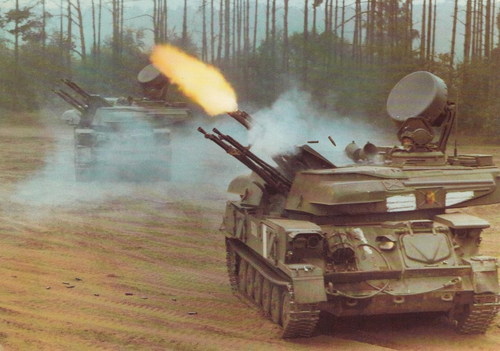
View File Improved Ground Gun Accuracy The purpose of this mod is to improve the ground gun accuracy especially the AA Guns. It changes the game's default ballistic coefficient entries and make better speed retention for trajectory items. Thus it makes guns perform much better for anything flying straight line. I have included 2 types of data in this mod. Please choose the one that works better for you. Type A = Ballistic Coefficient changed to 1.1 times, better gun accuracy. Type B = Ballistic Coefficient changed to 1.2 times, even higher gun accuracy but may influence AI plane in missions. Also included the ballisticdata change program which when open in a folder that contains G1.dat, will allow you to change the entries. For artillery, in addition to this mod, you can also change the accuracy in the gun data to 125 (yes, you can actually exceed 100) Installation: ----------------------------------------- Extract the G1.dat file under Type A or Type B folder under Objects folder in your mod directory Uninstallation ---------------------------------------- Delete G1.dat file under Objects folder in your mod directory Submitter orsin Submitted 12/24/2021 Category Other
-
Version 1.0.0
145 downloads
The purpose of this mod is to improve the ground gun accuracy especially the AA Guns. It changes the game's default ballistic coefficient entries and make better speed retention for trajectory items. Thus it makes guns perform much better for anything flying straight line. I have included 2 types of data in this mod. Please choose the one that works better for you. Type A = Ballistic Coefficient changed to 1.1 times, better gun accuracy. Type B = Ballistic Coefficient changed to 1.2 times, even higher gun accuracy but may influence AI plane in missions. Also included the ballisticdata change program which when open in a folder that contains G1.dat, will allow you to change the entries. For artillery, in addition to this mod, you can also change the accuracy in the gun data to 125 (yes, you can actually exceed 100) Installation: ----------------------------------------- Extract the G1.dat file under Type A or Type B folder under Objects folder in your mod directory Uninstallation ---------------------------------------- Delete G1.dat file under Objects folder in your mod directory -
thank you very much
-
Hi, I am creating a mod which requires better ballistic accuracy to test the weapon. I wonder if anyone still have a copy of either 1. Ballisticdata.exe from Thirdwire, which was available on TW forum to edit G1.dat file or 2. G1.dat editor by Honeyfox, which was once available in download section but no longer available. Please help!
-
No this is unnecessary. The can be launched vertically without problem.
-
yes it is totally possible We did it long time ago. You need to make sure the missile have an appropriate Loft Height and the Gimble Limit.
-
View File Admiral Kuznetsov Class Carrier - Data INI fix This is a Data file fix for the Admiral Kuznetsov Class Carrier released by rokieborhgunder. You can download the original aircraft carrier file in the link below Admiral Kuznetsov Class Carrier - Aircraft Carriers - CombatACE The data file of this carrier Mod has a lot of problems, causing game to crash to Windows Desktop when the aircraft carrier is hit by a weapon. This data file fixed the problem. This Data file also fixed the Kashtan CIWS system in game. Allowing the AK630 barrels on Kashtan to actually fire at the target instead of shooting at the sky. Installation: 1. Unzip the file to the installation folder of the Kuznetsov Carrier Mod. 2. overwrite the existing file. Submitter orsin Submitted 05/20/2021 Category Aircraft Carriers
-
is this project still alive?

