


Fubar512
-
Posts
8,418 -
Joined
-
Last visited
-
Days Won
42
Content Type
Profiles
Forums
Gallery
Downloads
Store
Everything posted by Fubar512
-
A-12 Avenger
Fubar512 replied to christian59's topic in Thirdwire: Strike Fighters 1 Series - General Discussion
Stealth works well, arguably too well, as it's presently an "all or nothing" effect. The values are not as well defined (or tweakable) as TK may have originally intended. To utilize stealth, under the detect system header, add: BaseRCSModifier=-0.050. Note that I've used a negative value. With the current AircraftObject.dll, if you do not specify a negative value, the RCS modifier will not work. You may also want to tweak the "Max visible Distance" to something under 4000 m, and declare the aircraft capability as "Night_Only", otherwise you will be visible to other aircraft at extreme distances, even at night. -
Sukhoi SU-34 Platypus
Fubar512 replied to bwRavencl's topic in Thirdwire: Strike Fighters 1 Series - General Discussion
Probably because the '34 in the image is carrying the maximum loadout for the mission it's flying. Even Marc's Su-27 has 12 weapon's stations. -
Cockpits are much harder to model than aircraft themselves, and as a result, there are a precious few individuals who actually take the time do so. Secondly, even if someone were to create a realistic E-model pit, it would not be fully functional at this point, due to the limitions of the avionics code. You'd either have a fairly accurate, working HUD and A2A radar only, or one sporting a "mocked-up" HUD with primitive (60's era) A2A & simplified A2G radar modes.
-
Desert Storm terrain
Fubar512 replied to Gabriele's topic in Thirdwire: Strike Fighters 1 Series - General Discussion
Kevin, getting the SCUD launcher into an armed recon mission should be easy. I once made up a little "surprise" package for Dave, who was gullible enough to install it. He later called me, angry as hell and cursing me out. It seems that he'd encountered a convoy on an armed recon mission that was entirely comprised of ZSU-23-4s -
New reds...
Fubar512 replied to cgold's topic in Thirdwire: Strike Fighters 1 Series - General Discussion
Roughly when they're ready. -
Change "FrequencyControl=" from TRUE to FALSE.
-
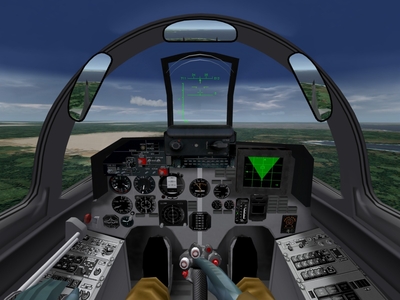
that's pretty simple, and the procedure is essentially the same for both aircraft. We'll use the MiG-29 as an example. Open up the MiG-29A's directory, locate the MiG-29_Cockpit.ini and MiG-29_Avionics.ini files, and either delete them, or (better safe than sorry) rename them. Do the same to the cockpit folder. Now, open up your Su-27 folder, locate the Su-27_cockpit.ini and Su-27_avionics.ini. files, and copy and paste them into the MiG-29A's folder. Do the same for the Su-27's cockpit folder. Next, in locate the following file in the MiG-29A's folder MiG-29A.ini, and edit the following lines to match: CockpitDataFile=Su-27_cockpit.ini AvionicsDataFilename=Su-27_avionics.ini AvionicsDLL=Avionics70.dll Another thing, you can also repaint the Su-27's cockpit panels a medium Gray, to give it more of a "MiG-29" look
-
-
Mig-29 Speed problem
Fubar512 replied to herman01's topic in Thirdwire: Strike Fighters 1 Series - General Discussion
I'm in the process of working on something that may cure a few of your ills, and I'll upload it as soon as it's complete. -
Mig-29 Speed problem
Fubar512 replied to herman01's topic in Thirdwire: Strike Fighters 1 Series - General Discussion
While there are (unrealistic) hacks one could perform, I'm afraid that the only real solution would be a new flight model for the '29. -
Mig-29 Speed problem
Fubar512 replied to herman01's topic in Thirdwire: Strike Fighters 1 Series - General Discussion
Actually, the original figures in the drag table may have been more accurate than you might have imagined , as evidenced by this table: The problem probably lies elsewhere in the calculations. -
Tornado Radar
Fubar512 replied to Tantobot's topic in Thirdwire: Strike Fighters 1 Series - General Discussion
They should have both. A bit of warning, first: Due to current SF configuration issues, if you enable any advanced HUD features on the Tornado (and thereby use the Avionics70.dll), you will lose air to ground radar capabilities, such as ground mapping and terrain avoidance. TK has assured us that this will be rectified in a future release. -
Aircraft Landing Lights
Fubar512 replied to TurtleHawk's topic in Thirdwire: Strike Fighters 1 Series - General Discussion
So, does that mean we won't see any more mistakes, such as MiG-17s with the landing light superimposed over the gun-camera lens? -
Adding Ships
Fubar512 replied to gillg's topic in Thirdwire: Strike Fighters 1 Series - Mission/Campaign Building Discussion
Here's what Killerbee and I were playing with in January/February of 2006: [TaskForceEscort] Position[01].Offset= 0, 0, 0 Position[02].Offset= 3000, 3800, 0 Position[03].Offset= -2100, -7600, 0 Position[04].Offset= 4100,-8400, 0 Position[05].Offset= 3000,-9200, 0 Position[06].Offset= 3900,-10000, 0 Position[07].Offset= -3200,-10800, 0 Position[08].Offset= 4200,-11600, 0 Position[09].Offset= 3200,-12400, 0 Position[10].Offset= 3800,-13200, 0 Position[11].Offset= -3300,-14000, 0 Position[12].Offset= 4300,-14800, 0 [TaskForceBattleLine] Position[01].Offset=0, 0, 0 Position[02].Offset=0, -3000, 0 Position[03].Offset=0, -6000, 0 Position[04].Offset=0, -9000, 0 Position[05].Offset=0, -12000, 0 Position[06].Offset=0, -15000, 0 Position[07].Offset=0, -18000, 0 Position[08].Offset=0, -21000, 0 Position[09].Offset=0, -24000, 0 Position[10].Offset=0, -27000, 0 Position[11].Offset=0, -30000, 0 Position[12].Offset=0, -33000, 0 -
Adding Ships
Fubar512 replied to gillg's topic in Thirdwire: Strike Fighters 1 Series - Mission/Campaign Building Discussion
If Killerbee were reading this, he'd be laughing. I have a hint for you: Formations -
Mig-29 Speed problem
Fubar512 replied to herman01's topic in Thirdwire: Strike Fighters 1 Series - General Discussion
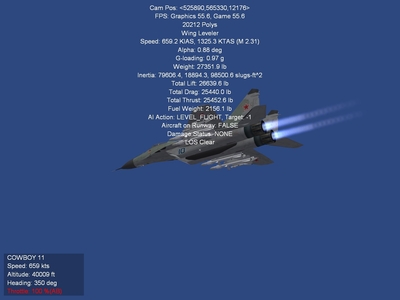
I think Mach 2.31 should be acceptable. -
-
How to use LGB ?
Fubar512 replied to Luiz Carlos's topic in Thirdwire: Strike Fighters 1 Series - General Discussion
Google is your friend. Only on some MiG-27s, latter model Su-24s, the Su-25, Su-34 and the Su-39. -
Most default and third-party aircraft have too low a deployment velocity for their countermeasures. A bit of research shows that 30 meters per second is the approximate average muzzle or ejection velocity achieved by CM dispensers in real life. Below is an example of the CM values I'm currently using on one aircraft model I was involved with. [FlareDispenser] ReferenceName=AN/ALE-40 SystemType=DECOY_DISPENSER EjectPosition= -3.0,-4.15,-0.05 EjectVelocity=-30.0,0.0,-30.0<---statement and value of interest The first number in the value-set is -30.0. This tells the dispenser to eject the flare towards the left at a velocity of 30.0 m/s. A positive number (30.0) would throw the CM towards the right, likewise at 30 m/s. The second set of numbers would impart forward (positive) or an aft (negative) velocity to the CM. In this case, we're using zero, so the the CM does not have a longitudinal vector. The final number, "-30.0", imparts velocity in a vertical vector. Negative values for down, positive for up. Next, using the SFP1E tool, extract the countermeasureobject.ini file from the objectdata.cat. By default, a copy will be extracted into the objects directory, where it can be edited and where it will reside. Edit it to match the data posted below: [ChaffData] EffectName=ChaffEffect RadarCrossSection=100.0 <---this is a fairly accurate "average" value derived from web research. MaxVisibleDistance=300 <---limits any possible hit on rendering speed (FPS) DragFactor=5.0 <---may possibly be higher in RL LifeTime=15.0 Length=5.5 <---this is a fairly accurate "average" value derived from web research. VelocityDeviation=0.3 [FlareData] EffectName=FlareEffect MaxVisibleDistance=3000 <---limits any possible hit on rendering speed (FPS) HeatSignature=100.0 <---series specific DragFactor=1.00 LifeTime=4.0 <---this is a fairly accurate "average" value derived from web research. VelocityDeviation=0.3
-
Nav mode key-stroke?
Fubar512 replied to TurtleHawk's topic in Thirdwire: Strike Fighters 1 Series - General Discussion
Did you try it in-game? It is listed (in deference to earlier aircraft-types that did not feature a HUD) as "Previous Gunsight Mode" and 'Next Gunsight Mode" : -
Baddest of the Bad of Vipers
Fubar512 replied to Dave's topic in Thirdwire: Strike Fighters 1 Series - General Discussion
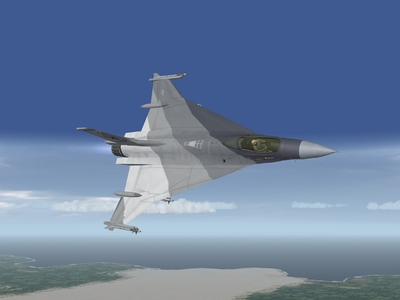
Baddest of the Bad? Perhaps not...... -
-
You mean campaigns for WoE like NATO fighters I & II? All terrains are theoretically interchangeable across the series. Refer to the Knowledge Base for directions on modifying terrain.ini files to work in a given sim.
-
Nav mode key-stroke?
Fubar512 replied to TurtleHawk's topic in Thirdwire: Strike Fighters 1 Series - General Discussion
It is the default key asignment in WoE. The only way you would not see this, is if the key assignment had been changed, or if you were attempting to use a third party model in a pre-SP4 install of SF or WoV (which would not feature a fully functional HUD to begin with). -
Nav mode key-stroke?
Fubar512 replied to TurtleHawk's topic in Thirdwire: Strike Fighters 1 Series - General Discussion
Shift ' allows you to toggle through the various HUD modes. Next time you need to know a keystroke in game, simply choose Options/Controls/Customize, and read down the list of keystroke/controller button assignments.