


Fubar512
-
Posts
8,418 -
Joined
-
Last visited
-
Days Won
42
Content Type
Profiles
Forums
Gallery
Downloads
Store
Everything posted by Fubar512
-
-
I'm in the process of working on something that may cure a few of your ills, and I'll upload it as soon as it's complete.
-
While there are (unrealistic) hacks one could perform, I'm afraid that the only real solution would be a new flight model for the '29.
-
Actually, the original figures in the drag table may have been more accurate than you might have imagined , as evidenced by this table: The problem probably lies elsewhere in the calculations.
-
They should have both. A bit of warning, first: Due to current SF configuration issues, if you enable any advanced HUD features on the Tornado (and thereby use the Avionics70.dll), you will lose air to ground radar capabilities, such as ground mapping and terrain avoidance. TK has assured us that this will be rectified in a future release.
-
So, does that mean we won't see any more mistakes, such as MiG-17s with the landing light superimposed over the gun-camera lens?
-
Here's what Killerbee and I were playing with in January/February of 2006: [TaskForceEscort] Position[01].Offset= 0, 0, 0 Position[02].Offset= 3000, 3800, 0 Position[03].Offset= -2100, -7600, 0 Position[04].Offset= 4100,-8400, 0 Position[05].Offset= 3000,-9200, 0 Position[06].Offset= 3900,-10000, 0 Position[07].Offset= -3200,-10800, 0 Position[08].Offset= 4200,-11600, 0 Position[09].Offset= 3200,-12400, 0 Position[10].Offset= 3800,-13200, 0 Position[11].Offset= -3300,-14000, 0 Position[12].Offset= 4300,-14800, 0 [TaskForceBattleLine] Position[01].Offset=0, 0, 0 Position[02].Offset=0, -3000, 0 Position[03].Offset=0, -6000, 0 Position[04].Offset=0, -9000, 0 Position[05].Offset=0, -12000, 0 Position[06].Offset=0, -15000, 0 Position[07].Offset=0, -18000, 0 Position[08].Offset=0, -21000, 0 Position[09].Offset=0, -24000, 0 Position[10].Offset=0, -27000, 0 Position[11].Offset=0, -30000, 0 Position[12].Offset=0, -33000, 0
-
If Killerbee were reading this, he'd be laughing. I have a hint for you: Formations
-
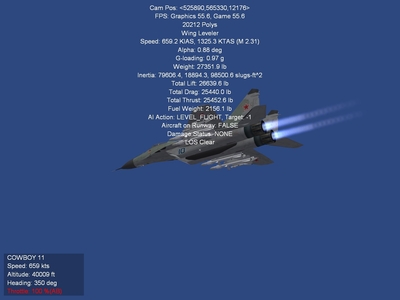
I think Mach 2.31 should be acceptable.
-
-
Google is your friend. Only on some MiG-27s, latter model Su-24s, the Su-25, Su-34 and the Su-39.
-
Most default and third-party aircraft have too low a deployment velocity for their countermeasures. A bit of research shows that 30 meters per second is the approximate average muzzle or ejection velocity achieved by CM dispensers in real life. Below is an example of the CM values I'm currently using on one aircraft model I was involved with. [FlareDispenser] ReferenceName=AN/ALE-40 SystemType=DECOY_DISPENSER EjectPosition= -3.0,-4.15,-0.05 EjectVelocity=-30.0,0.0,-30.0<---statement and value of interest The first number in the value-set is -30.0. This tells the dispenser to eject the flare towards the left at a velocity of 30.0 m/s. A positive number (30.0) would throw the CM towards the right, likewise at 30 m/s. The second set of numbers would impart forward (positive) or an aft (negative) velocity to the CM. In this case, we're using zero, so the the CM does not have a longitudinal vector. The final number, "-30.0", imparts velocity in a vertical vector. Negative values for down, positive for up. Next, using the SFP1E tool, extract the countermeasureobject.ini file from the objectdata.cat. By default, a copy will be extracted into the objects directory, where it can be edited and where it will reside. Edit it to match the data posted below: [ChaffData] EffectName=ChaffEffect RadarCrossSection=100.0 <---this is a fairly accurate "average" value derived from web research. MaxVisibleDistance=300 <---limits any possible hit on rendering speed (FPS) DragFactor=5.0 <---may possibly be higher in RL LifeTime=15.0 Length=5.5 <---this is a fairly accurate "average" value derived from web research. VelocityDeviation=0.3 [FlareData] EffectName=FlareEffect MaxVisibleDistance=3000 <---limits any possible hit on rendering speed (FPS) HeatSignature=100.0 <---series specific DragFactor=1.00 LifeTime=4.0 <---this is a fairly accurate "average" value derived from web research. VelocityDeviation=0.3
-
- 1
-

-
Did you try it in-game? It is listed (in deference to earlier aircraft-types that did not feature a HUD) as "Previous Gunsight Mode" and 'Next Gunsight Mode" :
-
Baddest of the Bad? Perhaps not......
-
-
You mean campaigns for WoE like NATO fighters I & II? All terrains are theoretically interchangeable across the series. Refer to the Knowledge Base for directions on modifying terrain.ini files to work in a given sim.
-
It is the default key asignment in WoE. The only way you would not see this, is if the key assignment had been changed, or if you were attempting to use a third party model in a pre-SP4 install of SF or WoV (which would not feature a fully functional HUD to begin with).
-
Shift ' allows you to toggle through the various HUD modes. Next time you need to know a keystroke in game, simply choose Options/Controls/Customize, and read down the list of keystroke/controller button assignments.
-
Irregardless of how the "Slammer" behaves in real life, in this series, once you've verified that the missile has acquired the target on its own and has begun tracking it (as evidenced by it performing fast and often erratic-appearing course corrections), you are free to target another aircraft.
-
I personally use and recommend Kreelin's Mission Designer (KMD). If you search around, you'll find a rather helpful how-to article by Streakeagle on how to use it. As for ground vehicles, you'll have to peruse the contents of your ground objects folder. There are literally tons of add ons available; SAM launchers, tanks, APCs, warships, even infantry. Flying the default AI aircraft is no different here than in any of WoE's siblings. You'll need to edit the aircraft.ini files, adding declarations for cockpits, and hangar loading screens (if you want to get that detailed). There are also additional Soviet aircraft to download and install, from MiG-15s on up to and including Su-27s & MiG-29s. The NATO side of things is also well represented. I suggest you search the "cold war" and "modern" aircraft download sections here at CA. Installing the latest weapon's pack is a plus, but you'll then have to edit the loadout.ini files of practically every aircraft in order to take advantage of it. I suggest that you read Wrench's article on that process in our Knowledge Base.
-
As an alternative, if the carrier has a radar, and the aircraft you're flying is equipped with an RWR, simply use the carrier's "RWR blip" as a reference.
-
Cargo Ship 2 View File An add-on that utilizes the existing SF/WoV/WoE cargo ship, and adds an interesting twist, SA-14 Gremlin manpads! To install, simply extract the "Cargoship2" to your groundobjects folder, and add the following entry to your weapondata.ini: [WeaponDataXXXX] <----change number to match sequence TypeName=SA-14 FullName=SA-14 Gremlin ModelName=SA-7 Mass=10.300000 Diameter=0.600000 Length=1.470000 AttachmentType=WP,SOVIET NationName=SOVIET StartYear=1974 EndYear=2000 Availability=3 BaseQuantity=1 Exported=TRUE ExportStartYear=1974 ExportEndYear=2020 ExportAvailability=3 WeaponDataType=1 RailLaunched=FALSE RocketPod=FALSE Retarded=FALSE Streamlined=TRUE FinStabilized=TRUE SpinStabilized=TRUE HasGrowl=TRUE EffectClassName=SmallMissileEffects ReleaseDelay=0.000000 WarheadType=0 Explosives=1.170000 FusingDistance=1.000000 ClusterBomblets=0 ClusterDispersion=0.000000 GuidanceType=10 Accuracy=80 MaxTurnRate=18.000000 MaxLaunchG=1.500000 LockonChance=90 LaunchReliability=85 ArmingTime=0.200000 SeekerFOV=4.500000 SeekerGimbleLimit=25.000000 Don't forget to save the changes twice, both on closing with notepad, and then again with the weapon editor. Submitter Fubar512 Submitted 07/08/2007 Category Cargo and Transports
-
511 downloads
An add-on that utilizes the existing SF/WoV/WoE cargo ship, and adds an interesting twist, SA-14 Gremlin manpads! To install, simply extract the "Cargoship2" to your groundobjects folder, and add the following entry to your weapondata.ini: [WeaponDataXXXX] <----change number to match sequence TypeName=SA-14 FullName=SA-14 Gremlin ModelName=SA-7 Mass=10.300000 Diameter=0.600000 Length=1.470000 AttachmentType=WP,SOVIET NationName=SOVIET StartYear=1974 EndYear=2000 Availability=3 BaseQuantity=1 Exported=TRUE ExportStartYear=1974 ExportEndYear=2020 ExportAvailability=3 WeaponDataType=1 RailLaunched=FALSE RocketPod=FALSE Retarded=FALSE Streamlined=TRUE FinStabilized=TRUE SpinStabilized=TRUE HasGrowl=TRUE EffectClassName=SmallMissileEffects ReleaseDelay=0.000000 WarheadType=0 Explosives=1.170000 FusingDistance=1.000000 ClusterBomblets=0 ClusterDispersion=0.000000 GuidanceType=10 Accuracy=80 MaxTurnRate=18.000000 MaxLaunchG=1.500000 LockonChance=90 LaunchReliability=85 ArmingTime=0.200000 SeekerFOV=4.500000 SeekerGimbleLimit=25.000000 Don't forget to save the changes twice, both on closing with notepad, and then again with the weapon editor. -
Perhaps it's the SA-7 launcher itself. I'll have a go at, and see if I experience any issues. I know the SA-7 missile itself works well, as I've come up with a nasty little twist on the default SF-series cargo ship.
-
Unfortunately, one cannot add a new mission category, as mission types are limited to what's already coded into the dll files. Regarding your sound file issue, why not simply combine all the radio chatter into one, long wav file, name it "SARchatter.wav", and then use it in place of the default wind sound?