
gerwin
-
Posts
829 -
Joined
-
Last visited
-
Days Won
9
Content Type
Profiles
Forums
Gallery
Downloads
Store
Everything posted by gerwin
-
I don't feel like programming it from scratch, and the coding library I use has no good big-list functions. If you want a Graphical user interface It would be a good idea to team up with Dragon Unpacker or something similar, and see if a cat-plugin can be made.
-
The New CatPack Extractor/Packer is available for download as of now. So you can look under the hood of SF2! The new cat format gave me a few suprises so that's what delayed the release. Thanks go to Kreelin and Paolo for testing and reporting back on the program the past days. http://forum.combatace.com/index.php?showtopic=35250
-
3,117 downloads
CatPack - Archiving utility for Third-Wire CAT format, GB 17-07-2011. V1.22, Freeware, Use at your own risk, files limit is set at 8000. Packs all files in current folder to CatPack.cat except CatPack.exe/CatPack.cat. Unpacks any cat file you drop on the icon to a folder with the archive's name. You can press Ctrl+Break to interrupt and close the program, but it will leave files unfinished when doing so. UPDATE: CatPack V1.1 will extract contents of the new Strike Fighters 2 Cat (no 2) archives. The Display will tell the Cat version to be 2, instead of 1. Subfolder information contained in version 2 archives will be restored properly. The unicode filenames in the version 2 archives are converted back to ASCII, therefor actual unicode-only characters in filenames will not be restored. Catpack does not yet support creating a version 2 Cat archive. Maybe later. CatPack V1.11 works properly when Cat files are in folders that have their 'archive' flag set. This seems to be the case with the SF2 objects folder. CatPack V1.12 has some additional features when extracting a Cat archive: First it automatically creates an index file of the Cat file. Second and it allows one to optionally pass a wildcard string, only files matching this wildcard string will be extracted from the archive. For example "mig" will only extract files that have "mig" in their name or extension. CatPack V1.22 Supports extracting a slightly new Cat format (no 3) as introduced between May and July 2011. Yet the compressed format that was also introduced is not supported. As SF2 since that time does not recognize version 1 cat archives, support for creating version 2 and 3 was added. Though without packing subfolders. For now it is recommended to just use format 2. Credits: Gerwin (gbroers[at]quicknet[d0t]nl) - Author Kreelin and Paolo - Beta testing of V1.1. Allegro game programming library - File and Unicode routines. -
View File CatPack Archiving utility CatPack - Archiving utility for Third-Wire CAT format, GB 17-07-2011. V1.22, Freeware, Use at your own risk, files limit is set at 8000. Packs all files in current folder to CatPack.cat except CatPack.exe/CatPack.cat. Unpacks any cat file you drop on the icon to a folder with the archive's name. You can press Ctrl+Break to interrupt and close the program, but it will leave files unfinished when doing so. UPDATE: CatPack V1.1 will extract contents of the new Strike Fighters 2 Cat (no 2) archives. The Display will tell the Cat version to be 2, instead of 1. Subfolder information contained in version 2 archives will be restored properly. The unicode filenames in the version 2 archives are converted back to ASCII, therefor actual unicode-only characters in filenames will not be restored. Catpack does not yet support creating a version 2 Cat archive. Maybe later. CatPack V1.11 works properly when Cat files are in folders that have their 'archive' flag set. This seems to be the case with the SF2 objects folder. CatPack V1.12 has some additional features when extracting a Cat archive: First it automatically creates an index file of the Cat file. Second and it allows one to optionally pass a wildcard string, only files matching this wildcard string will be extracted from the archive. For example "mig" will only extract files that have "mig" in their name or extension. CatPack V1.22 Supports extracting a slightly new Cat format (no 3) as introduced between May and July 2011. Yet the compressed format that was also introduced is not supported. As SF2 since that time does not recognize version 1 cat archives, support for creating version 2 and 3 was added. Though without packing subfolders. For now it is recommended to just use format 2. Credits: Gerwin (gbroers[at]quicknet[d0t]nl) - Author Kreelin and Paolo - Beta testing of V1.1. Allegro game programming library - File and Unicode routines. Submitter gerwin Submitted 12/29/2008 Category Utilities / Editors
-
As requested by Kreelin, I have updated my CatPack tool to unpack the new cat format from Strike Fighters 2, I will upload it tomorrow.
-
Indeed, things look great on your example. Again no luck here with your shader mod though, animated water insists on being crappy on my system. I just checked with a clean 2006 WOE installation, and animated water gives no such flaws with that version. So I correctly remembered it to work properly in the past. Coincidentally a similar topic was just revived at the thirdwire tech. support forum: http://bbs.thirdwire.com/phpBB/viewtopic.php?f=9&t=5367
-
Yes, I had the water shimmiring problem fixed weeks ago, thanks to this forum. (the relevant entries in the vietnamSEA data file have been like this: SolidObjectVertexCount=12288 SolidObjectIndexCount=18432 AlphaObjectVertexCount=8192 AlphaObjectIndexCount=12288 ..and.. LowDetailMesh=-1.0 WaterMesh=0.8) But I think that the strange water land transitions must be another issue...
-
Okay, good to hear It is not just my system ;) I have an nvidia 7600 GS (AGP) in there. ....Will be Back here tomorrow, it's late.
-
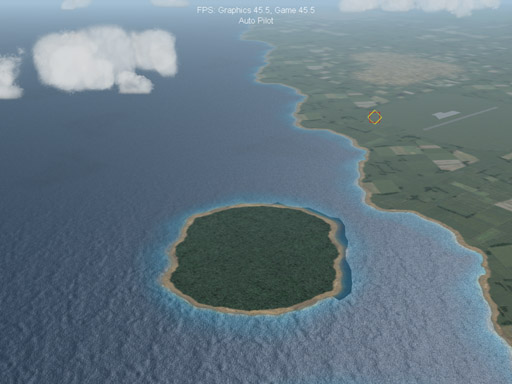
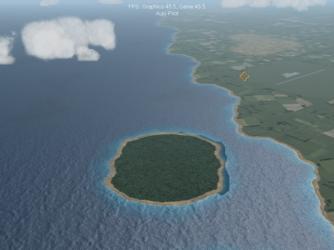
Oh, I did not want to say that anything is faulty on this matter, just not as good as I would like. I found the "low/medium" water looking boring and the "high" water looking overdone. And that is somewhat the same on all 4 official terrains IIRC. I never really thought it would differ for each terrain, I would have to test that and see if one terrain gives better water effects than the other. Besides that, what it do notice on germanyCE and VietnamSEA that one could call faulty is these crude land-water transitions that appear and vanish as you move over the terrain, when water is set "high". See screenshot, at the right side of the island. Is that common? Sure, would like to see a screenshot.
-
Thanks, so the water effects are attached to the terrain folders. I just put in the 2006 germanyCE terrain folder and it indeed gives a water effect more close to what I remembered. So that's a good thing, I can probably trace it back from there. I do have occasional crude transistions between water and land though, when water animation is enabled.
-
Since the patch, when I select low or medium water settings, the water appears totally static. But it does appear more shiny than land area. When I set water to high I get some slowly moving waves, which is not bad, but I am not to fond of it either. Now I remember with the 2006 versions of the game; the water was moving and glittering a bit, and I liked that effect more. Maybe there is a way one can get that effect back in the latest version of the game? I have never tried modifying effects myself, and I don't know to what degree it is hardcoded. Any suggestions on this topic?
-
to extract; drag 'n drop the cat file on the catpack program's icon.
-
If all else fails, CatPack can also extract contents of cat files: http://forum.combatace.com/index.php?autoc...p;showfile=7346
-
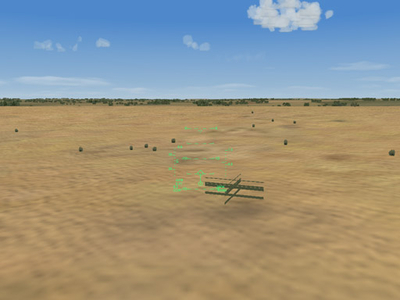
Thanks a lot, suprisingly these settings in the Desert_Data.ini fixed it, I a cannot find any green crosses anymore. Also the trees now appear anti-aliased or something, which makes them less pixelated without much framerate loss. I might try out these settings for other terrains as well, because it works well.
-
I put a screenshot of the object here (as I cannot attach images in download-support topics): http://forum.combatace.com/index.php?autoc...si&img=7493 what do you think?
-
Just SFP! related things I had to put somewhere.
-
-
From the album: Temporary
-
This is a great enhancement! As I always have something to complaint : you have any idea how I can remove these green cross-like objects that are placed occasionally.
-
1) Look at the bitmap names of the stock WOI skins, suitable additional skins need to have the same naming. Like F-15A_baz_1.bmp and f-4E_IAF_1.bmp. 2) Some older skins voor stock Third-wire aircraft are suitable for WOI too, except they need some files to be renamed. Like with the F-15A Eagle and the F-4E phantom II, Example: Skin bitmaps for WOE named F-15A_1.bmp: for WOI rename to F-15A_baz_1.bmp (same for nr 2 to 5) Skin bitmaps for WOE named F-4E_1.bmp: for WOI rename to f-4E_IAF_1.bmp (same for nr 2 to 5) The A-4 skyhawk models have changed since WOI, so be careful with these. 3) Skins I uploaded for WOI French Silver Scheme for Mirage 5D (TW model) Generic Hill Scheme F-16A (Netz) Skin for TW model Skins I uploaded for WOE, but that can be renamed for use in WOI. Generic Hill Scheme F-4E+F-4G Phantom II Skin for TW+MF model Sand/Desert F-15a Skin (fictional) for third-wire model and of course many more from other contributors...
-
This is an interesting aircraft to add to the game! The model looks good, and the textures are done very well. I made it a static transport plane for airfields, as the C-130 started to bore me. The data changes for this to work are below. Wikipedia says the servicestartyear can be 1955 (instead of 1968). The only downside is that the package is without lower detail models (additional LOD files), this way a formation of planes brings my framerate down quite a bit. C-119_data.ini [MissionData] NationName=USAF ServiceStartYear=1955 ServiceEndYear=1973 AircraftRole=TRANSPORT AircraftCapability=DAY_AND_NIGHT Availability=VERY_COMMON Exported=TRUE ExportStartYear=1959 ExportAvailability=VERY_COMMON PrimaryRoles=TRANSPORT,AIR_ASSAULT SecondaryRoles= NormalMissionRadius=900 MaxMissionRadius=925 Ceiling=7620.0 MinBaseSize=SMALL
-
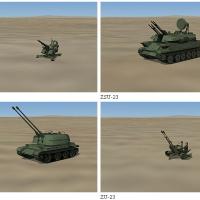
473 downloads
Previews of stock Ground Objects As present in SFP1, WOV, WOE, WOI with oct 2008 patch. This is a collection of 52 small screenshots, comes with a web-page layout for convenient viewing. compiled by Gerwin 24-11-2008- 1 review
-
- 1
-

-
View File Previews of stock Ground Objects Previews of stock Ground Objects As present in SFP1, WOV, WOE, WOI with oct 2008 patch. This is a collection of 52 small screenshots, comes with a web-page layout for convenient viewing. compiled by Gerwin 24-11-2008 Submitter gerwin Submitted 11/24/2008 Category SF/WO* Utilities/Editors
-
Nice! yet I cannot help notice that the trees leave big shadows on differing directions. if you know what I mean.
-
Slight millisecond stutter when glying sfp 1 installs.
gerwin replied to dsawan's topic in General Discussion
thanks, might give that a try too, as soon as the game starts misbehaving again. -
Slight millisecond stutter when glying sfp 1 installs.
gerwin replied to dsawan's topic in General Discussion
I 'sometimes' have stuttering on either one of my two PC's when playing Thirdwire sims. And IL-2 has it too. You can notice it quite well when looking a the easy radar display, as a stutter occurs approx. once every radar scan. A few eeks ago I manually disabled each and every unnecessary service and background program, to no avial. Eventually had to confess I could not fix this... will try FSautostart though.