
Menrva
-
Posts
4,635 -
Joined
-
Last visited
-
Days Won
48
Content Type
Profiles
Forums
Gallery
Downloads
Store
Everything posted by Menrva
-
I wonder why it's not standard procedure. I guess it would increase costs. But the passengers' lives are not expendable; all means to ensure their safety should be taken. In a different world maybe...
-
To be more precise, the issue is due to the Effects setting. Effects should be set to High, everything else can be set to Unlimited, AFAIK. As I stated countless times, with Effects set to Unlimited, the game uses specific DirectX 10 calls which have been implemented poorly, I guess.
-
No apologies needed, you did the right thing by investigating further. We are all concerned about protecting intellectual property. SimonMavrick should have double-checked what he was going to upload. It could have contained anything. Also, there's a good reason why mods are mostly distributed with ReadMe files. The few ones who care to read them know who deserves real credit. Thinking about this upload, I'd suggest it to be removed. One of the admins can re-upload it with a whole new description, a simple copy and paste of that ReadMe file would do, I suppose.
- 6 replies
-
- 2
-

-
- add-on aircraft
- strike fighters 2 series by thirdwire
- (and 1 more)
-
First of all, @russouk2004 linked what is an aircraft mod/add-on for HAWX, not a 3d model of HAWX. HAWX does not contain such aircraft. Second, if you downloaded the package, you'd notice a ReadMe.html file inside; this 3d model was reworked by YEYEYE (and AFAIK there is a lot of stuff from him here at CA, including well made cockpits, etc.). YEYEYE mentions a few other names as the original creators of the 3d model, referred to as "HAWX FFR-41MR MOD". It's the same HAWX mod linked by russouk2004. Who uploaded the mod should have copy-pasted the content of such ReadMe file as the mod's description, because the authors are mentioned and credited there! Of course, even who uploaded the mod did not care to have a look at the ReadMe file. Here's the mentioned file everybody literally ignored; Readme.html In the end, YEYEYE took this mod for HAWX and made it for SF2. He credited the original creators, but we do not know if it's a straight-away rip or if he obtained the source files and reworked them. I hope this clarifies what should have been clear since the upload was going to be made.
-
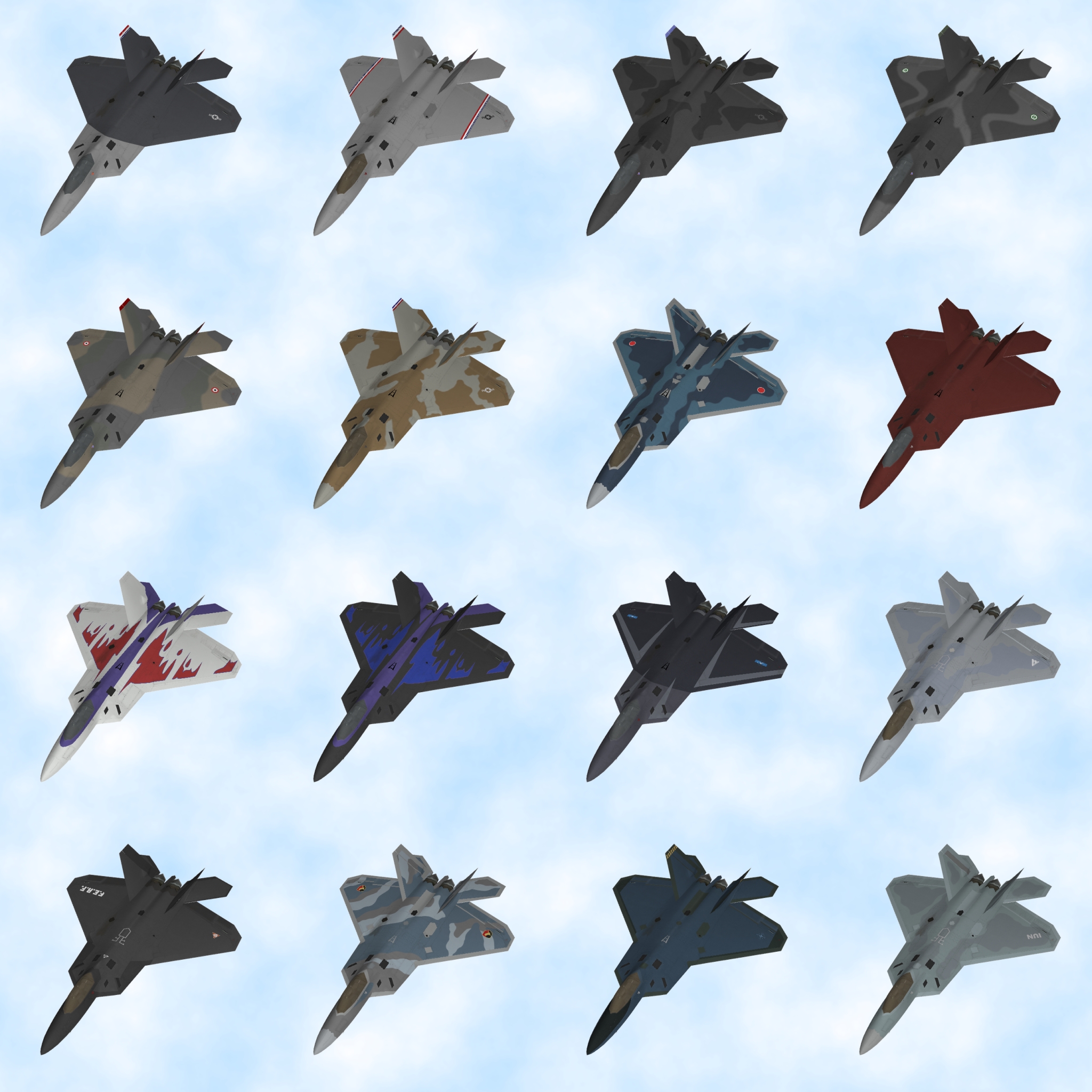
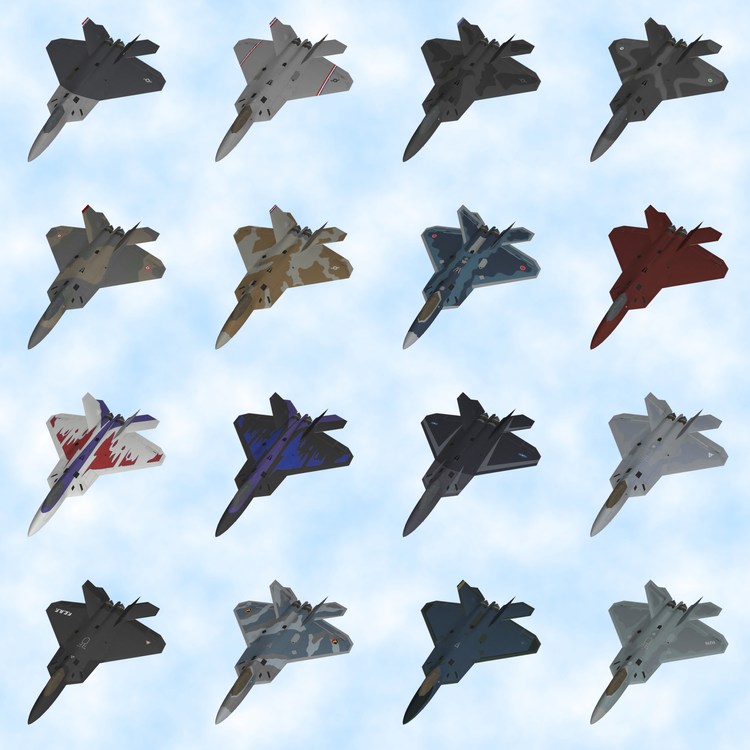
Aircraft add-on + extra skin pack coming soon...
-
Good to see you! Likewise, have a great 2020! 2019 has been a very positive year for me; I have engaged with the love of my life and I have passed many exams, so I am closer to graduation in IT engineering. However, back in November, my father started to feel bad. He's in hospital since December, and he's not in good shape. It hurts me not to see him at home anymore. Hopefully he'll soon be back. This reminds me how health is important in our everyday lives. So, I wish you all, dear members of the CA family, health and strength for this new year. Whichever obstacles you may encounter, know that friendship and love help get through them. Rob "Menrva" Minervini
-
You're wrong, Stratos. You can add a reference map in TFDtool, but I never used that function. It's less than ideal, because you'd need to find a perfectly squared reference map which matches the terrain's HFD exactly, otherwise the placement of things will be way off. I do what Gepard says; I use charts, Google Earth and the heightmap view function of TFDtool, which shows coastlines and even river valleys. It takes weeks of full work, but due to RL it takes months to add most of the Real World rivers by hand via TFDtool, on a rather big terrain area.
-
The terrain itself will suffice. I can test it anyway, without proper objects and aircraft.
-
Wrench, I have some time to look at the terrain in the next days. Feel free to send me a PM and I'll see what I can do to improve the terrain on various aspects. I can tile the missing Mekong Delta area if you have not started already.
-
 Exactly. The same can be said about the F-22A Raptor's nose. While working on this aircraft add-on, I was puzzled to see that the nose of the Raptor looked different on various photos. In the end, I concluded that old Raptors have a darker nose, while newer ones still show a lighter shade.
- 4 replies
-
- 1
-
-
- f-16
- f-16 viper
- (and 4 more)
-
Nope, it's ripped from Tom Clancy's HAWX, same skin layout of InSky's Su-34. Ace Combat models are much better IMHO. Anyway, it's ripped, so forget about it.
-
I have seen some screenshots of those peculiar prototype bombers. I wasn't able to find them anywhere here at CA. Are those from Capun's A-Team? If so, it's a pity we don't have "freeware" ones at CA. They seem a fun addition to the roster of what-if/experimental aircraft.
-
Yes, that version of Stary's GH3 was just an improved stock tileset, with added TODs and visual bump effects. The latest Green Hell 3.5 by Stary is instead totally new, made from scratch with hand-painted tiles. I still prefer Green Hell 2 (showed by Stratos) as it is based on satellite imagery. I will send you a PM in the near future. Right now RL is limiting my time and resources. I can have a look at the .inis as well for all sorts of tweaks. For instance, in the nations.ini I'd change South Vietnam and North Vietnam with French Indochina. It's nothing important, but when obtaining medals, you'd see a more correct name for the historical period being shown.
-
"Operation Desert Storm" for SF2 (Redux) - Part 1 of 3
Menrva replied to eburger68's topic in File Announcements
@Uhu I have made a nations expansion for SF2. It fixes those issues, adds more medals to many services and fixes even stock SF2 bugs. Here's the link: https://combatace.com/files/file/16986-nations-medals-expansion/ However, be aware that this expansion is meant for generic mod folders. It does not contain specific ODS medals, so you will not be able to obtain those by using this mod. But you gain a lot more in other fixes and additions, so to speak. I suggest that you make a backup of the relevant folders and/or files. The fact that you use the latest SF2 patch is perfect, as my mod is built upon the latest nations.ini of SF2. -
@Wrench I didn't know you've made so many new tiles already. Still, in most of my releases I created many transition tiles, so I know how time consuming it is. But it's no nightmare for me; only time is really needed, as RL is a b*tch ATM. For a quicker release, your tweaks will do just as fine. I simply offered to help improve it even more. But if you guys don't want to wait, no problem at all. I have other projects to take care of.
-
Yeah, Wrench is using the stock tileset and is expanding it with new tiles and TODs. I'd use Green Hell 2 and create the needed tiles for it. Let's wait for Wrench to finalize his work first. I'd really like to help with my expertise, you guys got me interested in the scenario. The Vietnam terrain needs an overhaul in general (higher resolution heightmap, more accurate target locations, and so on...).
-
What do you mean? We are not talking about the texture, that is a .tga file. The _water bitmap I gave to Wrench is an 8-bit map which the game engine uses to assign carrier station positions, and to distinguish land from water.
-
Here's an update on the project. I have been dealing with an issue about GPS-guided EOGB not working on racks, and initially I had resorted to use GPS-guided EOGR, so the bomb would actually be a an air-to-ground missile. However, that makes the AI crazy sometimes (flying towards the ground and crash). Not only that, there's a severe lack of avionics for all GPS-guided weapons in SF2; you never get a cue of a lock on the target. In the end, I may have found the best workaround for all the GPS bombs, making use of some info from this very old thread: https://combatace.com/forums/topic/18331-bru-help/?tab=comments#comment-73751 Basically, all GPS-guided bombs should be changed to LGB. There is no need of a targeting pod, and the bomb works pretty much as a GPS one; in fact, on Strike missions (aircraft only using GPS bombs should be limited to Strike missions, no Armed Recon nor SEAD) you're assigned a primary target. The bomb will only lock on that target. If that primary target gets destroyed by you or the AI, you cannot drop the remaining bombs anymore. This reflects what a GPS bomb is all about, even though in the weapon files it is defined as a LGB. For the F-22A Raptor, target coordinates are preset before a mission, so the GPS-guided bomb only works for that preset target. When that is gone, you do not have data for locking on targets of opportunity. Moreover, this change from GPS EOGB to LGB brings working avionics, so it's totally for the better. Some more testing is needed, but it seems to work just fine. A few more updates must be finalized, including an important overhaul of the aircraft's fuel cells. The package's release will most likely slide to 2020; I want to ensure that the final product is as bug free as possible, so it will be worth the wait.
-
Great! I'm glad to help, Kevin! When you feel like the terrain is ready for release, and if you wish, I can worry about fixing the tiling of the missing Mekong Delta area and make a few other of my usual adjustments.
-
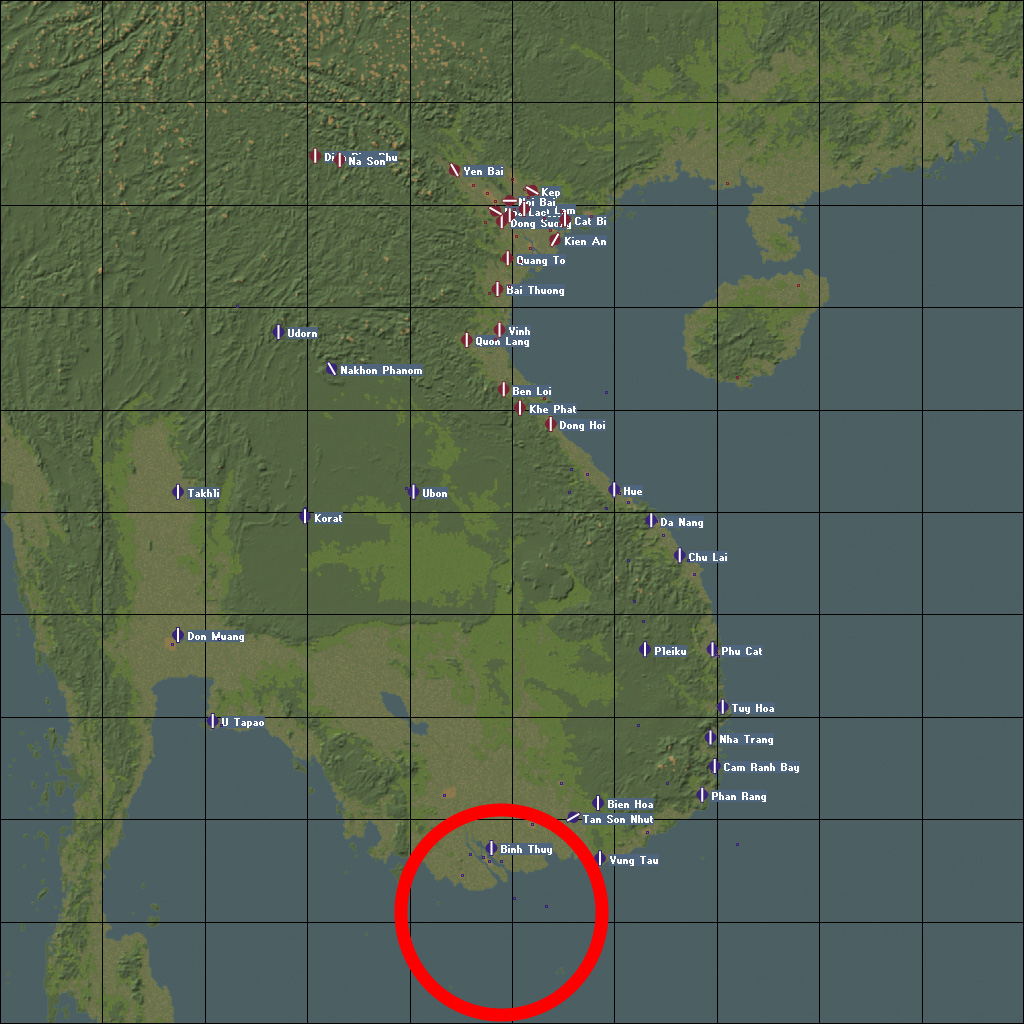
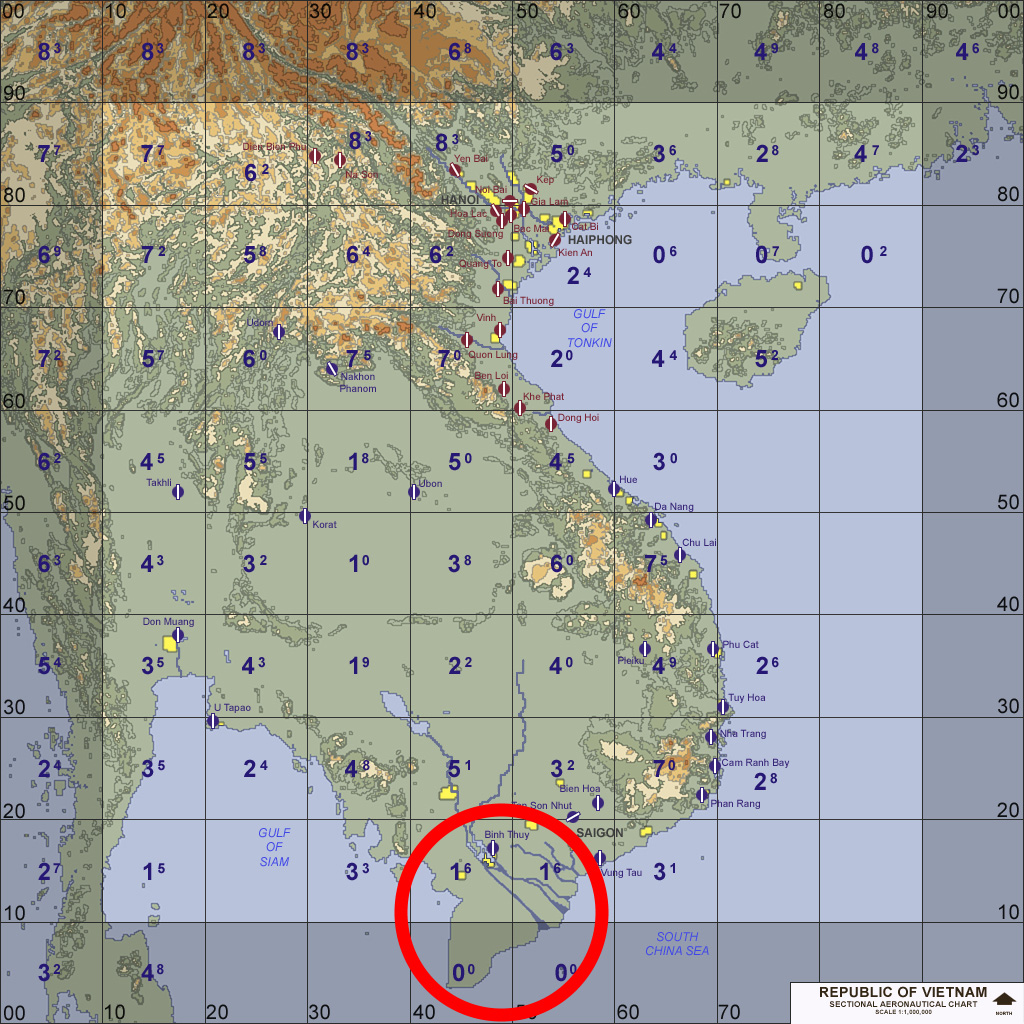
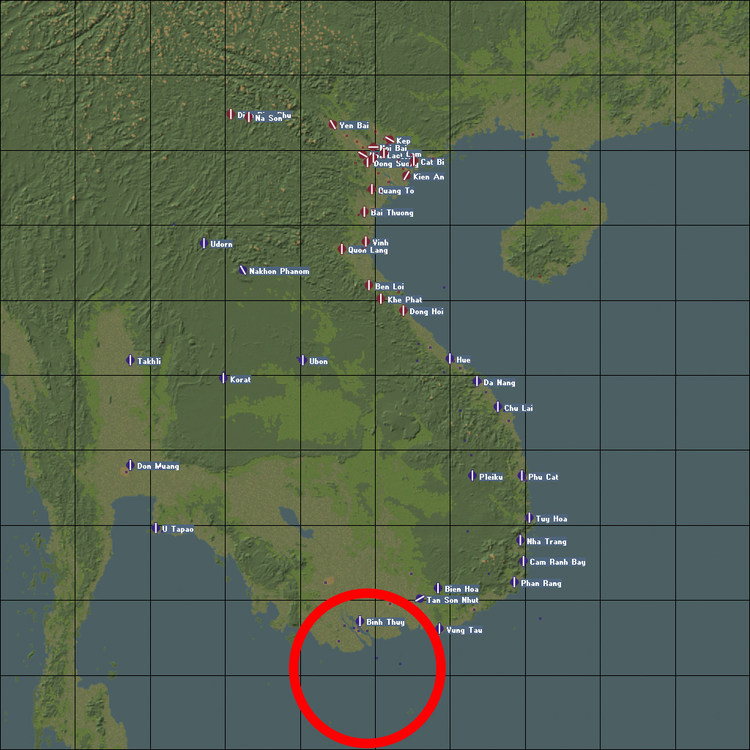
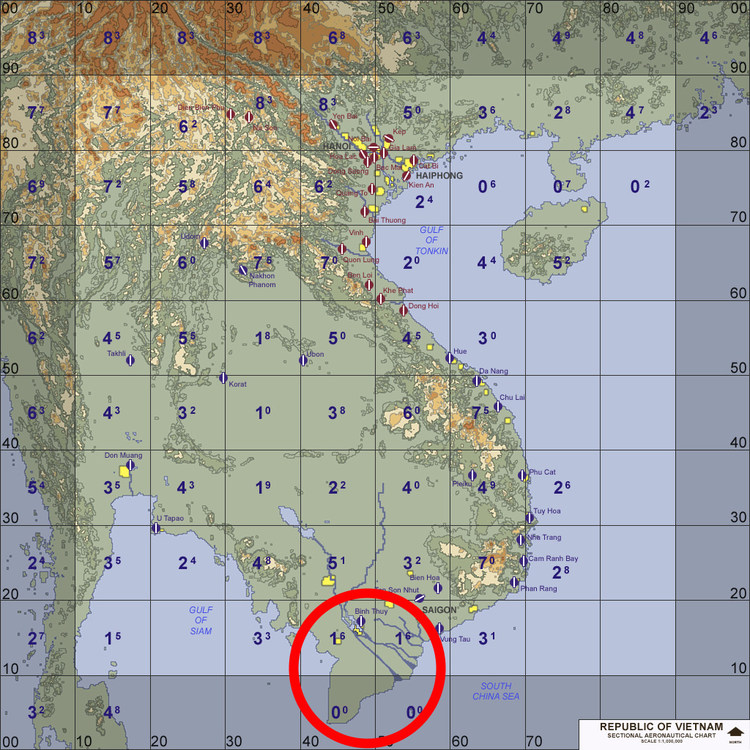
Nope, what I am talking about is even worse, look below; I reckon that I was wrong in saying that this is a small peninsula; it's a rather important part of the terrain. In fact, some stock target areas/cities (you can see those small blue dots) are over water, where instead there should be a huge portion of land. The whole Mekong Delta is not there! TK should have doubled check.
-
I had issues with Paint.NET. The new _water bitmap I saved with PS does have the exact same size of the one from IcelandNA (just right click and double check the properties of both files). If it doesn't seem to work, then it's due to the water area size. In that case, ships spawn where they want, they disregard the info of the water bitmap (generally, in such instances I observed that Blue fleets always spawn on the lower left of the terrain, Red fleets on the upper right, much like in the stock IcelandNA terrain). I also suggest to save water bitmaps with MS Paint, it should do okay as well. Here's the one I re-made, rename accordingly: VIETNAMSEA_WATER2.bmp Also, little trivia: nobody seems to have ever noticed this, but TK's VietnamSEA is a mess to say the least; the small peninsula to the south (around the Mekong Delta) is completely cut, there's water instead of land! I had fixed this for my own use, but I will gladly share the fix (however, the TFD is based on the one using a different tileset from the WOV Gold expansion, so changes will have to be remade from scratch, I guess). What's even more amusing is the fact that both the stock water bitmap and the planning maps correctly show this small peninsula. I suspect that TK did not double check during the auto-texturing stage of the terrain's development)
-
Hey, Wrench. Just post the water bitmap, and I'll look into it. A few painting softwares don't save 8bit bitmaps correctly. However, considering how small the water area is in VietnamSEA, I pretty much doubt we can have CV stations as in stock IcelandNA. NavalMap=TRUE should only be used on terrains where we can have big naval battles, as that also affects strike missions to an extent. For other scenarios like this one, carriers should be static and set in campaigns. I had similar issues in the IraqWA terrains I released. The water area was simply too small given the 63% RL size, and so NavalMap=FALSE was kind of a forced decision.
-
Couldn't agree more. As a youngster, I see how many of my generation take so much for granted...
-
Thanks, Coupi. I was sure everything was right on my add-on aircraft. I had suspected the issue could be due to wrong collision boxes for those ground objects. BTW, that object actually is PIT16, not PIT1 which is not used on stock airbases AFAIK. In the small Runway 2 and Runway 3 airbases, I cannot move past the shelter objects, the plane soon explodes. The solution by Wrench should work, but it's less than ideal, I would prefer stock objects to have a better collision LOD. SF2 is not really a good example of "hitbox porn" (a fun way of saying when a game does have impressively accurate hitboxes). Other games have much better physics when it comes to object/hit detection.
-
Well, it happens on stock terrains on my end. I guess this is either due to the custom aircraft I am using or due to the Hard difficulty settings which change the physics a bit.