
-
Subscription required to download files
-
- 114 replies
- 5,501 views
-
-
Available Subscriptions

Strike Fighters by Thirdwire
All SF / WOV / WOE / WOI Simulation Modifications and Add-Ons
-
 Found a pic on the web of this and decided to try it. I'm pretty sure it's a fictional skin, but who knows.
F16B_10 skin of 323 SQ "Dirty Diana"
Thanks and credit to Team Viper for the F16B_10 model.
Read Me file included in the zip so please READ IT!
By HrntFixr185 1 -
 FINAL: Can't remember where I got button images but I do thank whomever you are...great work. Rest by me. Just place contents into WOV menu folder.
This zip includes:
All main menu screens:
As always backup originals ;)
By polaski463 0 -
Final: Changed sequence and cleaned up a bit (removed various tone sounds to lessen confusion with ingame tones). Now includes Stock Soundlist.ini with adjustments to it for this mod. Already in proper folders so unzip-drag and drop and it will overwrite.
2.0 UPDATE: Longer 23 minutes worth
This replaces stock windloop with 23 minutes of actual vietnam/modern era communications. Gives the game a really cool feel while in flight.
Changes needed in respective aircraft data.ini which need to be extracted via SFP1 extractor located in D/l utilities section.
EXAMPLE: A-4B Data.ini
[sound]
EngineSoundName=A4Engine
AfterburnerSoundName=
DamagedEngineSoundName=Planefire
FlapsSoundName=Flaps
AirbrakesSoundName=Airbrakes
GearsSoundName=Gear
WindSoundName=windloop <----- This line needs to be added in aircraft data.ini
NOTE: Engine noise may overshadow this sound...you will need to decrease volume level for all engine sounds including afterburner.
This can be done with sound recorder which is included in windows...it can be found under start/programs/accessories/entertainment. Open the engine sound and decrease volume level to your liking then save.
As always backup originals in case you don't like it.
By polaski1,884 0 -
 Skinpack for the F-16A, B and C with the tiger meet paint scheme of KLu 313sqn. Many thanks to Bibbolicious for all the help!
By Jrz196 0 -
 Burning Sands 1983
This is the original Burning Sands Campaign set in 1983. You can fly for the USAF, USN, USMC or the RAF. All USN aircraft are carrier based. The aircraft available to fly are:
USAF: F-15A, F-16A, F-19, F-111A, A-10
USN: F-14A, FA-18A, A-7E
USMC: FA-18A, AV-8C
RAF: SEPECAT Jaguar GR Mk1, Tornado GR.Mk1, Tornado F.Mk3, F-111K
By vinman725644,985 4 -
Mission start on carriers: You will now hear flight deck communications.
FINAL ver.1.0 : Complete with underlying noise and added additional voice.
I've included modded stock WOV soundlist ini. to include as follows:
SoundFile0XX=CVNAmbient
SoundFile0XX=CVNMovement
Original sounds were provided with Digital Overload CVN-75 which is available here:
http://forum.combatace.com/index.php?download=1788
You must change any/all carrier addons or stock as per below in the respective carrier data.ini
[sound]
EngineSoundName=CVNAmbient
MovementSoundName=CVNMovement
Stock data.ini can be extracted via SFP1 extract utility.
CVNAmbient.WAV Goes into sounds folder
Soundlist.ini Goes into flight folder
MUCH THANKS TO DIGITAL OVERLOAD!!!
By polaski954 0 -
 This mod will add a landing light in the nosewheel well of the F-19.
By vinman72564287 0 -
 *note, A Newer Version Has Been Released*
By SkateZilla1,704 0 -
The 3 files included are the CARGOSHIP_DATA.INI, this is needed to get the smoke to come out of the stack in the new location; and cargoship.lod which is the model itself, and I am including the cargoship.out which is generated when exporting the object from 3ds Max (not really sure what this does).
Currently to use the carrier fly an antishipping mission. The Antishipping mission is usually a group of cargoships but randomly has Tankers at times...this Mod replaces the Cargoship and not the Tanker, so if you get a tanker you will need to exit and reload the mission. A quick way to tell is surface radar, if multiple contacts then likely you got the carrier(s), if a single ship likely a tanker. The Carrier is visible at 8 miles.
By Beer825 0 -
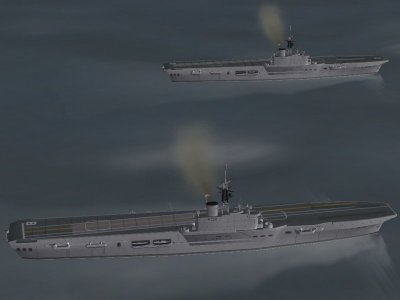 R07 HMS Albion of the Centaur Class - Beta Release
The model represents the ship as completed in 1954. Not perfect, but seems worth releasing. Working AA and radar to be developed.
Model/texture: Hinchinbrooke
Loads of help: Gramps
"This class was an improvement over the war-built light fleet carriers of the "Colossus" and "Majestic" classes with double the power for an additional 5 knots of speed, accompanied by increased dimensions which resulted in more hangar space and a lightly armoured flight deck.
Construction was arrested by the termination of hostilities and four units (including the original Hermes) were cancelled. Three of the remaining units - Albion, Bulwark, and Centaur - were completed to a modified design, which considerably increased their original displacement of 18,300 tons and resulted in a 2-knot loss of speed, and included a 5 3/4-degree angled deck; while the final unit - the second Hermes - had further extensive modifications worked in placing her in a sub-class of her own.
The Albion and Bulwark were later converted to commando carriers during 1959-62, leaving only the Centaur able to operate fixed wing aircraft, and she had steam catapults installed in 1957. Owing to her relatively small size and limited hangar space, the Centaur does not now meet modern requirements, but is nevertheless, still capable of active employment although laid-up in reserve."
H. T. Lenton, Warships of the British and Commonwealth Navies, Ian Allan, 1971
All files should sit in an "Albion" sub-directory within the "Objects" directory. The data.ini file should be moved to the main "Objects" directory. Extract the groundobjectsdata.ini file and add lines for Albion.
Please do not distribute or post without previous consent.
All copyrights reserved and no modifications are to be made without prior consent.
Complaints, reference books, beer, send to:
Hinchinbrooke1963(AT)yahooDOTcom
By MadJeff918 0
-
Download Statistics
14,454
Files12,699
Comments27,081
Reviews