Jump to content
    1. Dirty Bird Exhaust Effect For SF2
       
      By NeverEnough
       
      This exhaust effect was inspired by the work of Deuces, Fubar512 and Spillone104.
       
      After looking at lots of photos of the billowing smoke trails generated by the phantastic F-4 Phantom; I wanted to try to duplicate these big, greasy skidmarks in the sky.
       
      The Dirty Bird Exhaust Effect is configured so that it may be used in either single engine or dual engine aircraft. The DBSingleExhaustEmitter will produce slightly more exhaust volume than the DBDualExhaustEmitter when used on a dual engine aircraft if you really want to accelerate global warming.
       
      If you wish to have a slightly less smokey single engine aircraft, you could utilize the DBDualExhaustEmitter in a single engine aircraft.
       
      This exhaust effect is compatible with both SF2 and SFP1.
       
      Also included in the Dirty Bird Exhaust Effect package, is a particularly striking loading screen of the dirty end of a West German F-4F Phantom.
       
      This File is Freeware and can not be sold or included in any Payware software.
       
       
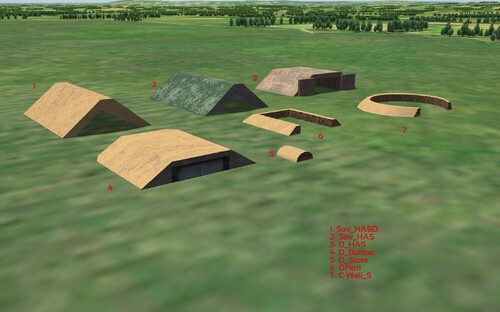
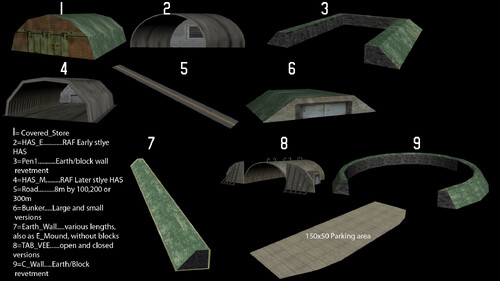
      179 0
    2. this is the ACES II ejection seat for the F-16
       
      just drop the ACES_II_F-16 folder in to your Pilots folder
       
      use this positions for TW standart F-16 (F-16A_Netz)
      [Pilot]
      SystemType=PILOT_COCKPIT
      SetCockpitPosition=TRUE
      PilotModelName=ModUSAF
      PilotHeadNodeName=head
      Position=0.0,4.10,0.86
      SeatModelName=ACES_II_F-16
      SeatPosition=0.0,4.10,0.86
      MinExtentPosition=-0.36, 3.76,-0.15
      MaxExtentPosition= 0.36, 4.75, 0.96
      CanopyNodeName=canopy_frame_outer
      CanopyAnimationID=7
       
       
      use this positions for the TMF single and two-seater F-16
      [Pilot1]
      SystemType=PILOT_COCKPIT
      PilotModelName=ModUSAF
      Position=0.0,3.892,0.76
      SeatModelName=ACES_II_F-16
      SeatPosition=0.0,3.892,0.76
      MinExtentPosition=-0.148, 3.467,0.169
      MaxExtentPosition=-0.148, 4.296,0.624
      CanopyNodeName=Canopy
      CanopyAnimationID=8
       
      [Pilot2]
      SystemType=PILOT_COCKPIT
      PilotModelName=ModUSAF
      Position=0.0,2.112,0.78
      SeatModelName=ACES_II_F-16
      SeatPosition=0.0,2.112,0.78
      MinExtentPosition=-0.148, 3.467,0.169
      MaxExtentPosition=-0.148, 4.296,0.624
      CanopyNodeName=Canopy
       
       
      ravenclaw_007
      281 1
    3. there are 3 versions of the ACES II seat includet the early the late-forward and the late-rear one
       
      just drop the ACES_II_F-15 , ACES_II_F-15_Front and ACES_II_F-15_Rear folder´s in to your Pilots folder
       
      Data_ini and Cockpit_ini files for all F-15 versions of the F-15_Pack and TW F-15 are includet , you have to replace the Data_ini file with the ones that are includet here , if you have a edited data_ini and dont like to use the one includet here you have to copy the remove part from the AircraftData (for TMF F-15) and the Pilot/WSO postion and Seat position to your data_ini
       
      Component[010]=Remove1
      Component[011]=Remove2
       
      [Remove1]
      ParentComponentName=Nose
      ModelNodeName=ESeat_FrontFrame_ok
      DestroyedNodeName=ESeat_FrontFrame
      DetachWhenDestroyed=TRUE
      HasAeroCoefficients=FALSE
       
      [Remove2]
      ParentComponentName=Nose
      ModelNodeName=ESeat_RearFrame _ok
      DestroyedNodeName=ESeat_RearFrame
      DetachWhenDestroyed=TRUE
      HasAeroCoefficients=FALSE
       
      Note: use the Pilots position as the Seat position


      ravenclaw_007
      536 1
    4. there are two versions of the ACES ii seat includet the red colored and the green colored one , red for the early B-1B and green for the later B-1B version
       
      just drop the ACES_II_B-1Bg and ACES_II_B-1Br folder in to your Pilots folder
       
      Data_ini and Cockpit_ini files for all B-1B versions are includet , if you have a edited version of the data_ini change only the pilots and seat position as shown below but you have to replace the Cockpit_ini file with the ones that are includet here , if you dont the seat will not be displayed in the right position
       
      Note: use the Pilots position as the Seat position
       
      [Pilot]
      SystemType=PILOT_COCKPIT
      PilotModelName=MODusaf
      Position=-0.55,15.5,1.574
      SeatModelName=ACES_II_B-1Br
      SeatPosition=-0.55,15.5,1.574
      SeatID=1
      CanopyAnimationID=8
       
      [CoPilot]
      SystemType=PILOT_COCKPIT
      PilotModelName=MODusaf
      Position=0.55,15.5,1.574
      SeatModelName=ACES_II_B-1Br
      SeatPosition=0.55,15.5,1.574
      SeatID=2
       
       
      ravenclaw_007
      140 0
    5. just drop the ACES_II_A-10 folder in to your Pilots folder
       
      Data_ini files for TW A-10 are includet , if you have a edited version of the data_ini change only the pilots and seat position as shown below
       
      Note: use the Pilots position as the Seat position
       
      [Pilot]
      SystemType=PILOT_COCKPIT
      PilotModelName=ModUSAF
      SetCockpitPosition=TRUE
      Position=0.0,4.43,1.22
      SeatModelName=ACES_II_A-10
      SeatPosition=0.0,4.43,1.22
      MinExtentPosition=-0.41, 3.80,-0.02
      MaxExtentPosition= 0.41, 4.95, 1.45
      CanopyNodeName=Canopy_Frame_R
      CanopyAnimationID=9
      HasArmor=TRUE
      ArmorMaterial=TITANIUM
      Armor[FRONT].Thickness=30
      Armor
      .Thickness=30
      Armor
      .Thickness=30
      Armor[REAR].Thickness=30
      Armor[bOTTOM].Thickness=30
      Armor[TOP].Thickness=10
       
      ravenclaw_007
      187 1
    6. Improved Afterburner Effects for Strike Fighters 2 V1.0
       
      -------------------------------------------------------------------------------------------------------------------
       
      Installation:
       
      Put the .INI and .TGA files in the Effects folder.
      User\Saved Games\ThirdWire\StrikeFihgters2\Effects
       
      <<<VERY IMPORTANT!>>>
       
      Then the real work begins:
       
      Open the DATA.ini of the aircraft you want to use these effects.
       
      Since this effect is a combination of 2 emitters, one volumetric and the other in the form of a ribbon(for shock diamonds)... You need to duplicate the engine or engines in this way:
       
      (As exhample the F-105 is used)
       
      [Fuselage]
      SKIP ALL THE PARAMETERS
       
      SystemName[001]=Engine
      SystemName[002]=Tailhook
      SystemName[003]=Airbrake1
      SystemName[004]=Airbrake2
      SystemName[005]=Airbrake3
      SystemName[006]=Airbrake4
      SystemName[007]=AftTank
      SystemName[008]=BombbayTank
      SystemName[009]=CenterlineStation
      SystemName[010]=TopFuselageLight
      SystemName[011]=Engine2 ADD THE NEW ENGINE
       
       
      Edit the afterburner emitter on the first engine:
       
      [Engine]
      AfterburnerEmitterName=J79-ABEmitter CHANGE TO THIS ONE
       
      Then add the second engine below the first true one.
       
      [Engine2]
      SystemType=JET_ENGINE
      InputName=THROTTLE_CONTROL
      EngineID=1
      HasAfterburner=TRUE
      NumAfterburnerStages=4
      SLThrustDry=0.00 THE THRUST MUST BE SET TO 0.00
      SLThrustWet=0.00 THE THRUST MUST BE SET TO 0.00
      ThrustAngles=0.0,0.0,0.0
      ThrustPosition=0.0,0.0,0.0
      ThrottleRate=0.15
      NozzleAnimationID=3
      IdleThrottle=0.10
      IdleRPM=0.68
      IdleNozzle=0.0
      CruiseThrottle=0.37
      CruiseRPM=0.82
      CruiseNozzle=0.0
      MilThrottle=0.65
      MilRPM=1.00
      MilNozzle=0.0
      MaxThrottle=0.78
      MaxRPM=1.00
      MaxNozzle=0.0
      FullABThrottle=1.12
      FullABRPM=1.00
      FullABNozzle=1.0
      AltitudeTableNumData=10
      AltitudeTableDeltaX=3048.0
      AltitudeTableStartX=0.0
      AltitudeTableData=1.000,0.802,0.634,0.496,0.381,0.288,0.206,0.147,0.105,0.000
      DryMachTableNumData=4
      DryMachTableDeltaX=0.4
      DryMachTableStartX=0.0
      DryMachTableData=1.000,0.980,1.172,0.000
      WetMachTableNumData=7
      WetMachTableDeltaX=0.4
      WetMachTableStartX=0.0
      WetMachTableData=1.000,0.991,1.207,1.683,2.473,2.750,3.027
      MaxInletTemperature=136.1
      TSFCM0=0.00 AND THE FUEL CONSUMPTION TOO
      TSFCM1=0.00 AND THE FUEL CONSUMPTION TOO
      AfterburnerTSFCM0=0.00 AND THE FUEL CONSUMPTION TOO
      AfterburnerTSFCM1=0.00 AND THE FUEL CONSUMPTION TOO
      MinFuelFlow=0.02
      ExhaustEmitterName= DELETE THE SMOKE
      ExhaustPosition=0.0,-9.27,0.51
      AfterburnerNodeName=afterburner
      AfterburnerEmitterName=J79-ABEmitter2 AND CHANGE THE EMITTER
      AfterburnerEffectSize=1.10
      MinExtentPosition=-0.78,-9.07,-0.28
      MaxExtentPosition= 0.78,-3.22, 1.29
      FireSuppression=TRUE
      GasTempMaxRPM=650.0
      GasTempIdleRPM=340.0
      GasTempChangeRate=5.0
      OverheatTemp=675.0
      DamageTempDelta=300.0
      OilPressMaxRPM=50.0
      OilPressIdleRPM=35.0
      OilPressChangeRate=0.5
      LowOilPress=12.0
      LowOilTempDelta=400.0
      HasArmor=TRUE
      ArmorMaterial=STEEL
      Armor[FRONT].Thickness=12
      Armor
      .Thickness=12
      Armor
      .Thickness=12
      Armor[REAR].Thickness=12
      Armor[bOTTOM].Thickness=12
       
       
      That's it! Now you have your jet with new afterburner flames.


      -------------------------------------------------------------------------------------------------------------------
       
      Beta testers : Canadair and Dysko.
       
      -------------------------------------------------------------------------------------------------------------------
       
      Legal stuff:
       
      This mod is freeware. Commercial use is not allowed.
       
      ------------------------------------------------------------------------------------------------------------------
       
       
      Enjoy and good flight. :)
       
      November 2011
       
      Spillone104
      538 5
    7. This is small mandatory update to my Unified Effects Pack available at Combatace here:
       
      http://combatace.com/files/file/11802-unified-effects-pack-10/


      updated or new effect files:
       
      Effects\MediumBombEffect.ini
      Effects\TracerSmokeEmitter.ini
      Effects\LmgObjectHitEffect.ini
      Effects\AircraftSmokeEffect.ini
      Effects\AircraftEngineFireEffect.ini
      Effects\AircraftFuelFireEffect.ini
      Effects\AircraftFireEffect.ini
      Effects\SmallBombEffect.ini
      Effects\UP_bombdirtspike.tga
      Effects\UP_vapurwave.tga
      Effects\WW2_GraySMOKE2.tga
      Effects\ArtilleryGroundHitEffect.ini
      Effects\37MMGroundHitEffect.ini
      Effects\LargeBombAirExplosion.ini
      Effects\MediumBombAirExplosion.ini
      Effects\SmallBombAirExplosion.ini
      Effects\LmgGroundHitEffect.ini
      Effects\HmgGroundHitEffect.ini
      Effects\30mmGroundHitEffect.ini
      Effects\MissileFireEffect.ini
      Effects\23mmGroundHitEffect.ini
      Effects\23mmObjectHitEffect.ini
      Effects\30mmObjectHitEffect.ini
      Effects\20mmObjectHitEffect.ini
      Effects\HmgObjectHitEffect.ini
      Effects\ClusterBombletExplosionEffect.ini
      Effects\LargeBombEffect.ini
      Effects\blast0.tga
      Effects\TankGunFireEffect.ini
      Effects\ArtilleryFireEffect.ini
      Effects\VeryLargeBombAirExplosion.ini
      Effects\VeryLargeBombEffect.ini
      Effects\WW2_GraySMOKE.tga
       
       
      includes "muzzleflash fix" released at CA forum.
       
      Installation of this pack assumes you have installed and working Unified Effects Pack 1.0 in your desired mod install of Strike Fighters 2
       
      Extract to your "mods" folder, overwrite files when asked.
      1,642 5
    8. This is a new Hawk site SAM with desert
      skin, I hope you like it.
       
      there are five new models included
       
      1. HAWK_CWAR (Pulse Acquisition Radar)
       
      2. HAWK_HIPIR (Hight Power IIIuminator)
       
      3. HAWK_CCWAR (CW Acquisition radar)
       
      4. HAWKL (Missiles and Launches)
       
      5. destroyed site for all the above
       
      All the credit goes to everyone who helped me and If we forget anyone to credit in the read me please forgive me.
       
      last please accept my first contribution to thiscommunity and to this excellent game.
       
      Take care,
       
      umm
      498 2
    9. This pack corrects the countermeasures on the following aircraft to include the Saab BOL Advanced Countermeasure Dispenser:
       
      *F-15C http://combatace.com...ck-version-231/
       
      *EF-2000 Eurofighter http://combatace.com...urofighter-sf2/
       
      *JAS-39C Gripen http://combatace.com...for-sf2-series/
       
      *Tornado F3 http://combatace.com...ado-f3-for-sf2/
       
      *Tornado F3 (NATO Fighters 4) http://combatace.com...-update-pack-4/
       
      *F-14A & B http://combatace.com...d-f-14b-tomcat/
       
      *F-14D http://combatace.com...297-sf2e-f-14d/
       
      *RAAF F/A-18 http://combatace.com...ike-fighters-2/
       
      The BOL countermeasure dispenser is a 160 shot dispenser that has been integrated into a AIM-9/ AMRAAM launching rail (LAU-7, LAU-127/128/129,CRL,MPRL). The BOL is a non pyrotechnic dispenser that uses air scoops on the dispenser and the wing vortex of the aircraft to disperse its packets of Chaff. The countermeasure is launched rearward from a port in the rear end of the rail. For IR threats a new burning chaff product is being developed. For the above aircraft the BOL launchers are normally loaded with 160 chaff each which frees up the aircrafts existing pyrotechnic launcher/s for a full load of flares. That is what this mod recreates. The weapon station that carries the BOL launcher on the above aircraft has been made to stay even when the station is not loaded otherwise you would have chaff launching from mid air when you had no weapon loaded on that rail to make the node show up.
       
      -USAF and ANG F-15C fighters had the four wing sidewinder/AMRAAM rails replaced with BOL versions around 2000.
       
      -USN F-14A/B/D Tomcats had the BOL launchers fitted in the early 90’s in place of their two sidewinder rails.
       
      -Australian F/A-18 Hornets had BOL dispensers added to the sides of the outer wing pylons, I have been able to paint these onto the skin.
       
      -Unsure when the Tornado F3 was equipped with the BOL but they are on the two inside AIM-9 rail positions. I am unable to make the dispensing position move with the swinging wings so the chaff is launched from the position the rear of the sidewinder rails are in when the wing is in the fully swept position.
       
      -I have been able to paint on the details of the BOL launchers on the Gripen rails as the way the skin was done allowed for it. The Gripen rails still disappear when not loaded as there is no dedicated position for short range missile rails like the other aircraft and the BOL launcher is only used when an air-to-air missile is loaded on that station.
       
      http://www.saabgroup...sure_Dispenser/
       
      http://www.saabgroup...uct%20sheet.pdf
       
      Credit goes to the Authors of the original aircraft as all I have done is made a few alterations.
       
      Instillation: Simply copy and paste the included data.ini files into the correct aircraft folder and overwrite.
       
      444 0
    10. Another collection of various hangars/walls etc aimed mainly at desert type terrain although they can be used in any you like.
      604 0
    11. This is a "What If" nation missile system based off of the real SA-18 Grouse (or what I could find though internets sources).
       
      It is set for the "Taliban" nation for my Afghanistan install but can be adapted of course for any map or nation:
       
      [Nationxxx]
      Name=Taliban
      DisplayName=Taliban
      Alignment=ENEMY
      Mercenary=TRUE
      PilotNameList=NamesMercs.lst
      RankList=RanksUSAF.lst
      CallsignList=CallsignsUS.lst
      Formation.Fighter=USFighter
      Formation.Attack=USFighter
      Formation.Bomber=USBomber
      Formation.Transport=USBomber
      Formation.Tank=USTank
      Formation.MobileAD=USAD
      PilotTrainingStandard=EXCELLENT
      GenderRatio=0
      DebriefSuccessMusic=DebriefSuccess.wav
      DebriefFailMusic=DebriefFail.wav
      DebriefKilledMusic=DebriefKilled.wav
      SpeechFile=USAFSpeech.cat
      SpeechTextFile=USAFSpeechText.str
      StartDate=1994
       
      It uses Pasko's "SAM Gunner" since I have no modeling skills and is setup for SF2. It can be of course adapted for SF1 but that requires a bit of work that can be found in the SF2 Knowledge Base and is a drag and drop as all files and folders are already organized.
       
      Afghanistan rules of thumb:
       
      Kandahar-Shindand-Herat-Qala I Naw "ring" stay above 24,000ft MSL + for traveling. When you break that (usually 23,000 ft) you may get shot at. Other areas roughly 22,000 ft MSL + is a good altitude to stay above but again use flares conservatively. It's not very accurate but if enough are fired you will get shot down. I've seen earlier versions of this shred SEAD flights.
       
      This is strictly for What If scenarios or installs rather than real world setups as so far there is no heavy use of SAMs in-country.
      101 0
    12. A collection of various buildings,roads & general airfield objects designed for and tested in the SF2 Germany terrain [any version..]
      578 0
    13. This is small fix that reverts the various calibre guns muzzle flashes back to their TW default effects.
       
      Unzip to your effects folder, overwrite when asked.
       
      Sorry for my mistake
       
      Stary
      737 0
    14. Unified Effects Pack
       
      For Strike Fighters Series 2
       
      version 1.0
      26 FEB 2011
       
       
      This effects pack is a compilation of many effects I did over the years for Strike Fighters and First Eagles series of flight simulators by Thirdwire.
       
      Build around "Desert Storm FX Pack beta" released in early 2009, this pack replaces most of the stock effects with new ones, most of them volumeric or "3D" in appearance. Also used are few reworked/tuned down effects from my "Hollywood Explosions" mod, aswell as several never before relased ones.
      3,491 7
    15. Postprocess shader tweaks
       
      FOR STRIKE FIGHTERS 2 DirectX 10 ONLY!
      Made for and tested in SF2 all titles merged with Expansion Packs 1&2
      (but should work with any SF2 title)
       
      version 1.0
      30.12.2010
       
      This is set of modified Thirdwire postprocess shader variants that change the appearance of Strike Fighters 2.
       
      This mod works only in Strike Fighters 2 in Dx10 mode. Also you need to set your effects detail to unlimited for this shader to display!
      Please note that when using sepia, fake night vision and black&white shaders, various on-screen elements (like gunsight, HUD, radar display box and text) are still displayed unchanged. These are processed using different own shaders.
       
      Included are several variants, with various color corrections (old film, sepia, black and white, light green, nightvision) and various strenghts of screen vignetting.
      818 0
    16. Tracermania
      AAA Tracers and bullets modification
       
      FOR STRIKE FIGHTERS 2 Europe with Expansion pack 2
      Made for and tested in SF2 all titl mergedwithes merged with Expansion Packs 1&2
       
      by Stary
      version 1.0
      06.12.2010
       
      This little modification changes the number of tracers fired by all stock AAA units and patrol boats. Number of tracers has been increased 5 times, instead of every fifth bullet being tracer round now EVERY SINGLE bullet fired by Triple-A is tracer. Also I changed the data for stock partol boats, that makes these vessels track and attack air targets too.
      Second tweak is the increase of bullets fired in a burst by AAA crews, usually from 12 to 20 or 24. This seem to me does not make them more or less accurate.
      As these changes may increase CPU usage I eliminated ALL tracersmoke trails of any kind for any calibre guns (...)
      527 3
    17. BTR-80 and 80A
       
       
      314 0
    18. ---------------------BTR-70 ------------------------Oct/26/2010 Updata------------------------
       
      sorry to everyone who's download it.
       
      this File have some problems in it,The original "BTR-70_DATA.ini" was wrong,and the original 3D model was not work in game
       
      But now,we rework this model,it is ok now........................
       
      If,still can not use this model,you may try,drop the "BTR-70"folder into your "Objects" not "Ground Objects" ,or drop it on your Volume which install the game
       
      ---------------------BTR-70 ------------------------Oct/26/2010 Updata------------------------------------------------------
       
      Soviet Army BTR-70 APC (Armor Person Carrier)
      BTR-80/90 is making
       
      this model work for SF2,maybe can used into SF1,you can try it by yourself...................
       
      with the original 3Dmodel in it,your can changer this .Max file by yourself,if you need:drinks:
       
      put the BTR-70 folder into your "Objects/GroundObjects..................."
       
      If your are SF2player,only put the GunData file from the file call"Guns For SF2",into your "Guns" folder
      Or you are SF1player,please open "GunData For SF1.txt"?and copy the [GunDataXXXX] to your GunData.ini
       
       
      GunData:
       
      [GunDataXXXX]
      TypeName=7.62MM_PKB
      FullName=7.62mm PKB/PKMB Machinegun
      Caliber=7.620000
      ROF=900.000000
      MuzzleVel=935.000000
      AmmoWt=0.012500
      WarheadWt=0.000000
      Reliability=97.000000
      Accuracy=70.000000
      AddLight=TRUE
      MaxLightRange=1000.000000
      FireColor=0.150000,0.150000,0.150000
      GunFireEffect=LmgFireEffect
      GunFireSound=50cal
      EffectClassName=LmgEffects
      EffectTime=0.100000
      TracerTexture=Tracer2.tga
      TracerSize=0.150000
      TracerDistFactor=0.002000
      TracerLength=0.015000
      MaxVisibleDist=4000.000000
      MaxStreakVisibleDist=1000.000000
      TimeFuzed=FALSE
       
      [GunDataXXXX]
      TypeName=14MM_KPV
      FullName=14.5mm KPV Machinegun
      Caliber=14.500000
      ROF=600.000000
      MuzzleVel=976.000000
      AmmoWt=0.064000
      WarheadWt=0.000000
      Reliability=95.000000
      Accuracy=66.000000
      AddLight=FALSE
      MaxLightRange=1000.000000
      FireColor=0.150000,0.150000,0.150000
      GunFireEffect=HmgFireEffect
      GunFireSound=50cal
      EffectClassName=HmgEffects
      EffectTime=0.100000
      TracerTexture=Tracer2.tga
      TracerSize=0.150000
      TracerDistFactor=0.002000
      TracerLength=0.015000
      MaxVisibleDist=4000.000000
      MaxStreakVisibleDist=1000.000000
      TimeFuzed=FALSE
       
      (original 3D model from "wsly936880205")
      284 2
    19. a hmmwv with12.7mm M2HB Machine Gun
       
       
      272 0
    20. Soviet SA-9 Gaskin Surface to Air Missile
       
       
      426 0
    21. PT-76 Light Tank
      it work for SF2
      243 0
    22. a hmmwv with 40mm MK19 Automatic Grenade Launcher,(original 3D model from GoogleSketchup)
       
       
      203 2
    23. this is my first time to upload File into the CombatACE.com,I make a hmmwv M1045,it maybe have some problems.So.I put the Original 3D model into this File,If something wrong with it.you can repair it by yourself,(the original 3Dmodel creat by "wsly936880205" ,the Tow Missile was creat by TerceraEscuadrilla ,the version of 3dmax is 3dmax2009)
       
      Have fun.
      258 0
    24. Alternative Armour Pack
       
      This armour pack is my humble attempt to make ground war somewhat more "accurate". It's been created with SF2:E/NF4+ in mind, but it should be easy to adapt it to other mods/installs. Several "new" tanks have been created, but due to my lack of modelling skills they're only ini edits. Other tanks (both TW and community ones) have been tweaked.
       
      "New" stuff:
       
      - Chieftain mk2, mk5 & mk11 (edited stock Centurions);
      - 120MM L11 gun for Chieftain, parameters optimized for the L15 APDS round;
      - Leopard 1 (edited stock Leopard 1A1);
      - M1 IP (edited M1 Abrams from NF4+);
      - M60A1 AOS (edited stock M60A1);
      - M60A3 (edited Pasko's & Kesselbrut's M60A3)
      - T-80B (edited T-80BV by SWS, BPAo, Fubar512 & 331Killerbee)
       
      Modified stuff:
       
      - 120MM L44 customized for '80s M829 APFSDS round);
      - Centurions (mk5,6,8,10,13), Leopard (1A1-1A5), Leopard 2A4, M1, M1A1, M48 (A2 & A3), M60A1, T-54, T-55, T-62A, T-72A, T-80BV;
       
      Modifications inlclude following changes/corrections:
       
      - tank's weight;
      - armor values have been changed to RHA equivalents against Kinetic Energy rounds. Angled plates have been taken into account whenever possible. Late tanks (T-72, T-80, Abrams, Leo 2) armor RHA values have been greatly influenced by data presented in "Armor Basics" created by Paul Lasowski & included in Steel Beasts;
      - number of gun rounds carried;
      - presence (or lack thereof) of nightsight, gun stabilization;
      - rangefinder & ballistic computer values;
      - service entry dates.
       
      I "hope" all this changes enhance accuracy but please bear in mind that:
       
      - SF series is about flying and the ground war aspect is kind off limited;
      - I'm no guru, I pulled the data from the Internet, therefore it might not be actually accurate, lol;
      - there's no easy way to calculate RHA values, info on the net can vary significantly from source to source; if you have some good/reliable literature where these are well/reliably documented for many cold war tanks and their variants/sub-types you're welcome to share ;)
       
      If you find any bugs/errors, please let me know so I can correct it.
       
      INSTALLATION:
       
      Back up your stuff first, so you can revert changes if you don't like them! Unzip archive and copy Objects folder to your mod directory (usually "C:\Users\Username\Saved Games\ThirdWire\StrikeFighters2 Europe\" when using Vista/7). If you want M60A3 & T-80B\BV to show up you'll need to download them from CA (I didn't include lod files or textures). M60A3 is included in US Armour Pack, T-80BV is, well T-80BV. For T-80B copy T-80BV lod files into it's directory. If you don't have NF4+ installed you'll have to get the M1 Abrams from the US Armour Pack as well. And obviously if you want all the "new" stuff to show up in a campaign, you'll have to modify campaign data file. For starters I suggest replacing British Division's Leos with Chieftains in 1979 & 1986 campaigns.
      If you're still lost PM me :).
       
      Enjoy!
       
      SFP1Ace
       
      CREDITS:
       
      Pasko & Kesselbrut (M60A3)
      SWS, BPAo, Fubar512 & 331Killerbee (T-80BV)
      NF4+ Team/Kesselbrut (M1 Abrams)
      439 1
×
×
  • Create New...

Important Information

By using this site, you agree to our Terms of Use, Privacy Policy, and We have placed cookies on your device to help make this website better. You can adjust your cookie settings, otherwise we'll assume you're okay to continue..