FastCargo
-
Posts
8,142 -
Joined
-
Last visited
-
Days Won
16
Content Type
Profiles
Forums
Gallery
Downloads
Store
Everything posted by FastCargo
-
Honestly, I couldn't tell ya. But the damn thing was a scalded ape in all regimes except for initial takeoff at max gross...then it could take a while. But wings back...it was slick as snot and actually difficult to slow down. Couldn't quite supercruise...you'd need a significant amount of burner to push through the Mach, then min burner to stay there. The limits stated on the website are not because it's power limited...hardly. The jet would do .9 mach down low without breathing hard all day...that's our standard ops speed low level. FastCargo
-
Assuming the models are accurate: The F-35C actually looks larger than a F-18C. FastCargo
-

-
That's what it says on paper... FastCargo
-
Are you farking kidding me? In a word (from a military and civilian pilot) .... hell ****ing no! And another note, this concept isn't new. Boeing/NASA investigated the same possibility when they explored the HSCT concept back 10+ years ago. The idea was building 'synthetic vision' systems, using the same idea...you look out a 'window' that was in reality, a large HDTV screen. It's a dumbass idea. You're fooling yourself if you think all the systems we have in place to avoid unintended aircraft proximity incidents are actually 100% percent reliable. I will say this ONE MORE TIME (and I haven't had an engineer disagree with me yet)..."No engineer has EVER anticipated every failure possibilty of an aircraft." You don't want to be the guy writing the manual 'on the fly' because no one had ever seen this kind of emergency situation before. Vision enhancement systems, hey I'm all for that. We've started installing those in our MD-11s, and the pilots who've flown with it say it rocks...a HUD in combo with a FLIR allows basically 'seeing through clouds' while still allowing a standard visual lookout...but you can flip it out of the way if it fails. Kind of hard to do that with a TV screen. I will never endorse a system that replaces the Mark I eyeball...supplements, sure...replaces? Nope. FastCargo
-
Not to say someone hasn't considered the possibility for the Thirdwire series. FastCargo
-
Jug, Wrong T-6 my friend. I'm talking about the T-6 Texan II. Totally different aircraft. Based on the PC-9. Also, Bone and BUFF guys for a while were moved to the T-1 track, but were moved back to the T-38 after it was realized the carnivores reside on our side of the training shack. FastCargo
-
Yea, Gocad, pieces from your skin are incorperated in the current prototype skin just to have something that looks reasonably like the real thing. Waiting on a few things from other people before I send it back to Klavs. FastCargo
-
I don't know...it looks a little 'stubby' to me... FastCargo
-

-
Brings a tear to my eye... FastCargo
-
-
Actually, I had been thinking about that myself. Now that Dels T-6 Texan II is out there, and eventually the T-38 and AT-38, the framework exists to make a 'USAF' intro to basic combat training. The idea would be for in the T-6 to learn basics of overhead flying, close formation, and low level navigation. And for the T-38, advance formation handling (Tactical type formations). Finally, for the AT-38, weapons delivery and BFM, starting with one on engagements at increasing levels of difficulty (starting in maintaining perfect gun solution, then tail aspect, then 45, 90, 180). Also, defensive BFM, starting the same way and progressing in difficulty. FastCargo
-
Well, to be fair, it's an advanced trainer. Designed for transition to fighter type aircraft, not for any one specific fighter. As far as SK's future fighter buys, until it's painted in SK colors and sitting on the ramp, nothing is decided. Right now, their fighter buys are based on the current F-X fighter modernization program, Phase 1 which was the purchase of 40 F-15Ks of which the last was delivered this month. F-X Phase 2 initial bids were for a multi role follow on, but the F-22 was never considered, the F-35 was excluded for having incompatible timelines, Dassault and Sukhoi didn’t attend the DAPA presentation after being named as candidates, then Eurofighter pulled out, leaving Boeing as the only submission. So Phase 2 will be a buy of 21more F-15Ks with different engines and some other minor modifcations to be delivered between 2010 and 2012. For Phase 3, SK plans to open bidding in 2011 for 60 “5th-generation” jets under a 5.4 trillion won/ $5.4 billion program, aiming to deploy the planes between 2014 -2019. Stealth has been mentioned as an important characteristic, and the F-35 Lightning II may be the only viable candidate – unless Korea decides to produce a stealth UCAV instead. F-X Phase 3 would then be followed by an indigenous KF-X (Korea Fighter – X) program to develop an indigenous 5th generation plane by 2020 and produce up to 120 of them. However, from recent updates, it sounds like the KF-X probably wouldn't be built due to the expense. Jeez, this thread has deviated a bit... To the point - trainers for transition to a specific type of aircraft where possible...not for training to a specific aircraft. Training for a specific aircraft is done in that aircraft. FastCargo
-
Well, not really. SK has no F-22s and as far as I know, isn't getting any anytime soon. It was mainly to provide an advanced trainer for their pilots heading on to F-16s. SK had also looked at the T-38C as a possible trainer (a friend of mine flew the T-38s in SK as part of the test eval) but ultimately decided to build their own. There are 3 variants of the airframe: The T-50, A-50, and F-50. The T-50 is a trainer version, and looks roughly like a F-16, with F-18 styled intakes. The A-50 is a light attack version and has A/G capability. While the FA-50 is a full fighter version, with an AESA radar. The USAF is actually looking at the T-50 as a replacement for the T-38C. One of our squadronmates actually went over there about a year ago to SK as part of the official USAF eval team and got to fly it. He was VERY impressed with it. He gave us a brief afterward...the thing is pretty damn amazing. The real stumbling block to us buying it is the high inital cost. However, in the long run, it would be cheaper and more cost effective to operate than the T-38C fleet. But we still have to get over the initial cost. FastCargo
-
Actually, here's an example of a MSN file I use to practice: You can see it's pretty easy to figure out and alter. FastCargo
-
First, avoid if possible. If you can get SA on where the Migs are at from RC, and can alter your flight path to avoid them, do so. Second, get low, Low, LOW. Fast movers have trouble maintaining proper attitude (they get target fixation and run into the ground) at less than 100 feet in altitude. Third, do not get into an extended turning fight. A Hog has enough energy to get one, maybe two hard turns in level flight. After that, you're out of energy and will take a long time to get it back. This can be useful if the MiG is closing too quickly. You can do a hard bat turn into him, causing him to overshoot, then QUICKLY reverse direction and either gun him or give him a Winder for his trouble. But that is it. Do not press the attack if your gun or winder misses. Instead, extend, get distance, GET LOW and run. Hopefully you can either run him into the ground, or make his pursuit curve take so long that he runs out of gas and heads home (which I've seen happen). If he comes after you again, just repeat the same procedure (because it will take a long time for him to get his nose back around and catch up to you) because hopefully while he's been turning to catch up to you, you've been gaining energy back and are ready for another hard turn. Fourth, did mention stay low? Try to be able to do all of this without climbing above 100, maybe 200 feet. Otherwise, you are in his element and your chances of survival go down dramatically...especially if he's smart and maintains his energy. FastCargo PS What I would recommend is taking one of the single missions that comes with WOE and altering it (making a backup first) to practice a one on one encounter with a Mig. If you look at the MSN files in the Missions directory, you'll note that they are just text files, and most parameters are very easy to figure out. So just take one of the 'one on one' missions, change the aircraft, lower the altitude of the players, and give it a shot. Practice makes perfect...
-
This thread is making me hungry...I guess I know what I'm having for dinner! FastCargo
-
New Life For Phantoms, Killer Zombie Drones!
FastCargo replied to Weasel Keeper's topic in Military and General Aviation
It's an interesting concept, but I'm not sure how cost effective it is. Reapers are more expensive, initially, but they have several advantages I would imagine: 1) Loiter time - more efficient airframe and engine 2) Double duty - Recon with the camera ball and possible ELINT 3) More secure links - Because it's an in theatre aircraft, I'd imagine the Reaper's links and internal AI (for loss of downlinks) are more robust vs a aircraft that never leaves a test or weapons range 4) R&D - Already paid for, I'd imagine the F-4 remote capabilities (and ultimate weapons loadouts) would have to be developed and tested 5) MX - More than likely the Reaper has better MTBF and MX procedures...I had heard the F-4s were always a bit of a bear to work on compared to more modern aircraft Finally, I get the feeling the missions would be different. The Reaper is more useful in COIN type operations, where loiter time and ultra positive target IDs take priority. A F-4 UCAV would be a different beast...designed for high speed, anti IADS operations where time is a factor. The 2 missions really don't overlap. And cost savings isn't that great if survivability of your platforms is a serious issue (ie UCAVs, though unmanned, aren't exactly 'throwaway'). FastCargo -
The ENVIRONMENTSYSTEM.INI file located in the Flight folder. Nice work there on that terrain! FastCargo
-
I've been doing a lot of research on the F-5 since I started my project...there are just a ton of variants out there, because of the amount of countries it was exported to and the length of time the aircraft has been around. The hard part has been just narrowing it down to a limited amount of models to keep the project to within manageable limits. Speaking of which, the T-38s and F-5Bs have been remapped to a MUCH more logical layout and to make decals easier to use. Also, they are now based on a new 'modular' MAX file...instead of 5 separate models, there is simply one MAX file where you hide or unhide parts to get the LOD file you need. Which means though, that the skins need to be redone. The F-5F and Saqheah files are unchanged, I'll be making a few minor enhancements, but nothing that changes the mapping or skins. As far as the recon versions go, the specialized noses require new MAX files...if you try a nose addon, you'd get 'flashing' faces because the polygons would be so closely aligned. Also, the F-20 wasn't based on the F-5G per se. The F-20 was the F-5G in the inital development phase...but was changed to the F-20 designation by Northrop as a marketing tool to show potential buyers that it was more than just a 'growth' version of the F-5 family. The F-5G designation was sometimes used for the versions of the F-5A used by Norway. It's funny, the F-4 gets a lot of kudos for being around for so long and for being so widely used. But the F-5 has been around nearly as long and if anything, has been even more prolific, with unlicenced variants still being made (by Iran). FastCargo
-
We are not worthy!! FastCargo
-
Assuming it's not an open face burger, the only time to ever use a knife is if you're cutting it in half to make it easier to hold. Otherwise...even a big old messy chili burger should be eaten with your hands... FastCargo
-
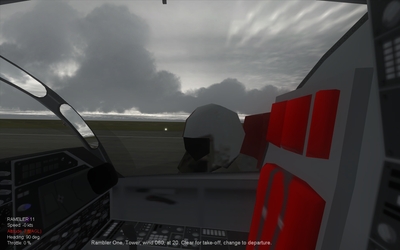
Folks, this is why I CONSTANTLY stress that when you apply a mod, that you know EXACTLY how and why it works...so you can figure out when it doesn't and fix it yourself. Okay, long explanation ahead...sit down and buckle in. First, note this line in the FLIGHTENGINE.INI file in the Flight folder (don't worry, we're not doing anything with it): The bolded parameter defines a 'bubble' in meters from the pilot's point of view. Anything that is not part of the cockpit model will not be drawn by the simulation engine inside this 'bubble'. Lexx_Luthor's method of getting cockpits into different aircraft involves adjusting this number to something smaller. However, this affects EVERY aircraft, and results in some weirdness with flashing textures for ground objects. In addition, any parts of the cockpit would still get drawn 'on top' of stuff not part of the cockpit. So even if you adjusted the parameter above to something small, the copilot would still not show 'inside' the cockpit...it would look like something like this: Note how you can see his head, but not the rest of the body...that's because the cockpit is being drawn 'on top' of the pilot model. That's why with Lexx_Luthor's method, you have to delete (actually just move) the majority of the cockpit model except for the instrument panel to get other stuff in there, like crew members. Now, lets go to the particular aircraft's data.ini...in this case, my EF-111 alpha project. Note this area: ALL aircraft have this section in their data.ini which lists Components. Now, lets go to the Fuselage component: Note the parameters in bold again. The first bolded line is ShowFromCockpit=TRUE. This should be fairly obvious what this means. This is what allows you to see wings, weapons, stuff from the cockpit view. THIS IS IMPORTANT! The second bolded line is a SystemName. Think of SystemNames as 'parts' of Components. If you go further down the data.ini, you'll start seeing entries for all those SystemNames as well. So, in summary, under the old (pre-patch) parameter list: We realize that we should be able to see the CoPilot from the cockpit view, but are inhibited by the NearClipDistance= parameter being too big AND the cockpit 'overdrawing' anything outside of the cockpit. This has changed with the new patch. Now, lets look at the cockpit.ini of the particular aircraft...again, the prototype EF-111. Note the following entry: The bolded parameter has been enabled for the new patch and it's damn important. It does 2 things for you: 1) It gets rid of the NearClipDistance= parameter restriction for the cockpit view...so now stuff can get drawn inside that 'bubble' for that particular aircraft cockpit view ONLY. 2) It also deletes the cockpit 'overdraw' that existed before. Now stuff outside the cockpit will NOT be overdrawn by the cockpit model. Which means now any Component that has the ShowFromCockpit=TRUE parameter enabled (and by default, any SystemNames within that Component entry) will now show INSIDE the cockpit if they are positioned that way. Do you see what the problem is now? Components that used to not be seen because of the 'bubble' can now be seen, and will now show inside your cockpit. The solution to this should now be obvious....but just in case... Find the Component that's poking inside your cockpit (more than likely the [Nose]) and change the ShowFromCockpit= parameter from TRUE to FALSE. Now, if your Copilot is a SystemName that was listed under that Component, you will have to move him (his SystemName entry) to another Component where the ShowFromCockpit parameter is TRUE...like the [Fuselage] for instance. Or even make a custom Component entry (I'll let you figure out how to do that). You have now been armed with the basic blocks of how this modification works, and how to solve your own problems. What you do with this knowledge is up to you. FastCargo
-