


Wrench
-
Posts
28,328 -
Joined
-
Last visited
-
Days Won
188
Content Type
Profiles
Forums
Gallery
Downloads
Store
Everything posted by Wrench
-
you should see the height bmp for the Norway map.....talk about mangled!!! Look at the regions around Glasgow, Kiel, Oslo, Wilhelmshaven, the firths on the eastern UK. To say nothing of the fjords...
-
but I don't have moving trains ...(sad face)
-
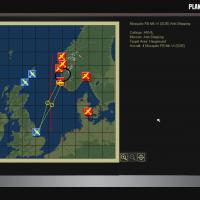
View File SF2 WW2 Northen Europe/North Sea Fix-It Pak SF2 WW2 Northen Europe/North Sea Fix-It Pak 1/22/2014 = For Use on the Recently Released WW2 Northern Europe/North Sea Terrain = This fix-it pak contains a modified Norway.ini (main ini) and Norway_Movements.ini. The main ini has the correction to reset the terrain size to the actual size of the terrain, now allowing the in-game planning map to show things where they truely are. The Movements ini has a repositioned 'front line', that now also sits where it's supposed to! The terrain is available at the following URL: http://combatace.com/files/file/14545-sf2-ww2-northern-europenorth-sea-terrain/ This is to be applied on those already downladed. A 'new' version of the terrain will be uploaded with these changes/repairs already added. As always, fairly easy to follow, yet detailed install instructions are included. PLEASE read them!!! Happy Landings! Wrench Kevin Stein Submitter Wrench Submitted 01/23/2014 Category Full Terrains
-
372 downloads
SF2 WW2 Northen Europe/North Sea Fix-It Pak 1/22/2014 = For Use on the Recently Released WW2 Northern Europe/North Sea Terrain = This fix-it pak contains a modified Norway.ini (main ini) and Norway_Movements.ini. The main ini has the correction to reset the terrain size to the actual size of the terrain, now allowing the in-game planning map to show things where they truely are. The Movements ini has a repositioned 'front line', that now also sits where it's supposed to! The terrain is available at the following URL: http://combatace.com/files/file/14545-sf2-ww2-northern-europenorth-sea-terrain/ This is to be applied on those already downladed. A 'new' version of the terrain will be uploaded with these changes/repairs already added. As always, fairly easy to follow, yet detailed install instructions are included. PLEASE read them!!! Happy Landings! Wrench Kevin Stein -
Cocas' new Beau in desert colors
-
are those my decals??? (and they didn't use Ns -- d-30 & d-40s. I have a whole book on latin American post war jugs) -------- required screenie
-
SF2 WW2 Northern Europe/North Sea Terrain (v2)
Wrench replied to Wrench's topic in File Announcements
allen: you mean the this one (highlighted)??? -
ask Baltika! He did the base TFD/HFD (from 2 DEMS) for me the ini says the map is 2000 x 2000 I won't be targeting anything further east than Haiphong, as Hinan doesn't really play a part in ww2; at least not in reference to the main B/I operations. Although there was a small IJN naval base with attached aircraft (some Zeros, Mavis Emily) for sea search/recon. Also leaves plenty of space away from the Eastern Wall be using GH3, of course, and MANY of my GH3 speced 'specials', including the new river-paddy tiles and the various port tiles
-
I LOVE how the runway and base is merged with the forest. Accurate item placement like that can be a nightmare!!! good work!!
-
check the movement ini for the shipping routes (Gerwins tools is OUTSTANDING for this!!) actually, for islands, I've found exporting the height map as bitmap, and the repainting their location to the blue sea color really helps when it comes to placing airbases on them. When flattened, they remain at 'sea level'. Of course, this assumes NO mountains on the island... the tile misplace looks like an errant mouse click -- been there, done that!!!
-
Aerodynamics... Drag question.. Please help a bit.
Wrench replied to Snailman's topic in Mods & Skinning Discussion
oh, man. what a drag!! (sorry, somebody had to say it!!) -
did you change the games year span in the options ini??? as per http://combatace.com/topic/68224-adjusting-beginning-end-year-spread/ you shouldn't ever have to touch the date in a mission, if this is correct.
-
SF2 WW2 Northern Europe/North Sea Terrain (v2)
Wrench replied to Wrench's topic in File Announcements
Blessings on you Gepard!!! that sure did the trick! Never even noticed that mistake Looks like I'll have move the front line east a bit, but that's an easy fix -
East India (the city under the 2 airfields top center is Calcutta) btw, the part of india on the east side of the bay (of Bengal) is now Bangladesh, Burma, Thailand, French Indo-china*, parts of southern china, Tibet/Nepal, Malaya (RAF Tengah=Singapore), eastern Sumatra in the lower right corner Andaman and Nicobar islands near the center basically, almost the entire CBI Theatre, minus China north of Kunming. If you look on the right (eastern) coast of Indo-china, and follow the coatline past the large island (aka Hinan Island), you'll see a large U shape in the coastline. That's where Hong Kong is. all the major rives will need doing ... all the cities added (yes, the future Vietnams will get their cities, and least Hanoi, Haiphong -a major Japanese port-, Saigon, etc. *-what will become Laos, Cambodia and both Vietnams Don Muang = Bangkok Mingladon = Rangoon in theory, this map could be used for more than just ww2 -- the (?) Indo-East Pakistan (Bangladesh) war, Malayan Emergency, possibly even a replacement for the stock VNSEA -- all of Thailand and Vietnam are usable- for SF2V . I will be leaving spaces for the locations of post-ww2 & 1960's historic airbases
-
Can stock ground objects textures be modified?
Wrench replied to Rends's topic in Mods & Skinning Discussion
checked the _col.lod. It calls for the same airport_tower.bmp how odd! -
could've use that pile of coal on the Euro WW2 map!! I put the refineries and gassification plants in ... but no coal!! those stock cranes just don't cut it ... we've needed better ones for a loooooooooong time! The af51 has (nearly) the right shape, but is 1/2 the size it should be nice work; sure that comm tower isn't for Star Wars??? looking good!
-
Can stock ground objects textures be modified?
Wrench replied to Rends's topic in Mods & Skinning Discussion
into the terrain folder itself, in the mods folder. If it's in the core files, the game won't see it at all. the way things used to (and still should --), is the engine looks in the folders 1st, then if it doesn't see what's needed, 'pulls' them from the various cat files. that's why stock aircraft have no skins or decals in their folders, and an add-on terrain that uses all stock tiles can just use the cat pointer line to locate what's needed. Same goes for other terrains, referencing terrain objects (evildamncommbuildings, for example), and so forth. now the weird thing, in the last 4 WW2 terrain mods I've uploaded, the pit1.bmp is residing in the terrain folder, with no lod, and the "new" sandbag texture shows with no problems. on this one, using just the texture in 3 different mods folders (SF2E, SF2NA, SF2) sitting INSIDE the GermanyCE terrain folder, it wouldn't work just some really weird shit going on!! -
again, and anew. With extensive thanks to Baltika for the base pallet to work from... the potential this terrain has is astonishing!!! Going to be reaching out to some of our Experts (ah, Sandesh, are you there??? LOL!!) This is one of the biggest one's I've ever taken on. Of course, I always pick someplace where hard data is not easy to come by... why would I want to make my life easy, eh??? In between the new aircraft Cocas & Co are working on, I'll be fiddling with this, too!! Months and Months away....my target date in sometime near summer's end.
-
Can stock ground objects textures be modified?
Wrench replied to Rends's topic in Mods & Skinning Discussion
you'll want to do a better job of repainting the texture, the one I have is just awful!!! After all, the flood bucket in PS really DOES flood!! Left (most) of the windows and doors!! -
I like it!!
-
Can stock ground objects textures be modified?
Wrench replied to Rends's topic in Mods & Skinning Discussion
ok, having tested this on 3 different installs on the GCE terrains, I can state that Rends is correct ... for some berserk reason, the stupid game engine is NOT seeing a texture residing within the terrain folder, as has been in the past. The only way I got the 'new' texture to show was (as I stated above) using my archived lods (you all know that all the items 08 level cats are 100% compatable with SF2, right?) renamed the ini, editied the lod name within the ini, renamed the lod, renamed the bmp, did a quick and dirty flood of 25% white (concrete looking) hex edited the lod, and saved everything. Added the new clone to the _types ini, replaced the tower at Bitburg, and below is the result why in hell what has worked since Day 1 is no longer, I can only attribute to some fuck up internally in the game engine. -
you'll find containers and stacked containers in the Persian Gulf map (cocas did the lods)
-
maybe in one of the MiG-29 paks??
-
Can stock ground objects textures be modified?
Wrench replied to Rends's topic in Mods & Skinning Discussion
yes, with lod hex editing and texture renaming -
SF2 WW2 Northern Europe/North Sea Terrain (v2)
Wrench replied to Wrench's topic in File Announcements
no apology is necessary my friend; I dropped the ball! oddly, the EAWEuro WW2 has 7 digit locations, and does NOT have this problem could be related to the higher latitudes or that Gerwin 'twisted' the base TFD/HFD to give the straight N/S orientation, as opposed to my original, which had the latitude 'warping', drifting things eastwards. (oddly, thinking about it now, the displacement is about the same ... if the map had the latitude convergences, the objects might show in the correct locations. Just don't know!!) but it's only on the planning map views. The in-flight map shows things were they are (or go or whatever!)
