


Wrench
-
Posts
28,331 -
Joined
-
Last visited
-
Days Won
189
Content Type
Profiles
Forums
Gallery
Downloads
Store
Everything posted by Wrench
-
and buzz numbers
-
the Firecan issue was fixed some time ago. (OTH, perhaps they're Directed Energy Weapons?? Gonna microwave ya to death) I've seen mixed columns in Armed recon missions; something that got added in 2013? 2012? After NA came out, irrc. (meaning: mobile AD units supporting truck convoys)
-
Called it!! who ever did the profile, totally dropped the ball on the US star-and-bar. Post-47, would have the red stripe
-
with those markings, I'd guess a PTO F-6D. But the 2 red star victory markings, might indicate Korean Era. If so, the national markings are incorrect for post-1947 anythings. no code letters or numbers available?? Would help narrow down the search. The "14" doesn't help much!!
-
trying to find more information on FAA Seafires, in particular squadron markings. I know early ones only carried the plane-in-group letter, but later on, carried some sort of 2 digit designator for the ship and/or squadron, along with the individual letter. most particular interest is Atlantic, Med, and BEIF. BPF stuff, in particular for the IIIC is pretty easy (just which carrier had what code, etc) pointers, links, books on pdf, etc (already have the SSP Fleet Air Arm book) thanks!!!
-
Questions about water editing (color and wave effect)
Wrench replied to Rends's topic in Mods & Skinning Discussion
did you by chance use the waternormal.bmp AS the water??? That's the only thing, in ALL terrains, that has that color. That's a no-no I've restored the alpha back to it's stock type, from Stary's seasonal Germany. the odd thing is, there's nothing that I can see wrong with the RGB channels either. It's either something wrong in the data ini statements or ???????????? how you got that to show as such, I've no idea. -
Questions about water editing (color and wave effect)
Wrench replied to Rends's topic in Mods & Skinning Discussion
good! this is the tga? looks like GermanyCE ... lets see what's happening here!! -
Questions about water editing (color and wave effect)
Wrench replied to Rends's topic in Mods & Skinning Discussion
only if you use the correct image manipulating program. I use Photoshop 6, as 7 has some "issues" with 32-bit tga with alpha. I've never tried it with Gimp or Paint.net, as why would I need too?? as you mentioned about the yellow in the German Forum, about the yellowing. I can guantee whatever you're using is fouling up the alpha channels can you post a screenie of the yellowing? It'll help me see what screwing up, and confirm or deny my suspicion. Also, what/which imaging program are you using? -
View File SF2 WW2 MTO Spitfire Mk.V (Trop) Pak by Cocas Aircraft Factory & Co SF2 WW2 MTO Spitfire Mk.V (Trop) Pak by Cocas Aircraft Factory & Co (ver 0.9) 1/06/2014 -- Something for the MTO players -- = For SF2, Full-5 Merged (Reccomended/Preferred) = *Note: having whichever expansion pak gave us the Spit Mk. IX is required, as this mod references the stock 3W destroyed Spitfire* This is tagged as Ver 0.9, as we're sure some minor fixes may be required. We wanted to get it out into the hands of End Users , both for your flying pleasure, and further examinations. This package is for MTO (North Africa, The Med, etc) Spitfire V Trops -ONLY!!!- . Not to be used elsewhere! Seperate version(s) for CBI RAF and SoWesPac RAAF usage will be released at a later date. Skins included with the package are: RAF: No. 92 Squadron, RAF "East India" (after transfer from the UK) No. 417 Squadron, RCAF "City of Windsor" No. 1 Squadron, SAAF USAAF: 307th FS, 31st FG (MX) 308th FS, 31st FG (HL) 309th FS, 31st FG (WZ) (TORCH, and Post TORCh -yellow outline star/ball) Free French AF: GG II/7 FFAF (No. 326 Squadron RAF) (start 6/43) Squadron crests (when locatable) or in AAF cases the squadron patch, are used as the paint chip, as seen on the Loadout screen. This pack makes use of the Brain32 trick of having the skin maps in the MAIN aircraft folder, NOT in the individual squadron folders. As most MTO-based Spitfires were painted the same camo, this reduces the size of the package. Only the markings (squadron codes, national insignia) change. All marking are decals, and decal randomization is TRUE. Other squadrons, RAF USAAF, FFAF, etc can easily be done by creating new squadron code letters. The Userlist ini has dates rounded to the closest whole month. The canopy operates via the Standard Animation Keystroke , Shift/0. Guns are also grouped, MGs in Group 1, the cannon in Group 2. When in game, you'll see: Spitfire Mk.Vb Trop (CAF) on the aircraft selection dropdown menu. This will diferentiate THIS Spitfire from any other MK Vs you may (or may not) have. An revamped SF2 version of my original "box art" hangar screen is included. As always, fairly easy to follow, yet detailed install instructions are included. So, please read them. Good Hunting! Wrench Kevin Stein -for Cocas Aircraft Factory, Prop Works Division- Submitter Wrench Submitted 01/10/2014 Category Spitfire
-
- 1
-

-
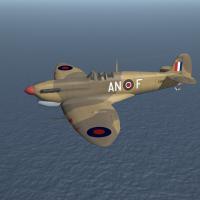
Version 0.9
132 downloads
SF2 WW2 MTO Spitfire Mk.V (Trop) Pak by Cocas Aircraft Factory & Co (ver 0.9) 1/06/2014 -- Something for the MTO players -- = For SF2, Full-5 Merged (Reccomended/Preferred) = *Note: having whichever expansion pak gave us the Spit Mk. IX is required, as this mod references the stock 3W destroyed Spitfire* This is tagged as Ver 0.9, as we're sure some minor fixes may be required. We wanted to get it out into the hands of End Users , both for your flying pleasure, and further examinations. This package is for MTO (North Africa, The Med, etc) Spitfire V Trops -ONLY!!!- . Not to be used elsewhere! Seperate version(s) for CBI RAF and SoWesPac RAAF usage will be released at a later date. Skins included with the package are: RAF: No. 92 Squadron, RAF "East India" (after transfer from the UK) No. 417 Squadron, RCAF "City of Windsor" No. 1 Squadron, SAAF USAAF: 307th FS, 31st FG (MX) 308th FS, 31st FG (HL) 309th FS, 31st FG (WZ) (TORCH, and Post TORCh -yellow outline star/ball) Free French AF: GG II/7 FFAF (No. 326 Squadron RAF) (start 6/43) Squadron crests (when locatable) or in AAF cases the squadron patch, are used as the paint chip, as seen on the Loadout screen. This pack makes use of the Brain32 trick of having the skin maps in the MAIN aircraft folder, NOT in the individual squadron folders. As most MTO-based Spitfires were painted the same camo, this reduces the size of the package. Only the markings (squadron codes, national insignia) change. All marking are decals, and decal randomization is TRUE. Other squadrons, RAF USAAF, FFAF, etc can easily be done by creating new squadron code letters. The Userlist ini has dates rounded to the closest whole month. The canopy operates via the Standard Animation Keystroke , Shift/0. Guns are also grouped, MGs in Group 1, the cannon in Group 2. When in game, you'll see: Spitfire Mk.Vb Trop (CAF) on the aircraft selection dropdown menu. This will diferentiate THIS Spitfire from any other MK Vs you may (or may not) have. An revamped SF2 version of my original "box art" hangar screen is included. As always, fairly easy to follow, yet detailed install instructions are included. So, please read them. Good Hunting! Wrench Kevin Stein -for Cocas Aircraft Factory, Prop Works Division- -
Questions about water editing (color and wave effect)
Wrench replied to Rends's topic in Mods & Skinning Discussion
shaders are locked away; have been for some time as mentioned once before to change the water's color, you'll have to repaint the water on EVERY SINGLE SEA TO LAND TRANSITION TILE, INCLUDING RIVERS, RIVERMOUTHS, AND SEAPORT TILES. (the ocean tile's repaints is a 'given') -
already in the KAW mustang pak, the ROK skin haven't seen that movie in YEARS!!!!
-
"Spitfires Over Darwin" (aka "54 Squadron vs The Zeros")
-
the Lightnings are NOT SF2 (desert) only. I think the F.53 (and the others) came with SF2E; or from wherever, an expansion pak methinks, we got the F.1 - F.6s from
-
View File SF2 WW2 ETO Spitfire Mk.V Pak by Cocas Aircraft Factory & Co (ver 0.9) SF2 WW2 ETO Spitfire Mk.V Pak by Cocas Aircraft Factory & Co (ver 0.9) 12/10/2013 -- Something for the ETO players -- = For SF2, Full-5 Merged (Reccomended/Preferred) = *Note: having whichever expansion pak gave us the Spit Mk. IX is required, as this mod references the stock 3W destroyed Spitfire* This is tagged as Ver 0.9, as we're sure minor fixes may be required. Skins included with the package are: RAF: No. 92 "East India" Squadron No. 610 "County of Chester" Squadron USAAF: 336th FS, 4th FG "Rocketeers" (circa 9/42)* (*Please note, as ex-Eagle Squadron aircraft, they still carry their RAF squadron code letters. The standard 4th FG codes did -not- appear until after transitioning to Thunderbolts) Squadron crests, or in AAF cases the squadron patch, are used as the paint chip, seen on the loadout screen. This pack makes use of the Brain32 trick of having the skin maps in the MAIN aircraft folder, NOT in the individual squadron folders. As all ETO Spitfires were painted the same camo, this reduces the size of the package. Only the markings (squadron codes, national insignia) change. All marking are decals, and decal randomization is TRUE. Other squadrons, RAF or USAAF, can easily be done by creating new squadron code letters. The AAF skin is set to start in September, 1942, as this is approximately correct for the 4th FGs formation. The Userlist ini has dates rounded to the closest whole month. SF2 versions of my "box art" style hangar and loading screens are included. All aircraft use a "pool" of plane-in-group letters, and serial numbers. The serial numbers, while 'generic' in nature (representing no particular aircraft), ARE correct for the variant depicted. The canopy operates via the Standard Animation Keystroke , Shift/0. Guns are also grouped, MGs in Group 1, the cannon in Group 2. When in game, you'll see: Spitfire Mk.Vb (CAF) on the aircraft selection dropdown menu. This will diferentiate =THIS= Spitfire from any other Mk.Vs you may (or may not) have. The skin template is NOT included, as it's being used for other variants. When those are finished, and released, the template will be also (in the hopes someone can fine tune OUT my mistakes! <grin>). As always, fairly easy to follow, yet detailed install instructions are included. So, please read them. Good Hunting! Wrench Kevin Stein -for Cocas Aircraft Factory, Prop Work Division- Submitter Wrench Submitted 01/10/2014 Category Spitfire
-

Version 0.9
158 downloads
SF2 WW2 ETO Spitfire Mk.V Pak by Cocas Aircraft Factory & Co (ver 0.9) 12/10/2013 -- Something for the ETO players -- = For SF2, Full-5 Merged (Reccomended/Preferred) = *Note: having whichever expansion pak gave us the Spit Mk. IX is required, as this mod references the stock 3W destroyed Spitfire* This is tagged as Ver 0.9, as we're sure minor fixes may be required. Skins included with the package are: RAF: No. 92 "East India" Squadron No. 610 "County of Chester" Squadron USAAF: 336th FS, 4th FG "Rocketeers" (circa 9/42)* (*Please note, as ex-Eagle Squadron aircraft, they still carry their RAF squadron code letters. The standard 4th FG codes did -not- appear until after transitioning to Thunderbolts) Squadron crests, or in AAF cases the squadron patch, are used as the paint chip, seen on the loadout screen. This pack makes use of the Brain32 trick of having the skin maps in the MAIN aircraft folder, NOT in the individual squadron folders. As all ETO Spitfires were painted the same camo, this reduces the size of the package. Only the markings (squadron codes, national insignia) change. All marking are decals, and decal randomization is TRUE. Other squadrons, RAF or USAAF, can easily be done by creating new squadron code letters. The AAF skin is set to start in September, 1942, as this is approximately correct for the 4th FGs formation. The Userlist ini has dates rounded to the closest whole month. SF2 versions of my "box art" style hangar and loading screens are included. All aircraft use a "pool" of plane-in-group letters, and serial numbers. The serial numbers, while 'generic' in nature (representing no particular aircraft), ARE correct for the variant depicted. The canopy operates via the Standard Animation Keystroke , Shift/0. Guns are also grouped, MGs in Group 1, the cannon in Group 2. When in game, you'll see: Spitfire Mk.Vb (CAF) on the aircraft selection dropdown menu. This will diferentiate =THIS= Spitfire from any other Mk.Vs you may (or may not) have. The skin template is NOT included, as it's being used for other variants. When those are finished, and released, the template will be also (in the hopes someone can fine tune OUT my mistakes! <grin>). As always, fairly easy to follow, yet detailed install instructions are included. So, please read them. Good Hunting! Wrench Kevin Stein -for Cocas Aircraft Factory, Prop Work Division- -
a quick note on stary's hangars: they're backwards (read: 180 degrees off), so if the original faces 90, his must face 270 again, sorry for the English!
-
(sorry for using English - but I don't trust the google translator) if the Russian freighter is the 'freighter2' from CubaOTC, you should use (or it should already be) something like this for the destroyed lod: DestroyedEffect=LargeBombExplosionEffect DestroyedModel=shipcargo2.lod <----points to the 'regular' lod SecondaryEffect=LargeOilFire SecondaryChance=100 if you want to get VERY clever, you can create a 'clone' of the shipcargo2.lod ie: copy/rename to shipcargo2_dest.lod, do a little hex editing on the 'new' destroyed lod, create copies of the various skins -again using the hex editor on 'search' to find them, repaint them a splotchy/mottled black to represent burnt paint and such, rename them slightly differently, hex edit the lod's bmp pointers to match -with exactly the same number of digits/letters as the originals !!!!- (example: ship1.bmp becomes shipd.bmp) and test in game by destroying it. with luck, it'll explode, and sit at it's mooring burning. simply because most harbors are quite shallow (3-12 meters more or less), and as the game engine really doesn't allow for rolling over and sinking at dockside, this would be the best. Something similar is how I've been doing it for years. you don't want to use the 'shipdestroyedeffect', as that, I believe, causes the model to sink and leave an oil slick. This way, it stays moored, but (sunk) and burning.
-
OUTSTANDING!!!! fantastic job man!!! love the sound effects; I assume that's real, "attached" as the Movement sound? the train station/depot is nicely dressed,too. Great work!!!
-
oh!!! I like that damaged rudder!! looks perfect with ripped and torn off fabric! (should be an aft fues, too!) You mean No. 17 Squadron code letters?? for Battle of France, or Burma?? edit: here's the YB squadron code letters for BoF/BoB time frame
-
How would Dave do it? Oh, Hell, that's easy.... http://www.youtube.com/watch?v=YQLbwOGT8eM (why the frack isn't this giving me the youtube window?? the hell???)
-
Sea Control Ships: your thoughts...
Wrench replied to daddyairplanes's topic in Sci-Fi/Anime/What If Forum
Florian's Sea King???? -
re: AFR folks keep forgetting the maps (stock ones, that is) are only 63% Realilty. Most of the add-ons are also NOT full scale. in other words: it ain't really necessary. Those Development Funds could/would/should be spent on more 'mission orientated' items. Like avionics fixes as Stary said. Better visuals? naaaah.... Better terrain engine? the last one ... well... the less said the better. New planes? Totally agree. But, then we're back to the avionics and they'll need cockpits. The vicious circle eats it's own tail
-
la la la lalala .. I've been vaporized....
-
first look (still VERY early in the process, so keep comments to oneself)