

Wrench
-
Posts
28,336 -
Joined
-
Last visited
-
Days Won
189
Content Type
Profiles
Forums
Gallery
Downloads
Store
Everything posted by Wrench
-
.
-
no longer available
-
small data ini fix: in the "FlightControl" section, near the top, replace FlapSettingForCatapult=2 with: FlapSettingForCatapult=1
-
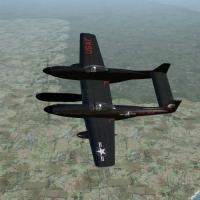
View File SF2 F-82G Twin Mustang, Korean War Era by KAW Team SF2 F-82G Twin Mustang, Korean War Era by KAW Team = For SF2, Full-5 Merged (Reccomended/Preferred) = *This mod will =NOT= work in SF/Wo* 1stGen game installs, due to the MAX level used to create it. It is HIGHLY suggested you be at the latest SF2 patch level for the mod to work properly* This is the NAA F-82G "Twin Mustang" as operated by the USAF during the Korean War. This is a BRAND NEW MODEL!!!, created expecially for KAW. You will probably want to delete any other Twin Mustang you may (or may not!) have. This will replace it completely. This pack comes with 3 skins: 4th AWS 68th AWS 339th AWS as used in the Air Defense of Japan, and over Korea itself. All aircraft are finished in 'Night Black". All skins and damage textures are in DDS format. Decal randomization is set to TRUE. All sounds, weapons, pilot figures and goodies are included. A New SF2-style 'box art' hangar is included (rebuilt from the 1stGen version). The Standard Animation Keystroke operate the canopies (Shift/0). As always, fairly easy to follow, yet detailed install instructions are included. So, please read them. Also, might want to give the "Notes" section a look-see, for further explinations, illuminations, and operational notes. Good Hunting! wrench kevin stein for the KAW Team Submitter Wrench Submitted 11/12/2012 Category P-51
-
682 downloads
SF2 F-82G Twin Mustang, Korean War Era by KAW Team = For SF2, Full-5 Merged (Reccomended/Preferred) = *This mod will =NOT= work in SF/Wo* 1stGen game installs, due to the MAX level used to create it. It is HIGHLY suggested you be at the latest SF2 patch level for the mod to work properly* This is the NAA F-82G "Twin Mustang" as operated by the USAF during the Korean War. This is a BRAND NEW MODEL!!!, created expecially for KAW. You will probably want to delete any other Twin Mustang you may (or may not!) have. This will replace it completely. This pack comes with 3 skins: 4th AWS 68th AWS 339th AWS as used in the Air Defense of Japan, and over Korea itself. All aircraft are finished in 'Night Black". All skins and damage textures are in DDS format. Decal randomization is set to TRUE. All sounds, weapons, pilot figures and goodies are included. A New SF2-style 'box art' hangar is included (rebuilt from the 1stGen version). The Standard Animation Keystroke operate the canopies (Shift/0). As always, fairly easy to follow, yet detailed install instructions are included. So, please read them. Also, might want to give the "Notes" section a look-see, for further explinations, illuminations, and operational notes. Good Hunting! wrench kevin stein for the KAW Team -
eeeeeeeeeeeeeeeeeeeeeeeeeeeeeeeeewwwwwwwwwwwwwwwwwwwwwwwwwwwwwwwww!!! but the question "remains", did it put out fire??
-
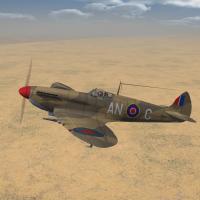
View File SF2 WW2 Spitfire Mk.VIII by Mod Mafia/TMF SF2 WW2 Spitfire Mk.VIII by Mod Mafia/TMF = For SF2, Full-4/5 Merged (Reccomended/Preferred) = -For WW2 MTO Usage- *Note: There is a distinct possibility that this mod MAY work in SF/Wo* 1stGen game installs However, some data ini statements will not be in effect in 1stGen SF/Wo* at any patch level (with the possible exception of WoI plus it's ExpansionPak -this has not been tested, as I ONLY mod for SF2). It is designed for use in SF2, at the most current patch level. Your milage will vary!* A brand "new" model that was never completed when Bpao passed away a few year back. I've been fortunate enough to be allowed to complete his work, as a member of the Mod Mafia. Skin/Decals set included are for: 31st FG, USAAF: 307th FS 308th FS 309th FS Royal Air Force: 92 Squadron 417 Squadron All the units served in the MTO. All skins are in jpg format, Decal Randomization is TRUE. A "new" SF2 version of the original 'box art' hangar screen and loading screens are included. All markings are decals (excepting National Markings, that are painted on); making it supremely easy to recreate other squadron users. A user list is included; operational service dates have been rounded to the closest whole Year. All weapons, sounds, pilot figure(s) (including the 'fake pilot') are included. For those squadrons listed in the stock SquadronList.ini, my 'fake SqTail' decal will activate the Displayed Name on the Loaodut Screen. The Canopy opens with the Standard Animation Keystroke , Shift/0 Damage textures are set for DDS; tga versions are supplied for 1stGen users that attempt to use it in SF/Wo*. When 'in game', you'll see "Spitfire Mk.VIII (TMF)" in the aircraft selection drop-down window. This will diferentiate it from any other Mk.VIIIs you may (or may not) have . As always, fairly easy to follow, detailed install instructions are included. So, please -READ- them. Also, give the "Notes" section a read too for futher explinations, clarifactions, illuminations and so forth. Good Hunting! wrench kevin stein For Oli; you are sorely missed! Submitter Wrench Submitted 11/12/2012 Category Spitfire
-
299 downloads
SF2 WW2 Spitfire Mk.VIII by Mod Mafia/TMF = For SF2, Full-4/5 Merged (Reccomended/Preferred) = -For WW2 MTO Usage- *Note: There is a distinct possibility that this mod MAY work in SF/Wo* 1stGen game installs However, some data ini statements will not be in effect in 1stGen SF/Wo* at any patch level (with the possible exception of WoI plus it's ExpansionPak -this has not been tested, as I ONLY mod for SF2). It is designed for use in SF2, at the most current patch level. Your milage will vary!* A brand "new" model that was never completed when Bpao passed away a few year back. I've been fortunate enough to be allowed to complete his work, as a member of the Mod Mafia. Skin/Decals set included are for: 31st FG, USAAF: 307th FS 308th FS 309th FS Royal Air Force: 92 Squadron 417 Squadron All the units served in the MTO. All skins are in jpg format, Decal Randomization is TRUE. A "new" SF2 version of the original 'box art' hangar screen and loading screens are included. All markings are decals (excepting National Markings, that are painted on); making it supremely easy to recreate other squadron users. A user list is included; operational service dates have been rounded to the closest whole Year. All weapons, sounds, pilot figure(s) (including the 'fake pilot') are included. For those squadrons listed in the stock SquadronList.ini, my 'fake SqTail' decal will activate the Displayed Name on the Loaodut Screen. The Canopy opens with the Standard Animation Keystroke , Shift/0 Damage textures are set for DDS; tga versions are supplied for 1stGen users that attempt to use it in SF/Wo*. When 'in game', you'll see "Spitfire Mk.VIII (TMF)" in the aircraft selection drop-down window. This will diferentiate it from any other Mk.VIIIs you may (or may not) have . As always, fairly easy to follow, detailed install instructions are included. So, please -READ- them. Also, give the "Notes" section a read too for futher explinations, clarifactions, illuminations and so forth. Good Hunting! wrench kevin stein For Oli; you are sorely missed! -
you can actually turn it around; the list of what wasn't used is MUCH shorter
-
yup, sure sure was. Kittyhawk by the RAF, Warhawk by AAF (same plane, different name). THOUSANDS of them!!! D,E,F,N models there weren't nowhere it wasn't used!! (except maybe Antarctica!!!)
-
not until 1945, did AAF squadron start recieving Mustangs, mostly B/C models. Sometime after that, D started appearing. By then, all squadron were operating from Italy. Including RAF units So, no; not any "real" mustangs if you give me 24 hours, you'll have a nice BRAND NEW Spit Mk.VIII in AAA and RAF markings
-
Yes, sometime "Thank You" just isnt enough!!
-
Problems with a1h_ver6 mod Skyraider for SFP1/WOV
Wrench replied to JollyRogerTwo's topic in Mods/Skinning Discussion
missing the necessary ground objects to hit maybe???? VNSEA has 4 CAS routes in the movements ini... maybe need to download "something" the NVA would be using??? Since, iirc, even in 1stGens it uses the LimitedNations statement, you aren't going to find something that wasn't "exported" to them (ie: tanks --yes, we know they did show in Real Life). There's s ome NVA and VC troop GOs around someplace using the F7 ground object view, were there any US armored units waiting to engage?? bottom line: i think you're missing some ground objects (troops, waterbuffalo, etc) -
Problem making machine guns on tank turrets
Wrench replied to WhiteBoySamurai's topic in Mods & Skinning Discussion
iirc, like ships, tanks should have a 'gunner' statement for each gun. I could be wrong, too! -
ok, them's the really old ones and not to sF2 standard.; they are ALL being replaced as soon as Fubar gets me the updated FMs (he's in New Jersey, so we all know what just happened there; delays are expected) open the avionics ini, if they have them. if those are the old tazkiller mods, they may not even have one with the radar ranging gunsight, but look for lilnes like this: [RWR] Type=AUDIO_ONLY TrackSound=RWRTrackSound.wav LockSound=RWRLockSound.wav ThreatLaunchSAMOnly=TRUE ThreatLaunchFlash=TRUE LockFlash=TRUE LockFlashRate=0.1 [RWRTrackSound] Priority=HIGH 3DSound=FALSE Looped=TRUE NumBuffers=1 [RWRLockSound] Priority=HIGH 3DSound=FALSE Looped=TRUE NumBuffers=1 if so, delete it. AFAIK, even late model F didn't have anything (although some of my sources seem to mention a light near the gunsight, that illuminated when the aircraft was being "looked at or locked" with a radar (smiliar to RAF WW2 'Boozer" systems)
-
ah, yuup!!!
-
Problem making machine guns on tank turrets
Wrench replied to WhiteBoySamurai's topic in Mods & Skinning Discussion
wouldn't the MG cupola need a seperate node? I remember when I first added the MGs to 1stGen back in 05, we just 'ignored' the face they weren't really connected to to turret or chasis. I know the Abrams, being 3rdParty has a OUT that lists the MG cupola; that what I used. But I can't recall if the sub-turret (for lack of a better term for the cupola) was animated and nowadays, without access to the 3W lods....be diffucult to figure it out (of cousre, some are still in SF/Wo* and lods can be extracted and browsed with a hex editor) -
a picture is worth 1000 words...(your username will be different, of course! ) you'll notice, to the left a radio button; you can change the directory it extracts too as well
-
wrong on the Data ini adjustment. What that statement does, is tell you WINGMATES they have have an RWR the only thing that controls sounds or visual inidcation (on cockpits with the screen) is the aviionics ini. Geary: still need to know WHICH airplane!!
-
ok...lets try and narrow this down. do you have SF2 (plane jane), with the included Desert terrain? (can't remember from a previous post if you're Full-5 or not!) (the airfield lod included is because of some retextureing I did to; just ignore it) india/pak also requires the Desert.cat, although I did test it at some point with the Germany (in fact, the one i'm using now IS pointing to GCE)
-
point it to the desert.cat, like it said in the readme. You can also try GermanyCE. all the 'naming conventions' for terrain objects use those fo the Desert.cat. Problem being, previoulsy on 3W TV... the terrain cats had all the desert stuff still in them. Sometime around Jan2012 patch, or NA they got removed from all terrain cats BUT the desert cat. Oddly, all airfields (Vietnam_airfield***, Germany_Airfield***, even the IsraelME) use the same lods. They just get called something different in the _data.ini. and try ot use it ONLY in NA...the f***ing thing locks/freezes/and crashes the game when used in "standard" SF2 installs -even a full-5 merged SF2. I've never figured out why, so couldn't fix it. REALLLLLLLLLLLLLLLLLLLLLLy pisses me off!!!
-
knowing which aircraft would help. Some aircraft DID have an audible warnings, usually a 'tail waring radar' (aka proximity warn -those go back to ww2 used in P-47, P-51, P-38, to say noting of RAF ones) it'll be in the avionics.ini, as always
-
the item you posted is known as the 'main.ini', there's one for each aircraft (obviously!, as it tells the game what/who/how/etc) the decals inis are hiding in many of the varouis ObjectData***.cats, with each of skins. You'll need the 3rdWire cat extractor to pull them, create seperate folder in EACH aircraft's folder for EACH skin being modified place the decals ini in that folder, and THEN plot the positions for the actual decals, and test in game
-
yeah, that camo pattern would be NIGHTMARE to paint (belive me, I tried it for Wolfs!!)
-
they're set in each aircraft individual skin (as in 'each and everyone') decals ini. they're a Level 3 decal, and like all others, for 'addon' birds, must be located and placed on the aircraft, The example below is from the Phantom: [Decal030] MeshName=splitter_plate_left DecalLevel=3 DecalFacing=LEFT FilenameFormat=kill Position=5.995,-.141 Rotation=00.0 Scale=0.75 DecalMaxLOD=2 however, you'll only get the stock 'redstar-with-a-number-in-it'. Other kill marking, like say, WW2 'meatballs' or 'black crosses' would have to be (and have been) custom made, and treated like anyother decal; residing in they're own folder, with specific name for which side gets to use the. And, you'd need 100 of them