


Wrench
-
Posts
28,336 -
Joined
-
Last visited
-
Days Won
189
Content Type
Profiles
Forums
Gallery
Downloads
Store
Everything posted by Wrench
-
which is exactly WHY decals are used!! One squadron code letter set, "pool" of individual letter. much easier!!! nice skins Nigel!! as can be seen, the LOD dates from 2006, and i don't have the MAX file for either of the Spits (Mk.1 and Mk.VIII); although I do have the MAX for the uncompleted Mk.IX (but as theres a stock 3W one, and we have your skins for it....)
-
no real need, they only came 2 ways - NS Blue/Grey and 3 tone before retirement (read: war weary). You've got them; and the decal positions are all plotted. These are Birdcages, not -1As (3 tone or solid gloss blue) or -1Ds (solid). 3 tones would get either the red outline starbar (for 4-6 months) and the the blue outlines starbar for the rest of the war. There's still 4 models to come ------- requried screenie... Alder Tag (with apologies to Russo for splattering his 109E)
-
View File SF2 WW2 Spitfire Mk.1A by Mod Mafia/TMF SF2 WW2 Spitfire Mk.1A by Mod Mafia/TMF = For SF2, Full-4/5 Merged (Reccomended/Preferred) = *Note: There is a distinct possibility that this mod may not work in SF/Wo* 1stGen game installs at any patch level, due to the excessive modifications made to fit them into the SF2 environment. End Users that attempt to do so, do so at their own risk.* A brand "new" model that was never completed when Bpao passed away a few year back. I've been fortunate enough to be allowed to complete his work, as a member of the Mod Mafia. This is the Vickers/Supermarine Spitfire Mk.1A. This pak contains skins/decal sets for the following RAF Squadrons: No. 41 No. 54 No. 92 No. 610 in their 'Battle of Britain' livery. National markings are painted on, and all the aircraft use a 'pool' of indvidual call letters (A,B,C, etc) and serial numbers (all historiclly Mk.1s). Each has the Squadron letters (DW, EB, QJ, etc) also as decals. This will make it easier for other squadrons to be created by simply making new 2-digit Squadron letters. There is a blank bmp called "DW" in the 41 Squadron decals folder that can be resued for this. Those that know how, can duplicate my work quite easily. All skins are in jpg format, Decal Randomization is TRUE. A new SF2 version of the original 'box art' hangar and loading screens are included. Damage textures are dds format. A 'destroyed.lod' is included, taken from the WW2 terrains (its used for destroyed statics). Those with SF2I Expansion Pak1 can easliy switch to the 3W destroyed Spit lod. The canopy/entry door open with the Standard Animation Keystroke , Shift/0. For those RAF Squadron listed in the game's SquadronList.ini, my 'fake sqtail' decal will activate their "Displayed Name" on the LoadoutScreen. When 'in game', you'll see "Spitfire Mk.1A (TMF)" on the aircraft drop-down selection window. This will differentiate it from any other Mk.1s you may have. The Official Squadron Crest is used for the 'paint chip' for each skin. As always, fairly easy to follow, detailed install instructions are included. So, please READ them. Also, give the "Notes" section a read too for futher explinations, clarifactions, illuminations and so forth. Good Hunting! wrench kevin stein For Oli; you are sorely missed! Submitter Wrench Submitted 11/03/2012 Category Spitfire
-
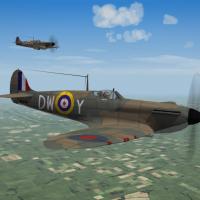
639 downloads
SF2 WW2 Spitfire Mk.1A by Mod Mafia/TMF = For SF2, Full-4/5 Merged (Reccomended/Preferred) = *Note: There is a distinct possibility that this mod may not work in SF/Wo* 1stGen game installs at any patch level, due to the excessive modifications made to fit them into the SF2 environment. End Users that attempt to do so, do so at their own risk.* A brand "new" model that was never completed when Bpao passed away a few year back. I've been fortunate enough to be allowed to complete his work, as a member of the Mod Mafia. This is the Vickers/Supermarine Spitfire Mk.1A. This pak contains skins/decal sets for the following RAF Squadrons: No. 41 No. 54 No. 92 No. 610 in their 'Battle of Britain' livery. National markings are painted on, and all the aircraft use a 'pool' of indvidual call letters (A,B,C, etc) and serial numbers (all historiclly Mk.1s). Each has the Squadron letters (DW, EB, QJ, etc) also as decals. This will make it easier for other squadrons to be created by simply making new 2-digit Squadron letters. There is a blank bmp called "DW" in the 41 Squadron decals folder that can be resued for this. Those that know how, can duplicate my work quite easily. All skins are in jpg format, Decal Randomization is TRUE. A new SF2 version of the original 'box art' hangar and loading screens are included. Damage textures are dds format. A 'destroyed.lod' is included, taken from the WW2 terrains (its used for destroyed statics). Those with SF2I Expansion Pak1 can easliy switch to the 3W destroyed Spit lod. The canopy/entry door open with the Standard Animation Keystroke , Shift/0. For those RAF Squadron listed in the game's SquadronList.ini, my 'fake sqtail' decal will activate their "Displayed Name" on the LoadoutScreen. When 'in game', you'll see "Spitfire Mk.1A (TMF)" on the aircraft drop-down selection window. This will differentiate it from any other Mk.1s you may have. The Official Squadron Crest is used for the 'paint chip' for each skin. As always, fairly easy to follow, detailed install instructions are included. So, please READ them. Also, give the "Notes" section a read too for futher explinations, clarifactions, illuminations and so forth. Good Hunting! wrench kevin stein For Oli; you are sorely missed! -
yup... ok, then... Mary Ann or Ginger???
-
SF2 Lockheed F-80C/RF-80C/T-33A Shooting Stars Pak by ErikGen
Wrench replied to Wrench's topic in File Announcements
that was totally MY fault!!! I neglected to triple check that ini; we had the lods sitting right there in front of me!! -
"new" TMF/Mod Mafia Spit Mk.VIII on patrol in Tunisia... coming "2 weeks"
-
good one JB!!
-
baff, open the data ini in Word, and it'll reaarange the text. Save as.. 'plain text'. I had to do that to a LOT pasko's old inis years ago they were all f***ed up with that weird 'cram it all together' oddness FC, why do you think I have a prop-head Zombatar??? edit: ok who did it???? who did it???? changed my 'tag line' to "known as Bob". that's funny as all hell!!!
-
View File SF2 WW2 F4U-1 Corsair (Birdcage) by Mod Mafia/TMF SF2 WW2 F4U-1 Corsair (Birdcage) by Mod Mafia/TMF = For SF2, Full-4/5 Merged (Reccomended/Preferred) = *Note: There is a distinct possibility that this mod may not work in SF/Wo* 1stGen game installs at any patch level, due to the excessive modifications made to fit them into the SF2 environment. End Users that attempt to do so, do so at their own risk. A Full 4/5 Merged install is reccomened; at very minimum, SF2:V is required, as this aricraft references the A-1H's destroyed model* *Note #2: this model will REPLACE, in it's entirety, the stand-in I built using Wolf's as a base. You may (well, should!) delete that mod completly* A brand "new" model that was never completed when Bpao passed away a few year back. I've been fortunate enough to be allowed to complete his work, as a member of the Mod Mafia. This is the eagerly awaited (and wanted!) F4U-1 "Birdcage" Corsair as issued to USMC, and later to USN squadrons. Skin/Decals set included are for: VMF-124 "Wild Aces", the 1st American unit to take the Corsair into combat in the Solomons. It is finished in the "Non-Specular Blue over NS-grey" VF-17 "Jolly Rogers", finished in the 3-tone blue camo All skins are in jpg format, Decal Randomization is TRUE. All get new SF2 versions of the original 'box art' hangar screens. Damage textures are the old tga versions. The 124 skin uses painted on National Markings, the "Jolly Rogers" use decals. Either skin version can easily be used to create other operational squadrons of the time period. A userlist is included with proper dates for BOTH USMC and USN operations. when 'in game', you'll see "F4U-1 Corsair "Birdcage" (TMF)" in the aircraft drop-down selection window. While the aircraft IS carrier capable, historically, the Birdcages saw very limited use aboard ship. The canopy operates via the Standard Animation Keystorke of Shift/0. Breaking with Modder tradition, the wingfold operates via the "airbrakes" key. I didn't change to the standard Shift/9, as the last time I did it, I broke it!. So, it is as it was originally set by Bpao. All lighting is historically accurate. WW2 weapons (ie: bombs) are NOT included. You should have them already. As always, fairly easy to follow, highly detailed install instructions are included. So, please READ them. Also, give the "Notes" section a read too for futher explinations, clarifactions, illuminations and so forth. Good Hunting! wrench kevin stein For Oli; you are sorely missed! Submitter Wrench Submitted 11/02/2012 Category F4U
-
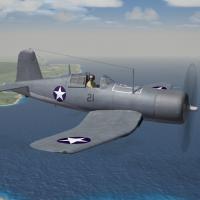
268 downloads
SF2 WW2 F4U-1 Corsair (Birdcage) by Mod Mafia/TMF = For SF2, Full-4/5 Merged (Reccomended/Preferred) = *Note: There is a distinct possibility that this mod may not work in SF/Wo* 1stGen game installs at any patch level, due to the excessive modifications made to fit them into the SF2 environment. End Users that attempt to do so, do so at their own risk. A Full 4/5 Merged install is reccomened; at very minimum, SF2:V is required, as this aricraft references the A-1H's destroyed model* *Note #2: this model will REPLACE, in it's entirety, the stand-in I built using Wolf's as a base. You may (well, should!) delete that mod completly* A brand "new" model that was never completed when Bpao passed away a few year back. I've been fortunate enough to be allowed to complete his work, as a member of the Mod Mafia. This is the eagerly awaited (and wanted!) F4U-1 "Birdcage" Corsair as issued to USMC, and later to USN squadrons. Skin/Decals set included are for: VMF-124 "Wild Aces", the 1st American unit to take the Corsair into combat in the Solomons. It is finished in the "Non-Specular Blue over NS-grey" VF-17 "Jolly Rogers", finished in the 3-tone blue camo All skins are in jpg format, Decal Randomization is TRUE. All get new SF2 versions of the original 'box art' hangar screens. Damage textures are the old tga versions. The 124 skin uses painted on National Markings, the "Jolly Rogers" use decals. Either skin version can easily be used to create other operational squadrons of the time period. A userlist is included with proper dates for BOTH USMC and USN operations. when 'in game', you'll see "F4U-1 Corsair "Birdcage" (TMF)" in the aircraft drop-down selection window. While the aircraft IS carrier capable, historically, the Birdcages saw very limited use aboard ship. The canopy operates via the Standard Animation Keystorke of Shift/0. Breaking with Modder tradition, the wingfold operates via the "airbrakes" key. I didn't change to the standard Shift/9, as the last time I did it, I broke it!. So, it is as it was originally set by Bpao. All lighting is historically accurate. WW2 weapons (ie: bombs) are NOT included. You should have them already. As always, fairly easy to follow, highly detailed install instructions are included. So, please READ them. Also, give the "Notes" section a read too for futher explinations, clarifactions, illuminations and so forth. Good Hunting! wrench kevin stein For Oli; you are sorely missed! -
yes, it needs more love. (the Betty or is it Veronica???) remember; bombers are best left to the AI 'Bob'
-
not available
-
Help me in adding weapons to SF2 series
Wrench replied to morteza1374's topic in Mods & Skinning Discussion
there should be an informative tutorial in our handy-dandy (and ever ignored) Knowledge Base. http://combatace.com/topic/44031-guide-to-converting-old-weapons-from-the-strike-fighters-1-series-to-the-new-plug-and-play-weapons-for-the-strike-fighters-2-series-by-migbuster/ short, weapons editor is NO longer needed; weapons are individually folderized with their main ini, data ini, lod, and textures within each seperate folder. best way, download the Gunny Pak, and pick/choose those you want, and drag/drop those folder into you /Weapons folder (create if necessary) -
SF2 Lockheed F-80C/RF-80C/T-33A Shooting Stars Pak by ErikGen
Wrench replied to Wrench's topic in File Announcements
prolly a 'distance lod' thing. There are 3 lods for the aircraft, but they'll not all listied in the main ini. Try this: [LOD001] Filename=F-80C_LOD00.lod Distance=5000 [LOD002] Filename=F-80c_lod001.lod Distance=8000 [LOD003] Filename=F-80C_lod.lod Distance=10000 seemed to work better for me -
there's ALWAYS interest in cool, 'What Ifs...'!!!!!!
-
Lack of land based anti air fire and weapons.
Wrench replied to TheWarrior's topic in World War II Forum
userlists are not necessay for the jap stuff ... they're nationalized, non-exported, single user items remember, they set up the pretty much the same a 08 style GOs This is what the main ini should look like; all other will be the same, with different 'object names' of course! [GroundObjectData] ObjectFullName=Type 88 AA ObjectDataFile=Type88_AA_DATA.INI [LOD001] Filename=Type88_AA.lod Distance=8000 [shadow] CastShadow=FALSE ShadowLOD= ShadowType=1 ShadowCastDist=10000 MaxVisibleDistance=400 -
I seem to remember that having been done already; unless it was the Yak-9. Seem to recall somebody uploading a bunch (herd?) of Pasko's Yaks in the SF2 Aircraft downloads section, with relatively 'decent' FMs but I could be mistaken. After all, I can't keep Carlo and Paulo names straight in my head! "bob" the wrench
-
starstreak???
-
in truth, IF I can pull this one out of my ass (or any other orfiicie), I sending a resume to TK!! that's a GREAT airbase, Ant. Is the LOD one piece??
-
the 'new' Spitfire Mk.1A (TMF) getting close...(yes, I know the code decals are little smaller than MOD spec)
-
Lack of land based anti air fire and weapons.
Wrench replied to TheWarrior's topic in World War II Forum
look in the 1stGEn downloads for Geo's ground object pak .. unfortunately, you're going to be doing a lot of editing to folderize and write inis for them to bring to 08/SF2 compliance. -
change the export start date too, in the date in AND the userlist ini. They have to match (as the Fang is originall Soviet, and exprted to PRC and NK)
-
extract weaponsdata ini from ObjectData001.cat. Your start dates are listed there or Google
-
yup. love how folks self limit themselves, when mod-makers are always trying to keep to the latest patch level for our uploads. folks gonna be missing out on some outstanding stuff
