Gocad
-
Posts
2,193 -
Joined
-
Last visited
-
Days Won
4
Content Type
Profiles
Forums
Gallery
Downloads
Store
Everything posted by Gocad
-
Which carrier? Which terrain? Which campaign/single mission?
-
Adding carriers to campaigns This article will explain what needs to be done in order to get aircraft carriers show up in-game during a campaign. I assume that you know the basic terms, how to extract files using the SFP1 cat extractor, install 3rd party add-ons and edit game files. I do also assume that you have got the KMD mission editor and know how to determine positions on the terrain map. Several aspects related to carrier operations in the Thirdwire sims will be addressed here: - Basic requirements & limitations - How to modify terrain & campaign files to enable carrier operations - Additional information Basic requirements for Carrier Ops: - Your game should be fully patched (v. 08.30.06*) - You will need an aircraft carrier (obviously) > Aircraft carriers are treated as ground objects and only WOV has carriers by default > There are plenty of 3rd party aircraft carriers available. Some of them, however, need some tweaking to get them to work properly in-game. What may need to be done will be explained later. - You may need to modify the targets.ini of some terrains as well. How to do that will be explained here also. Limitations: - Operating from an aircraft carrier is only possible in campaigns or missions made with the mission editor. It is not possible to fly from an aircraft carrier during a single mission created by the in-game mission generator How to modify terrain & campaign files to enable carrier operations Carriers act basically in-game as floating runways, however their placement is done in different manner than land-based runways. Land-based runways (also known as Airfields, Air Bases, etc.) are placed through the [terrainname]_targets.ini. This file is also needed to place a carrier on the map, but it's not the carrier itself that is placed here, but just the location where it could be placed. The actual placement of the carrier is done by the [campaignname]_data.ini. Several terrains are not prepared by default for carrier operations. To find out whether the terrain supports carriers or not, open the targets.ini and search for the term "CarrierStation". Should the terrain support carrier operations (such as the stock WOV terrain, VietnamSEA), you will find a target area that would look like this: [TargetAreaXXX] Name=[carrier station name] < regardless how it's named, the name is important for the campaign_data file. Position=xxxxxx.xx,yyyyyy.yy < position of the carrier on the map, can be determined with the mission editor Radius=5657 ActiveYear=0 Location=1 < Location name, as defined by the [terrainname].nations.ini Alignment=FRIENDLY CarrierStation=TRUE < Needs to be set to TRUE, otherwise the carrier won't show up If the terrain you intend to use does not have a target area that serves as carrier station, then just add it. Check for a suitable map position first. Once you have created a target area that serves as a carrier station you can move on and begin editing the [campaignname]_data file. How to edit the [campaignname]_data.ini The [campaignname]_data.ini is not only responsible for placing air and ground units on the map, but also the aircraft carrier(s). I will now explain how to add a carrier and the air units based on it to the [campaignname]_data.ini Step 1: adding a carrier unit, usually after the air unit entries. It should look like this example below: [CarrierUnitXXX] CarrierType=[groundobjectname] - It must be identical with the name of the object (its folder, to be precise) CarrierNumber=63 - The number itself is arbritary, but it's important for the placement of the carrier-based air units UnitName=CV-63 Kitty Hawk - the unitname is of no further relevance ForceID=1 Nation=USN BaseArea=[Name as defined by Targetarea entry]. NumSquadron=5 - That's the maximum number of air units that can be based on this particular carrier BaseSize=MEDIUM - means it can handle aircraft that operate from medium runways, but not aircraft that require LARGE runways (this is defined in the .data file of each aircraft) You may place several carriers at the same carrier station (this does also explain why carriers aren't placed directly on the map) Once you have added a carrier, you may continue with assigning air units to it. The entry for a carrier-based air unit is almost identical to that of regular air units. Land-based air unit: [AirUnit001] .... BaseArea=Generic Airbase - Name defined by the entry in targets.ini BaseMoveChance=0 RandomChance=100 .... Carrier-based air unit: [AirUnit009] .... BaseArea=Echo Station - Name defined by the entry in targets.ini, but does not place the unit aboard the carrier! CarrierBased=TRUE CarrierNumber=63 - very important, this line connects the unit to the carrier. The number itself is arbitrary, but it must match with the carriernumber of the carrier unit! .... The lines in bold are used only for carrier-based units. Two things need to be observed here. The aircraft used should be capable of operating from a carrier (check the aircraft's data.ini whether it contains the line 'CarrierBased=TRUE') and the CarrierNumber should match that defined by the CarrierUnit entry. And now you should be able to launch a campaign flying with a unit that operates from an aircraft carrier. Additional information Even when you have done everything exactly as it is explained here you still might encounter some problems, like that the aircraft carrier doesn't show up. This can have several reasons: 1. Check the campaign_data again. (i.e. misaligned CarrierNumbers, Min. Basesize, etc.) 2. Check the aircraft_data. (carrierbased?, min basesize) 3. Check the [aircraftcarriername].ini. Some carriers are not up-to-date and they do therefore lack an important entry there. This entry is: [GroundObjectData] ObjectFullName=[Name that is displayed in-game] ObjectDataFile=[aircraftcarrier]_data.ini Without this entry the game won't recognize the carrier and won't place it at the location as specified in the campaign_data.ini. ------------------------------------------------------------------------------------------------------------------------------------------------ *: Except for WOI, of course.
-
- 1
-

-
Good idea. Because it would be another reason to have the Spitfire XII/XIV in-game...
-
Introducing a Third Force Into WOI
Gocad replied to Pancho's topic in Mission/Campaign Building Discussion
More Crusaders! [burns]Excellent.[/burns] -
That depends on the skins you intend to use. If you use stock skins then it would make sense to create a decal named INSIGNIA[XXX-actual number depends on position of that country in the nations.ini] and place it in the Decal folder. Many 3rd party skins come with their own insignia decals...unless they are actually part of the texture. Short answer would be that it's not mandatory to do so, but it sure would add something if you did.
-
Nigeria: Air Force Gets Chinese Jets Soon
Gocad replied to BUFF's topic in Military and General Aviation
Maybe, but sometimes you have to take what you can get. I doubt that Nigeria would be able to order better aircraft from the US, Europe or even Russia at the moment. -
Analyst says Airbus tanker was 'superior' on all counts
Gocad replied to BUFF's topic in Military and General Aviation
Yeah, there's no question that the US military actually uses a lot of foreign-built/designed equipment, but still 'Not built here' is still a popular argument used during competitions. Remember the VH-X program? Boeing press release: Boeing to File Protest of U.S. Air Force Tanker Contract Award I wonder how long this will take... -
Thanks for the input. I guess it's true, you can't trust those color charts too much. I do think that I have found a solution that will satisfy me. Needs more detail work, though.
-
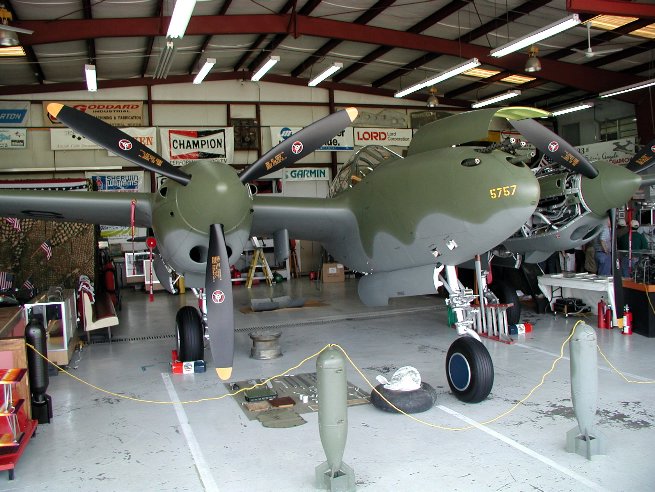
The color charts at the simmerspaintshop did make a difference, but I'm still not satisfied. This pic might explain why: That's Glacier Girl, which is painted in the same scheme I'm currently working on. Judging by this photo I have a hard time believing that olive drab is used there...
-
I'm currently working on a MTO scheme for a P-38 Lightning (hooray for reverse-engineered templates!) but now I'm really confused which colors I should use. I know that the Lightnings that operated in the MTO theatre around 1943 had a paint scheme that was a combination of Olive Drab and Natural Metal. I used this color chart (Link) to pick the colors I need, but the olive drab there looks way too much like brown. Judging by the color plates in Osprey's 'P-38 Lightning Aces of the ETO/MTO', the olive drab should look way more green than it does now. Has anybody any suggestions for me?
-
The XFV-12 WAS a mixup of F-4 and A-4 parts.
-
What Wrench said. All you need is a paint program that can handle layers, some spare time, patience, a steady hand, patience...and more patience. But it's definitely worth the effort. :yes:
-
Analyst says Airbus tanker was 'superior' on all counts
Gocad replied to BUFF's topic in Military and General Aviation
"Not built here" ... not really a new problem, though. Nor is it something that exists only in the US. If you check out NG's website for their KC-30 tanker, you will notice that they hardly ever mention that their aircraft is in fact an Airbus. -
Indeed. :yes:
-
Spitfire LF IXE, XII/XIV also Bear & Backfire F/A-18D
-
The MF Crusader has GLASS armor for its cockpit. I wonder whether you could combine two sorts of ARMOR for the same location, i.e GLASS for FRONT & TOP side, STEEL for BOTTOM and REAR... Anyway, thank you for the info, capun.
-
Analyst says Airbus tanker was 'superior' on all counts
Gocad replied to BUFF's topic in Military and General Aviation
I have said it already in the other thread about this topic, I doubt that the decision in favor of NG/EADS will survive. -
I think I have said it before, but I say it again: That's one nice package (pit&plane)!
-
A question about the 'ArmorMaterial'. What kinds of material does the game recognize? Is there a difference between, let's say, 'STEEL' and ALUMINIUM? (In-game, that is.) Also, nice tank, Craig. :yes:
-
IIRC you might be able to fix it by changing the decal positions. I know that there are some posts here that do explain what causes these distortions, but unfortunately I can't tell you where they are. Sorry about that.
-
LOL
-
IIRC this is caused by the decals and not by the textures themselves.
-
Heh, Clan Wolf insignia.
-
Analyst says Airbus tanker was 'superior' on all counts
Gocad replied to BUFF's topic in Military and General Aviation
I can't help it, but it seems to me that some politcians that are quoted in this report seem to be more concerned about fishing for votes than the actual matter, which is getting the best equipment for the armed forces. -
Damn, I should quit stalling on this carrier ops article I intend to write. Yes, there are a few modern carrier models in the d/l section (look under add-on ships) and a few campaigns that make use of them. Carrier ops in the TW sims is in my opinion rather basic, you can take off from a carrier and may land on it...but only in campaign mode or in a single mission made with the mission editor. Instant action or single missions, created with the ingame mission generator, will not feature carriers.