

orsin
-
Posts
356 -
Joined
-
Last visited
Content Type
Profiles
Forums
Gallery
Downloads
Store
Everything posted by orsin
-
I assume they come from line diagrams in sketchpads... Put it simple this way, there is no game as far as I know that models Chinese J-7 before SF. Where could they come from?
-
OK, tested a few times. Obviously the author was ambitius, there are nodes for moving map and RWR left in the model. However the technique to swap MFD display was not discovered by the time and the author possibly given up due to the difficulty. Thus those were left in the model not functioning.
-
I have noticed there are RWR/TEWS definition in F-117 mod, and corresponding textures. However I can't find a way to get the screen show up in the MFD. Anyone knows how to?
-
Thanks for the update
-
Back in roughly half-a-year ago there were discussions of an A-37B for SF2. Can anyone let me know if it was released? Can't seem to find it with forum search..
-
should work for SF1
-
why would you ever need one from Capun if there is already one in Combatace... search for my files in combatace.
-
Well, did notice a bug... In the options, you can no longer select "in the air, near base".
-
I know this is probably way too much, but can we possibly have back seat for F4 for the 1st time?
-
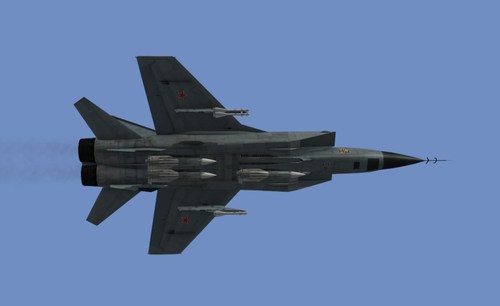
View File Mig-31BM Mini Update Pack Out of 3 Mig 31 models available in CA (not sure why Mig-31A got removed...) Mig 31BM has the oldest model dated back to 2008, which has problem casting shadows and is over-polygoned. This package contains models changed late 2010 with multiple level of details and correct shadow casting. So that you can finally ditch the SHD file. Original creator : jv44 Skin: jv44 Please note the new model is not compatible with any previous skin. This update is released as-is. You will need to download & install Mig31m/bm pack from Brain32, then update with this mini pack. Find Brain32's file here http://combatace.com/files/file/9474-mig-31m-bm-foxhound-sf2/ Submitter orsin Submitted 05/08/2013 Category MiG-31
-
Version 1.0
487 downloads
Out of 3 Mig 31 models available in CA (not sure why Mig-31A got removed...) Mig 31BM has the oldest model dated back to 2008, which has problem casting shadows and is over-polygoned. This package contains models changed late 2010 with multiple level of details and correct shadow casting. So that you can finally ditch the SHD file. Original creator : jv44 Skin: jv44 Please note the new model is not compatible with any previous skin. This update is released as-is. You will need to download & install Mig31m/bm pack from Brain32, then update with this mini pack. Find Brain32's file here http://combatace.com/files/file/9474-mig-31m-bm-foxhound-sf2/ -
 you must use "hard" setting in flight model in order to get it work.
-
Well, the formula used in the tool is based on actual game experiment. I.e. we experiment on actual game with debug window, then we find the formula that match it. This is generic blackbox method. You can very much expect the simulation close enough to actual game performance in WOI - 2008 code base. If SF2 changed something in code then there could be a difference
-
I am not the author of the software so my interpretation is just guesstimation. From my understanding the software requires parameters such as missile acceleration at different stages, launch altitude and launch platform speed. so that it evaluates the range of the missile. The air friction varies at different altitude in game, and we found it is in general a linear function of speed given the altitude is constant. Now, regarding the "sonic speed", I may have misinterpreted its use. however please not there are plenty of Mach-altitude tables online. Which are in contrast of your mention, but could have been deduced from experiential function of air density and average temperature....
-
well, I assume the sonic speed means the actual 1Mach speed at altitude. I assume the sonic speed means the actual sound speed at simulation altitude, such that an entry will contrast with ground sound speed, and help achieve the IAS/TAS ratio. As for the Gs, they could be acceleration Gs for booster and sustainer, etc. With the help of this tools, we were able to adjust most of missiles. Even stock US/NATO missiles are way off accuracy. After adjustment, we were able to see missile speed slow down to less than 1mach at max range. They struggle to catch up any air target in max range
-
there is a special tool by HoneyFox that evaluates missile performance in download section. Most of missiles need adjustments in order to align with their real world performance.
-
there is a bug in its INI definition somewhere. I found it long ago. Once you you fix it, they become very lethal..
-
I have not created a proper map before because i know the existing terrain creater is already terrible. Too many bugs and no autosave. Exit anytime without even a hint. I was hoping LOD based terrain can by pass the entire nightmare. Now it looks like so but travel sideway. I believe this max based terrain can be slowly achieved by steps such as follows 1. create a pure water map 2. create a map with water and sqared land 3. create a map with flat land 4. create a map with water and one curved hill 5. more hills 6. more hills and trees 7. etc
-
sadly the terrain editor only works for the old hfd format. we may never see a day when it support new terrain.
-
then where is the shader issue and lod difficulty come from??? are you implying people have been able to make NA style terrain since long, and not willing to because of TW's intention?
-
I have made some progress in reserching the file. by using hex editor (the ones that can read and modify memory directly, like game cheaters, for example WinHex). I manage to dump the memory when SF2CatExtractor read the IcelandNA.cat file. it is obvious the CAT extractor is well aware of the lod and fx files that it is hiding. In the meantime, the memory dump seemingly to indicate that the CAT extractor is also aware of the actual locations for those lod and fx files. in a section of its memory, there is a list of file each headed which a hex value, which is likely the file pointer of the CAT file.
-
Hi Stary, Can you explain futher? why do you need 1) and 2) ? My understanding is the new lod based map should use similar texural method like aircrafts. Is there a direct connection between the lod and the texture, which bypass the data.ini setting after all? By creating a brand new lod for terrain, there is no need for 1) and 2)?
-
I spent sometime today to check the map file for SF2NA. There are a few findings. 1. all trees are 3d objects like other buildings, unfortunately they are placed using the similar 3D coordinates. meaning large quantity of trees is difficult to achieve, unless the height of particular terrain area is well studied. that may also imply significant impact of performance on woods. As they are all identified as objects now. 2. File structure is similar however encrypted. the encrypted part is the header of the CAT file where it list out all contained files and pointers. However it may be possible to dump out from the memory once the .exe is running ( no sure whether that is allowed in this forum though ) 3. texture files are not encrypted however joined together in the CAT file. By using a 16 bit editor, each file can be extracted for editing purpose. meanwhile the tile name may be found on the tile section of the _data.ini section, which is fortunately not encrypted, However the file-section correspondence is unknown as the file name for each section of terrain textures were encrypted at the header of the file, implying many test-fail cycles before it eventually get figure out.
-
did you see possible source where it was ripped from??
-
Interesting comparison, the front view actually shows pilot kind of big for the pit. Anyway for the time being the focus is in the pit because there are so many unfinished parts. and i want to make the optical gunsight in front pit working. When that is done we may come back and revisit the external model.