


Fubar512
-
Posts
8,418 -
Joined
-
Last visited
-
Days Won
42
Content Type
Profiles
Forums
Gallery
Downloads
Store
Everything posted by Fubar512
-
How to control the variable geometry wing manually?
Fubar512 replied to a topic in Mods/Skinning Discussion
The reason variable geometry wings are generally set to automatic in SF, is that this allows one to declare as many as 4 wing-sweep settings, per model. Setting it manual, limits the model to just two settings: full forward, and full aft sweep. -
You might not have to with SF2, as you can declare limited nations, aircraft, and weapons on a terrain-by-terrain basis, so (at least in theory), one install can cover everything from WW2 and up.
-
"And with a whimper, I'm outta here, Jack...." He will be missed.
-
You could always try the node-rotation method, but be advised that you may uncover what may amount to ugly, non-mapped "holes" in the cockpit meshes.
-
If you followed the steps, and it had no effect, that means that it's hard-coded in the .dll files, and can only be changed by the programmer (TK).
-
I already did: MaxFreqSpeed=3000.0 m/sec
-
If you want to replace the windsound name with a cockpit chatter/ATC.sound, and want it to sound right (that is, not like you're listening to guys huffing helium )Extract the AIRCRAFTOBJECT.ini from the objects.cat, and place it in the objects folder. Open it up, scroll down to the following section, and perform the following, highlighted edits: [WindSoundOpen] MinFreqSpeed=0.0 MaxFreqSpeed=3000.0 MinVolume=10 MinVolumeSpeed=0.0 MaxVolume=100 MaxVolumeSpeed=100.0 MinFreq=1.0 MaxFreq=1.0 [WindSoundClosed] MinFreqSpeed=0.0 MaxFreqSpeed=3000.0 MinVolume=10 MinVolumeSpeed=0.0 MaxVolume=80 MaxVolumeSpeed=300.0 MinFreq=1.0 MaxFreq=1.0 Close the file, accept the changes, make sure it's in your objects folder, and you'll be good to go just remember, this is a global setting, so every aircraft will be effected. I've not tried it on an individual, plane by plane basis, but it may work there, too (the pertinent lines would go into the model's in the data.ini).
-
You might also try adjusting the .LOD visibility values in the aircrafts.ini (not the data.ini), but please keep in mind the 1-pixel limitation: irregardless of what you set it at, once it cannot be rendered by the system at 1 pixel or greater, it disappears. [LOD001] Filename=A-4F.lod Distance=100 [LOD002] Filename=A-4F_LOD2.lod Distance=250 [LOD003] Filename=A-4F_LOD3.lod Distance=500 [LOD004] Filename=A-4F_LOD4.lod Distance=1000 [LOD005] Filename=A-4F_LOD5.lod Distance=10000 The last one should be set to at least 10,000 meters on fighters, 20,000 on larger aircraft.
-
[DetectSystem] RadarType=RANGING VisualBlindArc=5,6,7 VisualRestrictedArc=4L,8L,12L MaxVisibleDistance=8100.0 (in meters) HeatSignatureModifier=0.6 HasRWR=TRUE
-
AircraftFireEffect & AircraftSmokeEffect ini's - Where?
Fubar512 replied to Mike Dora's topic in General Discussion
It always goes into the flight folder. -
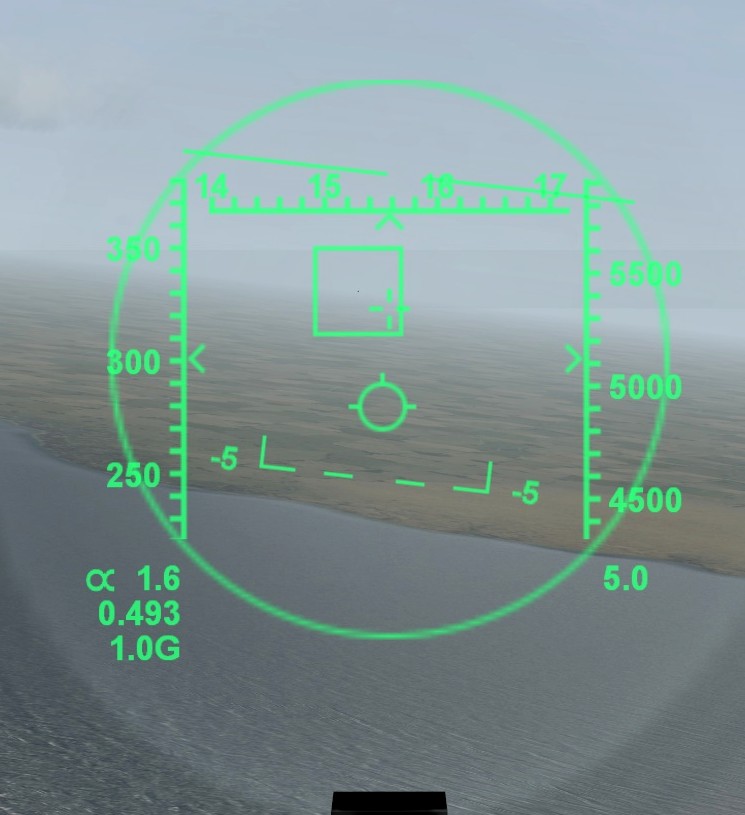
Welcome to CombatAce. Visibility is dependant on many factors. Screen resolution, magnification (zoom) level, and the max visible distance declaration in the model's data.ini file can make a huge difference, here. Everything in SF is ideally resolved down to a single pixel, which is closer to realism than most other sims (which cheat by using larger models at range). My experience is that I can easily see fighter-sized targets at 6-7 NM range, while running at 1680 x 1050 resolution. The bomb release sound has not been activated since the initial release of SF2, back in November of 2002. Likewise, the damaged engine sound entry was never used. All aircraft that are equipped with Radar Warning Receivers (RWRs) have track and lock tones associated with those events. These can be changed on a model-by-model basis, but one is limited to one set of tones for both air and ground threats (in other words, at present we cannot have individual sounds to denote the type of threat). Later model aircraft with TEWS RWRs do, however, have the ability to visually ID threats, by their assigned icons. Getting back to your first question. Below is an F-4E at 5 NM distance, as seen through the F-15A's HUD.
-
I've seen harmonic dampers under some long spans, and they've also used fiberglass fairings (that act like spoilers) on others. EDIT: From the same wiki article I posted a link to, above.... "The Bronx Whitestone Bridge, which is of similar design to the 1940 Tacoma Narrows Bridge, was reinforced shortly after the collapse. 14-foot (4.3 m) high steel trusses were installed on both sides of the deck in 1943 to weigh down and stiffen the bridge in an effort to reduce oscillation. In 2003, the stiffening trusses were removed and aerodynamic fiberglass fairings were installed along both sides of the road deck."
-
I can attest to the fact that "I Love Arizona" stickers seem to be a hot commodity in my area, lately.
-
AircraftFireEffect & AircraftSmokeEffect ini's - Where?
Fubar512 replied to Mike Dora's topic in General Discussion
The heirarchy is as follows 1) Effects files in the effects folder 2) Effects files in the cat file 3)Effects entries the particlesystem.ini. If the latter is extracted into the flight folder, it is used in lieu of the one that resides in the flightdata.cat. -
I've just answered a similar question, on the SFP1 boards: http://forum.combatace.com/topic/56080-aircraftfireeffect-aircraftsmokeeffect-inis-where/
-
AircraftFireEffect & AircraftSmokeEffect ini's - Where?
Fubar512 replied to Mike Dora's topic in General Discussion
By default, most effects are part of the particlesystem.ini. That file's located in the flightdata.cat, and should be extracted to the flight folder. Your best bet is to copy the pertinent lines from the particlesytem.ini, paste them into a new text file, save it as type "all files", with an .ini extension and name it (obviously) after the desired effect. You then place said effects.ini into your effects folder, where it will be easier to manipulate and more importantly, were it will effectively move up a notch in hierarchy, and be read before either the default effects, or the particlesystem entries. -
It's Tuma's FE2 Flanders in my SF2 combined install. What I did was: Edited the Nations.ini by adding two new nations "Nazi_Germany" and "Fascist_Italy", and set their start and end dates historically. I then created a nations list for the Flanders terrains, adding only the historical antagonists. I then added Wolf's ME-109 G10, with AVHistory's (GregoryP's) FM. Oh, and I also performed the necessary updates to bring Tuma's terrain mod to SF2 standards.... And it works fine for me. I will send this off in a nicely bundled package, for Wrench to beat his head against, errrrr, I meant, for Wrench to exhaustively test
-
SF2
-
Really?


-
JM, I caught that one on the Tuesday after it first opened, at an 11:00 AM viewing. Kids were still in school at the time, and most adults were supposed to be at work (my schedule back then had me working weekends, with Tuesdays and Wednesdays off). Despite the hour and the day of the week, the theater was still packed, though there was no line to see it when I got there.
-
The dog was so terrified, that he would not leave the car...he was the only fatality The winds at that time were only 40 knots....if you re-read my post, you'll see that I said that "hurricane-force gusts (over 130 kph), are common there", I never said that was the wind speed at the time of the collapse. Anyway, here's a link to the wiki page on the collapse: http://en.wikipedia.org/wiki/Tacoma_Narrows_Bridge_(1940)
-
I kind of had my suspicions, that as a solution to the '08 patch FM issue, it was a bit too easy to be real...
-
Pacman and Ms Pacman made my partners and myself a steady earning up until 1990 or so. At one point (around 1985), we had something on the order of 11 Pacman machines in our inventory, making us money, a Quarter at a time. The two games that really started it all though, were Space Invaders and Asteroids, in 1978 and 1979. And, even before that time, lets us not forget Space Wars (1976 or 77). http://en.wikipedia.org/wiki/Space_Invaders http://en.wikipedia.org/wiki/Asteroids_(video_game) http://en.wikipedia.org/wiki/Space_Wars
-
I've forgotten the exact term that was used, but that was one of the factors in the Tacoma Narrows bridge collapse. The other was underestimating wind speeds at that point in the Tacoma Narrows area. I understand that hurricane-force gusts (over 130 kph), are common there.
-
Too little, too late. That doesn't even classify as "fun to drive across". Now, this on the other hand, applies advanced aerodynamic principles in assuring that one experiences an entertaining drive while crossing the span