


Fubar512
-
Posts
8,418 -
Joined
-
Last visited
-
Days Won
42
Content Type
Profiles
Forums
Gallery
Downloads
Store
Everything posted by Fubar512
-
River Water
Fubar512 replied to Fubar512's topic in Thirdwire: Strike Fighters 1 Series - Mods/Skinning Discussion
From every angle and at every time of day? The river appears a copper-grey color when the sun's hitting it at an oblique angle, and it can ever appear blue, and I seen turn black from overhead. Here's a perfect example of what I'm talking about: http://www.123rf.com/photo_1826873.html -
River Water
Fubar512 replied to Fubar512's topic in Thirdwire: Strike Fighters 1 Series - Mods/Skinning Discussion
Well, I can tell that you've never flown over either body of water, in real life -
River Water
Fubar512 replied to Fubar512's topic in Thirdwire: Strike Fighters 1 Series - Mods/Skinning Discussion
Not to my knowledge, though a PM to Brain32 or Gepard might be in order. AFAIK, there is an option in the TW Terrain Editor for postioning river tiles. -
Look up "Korean War Gun Camera Footage", or better yet, spend the money and watch the commies fall on DVD: http://military.discovery.com/convergence/.../guncamera.html
-
River Water
Fubar512 replied to Fubar512's topic in Thirdwire: Strike Fighters 1 Series - Mods/Skinning Discussion
The East River ends just north of Governor's Island. It runs between Manhattan and Brooklyn. Bayonne lies on the west shore of the Hudson River/upper NY Harbor. -
OTC Cuba tree mod
Fubar512 replied to Stary's topic in Thirdwire: Strike Fighters 1 Series - Mods/Skinning Discussion
And the caimans & crocs? We can't forget those either.... -
OTC Cuba tree mod
Fubar512 replied to Stary's topic in Thirdwire: Strike Fighters 1 Series - Mods/Skinning Discussion
Ummmmmmmmmmmmmmmmmmmmmmmmmmmmmmmmmmmmmmmmmmmmmmmmmmmmmmmmmmmmmmmmmmmmmmmmmmmmmmmmmmmmmmmmmmmmmmmmmmmmmmmmmmmmmmmmmmmmmmmmmmmmmmmmmmmmmmmmmmmmmmmmmmmmmmmmmmmmmmmmmmmmmmmmmmmmmmmmmmmmmmmmmmmmmmmmmmmmmmm mmmmmmmmmmmmmmmmmmmmmmmmmmmmmmmmmmmmmmmmmmmmmmmmmmmmmmmmmmmmmmmmmmmmmmmmmmmmmmmmmmmmmmmmmmmmmmmmmmmmmmmmmmmmmmmmmmmmmmmmmmmmmmmmmmmmmmmmmmmmmmmmmmmmmmmmmmmmmmmmmmmmmmmmmmmmmmmmmmmmmmmmmmmmmmmmmmmmmmmmm mmmmmmmmmmmmmmmmmmmmmmmmmmmmmmmmmmmmmmmmmmmmmmmmmmmmmmmmmmmmmmmmmmmmmmmmm......I guess I can approve it -
You have to remember that most of these countries will spare no effort in showing photographs of downed aircraft to bolster their propaganda campaigns (curiously akin to the character traits of individuals suffering from delusional disorders). That being said, where's all the photographs of downed F-86s in China & North Korea, to back up those claims? And, where's the missing pilots? Didn't they have relatives who'd inquire about them if they went missing? Also, where's the pics of all the downed Israeli F-15s and F-16s in Lebanon & Syria?
-
Mig-21MF rear airbrake
Fubar512 replied to kukulino's topic in Thirdwire: Strike Fighters 1 Series - Mods/Skinning Discussion
Good idea, Russ. Unfortunately, the AnimationID links all three air brakes, irregardless of what's in the data.ini. Short of using the 'PFM .lod (which would require a bit of re skinning), there's not much else one could do, other than not using the air brakes. -
Mig-21MF rear airbrake
Fubar512 replied to kukulino's topic in Thirdwire: Strike Fighters 1 Series - Mods/Skinning Discussion
So, the Animation IDs are essentially hard coded. You either get all, or nothing. That's important to know. -
Mig-21MF rear airbrake
Fubar512 replied to kukulino's topic in Thirdwire: Strike Fighters 1 Series - Mods/Skinning Discussion
Do this: ;[RearAirbrake]<----------add a semicolon (;) in front of the header SystemType=AIRBRAKE DeployTime=3.0 RetractTime=1.5 AnimationID=3 ModelNodeName=Airbrake_Rear DragArea=0.68 If it still works, edit out (;) the AnimationID line. -
Mig-21MF rear airbrake
Fubar512 replied to kukulino's topic in Thirdwire: Strike Fighters 1 Series - Mods/Skinning Discussion
If you're asking if it can be disabled permanently; yes. Just delete or (remark out) the entry for it from the MiG-21MF_data.ini. If you're asking if it can be disabled automatically whenever something's loaded on the center pylon; AFAIK, that's not possible at this stage. -
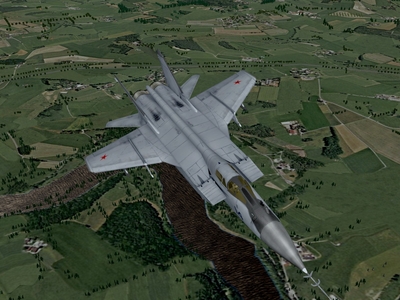
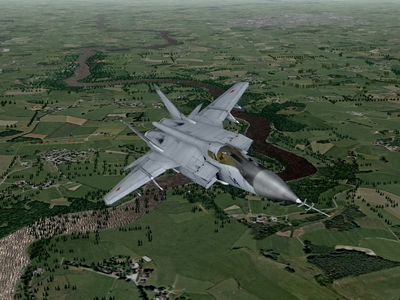
River Water should not be blue, and should not have open ocean swells surging across it! (It should not have standing trees in it, either, but I'll leave that topic for someone else) These are for Crusader
-
-
-
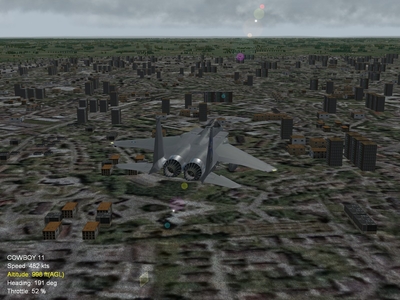
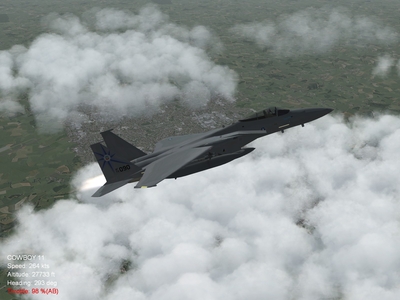
Just tried at with the detailmesh set at 17, and: Normal Horizon Distance Far horizon Distance Far horizon distance, at low level, just to prove that my terrain is "well populated"
-
-
-
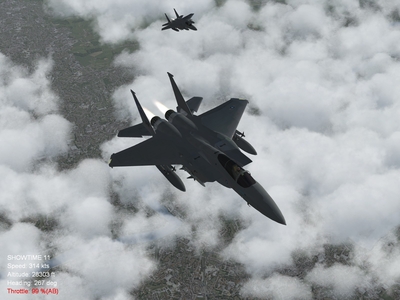
-
I know that setting helped prevent alpha objects from bleeding through clouds, but come to think of it, occasionally runway surfaces (bitmaps) still bled through, and of course, that ground tile is a bitmap. I'll try it myself at "17" and see what happens.
-
As a setting in the cloud material? It doesn't work? Really?
-
Ahhh... Sounds like an alpha object issue. There's a bit of a workaround, and that's to set "alphatestenabled" to false.
-
I've been using the same values going on like 5 years now, so I wasn't sure whether the "200000" value was a default or not. Out of curiosity, what was your intent with increasing the detail mesh value?
-
In changing the horizon distance, you've effectively changed the sky rendering distance, that is, the area over which clouds will be displayed. You've also introduced clipping. These are the values I use: [HighDetailOption] HorizonDistance=99000.0 DetailMeshSize=6 DetailLevel=1 WaterEffect=2 NoiseTexture=1 MaxTextureRes=2048 Along with: [FarSceneClip] FarClipDistance=200000.0 NearClipDistance=3500.0 [NormalSceneClip] FarClipDistance=140000.0 NearClipDistance=120249.97 [NearSceneClip] FarClipDistance=120250.0 NearClipDistance=1.2 You may have to set the skydistance in the environment system.ini to a value of 200000 as well, which will also force you to reset the horizon and vertex heights, as well as require you to increase the cloud (count) number for each weather level. It's almost like Algebra. What you do on one end of the equation has to be repeated on the other end UPDATE: Here's a webpage with data and graphs that you might find helpful, theoretical distance to the horizon, from varying altitudes ( in meters ): http://newton.ex.ac.uk/research/qsystems/p...hysics/horizon/
-
In that case, both of you would enjoy one of my favorites, "Last Chance", by Shooting Star LINK