


Fubar512
-
Posts
8,418 -
Joined
-
Last visited
-
Days Won
42
Content Type
Profiles
Forums
Gallery
Downloads
Store
Everything posted by Fubar512
-
TK from Third Wure has stated that SF,WoV, WoE, and FE are not currently supported by Windows Vista, due to the aforementioned titles being incompatible with DirectX10.
-
Right click on My Computer, and select Properties. Click the Hardware Tab, and then select Device Manager. In the Device Manager window, scroll down until you see Display Adapter(s). Hit the plus sign (+) next to it, to expand that branch, and it'll show you which adapter you're running.
-
Your graphics card is the weak link. A fully patched, SF-based sim really takes off with a decent DX9.0c compliant grahics card that has at least 256 mb of VRAM.
-
I've found that a patched-to-date install of any of the SF-based sims can drag any system down that does not have: A) A DX9.0C compliant graphics card with 256 mb of video RAM B) 1024 MB (1 gig) of system memory C) at least a 2.4 gHZ P4 (or equivalent) processor This is assuming that one wants to with all (or most) graphics options set to high.
-
Don't forget export start and end years, if applicable.
-
Update: I've uploaded a .wmv file to give you an idea as to how Sound3D works. Watch it, here: http://forum.combatace.com/index.php?autom...si&img=2197
-
-
The best solution, by far, is to use Kreelin's "Sound3D" utility. It silences the external engine sound to a whisper inside the cockpit, or, from a forward external view on approach, but allows full volume when an aircraft is viewed from the rear quadrant. It's quite immersive to go head to head with an opponent in virtual silence, and then catch an earfull of a doppler shifted "boooom!" as he recedes into the distance, behind you.
-
Alternative F-14 Cockpit with enchanced radar
Fubar512 replied to SandMartin's topic in General Discussion
I think you're confusing Max-sustained G with instantaneous G. For example, during a dogfight against a Noth Vietnamese MiG-17F, "Duke" Cunningham exceeded 11 G's for a moment, and snapped a flap-hinge on his F-4 Phantom, another aircraft with a "7.0 G-Limit" -
Alternative F-14 Cockpit with enchanced radar
Fubar512 replied to SandMartin's topic in General Discussion
Good! In your F-14A.ini (not the F-14A_data.ini), edit the following line; AvionicsDLL=Avionics60.dll to AvionicsDLL=Avionics70.dll Then just dop the two files from the attached .rar archive into your F-14A folder, and you'll be all set: -
Alternative F-14 Cockpit with enchanced radar
Fubar512 replied to SandMartin's topic in General Discussion
Do you have WoE? The reason I'm asking, is because a few of the necessary tga files for the HUD and radar, are default files for WoE's F-15A. If you do have WoE, then I can just post the .ini files for the F-14A's cockpit and avionics, and you'll be all set. If you do not have WoE, I can tell you that there's an updated F-14A cockpit in the works, and it will have its own, dedicated tga files. -
Let's try a silver one...
-
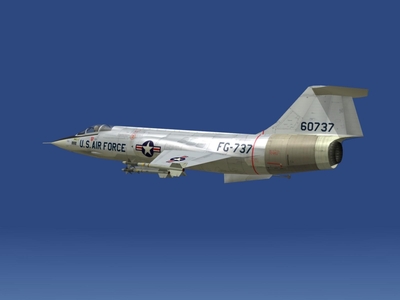
-
Testing one... two... three...
-

-
-
Warsaw Pact Fighters?
Fubar512 replied to MKSheppard's topic in Mission/Campaign Building Discussion
Perhaps, someday..... -
having trouble with the mig-21f-13 cockpit
Fubar512 replied to highlyflammable's topic in Mods/Skinning Discussion
OK, that may be a major issue. The SiS650 is an integrated video chipset, with performance roughly on par with an nVidia GeForce MX200. What all that means, is that your display adapter is comparable to a seven-year old graphics adapter, one that has hardware support for DirectX 7.0 , at best. The current patch level in the SF series can prove challenging to GeForce 6800 Ultras, cards that are two years old, and that are fully DirectX9.0C compatible, when all the graphics sliders are maxed out. Also, DirectX10 is currently available only in Windows Vista. That doesn't mean that you cannot enjoy SF, you'll just have to scale back on the graphics a bit, until you get a system (or video card) with a bit more horsepower. -
having trouble with the mig-21f-13 cockpit
Fubar512 replied to highlyflammable's topic in Mods/Skinning Discussion
From your original description, it sounded as if you had one or more corrupt .tga files. After viewing the images you provided, I'm more inclined to believe that it is a display driver issue. Can you supply us with a few specs? Namely, what graphics card you have, which display driver your using, and what release of Microsoft DirectX you're currently running. -
having trouble with the mig-21f-13 cockpit
Fubar512 replied to highlyflammable's topic in Mods/Skinning Discussion
Does your cockpit look like this? By looking at this image, can you tell us what's missing (or different) on yours? It may be nothing more than a corrupt *.tga file, but we'll need to know exactly which one it is, first. -
If you're trying to get the Tu-22 into WoV, and do not own either SF:P1 or WoE, then you're out of luck, as what's available here are just skins (textures). If you own either of the two aforementioned titles, you'll have to extract all the Tu-22's applicable files (*.lod.,*.shd, and .ini files), place them in the Tu-22's folder (in the aircraft directory), and drag them over to WoV. You'll then have to associate a cockpit and it's avionics with it if you wish to make it flyable. That's done in the Tu-22.ini file, by adding the following lines (highlighted in red): [AircraftData] AircraftFullName=Tu-22B Blinder-A AircraftDataFile=Tu-22_data.ini LoadoutFile=Tu-22_loadout.ini CockpitDataFile=A-6A_COCKPIT.INI AvionicsDLL=Avionics60.dll AvionicsDataFilename=A-6A_AVIONICS.ini Note that I'm using a default WoV aircraft's cockpit, the A-6A's. I feel this is a good fit for the Tu-22, with it's side by side seating. Alternately, you can download and use the F-111 'pit.
-
That is because the vast majority of addon ships are defined as warships. You have two choices: A:) Create a scripted mission where you fly againt the specific ship type(s) that you want.... or B:) Reclassify the addons as "Tankers" or "Cargoships" in their data.ini files, like so: GroundObjectRole=CARGO_SHIP or GroundOjectRole=Tanker They'll then appear (from time to time) in randomly-generated missions.
-
And for those who've read the above link and might wonder who "Ed Rasimus" is, USAFMTL provided this link: http://www.thunderchief.org/index2.html
-
Crusader just sent me this link: http://www.airtalk.org/f-4-chaff-flare-loads-vt25148.html It's an interesting read.
-
When Marcelo (Kiev) and Gabilon (Yak-141) decide that they are ready for prime-time. There's still quite a bit of work to do on both.