


Spinners
-
Posts
9,300 -
Joined
-
Last visited
-
Days Won
497
Content Type
Profiles
Forums
Gallery
Downloads
Store
Everything posted by Spinners
-
Nice one James, I really like that Lightning. Please make sure that dear old Dhimar gets it too!
-
BAC/Fairchild F-112B Lightning - 57th Fighter Interceptor Squadron, Keflavik, Iceland, 1966
-
Sorry MontyCZ, I meant to post a few days ago, these are brilliant and a superb compliment to your stunning L-39. Thank You!
-
Happy Birthday Craig and keep up the good work.
-
-
Fantastic Cobra's RAFG Lightnings Ant Big Sky Country!
-
"The old man's scale" (1/72)
-
Everytime I see XM172 I think of the Airfix kit!
-
I like the stock A-4 and F-104 engine sounds and also the VK-1 add-on engine sound. At one time, all of my 'red' aircraft had the VK-1 engine sound and it's really cool to hear the contrasting engine note when they are close, unlike the stock engine sounds.
-
It's a great aircraft but way too pedestrian when compared to what the P.1154 would have been like.
-
Aero/BAC Cadet T.3A - No.17 (Reserve) Squadron, Royal Air Force, 1998 Congratulations to Monty for the superb L-39 - outstanding!
-
Nice one Ed. BTW it goes nice in SF2 too with no prop issues.
-
BAC Lightning FR.7 - No.2 Squadron, RAF Germany, 1968
-
McDonnell Douglas F-18A Hornet - No.1 Squadron, Dhimari Air Force, 1990 TMF Hornet and a nice skin by Mike1
-
Any suggestions for converting the following Kurnass skins to SF2?
Spinners replied to ace888's topic in General Discussion
Hi ace888. You've got nothing to lose by getting GIMP. I find it so easy to use compared to Photoshop Elements and I use it to make all of my decals and to do the little bit of skinning/adapting that I do. As STORM has suggested you'll need to open up each individual BMP from whatever skin you are trying to adapt and also open up the stock BMP to compare and contrast. Even better, you can copy each different BMP (i.e. third-party and stock) into a new file (save as a PSD) to make your first layered templates and then either turn on and turn off a layer to see the layer below or set one layer at, say, 25% opacity to do the compare and contrast thing. That's how I adapted the F-4M RAF Camo skin to make it fit the F-4E. You'll pick it up easy enough. Oh, and the SimmersPaintShop (as recommended by hgbn) is worth a visit as that's where I learned how to make decals - I was totally clueless at first! -
BAC Lightning FG.7 - No.17 Squadron, RAF Strike Command, 1969 BAC Lightning FG.7 - No.17 Squadron, RAF Strike Command, 1969
-
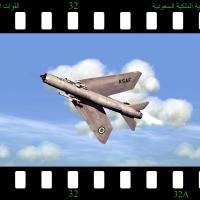
View File BAC Lightning F.52 (Saudi Arabia) BAC Lightning F.Mk 52 for STRIKE FIGHTERS 2 (EP2) This is a very simple mod of the stock Third Wire BAC Lightning F.2 to make the little-known F.Mk 52 version that was exported to Saudi Arabia as part of 'Operation Magic Palm' an early UK supplied defence package that also saw the supply of Lightning T.Mk 54 trainers, Hawker Hunters and Thunderbird SAM's. Four F.Mk 2's were withdrawn from RAF stocks and were refurbished at BAC Warton to F.Mk 52's before being delivered to the Royal Saudi Air Force in 1966 with a fifth F.Mk 52 joining them in 1967. Rather confusingly, four of these five aircraft were re-serialled so there are nine serial numbers included here. INSTRUCTIONS 1. From the AIRCRAFT folder drag and drop the Lightning52 folder into your Aircraft folder. 2. From the DECALS folder drag and drop the Lightning52 folder into your main Decals folder. 3. From the SOUNDS folder drag and drop the Avon_Dry and Avon_Wet files into your main Sounds folder. CREDITS Thanks to Third Wire for the continuous improvement of a great little game/sim. And thanks to everyone in the wider Third Wire community. Regards Spinners Version 2 - 31/12/13 Submitter Spinners Submitted 12/11/2010 Category Lightning
-
Version Version 2
506 downloads
BAC Lightning F.Mk 52 for STRIKE FIGHTERS 2 (EP2) This is a very simple mod of the stock Third Wire BAC Lightning F.2 to make the little-known F.Mk 52 version that was exported to Saudi Arabia as part of 'Operation Magic Palm' an early UK supplied defence package that also saw the supply of Lightning T.Mk 54 trainers, Hawker Hunters and Thunderbird SAM's. Four F.Mk 2's were withdrawn from RAF stocks and were refurbished at BAC Warton to F.Mk 52's before being delivered to the Royal Saudi Air Force in 1966 with a fifth F.Mk 52 joining them in 1967. Rather confusingly, four of these five aircraft were re-serialled so there are nine serial numbers included here. INSTRUCTIONS 1. From the AIRCRAFT folder drag and drop the Lightning52 folder into your Aircraft folder. 2. From the DECALS folder drag and drop the Lightning52 folder into your main Decals folder. 3. From the SOUNDS folder drag and drop the Avon_Dry and Avon_Wet files into your main Sounds folder. CREDITS Thanks to Third Wire for the continuous improvement of a great little game/sim. And thanks to everyone in the wider Third Wire community. Regards Spinners Version 2 - 31/12/13 -
BAC Lightning F.52's - Royal Saudi Air Force, 1969
-
Magic Carpet (BAC Lightning F.52)
-
Between TK and the boffins here it will all get sorted. Out of the box Expansion Pack 2 is outstanding!
-
Testing out the Twin Matra Pods...
-
We're having some lovely cold and icy weather in the UK and my wife just loves the snow. All day yesterday she had her nose pressed up against the window... in the end I had to let her in!
-
Regarding the Lightning - here is a delta-winged F.7 that I built in plastic a few years back... It was 1/72 scale but with 1/48 scale MiG-21 wings!
-
http://combatace.com/files/file/3148-mirage-iiio/
