Jimbib
-
Posts
1,547 -
Joined
-
Last visited
-
Days Won
9
Content Type
Profiles
Forums
Gallery
Downloads
Store
Everything posted by Jimbib
-
Looking good mate! Keep it up
-
I would pay large sums of money for a sim where we can go and play with Baghdad Bob's MiGs that are buried in the sand
-
Hey Davey can you show me where the nose is mapped?
-
Going by Russo's wip pics, it should be both versions.
-
Unfortunately, without the original model files, you're gonna have to do the keep on loading the game up to see the changes of your skins on the aircraft. If you happen to have the source files of an aircraft however you're in luck. By running the image editing software, and the modeling software at the same time, you can see the changes instantaneously. This is however impossible for the stock aircraft, as so far, there is no .lod viewer program that is advanced enough to be of any practical use.
-
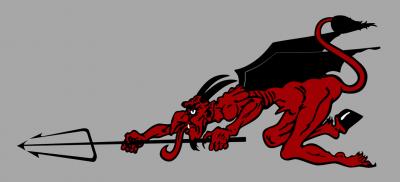
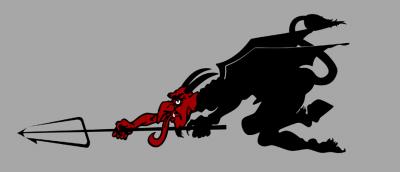
Small update, the devil tail art is done...
-
I say let's swashbuckle him to no end. Lot's of keelhauling too if that's ok with you. Yar-har me hearties!
-
Like C5 says, Batman has no actual superpowers, where as Superman is pretty bloody amazing, laser vision, ice breath, flying, super strength, the works. Superman would win hands down before Batman even has a chance.
-
Very early WIP on the tail....
-
I use 3DS Max 7, with Lithunwrap and Photoshop CS3.
-
Looking gorgeous there craig, you've done a fellow Brit very very proud!
-
Hey Wrench, to get some highly detailed blueprints, try these... http://airwar.ru/other/draw/f4u.html http://airwar.ru/other/draw/f4ucorsairds.html http://airwar.ru/other/draw/voughtsikorskyf4ucorsairdr.html http://airwar.ru/other/draw/f4ucorsairajp.html http://airwar.ru/other/draw/f4ucorsairsol.html http://airwar.ru/other/draw2/f4u4.html Also, for some advanced surface texturing check out this tutorial here, its really simple, but very effective... Making Surface Texture Effects Looking good mate!
-
You have totally caught the wrong end of the stick, USAFMTL isn't referring to Marc's wip of the B-1B, he is referring to the model that had been started by mikewhl a long while ago.
-
Davey Davey, almost correct, the last line is actually Fried chicken. Slightly before my time and just over 20 years ago now, here is the opening of the Queen concert at Wembley in 1986... P.S. Check out his piano skills in the intro to Seven Seas of Rhye.... http://youtube.com/watch?v=jWNBZnzNK_I
-
There's nothing wrong with the 3 view, it looks quite decent in fact. I think the problem is stemming from the flow of the polys under the cockpit. This comes from the method shown in mustangs videos of using the slice and then non-uniform scaling. The problem is that the pivot point stays in the middle of the selected vertices when you scale them. You need to "shift" down all the polys under the canopy so that the fuselage looks more fluent. I had the same problem trying to build a Martin Baker MB.5 model, if you can lower the pivot point when you have selected multiple vertices, it should be relatively easy to fix. So far your model is looking great mate, should be very fun to intercept with.
-
Gents, I think we have sighting of the new game...
Jimbib replied to allenjb42's topic in General Discussion
This is a bit of a shame indeed, as it has always been said that the TE is the tool that has always needed the most work. I think that if would be more user friendly and accessible, the 3rd party terrain involvement with the sim would take off. Improvement with the TE would be great as TK has always said he would support the 3rd party community with the necessary tools. -
Gents, I think we have sighting of the new game...
Jimbib replied to allenjb42's topic in General Discussion
I can only imagine that in order to be able to create parts of the game, like new flight models, terrain, cockpits, at some point you may have to have access to the game source code to fully understand how to implement features that are hard coded into the sim. If this is the case, I can certainly see why TK would be hesitant, or not want to have outside parties working on the games without any sort of binding that no person would take advantage of access to the code. Besides, even if third parties were to work for free for TK, there would be plenty of legal issues in correspondance with the publisher especially. -
Bloody great Fastcargo, really am looking forward to using these.
-
YAP is Yankee Air Pirate, a payware add-on for Wings Over Vietnam, Pasko's hueys are included in some of the mission packs of the mod. I believe they have the heli-like flight models also.
-
Aha, oky doke kreelin, fingers crossed Pasko can grant you permission as the videos of your Huey FM so far look good. Piloto, there are different variants of Pasko's huey available through YAP.
-
All of the weapons bugs should be fixed from before, including the wrong positions, and also the pylons showing up and not showing up when they shouldn't have done so. Like Dave says, due to the model positions in max, we can't get all munitions available to be perfectly positioned on the pylons, however they are as close as we can practically get them to make it look accurate. If there's any problems you have with the loadouts, give me a shout, and I'll do my best to fix it for you.
-
kreelin, seeing as Pasko's UH-1B Huey is still available as freeware, are you able to post an updated FM for that?
-
Yep, you're right, you would have to have the original max file in order to change the mapping of the canopies. I don't think a "split" tga is the case either as it is such a small file that it would be practically impossible to have two different meshes mapped onto it.
-
Unfortunately you won't be able to paint the rear canopy without affecting the front canopy. So if you extracted the CANOPYGLASS.tga texture file and made it opaque, the front canopy would be non-transparent also. You would require the model's canopies to be mapped to different texture maps in order to achieve your desired results.
-
Hi christian, in order to replicate and solve your problem, I'm going to need a bit more information. I need to know what exact munitions are loaded when the problem occurs, and also some screen shots of your problem would be helpful too.