

Flanker562
-
Posts
13,475 -
Joined
-
Last visited
-
Days Won
64
Content Type
Profiles
Forums
Gallery
Downloads
Store
Everything posted by Flanker562
-
Okay looks like I was just not doing stuff right (shows what happens when you're distracted in some ways) and making sure: Apparently the "issue" was only my fault, so now that's fixed I can move forward. Overall a weapons test will only to verify if the proxies are set right, but otherwise no other real change.
-
Solely from a website, only Admins can give you certain privileges, like here as well.
-
Weapons pack -Speaking of gun work.... right now Addon Builder is giving me issues again. Yes I'll still work with it but so far like the M468, the only major issue is animations, like the flip sights somehow hover below the weapon. Otherwise since it's a bullpup M14 the weapon does work, other than the animation issues. - Given the MP issues with my custom AN/PRC-152s I may drop those and instead just use the BIS radios for TF Black units. The LR rucks work fine still so I'm not going to mess with them. Maybe I'll get with nkey and send him the link so he can add a more real world setting for his mod. Given that I'm inheriting from the BIS radio I may need to make a new radio so it'll work. - Just have to texture the M70A1, otherwise it works too in-game. UH-60 work: - Still planning on making more MFD "pages" to mess with on the -60Ms a bit, though mainly it's to turn off the Compasses incase you don't need them, other than that not much work, as well as MFD pages for the FLIR equipped versions. UH-1Y - Again as mentioned only retuning the mini and the M2 for better and more realistic ballistics. There's not much more I can do with it so as things progress I'll see.
-
And the cleared (By The Edge via Plinskin):
-
After some testing I noticed that the new A3 sound system is in fact pretty damn cool. I was on the 25th ID server (Formerly TF Warhorse) and playing against CSAT I noted that when you fired... they didn't automatically pinpoint where I was at, even without a Suppressor. I managed to kill a squad minus without a single shot fired at me, at 100 metersish or so. So the sounds do work with the new system (now that I figured how to implement it. Things to finish up: - Bulldog weapons - M70A1 - New Soundset for the pistols. As far as the Kiowa goes the Unsung Mod was looking at the aircraft and they have some people going over it since I really don't have much skill with inside aircraft textures, always been an external artist and so on. But overall that will hopefully progress beyond the stage I was at. Given it will be for them a 'Nam era model, not much to expect from there. The UH-60 pack will see some more MFD interaction, mainly a pilot "page" for the FLIR on the MH-60s with a FLIR system (Army, Navy) installed. I'm also trying to make the Compasses disappear and will spend more time after the gun pack on those areas.
-
Back to work... Starting right now on the new sound system for weapons. Right now everything other than specific weapon sounds is very generic (uses the Test setup as a base. So far things sound normal. Bear in mind that i don't have a sound studio so when released there is no real Close,Mid,Distant ranged sounds. Maybe if there's a difference then I can see on how to tweak the sounds maybe, but for now it works, which is good.
-
Nope, you can keep your same username and password, just the Admins give you certain Privileges based on your stature within the forums. So the dev forums are just "hidden" for a normal person, so on average you simply won't see them, even though Admins and special tags have various access to the site. It's like any forum, there are always hidden forums (I used to manage my own too) and so EricJ back in 2003ish or so had access to the beta forums, as well as the normal forums. Now well.. yeah. Pretty much scan this distance, you can do this. Suffice to say that it can model real world radars quite well. Yes, NDA is Non-Disclosure Agreement, suffice to say all the cool work you did you can't really talk about, no matter how menial.
-
Yes. The main reason is not so much ED being dicks, but they don't want a lawsuit coming back and biting them real hard (I can't say I blame them, I'm of the same view on that issue) So they're very circumspect as far as what goes where and what gets approved. Suffice to say them limiting 4th and 5th gen is a good idea, given that the average player shouldn't have access to classified material.
-
////////////////////////////////////////////////////////////////////////////////////////////////////////////////////////////////////////////////////////////////////// New Download Link: https://drive.google.com/file/d/0B8BGm0Pi3UmtdGtuLUhCblRFS0E/view?usp=sharing ///////////////////////////////////////////////////////////////////////////////////////////////////////////////////////////////////////////////////////////////////// ADuke UH-1Y RC3 - Requires Game version 1.56 - Wreck is textured.
-
/////////////////////////////////////////////////////////////////////////////////////////////////////////////////////////////////////////////////////////////////////// New Download Link: https://drive.google.com/file/d/0B8BGm0Pi3UmtUkR1OHV1amhtRm8/view?usp=sharing //////////////////////////////////////////////////////////////////////////////////////////////////////////////////////////////////////////////////////////////////////// ADuke UH-1Y RC2 - Removed GEAR indicator on the HMD display - Added 2 Speedballs (thanks with some assistance from Odie0531) - Available via Zeus - Switched out the DAGRs for DAR rockets instead.
-
////////////////////////////////////////////////////////////////////////////////////////////////////////////////////////////// New Download Link: https://drive.google.com/file/d/0B8BGm0Pi3UmtZ0l4TURBX05pX1k/view?usp=sharing //////////////////////////////////////////////////////////////////////////////////////////////////////////////////////////////// EricJ UH-60 Pack RC19 - Fixed MH/UH-60M MFD geometries - Fixed Alpha "blue" effect on various aircraft. - Disabled door commands for the DAPs, both for the -60s and -92s as well as removed model.cfg entries - Improved S-94 SlingLoad display monitor geometries, as well as the ability for it to be turned off if needed. - Doors slide further based on real world references. - UH/MH-92s now have a separate MFD "page" for sling load operations, and is operable by only the pilot. - Removed the cheap sling MFD geometry for the S-94s, and moved the sling load page to the Pilot's MFD. By default it is off and can be turnd on and off. - AH/MH-6 references the right pilot type. - Fixed orientation of the Clan signs on the bottom of the fuselages - Fixed the USN Clan sign positions on the new door geometries. - Fixed the "floating" needle. - Removed the useless hoist from the UH/MH-92 models. When the game allows for such a capability then it will be put back. - Standardized external glass RVMATs so all helos have a uniform appearance both internally and externally. - Cleaned up various MH-92 DAP geometries - Tweaked Pilot and Co-Pilot positions so they would look better graphically. - Courtesy of ADuke823 the ducted fans were remapped, changing the Hiddenselections requirements for the S-94s and UH/MH-92s. - S-92 (White) now corrected to S-94 (White) - Updated the glass and added hitpoints to better show damage modeling - Added a new missile for the MH-92s, the "AGM-117 Rattler", a futuristic Hellfire. - Fixed the MH-60M 4-Pylon (Hellfire) Compass MFDs as well as removed the "Floading" compass geometry. - Fixed Compass MFDs on the -60Ms. - Improved Hellfire and Rattler performance
-
Weapons Pack: - Okay having some teething issues with my version of the TFAR AN/PRC-152 as on a dedicated server so far it completely disappears when TFAR initializes. So that's for something to fix. - Adding a requested Bulldog 7.62 rifle, both standard and some kind of GL version, more to follow on that. People I don't mind requests but realize that me accepting doesn't mean you can flood me with more. Seriously I have more than enough on my plate and so far need some time to work on just more than requests. Sometimes I do more, but overall I can't do everything, nor will I always want to. - Need to finalize the M70A1. - That and other necessary fixes will be slated for the next version. UH-60 - RC19 will not have the mentioned and brought up Apache. I'm having some issues and given that I promised working missiles on the MH-92 DAPs I can finally deliver later on Friday. I had hoped to slip it in and "works" but there are some more issues so RC20 will probably see the Apache. UH-1: - For some reason the rotors started to shrink and expand when starting up so.... WTF is going through my mind so I need to go through that as well as figure out why the sticks won't move. Figures the easiest part gives me the most trouble. I asked Odie0531 about S[eedballs but given that usually the USMC steals off of the US Army, I will at least include two but overall like the rest, milsim units have that responsibility to make their own versions. Kiowa: - Will texture the doors and hopefully get an Alpha out.
-
And finally, a cool picture can be done:
-
And finally (Helps if you use a different classname): And finally textured:
-
Some M70A1 work: And initial Rattler seeker head texturing. In this case I'm opting to not use a Hellfire type system, but keep it simple, texture courtesy of ADuke823:
-
Okay some things: Weapons Pack - Apparently figured out the issue with VAS and my version of the AN/PRC-152 and how it would not reload with loadouts, Apprently it's just the DIsplayname, and not the classname is the issue with them, so no change to the overall classname, but will just be "PRC-152". So when you save a loadout with them, it won't magically disappear when TFAR is enabled. - Graphics glitching. Apparently when you enter a vehicle and exit, my weapons glitch for some reason, methinks it may be a model.cfg issue so I'll see about fixing that. For now just grab my weapons or go to Virtual Arsenal and just select a weapon, doesn't matter. So then that bug can be worked around. Once I'm back into it I"ll see if redoing the model.cfg will fix that issue. - Addon Builder is doing some funky business with the Alphas so at night at certain angles you literally can't see shit, only so far noticed with the ACOGs. UH-1: - I've tweaked some things and moving he pilot positions around like the UH-60s so it looks right, and yes the sticks will be animated. Once I get that done and confirm I can use Zeus, that will be out shortly once those are settled. I have an XO and LIne skin to knock out for DCS so within a couple days I'll be more back into A3.
-
UH-60 pack: - Went over the Fire Geometries and cleaned up and enhanced the HitPoints for the various glass and other systems, via config and of course all the models. - AH-64D hasn't been touched at all yet. UH-1: - Removed the "GEAR" indicator on the MFD - Switched out the DAGRS for DARs. Given various reference photos there is no real reason to make them visible in the pods. - Need to confirm if it can be deployed via Zeus Gun pack: - I was able to get the M70A1 working, some issues with clipping (even the TV Show version was quite big and probably used a custom holster, which I can't mod for the game). There is the ability to "Shrink" the pistol in the holster but debating that as most of the guns are designed to look somewhat normal without clipping. As such it sticks out but I still like how it's working out so far. It'll have a railed top as in the picture and on the left hand side a laser/light slot, as the show version had some fake visible laser thingamajig to make it look cool. Otherwise it's a Glock 17 that fires only JHP ammo. Kiowa: - Got the doors set and the glass also set (still needs some tweaking) and texturing to be done. As such it's slowly coming along.
-
Oh yeah, these forums: http://forums.eagle.ru/
-
I had actually lost that privilege due to some personal issues (I had a psychotic break around 2012) and one day I had access, one day I didn't much give a shit at that point as I had plenty on my mind. So as I told someone there, I understood and didn't much worry about it, as I was more focused on putting my mind back together than gaming or anything related on a more focused scale so their decision I still support. Matter of fact I was removed as a moderator here due to that same issue as I simply wasn't mentally capable of being responsible of making critical decisions or felt reliable enough.. Once the Super Hornet for DCS is released I may look into it but given the low amount of BS sometimes it's like it's not always needed to be one. Despite that tense contention point overall I still work with a few people here and there, so while SS's decision really obviously hit a sore point and one day I'll bury that hatchet but some things just still rub it raw. But even then we don't bother each other and that's what is needed some time to heal the wounds and move on. Yes "Safer" meaning that they were developing the code for the Legacy and we could, maybe, possibly piggyback or reverse engineer the code so we'd have at least a somewhat capable radar suite. The reason I got "punished" was that I had thought since BS2 was out I was "clear" on that project, not realizing that my NDA was still valid. In a practical sense all the stuff I did I could only tell in my last breath of life. As for 2001... yeah, I also was a forum moderator for the Ubi Soft boards. Rich Sorochak helped me out considerably as well as my own skill in getting "inside". So I'm eternally grateful for that as well, but yeah around that timeframe.
-
Pretty much, teams like VEAO got a grant due to the fact that the UK MoD picked up their Typhoon as a component simulator for their pilots so there are exceptions to the rule, just have to play it by ear.
-
And on Steam: http://steamcommunity.com/sharedfiles/filedetails/?id=649256840
-
I still enjoy some aircraft at the FC3 level, the A-10A, Su-25T and that's about it. So it's worth the money in my opinion as well.
-
////////////////////////////////////////////////////////////////////////////////////////////////////////////////////////////////////////////////////////////////////// New Download Link: https://drive.google.com/file/d/0B8BGm0Pi3UmteXBPVUkyc24zaGc/view?usp=sharing ///////////////////////////////////////////////////////////////////////////////////////////////////////////////////////////////////////////////////////////////////// ADuke823's UH-1Y Venom RC1 - First Release This is a model that ADuke823 sent to me to help with a project (UH-60s) and when talking to him, said that it was kosher to release given I fixed a lot of the things that he didn't have time to fix, so it works, it flies and What You See Is What You Get for now. Given most of the hard work was done, all I needed to do was make it workable. The helo features a left M2, and right M134, and two FFV spots. Doors stay open (door gunner reasons) but it shoots and kills things.
-
I was affiliated with ED for like.... since 2001, or so until 2013, did some work here and there and one of the SMEs for the A-10C module. For some reason I got 'punished" for mentioning some work I did, and so on. Then last year when I mentioned the Super Hornet project the most idiotic Moderator, ShitSpawn, felt the need to ban me over some fucking idiot Suchoi25 on offering classified radar data (when I clearly stated we were modeling the APG-73 because it was "Safer" to a degree), and I didn't know this dude either so right now things have cooled. But ED can go fuck themselves on that note, to this day I still haven't figured out how I got banned when I didn't know Suchoi25 for shit but ShitSpawn needs to go fuck himself. I rarely hold grudges but that level of stupidity still blows my mind. Then again given that level of moderation I chose to stay banned. Not so much to "stick it to ED" but really I don't need to be in a place where some people think they know what they're doing , don't know what the fuck they're doing. Don't get me wrong there are some good people there, but getting fucked over like that leaves a lasting impression. So it's better I stay away lest I get banned for threatening to choke the living shit out of that one moderator.
-
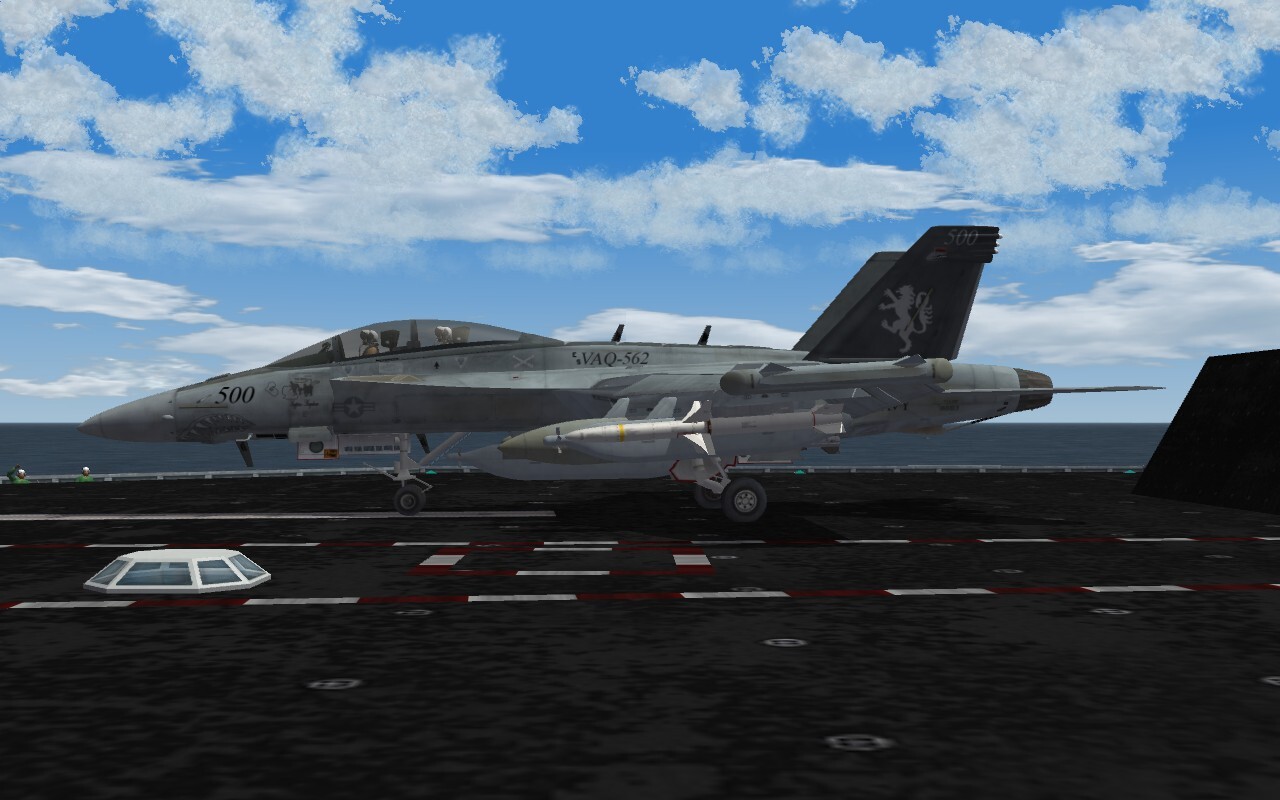
Super Hornet is moving slowly "in the dark", so it's being worked on, but given player attitudes we're doing better not talking about it, but it's overall progressing, slowly. It' should be noted that ED won't allow License Agreements for 4th or 5th generation aircraft, so essentially you're on your own for anything like that, like we are. I've gone somewhat public with the texture work but everything else is pretty much not discussed: https://www.facebook.com/media/set/?set=a.10153471621314855.1073741835.768464854&type=1&l=d02d8f07fc And it should be stressed that those four are just out of a total of like 34 total, or maybe 35.

