
Flanker562
-
Posts
13,478 -
Joined
-
Last visited
-
Days Won
64
Content Type
Profiles
Forums
Gallery
Downloads
Store
Everything posted by Flanker562
-
Updated: - Added reference for the laser cone (JP 3-09.3 Close Air Support) - JFO/JTAC Debate - Using your Cool TGP for ISR - Urban Warfare
-
Basic start, have to redo the canopy area and change the serial number to 75-260 if my reference shots are right.
-
And redone, looking much better:
-
Current progress
-
After a few days of doing modding for other people, I decided to get that Grey JAWS skin done, which starting forced me to relook at the one I did previously: Since all i need to change the overlay color and thin out the color a bit it shouldn't be too hard, but first I'm going to redo the splotches on the original texture and upload that, and get the grey version done as well.
-

My return to online multiplayer air combat... with DCS
Flanker562 replied to streakeagle's topic in General Discussion
And in case you're interested here's a mission I would train on. It has some easy areas, an urban area, rural, HVT, and Mountain Warfare positions to work with. All the Waypoints lead to one spot as the Mountain Warfare one is pretty special and once you figure it out it's easy but overall the level of play isn't much but good for weapons practice. JTACTrainingMission1_0.zip -
No actually I don't normally mess with the views, so for me it's not any HOTAS setting, it just adjusts the view and quite honestly I find it very convenient as I rarely change the views at all (only when needed but that's not often) compared other aircraft. No problem Dave!
-
My return to online multiplayer air combat... with DCS
Flanker562 replied to streakeagle's topic in General Discussion
Yep so far -
My return to online multiplayer air combat... with DCS
Flanker562 replied to streakeagle's topic in General Discussion
In case anybody's interested... http://562ndts.enjin.com/forum/m/26813760/viewforum/5203885 -
Haven't forgotten, just been tied up with some A3 work. After I get that finished going to switch up the mix and do that JAWS scheme with the different color (grey instead of the tan base color) next.
-
How to create/change MFDs that displays diferent pages?
Flanker562 replied to ricnunes's topic in General Discussion
I think the TMF F-14s get away with the MFD switcheroo thing because mostly it's an air-to-air fighter and subsequently the "Bombcat" modification you can still do it because the game models single store drop with guided bombs and not iron. I could be wrong as I don't mess with the TMF F-14s much. As one of the team members (and project lead) the Super Cockpits have the RWR display offset in the cockpit (Block I) and the Block II Supers have the RWR display on the UFCD (middle screen with the numbers below the HUD) active when switching to the weapons. Besides there wasn't much of a desire to get too in-depth with MFDs due to game logic and simplicity. If of course the functions were available (and manipulative like DCS) then yes it would have been done, but the SMS and basic pages were needed, not so much everything else. And as we all know there isn't a 6DOF support so you'd be looking at a simple texture, unable to do anything with it so there wasn't any point in adding such game limited functionality. The SMS page is of course more "interactive" but that's just to show weapons being removed from the inventory and not able to be specifically selected, like the DCS A-10C of course. -
That's just... beautiful work Volker!
-
np
-
I don't fly it enough (though I'm itching for a joyride though) to notice most bugs, like the stuff with the A-10C, I'm finally getting to the navigation stuff so some of the stuff applied to stuff I just didn't focus on.
-
Click on View\Dialogs\Show Liveries Dialog That opens that interface up, the aircraft is on the left, the skin (by folder name, not skin name) is on the right. It should be noted you can apply the skin regardless of the aircraft but naturally it'll look jacked up but the A-10s work regardless with each other.
-
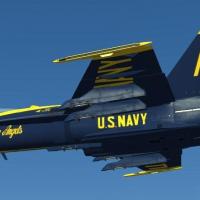
View File F/A-18C Blue Angels 1-6 This is a pack of the six single-seater version of the Blue Angels livery, with No. 7 being the F/A-18D and as such since it is not in DCS not done. As such since the texture is based off of the tactical version of the aircraft it’s still good enough to work with when DCS: Hornet is eventually released. Also done is a basic pilot skin and given the mapping and configuration does not represent the actual flight suit that the real pilots wear. To install simply navigate to your DCS World\Bazar\Liveries\fa-18c and copy and paste the folders into that folder, open up DCS World and if you have the appropriate mod, go fly. If not wait until DCS: Hornet comes along. Regardless go into the Payload Options and for Paint Schemes select “Blue Angels No.x” with the “x” representing the number for the appropriate aircraft. Submitter EricJ Submitted 12/04/2014 Category Misc/AI Aircraft Skins
-
Version 1.0
45 downloads
This is a pack of the six single-seater version of the Blue Angels livery, with No. 7 being the F/A-18D and as such since it is not in DCS not done. As such since the texture is based off of the tactical version of the aircraft it’s still good enough to work with when DCS: Hornet is eventually released. Also done is a basic pilot skin and given the mapping and configuration does not represent the actual flight suit that the real pilots wear. To install simply navigate to your DCS World\Bazar\Liveries\fa-18c and copy and paste the folders into that folder, open up DCS World and if you have the appropriate mod, go fly. If not wait until DCS: Hornet comes along. Regardless go into the Payload Options and for Paint Schemes select “Blue Angels No.x” with the “x” representing the number for the appropriate aircraft. -
Okay I'm not finding much else to do, I wanted to make the helmets yellow but I'm just not in the mood to mess with it yet. Down the road I'll probably tweak it but for now? Yeah I'll upload it.
-
Given that I'm modding a combat flight suit as opposed to a show version this is pretty much I can do unfortunately... finding little to go over though: However I did brighten up the uniform a bit:
-
Good stuff with the ground units that's for sure, I'm glad they added better zoom for the binos too.
-
Okay got 1-6 done, time for the pilot and they'll be ready to go. After this (unless A3 Tools starts to work again) an "Assymetric" scheme that from references says it was part of the JAWS program, so another A-10A to go back to.
-
Resized the numbers (was a bit too big after looking at it again):
-
And the best I can do with the namesake image:
-
Getting the number in (1) and of course will do 1-6 (yes I know it's AI stuff but with that "Fly everything mod" you can at least practice until the real thing shows up... eventually.
-
Some tweaking and some additions:
