

Stephen1918
-
Posts
1,204 -
Joined
-
Last visited
-
Days Won
19
Content Type
Profiles
Forums
Gallery
Downloads
Store
Everything posted by Stephen1918
-
For the Eastern Front - today I uploaded the Moska MB bis, a Russian single wing fighter. I have included two versions, a stock version with an angled gun, and a "field mod" version with a horizontal gun and deflector plates. There is also a ground object version of the plane with its wings folded.


-
View File Moska MB bis The Moska MB bis was a Russian single wing fighter, first deployed in 1916 and produced throughout the rest of World War I. It did not have a synchronized gun and the stock plane had the gun mounted at an angle to fire over the prop. I have created a "field modded" version with a horizontal gun and with deflector plates on the prop. Both versions use the same skins. I have included my skinning templates with the download. The planes uses the stock decals, so there is no "D" folder with this plane. One of the distinctive features of the Moska MB was that its wings could be folded for shipping and transport. I have included a static model, with folded wings, that can be used by modders in their terrains. The static version has a destroyed version and includes the Types.ini data. Credits Thanks to Ojcar for making the data file for the Moska MB bis. Thanks also to Nix for creating the sound file for the Gnome 80hp engine. Installation Instructions For FE1 - Unzip the file and move the folders named "MoskaMBbis" and "MoskaMBbisMod"into the FirstEagles/Objects/Aircraft folder. You also need to move the sound file "gnome80m4.wav" into the FirstEagles/Sounds folder. For FE2 - Unzip the file and move the folders named "MoskaMBbis" and "MoskaMBbisMod"into the FirstEagles/Objects/Aircraft folder. You also need to move the sound file "gnome80m4.wav" into the FirstEagles/Sounds folder. Submitter Stephen1918 Submitted 10/25/2014 Category Other Entente Aircraft
-

209 downloads
The Moska MB bis was a Russian single wing fighter, first deployed in 1916 and produced throughout the rest of World War I. It did not have a synchronized gun and the stock plane had the gun mounted at an angle to fire over the prop. I have created a "field modded" version with a horizontal gun and with deflector plates on the prop. Both versions use the same skins. I have included my skinning templates with the download. The planes uses the stock decals, so there is no "D" folder with this plane. One of the distinctive features of the Moska MB was that its wings could be folded for shipping and transport. I have included a static model, with folded wings, that can be used by modders in their terrains. The static version has a destroyed version and includes the Types.ini data. Credits Thanks to Ojcar for making the data file for the Moska MB bis. Thanks also to Nix for creating the sound file for the Gnome 80hp engine. Installation Instructions For FE1 - Unzip the file and move the folders named "MoskaMBbis" and "MoskaMBbisMod"into the FirstEagles/Objects/Aircraft folder. You also need to move the sound file "gnome80m4.wav" into the FirstEagles/Sounds folder. For FE2 - Unzip the file and move the folders named "MoskaMBbis" and "MoskaMBbisMod"into the FirstEagles/Objects/Aircraft folder. You also need to move the sound file "gnome80m4.wav" into the FirstEagles/Sounds folder. -
I have his Avro 504D and the decals seem to be working OK on the rudder.
-

Two new files: Lewis Gun and AEG C.IV
Stephen1918 replied to Stephen1918's topic in General Discussion
I'm sorry, Don246. I am stumped. It looks like the game is using a formation, but putting three of the planes in the same position instead of spreading them out. But your Formation.ini looks the same as mine. Have any of you other guys ever come across this? -
Two new files: Lewis Gun and AEG C.IV
Stephen1918 replied to Stephen1918's topic in General Discussion
Have you changed the Formations.ini in the Flight folder? If there is a Formations.ini file in your Flight folder, try moving it out of the folder and seeing what happens. -
Two new files: Lewis Gun and AEG C.IV
Stephen1918 replied to Stephen1918's topic in General Discussion
Perhaps it's something in the Formations file? Can you post a screen shot? -
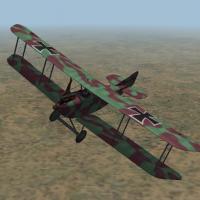
Yesterday I uploaded two new files for First Eagles - A stand alone Lewis Gun and the AEG C.IV two seater. The Lewis Gun is based on the gun I made for my Nieuports 10 and 12. I included the data for the Weapons Data, based on the data Whiteknight06604 used for his Lewis Gun on the Nieuport 17. I did not attempt to make installation instructions, but I did include a diagram to help modders calculate the data needed in the plane's FM. The AEG C.IV was a German two seater which saw heavy use during the last two years of the war. I was thinking of Palestine when I made this, but the skins are generic enough to use on any front. My thanks to Ojcar for making another wonderful FM for my plane.


-
View File AEG C.IV The AEG C.IV was a German 2 seater that was introduced in 1916 and saw service until the end of the war. It served on the Western, Eastern, and Palestine fronts and was operated by Bulgaria and Turkey as well as by Germany. It was primarily a reconnaissance plane, but was also used as a bomber escort, although not very successfully. It had a fixed Spandau machine gun for the pilot, a Parabellum on a ring mount for the observer, and could carry a small bomb load. I have included two skins, a green and lilac camo, and a green and brown camo. I have also included a full set of number decals. My skinning templates are included in the download. There are two bomb loadouts, one internal, and one external mounted under the wings. It is doubtful that the AEG C.IV carried external bombs, but I liked the look of it. For historical accuracy, you probably shouldn't use the External Bombs loadout. Credits Thanks to Ojcar for making the data file for the AEG C.IV and for providing valuable information, especially for the cockpit details. Thanks also to Nix, who made the sound file for the Mercedes 160hp engine. Thanks to Ojcar (again) for pointing out the problem with the decals. Installation Instructions For FE1 - Unzip the file and move the folder named "AEGC4" into your FirstEagles/Objects/Aircraft folder. You also need to move the sound file "mercedes160m2.wav" into the FirstEagles/Sounds folder. For FE2 - Unzip the file and move the folder named "AEGC4" into the FirstEagles/Objects/Aircraft folder. Then in the FirstEagles/Objects/Decals folder, create new folder named "AEGC4". Move the folder named "D" from the Aircraft/AEGC4 folder into the Decals/AEGC4 folder you just made. You also need to move the sound file "mercedes160m2.wav" into the FirstEagles/Sounds folder. Submitter Stephen1918 Submitted 10/13/2014 Category Other Central Powers Aircraft
-
Version v2
353 downloads
The AEG C.IV was a German 2 seater that was introduced in 1916 and saw service until the end of the war. It served on the Western, Eastern, and Palestine fronts and was operated by Bulgaria and Turkey as well as by Germany. It was primarily a reconnaissance plane, but was also used as a bomber escort, although not very successfully. It had a fixed Spandau machine gun for the pilot, a Parabellum on a ring mount for the observer, and could carry a small bomb load. I have included two skins, a green and lilac camo, and a green and brown camo. I have also included a full set of number decals. My skinning templates are included in the download. There are two bomb loadouts, one internal, and one external mounted under the wings. It is doubtful that the AEG C.IV carried external bombs, but I liked the look of it. For historical accuracy, you probably shouldn't use the External Bombs loadout. Credits Thanks to Ojcar for making the data file for the AEG C.IV and for providing valuable information, especially for the cockpit details. Thanks also to Nix, who made the sound file for the Mercedes 160hp engine. Thanks to Ojcar (again) for pointing out the problem with the decals. Installation Instructions For FE1 - Unzip the file and move the folder named "AEGC4" into your FirstEagles/Objects/Aircraft folder. You also need to move the sound file "mercedes160m2.wav" into the FirstEagles/Sounds folder. For FE2 - Unzip the file and move the folder named "AEGC4" into the FirstEagles/Objects/Aircraft folder. Then in the FirstEagles/Objects/Decals folder, create new folder named "AEGC4". Move the folder named "D" from the Aircraft/AEGC4 folder into the Decals/AEGC4 folder you just made. You also need to move the sound file "mercedes160m2.wav" into the FirstEagles/Sounds folder. -
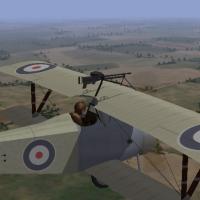
View File Lewis Gun Mk2 I modified the Lewis Gun I made for my Nieuports to make it a stand alone file, so that modders can use it with other planes. I ran the poly count to reduce file size and I made a new skin. I have included a diagram to help modders figure out the data they need to attach the gun. I have included the data file that Whiteknight made for the Lewis in his Nieuport 17 with Wing Gun. I named it "LewisGunMk2" so that it won't replace the existing Lewis Gun that others have used in their mods. My thanks to Whiteknight06604 for letting me use his Weapons Data. The picture shows the gun mounted on MontyCZ's Nieuport 17. Submitter Stephen1918 Submitted 10/12/2014 Category First Eagles - General Files - Weapons Mods
-
132 downloads
I modified the Lewis Gun I made for my Nieuports to make it a stand alone file, so that modders can use it with other planes. I ran the poly count to reduce file size and I made a new skin. I have included a diagram to help modders figure out the data they need to attach the gun. I have included the data file that Whiteknight made for the Lewis in his Nieuport 17 with Wing Gun. I named it "LewisGunMk2" so that it won't replace the existing Lewis Gun that others have used in their mods. My thanks to Whiteknight06604 for letting me use his Weapons Data. The picture shows the gun mounted on MontyCZ's Nieuport 17. -
The Fliegermaus (Type GR 16 in First Eagles) looks like a small bomb, with fins on the end. This is a loadout I made for Laton's Pfalz E.III for the Eastern Front. There are six Fliegermaus grenades racked next to the cockpit.

-
I've been working on an AEG C.IV. The plane itself is close to being finished, still a few tweaks to do. I've started skinning the cockpit and making decals. I am also planning a green and brown skin.


-
Extremeone alerted me to some minor problems with the Caudron, I have uploaded a new version with corrections. They are both very minor - In the ini file, I only had two LOD levels, so the plane disappears when you get about 200 meters away. All the LOD files were there, I just didn't have them in the ini file. LOD003 should be at 1000, and LOD004 should be at 7000. In FE2, the pilot and his skin have to be put into the Objects/Pilots folder, not in the Aircraft folder as I instructed. The installation for FE1 is correct. Version 2 fixes these problems.
-
I uploaded the Caudron G.4 today. It includes four skins and three bomb loadouts. My thanks to Ojcar for once again making a great FM for the plane - this makes 36 planes we've made for First Eagles. My thanks also to Whiteknight and Jeanba for help with the research.


-
View File Caudron G.4 The Caudron G.4 was a twin engine French bomber. It was introduced late in 1915, it used wing warping for banking and had four rudders. The plane was widely used, and saw service on most of the fronts. After 1916, it was used mostly for night bombing and reconnaissance. I have included four skins, a French linen, an Italian linen, a Russian grey, and a British brown. I have included some personal markings, but the serial number is so hard to see on this plane, that I only made one. My skinning templates are included in the download. There are three bomb loadouts, including one internal, and two external bomb loads. I had to make a special pilot, because the stock FE pilot would not fit in the Caudron cockpit. The new pilot is included in the download. Historical Note All of the examples I found had linen skins, except for some Russian grey or light blue planes. I have included a British brown skin because it seemed likely that other colors than plane linen were used, although I found no evidence of it. Credits Thanks to Ojcar for making the data file for the Caudron G.4. Thanks also to Whiteknight06604 who originally suggested this plane more than a year ago, and provided some resources at that time. Thanks also to Jeanba, who helped research skins for the Caudron G.4. Installation Instructions For FE1 - Unzip the file. Open the folder named "PutInAircraftFolder." Move the folder named "CaudronG4" and the two pilot files into your FirstEagles/Objects/Aircraft folder. The files named "CaudronPilot.lod" and "CaudronPilot.bmp" should be in the Aircraft folder, but not in any other folder. Open the "PutInSoundsFolder" and move the file named "LeRhone9c80hp1m4.wav" into your FirstEagles/Sounds folder. For FE2 - Unzip the file. Open the folder named "PutInAircraftFolder." Move the folder named "CaudronG4" into your FirstEagles/Objects/Aircraft folder. Move the files named "CaudronPilot.lod" and "CaudronPilot.bmp" into the FirstEagles/Objects/Pilots folder. Then in the FirstEagles/Objects/Decals folder, create a new folder named "CaudronG4". Move the folder named "D" from the Aircraft/CaudronG4 folder into the Decals/CaudronG4 folder you just made. Open the "PutInSoundsFolder" and move the file named "LeRhone9c80hp1m4.wav" into your FirstEagles/Sounds folder. Submitter Stephen1918 Submitted 09/27/2014 Category Other Entente Aircraft
-

Version v3
393 downloads
The Caudron G.4 was a twin engine French bomber. It was introduced late in 1915, it used wing warping for banking and had four rudders. The plane was widely used, and saw service on most of the fronts. After 1916, it was used mostly for night bombing and reconnaissance. I have included four skins, a French linen, an Italian linen, a Russian grey, and a British brown. I have included some personal markings, but the serial number is so hard to see on this plane, that I only made one. My skinning templates are included in the download. There are three bomb loadouts, including one internal, and two external bomb loads. I had to make a special pilot, because the stock FE pilot would not fit in the Caudron cockpit. The new pilot is included in the download. Historical Note All of the examples I found had linen skins, except for some Russian grey or light blue planes. I have included a British brown skin because it seemed likely that other colors than plane linen were used, although I found no evidence of it. Credits Thanks to Ojcar for making the data file for the Caudron G.4. Thanks also to Whiteknight06604 who originally suggested this plane more than a year ago, and provided some resources at that time. Thanks also to Jeanba, who helped research skins for the Caudron G.4. Installation Instructions For FE1 - Unzip the file. Open the folder named "PutInAircraftFolder." Move the folder named "CaudronG4" and the two pilot files into your FirstEagles/Objects/Aircraft folder. The files named "CaudronPilot.lod" and "CaudronPilot.bmp" should be in the Aircraft folder, but not in any other folder. Open the "PutInSoundsFolder" and move the file named "LeRhone9c80hp1m4.wav" into your FirstEagles/Sounds folder. For FE2 - Unzip the file. Open the folder named "PutInAircraftFolder." Move the folder named "CaudronG4" into your FirstEagles/Objects/Aircraft folder. Move the files named "CaudronPilot.lod" and "CaudronPilot.bmp" into the FirstEagles/Objects/Pilots folder. Then in the FirstEagles/Objects/Decals folder, create a new folder named "CaudronG4". Move the folder named "D" from the Aircraft/CaudronG4 folder into the Decals/CaudronG4 folder you just made. Open the "PutInSoundsFolder" and move the file named "LeRhone9c80hp1m4.wav" into your FirstEagles/Sounds folder. -
Looking good! It's getting closer to being ready to release!
-
Nice stuff! I like how you reskinned the Bazaar to make an... is it an ammo dump? By the way, the rail mounted artillery gun would have been parked by itself on its own siding for firing. They had such a long range, and had such a tremendous recoil, that they actually laid a separate set of tracks when they were deployed.
-
The cockpit is built and I'm working on the skins. Notice that there are two throttles, and fuel gauges on the engine nacelles. I still have a lot of work to do on the data file, and I need to make the LODs.

-
The Real World is keeping me pretty busy, so it will be 2 weeks or more before this is finished. I've been trying hard to find a balance between high level of detail and manageable file size. The twin engines and fluted wing edges really used up memory, so I've been doing a lot of tweaking. The G.4 was used by a lot of nations, I hope to at least have decal sets for France, Belgium, Italy, and Russia.
-
Whiteknight asked for the Caudron G.4 quite some time ago. I've been working on it off and on for a few months. The model is done, except for the gunner, whose legs still need some work. I made a new pilot because the stock pilot wouldn't fit into that narrow cockpit. I'm working on the skins and the cockpit model now.


-
Problem installing separate install of FE2
Stephen1918 replied to deanklef's topic in General Discussion
I don't know if I'm understanding your problem, but - when I make a new install, I copy the whole folder in the Program Files and rename the folder, I don't have to rename the exe file at all. Then, everything in the new terrain is installed in the new Saved Game folder. I have an install which is the standard, unmodded version of the game and I copy that whenever I make a new install of the game. -
I've never seen the problem that you posted on Aug 25, but I have seen flickering tiles sometimes. The flickering is a memory issue, and (for me) it usually happens along a river or coast line. Set the graphics mode to a lower setting and see if that helps.