

Stephen1918
-
Posts
1,187 -
Joined
-
Last visited
-
Days Won
19
Content Type
Profiles
Forums
Gallery
Downloads
Store
Everything posted by Stephen1918
-

402 downloads
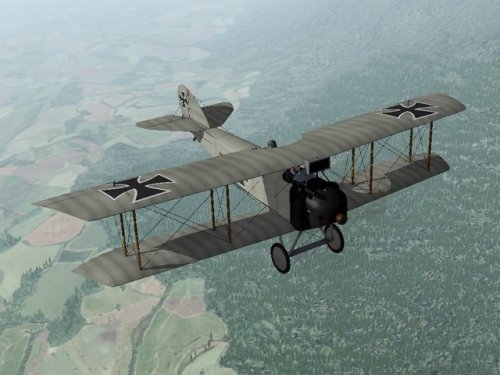
The Aviatik-Berg D.I had many variations, with different engines, different radiator configurations, different fuselage shapes, and different gun placements. This is a very early version, with a 185hp Daimler engine and a non-synchronized Schwarzlose machine gun mounted above the wing. The machine gun is detachable and can be mounted or unmounted in the Loadout screen. I have included one of Quack74's basic skins and decal sets with a set of serial numbers which will be applied randomly to each plane. This plane has an extra piece that was not included in Quack's skins, I have included skins for the new part to match each of Quack's skins, which you will need to add to each skin folder. Historical Notes This version of the Aviatik did not have a cutout in the upper wing and the fuselage was higher in front of the fuselage. My model is converted from a later version and has not been corrected because I wanted to make sure that all of Quack's skins would still work with this plane. Credits My great thanks to Ojcar for making the FM and the Schwarzlose weapon data, and for teaching me how to make weapon stations. Thanks to Quack 74 for making the skin and decal set for all the Aviatiks, and for allowing me use one as the default skin for this plane. And thanks to Nix for making the engine sound file. Installation Instructions If you are using FE1, you will need to use the Weapons Editor available from the Thirdwire Downloads area. You will also need to use a CAT file extractor utility (SFP1E Extract Utility available in the CombatACE Downloads area.) For FE1 - Unzip the file and move the folder named "AviatikD1_185" into the FirstEagles/Objects/Aircraft folder. This file uses the same sound file as the original AviatikD1. If you did not install that plane then you will also need to move the sound file "Austro-daimler200.wav" into the FirstEagles/Sounds folder. To install the gun - If you haven't already done so, extract the WeaponData.INI and the WeaponData.DAT files from the FirstEagles ObjectData.CAT file. Make a new folder named "Weapons" in the FirstEagles/Objects folder. Put the two extracted files into the new folder. In my download, open the file named "Single_Schwarzlose_Angled_Data.INI," copy everything and paste it at the end of the "WeaponData.INI" you just extracted. Then change the number (WeaponData001) to the next consecutive number. Save the file. In my downlaod, copy the files named "Schwarzlose.BMP" and "SchwarzloseAngle.LOD" and put them into the FirstEagles/Objects/Weapons folder. Open the Weapons Editor, Open the WeaponsData.INI, make sure the new weapon (Single_Schwarzlose_Angled) is there, click "Save" and Close the editor. For FE2 - Unzip the file and move the folder named "AviatikD1_185" into the FirstEagles/Objects/Aircraft folder. Then in the FirstEagles/Objects/Decals folder, create a new folder named "AviatikD1_185". Move the folder named "D" from the Aircraft/AviatikD1_185 folder into the Decals/AviatikD1_185 folder you just made. This file uses the same sound file as the original AviatikD1. If you did not install that plane then you will also need to move the sound file "Austro-daimler200.wav" into the FirstEagles/Sounds folder. To install the gun - From my download, copy the folder named "Single Schwarzlose Angled" into your Objects/Weapons folder. -
Today I uploaded some upgrades to my earlier planes. Ojcar has made new FMs for the two Phönix's which improve the flight characteristics. I included another level of LODs for both planes which should improve frame rate a little. Ojcar also made a new FM for the Early Aviatik D.I which strengthens the upper wing, making it harder to break. And I made a new cockpit for the DH4 Liberty with skins on the gauge needles so Sinbad can make better cockpit skins.
-
Looking good!
-
Thank you Ojcar! The stuff you sent included several good views of the Schwarzlose gun wing mount. I should have a model made pretty soon. (It looks like the gun was belt fed with chutes running from the fuselage to the gun.)
-
I'd be happy to try. Who has some photos (or some links) of the Schwarzlose wing mount? I have a lot of info for the gun itself, but I need to know how it was mounted and how the ammo was loaded. Did it have a drum feed? Did it have a brace at the barrel like the Lewis? Etc?
-
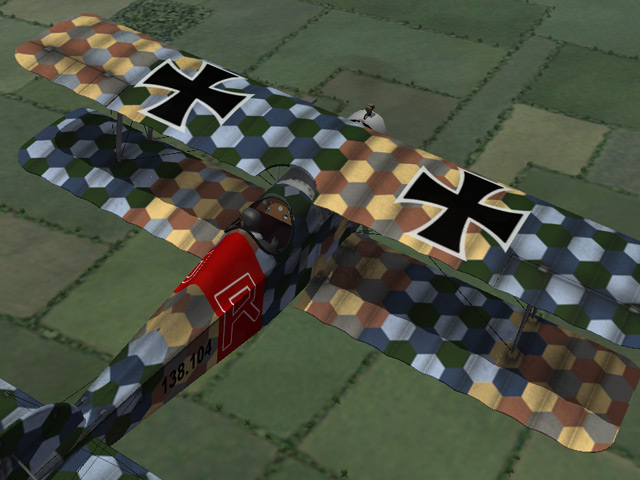
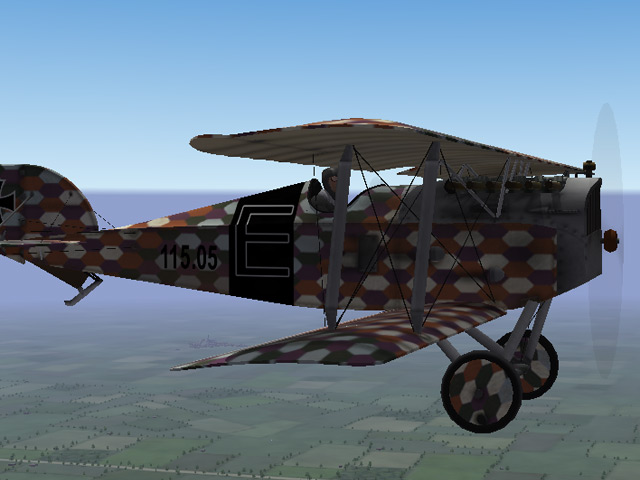
Today I posted upgrades for the Aviatik D.I. The original version has all new LODs and a revised FM by Ojcar. I also uploaded an early version with the machine guns mounted lower on the fuselage. In the early version I made patches for all of Quack74's skins to cover the space in front of the cockpit. Ojcar also made an FM which includes the weakness of the upper wing in the early versions of the plane (you can break the wing during violent maneuvers if you're not careful.)
-
View File Aviatik-Berg D.I (Early) Designed by Julius von Berg for the Aviatik company, the D.I was the first fighter completely built in Austria. The Berg was light and maneuverable, and after structural problems in the early models were overcome, it became a good combat plane. Early versions of the plane had the two Schwarzlose machine guns mounted low on each side of the engine. This is the early version of the plane. This download includes a new cockpit as well as a modified fuselage. Ojcar has made a completely new FM to reflect the different flight characteristics of this plane. I have included a basic skin and my skinning templates. I highly recommend the skins made by Quack74, available at CombatACE as a separate download. This plane has an extra piece that was not included in Quack's skins, I have included a skin to match Quack's skins which you will need to add to each skin folder. Credits My thanks to Ojcar for making the FM. And thanks to Nix for making the engine sound file. Installation Instructions For FE1 - Unzip the file and move the folder named "AviatikD1_Early" into the "Aircraft" folder in the FirstEagles/Objects folder. This file uses the same sound file as the original AviatikD1. If you did not install that plane then you will also need to move the sound file "Austro-daimler200.wav" into the FirstEagles/Sounds folder. For FE2 - Unzip the file and move the folder named "AviatikD1_Early" into the "Aircraft" folder in the FirstEagles/Objects folder. Then in the FirstEagles/Objects/Decals folder, create a new folder named "AviatikD1_Early". Move the folder named "D" from the Aircraft/AviatikD1_Early folder into the Decals/AviatikD1_Early folder you just made. This file uses the same sound file as the original AviatikD1. If you did not install that plane then you will also need to move the sound file "Austro-daimler200.wav" into the FirstEagles/Sounds folder. Submitter Stephen1918 Submitted 06/05/2012 Category Other Central Powers Aircraft
-
Version v1
489 downloads
Designed by Julius von Berg for the Aviatik company, the D.I was the first fighter completely built in Austria. The Berg was light and maneuverable, and after structural problems in the early models were overcome, it became a good combat plane. Early versions of the plane had the two Schwarzlose machine guns mounted low on each side of the engine. This is the early version of the plane. This download includes a new cockpit as well as a modified fuselage. Ojcar has made a completely new FM to reflect the different flight characteristics of this plane. I have included a basic skin and my skinning templates. I highly recommend the skins made by Quack74, available at CombatACE as a separate download. This plane has an extra piece that was not included in Quack's skins, I have included a skin to match Quack's skins which you will need to add to each skin folder. Credits My thanks to Ojcar for making the FM. And thanks to Nix for making the engine sound file. Installation Instructions For FE1 - Unzip the file and move the folder named "AviatikD1_Early" into the "Aircraft" folder in the FirstEagles/Objects folder. This file uses the same sound file as the original AviatikD1. If you did not install that plane then you will also need to move the sound file "Austro-daimler200.wav" into the FirstEagles/Sounds folder. For FE2 - Unzip the file and move the folder named "AviatikD1_Early" into the "Aircraft" folder in the FirstEagles/Objects folder. Then in the FirstEagles/Objects/Decals folder, create a new folder named "AviatikD1_Early". Move the folder named "D" from the Aircraft/AviatikD1_Early folder into the Decals/AviatikD1_Early folder you just made. This file uses the same sound file as the original AviatikD1. If you did not install that plane then you will also need to move the sound file "Austro-daimler200.wav" into the FirstEagles/Sounds folder. -
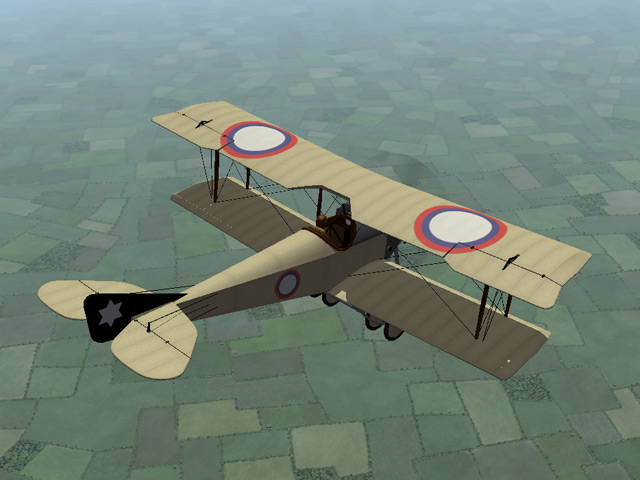
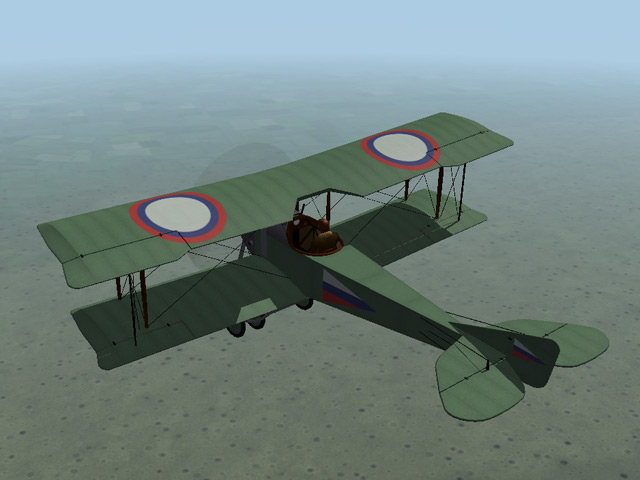
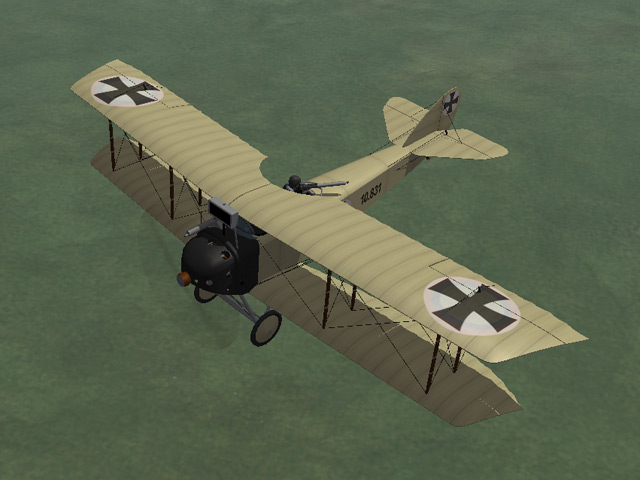
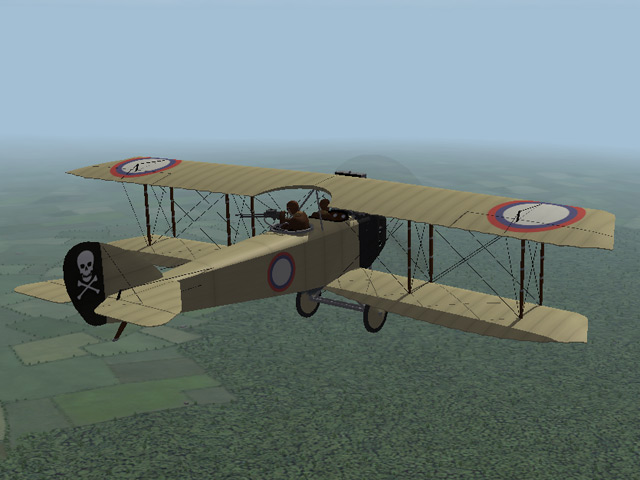
In the last couple of days I've uploaded new versions of the Sikorsky and Anatra. The Sikorsky was one of my first planes and I've learned a lot since then. I have made changes to the model and the way the model was rigged, so these uploads (the Sikorsky and the Sikorsky flat deck) include a complete set of new LODs. Ojcar has made brand new data files for both planes, and I have included new skins with markings for several Russian squadrons. For the Anatra, I've included a bomb loadout and skins for different squadrons. I also made an Austrian version, with a Schwarzlose machine gun and loadouts for German bombs.
-
View File Anatra C.I This version includes a new FM made by ojcar. When the Ukrainian city of Odessa was occupied by Austria-Hungary early in 1918, the Anatra factory was found intact and production of the Anatra DS was continued as the "Anatra C.I". Many of the first Austrian versions had the Austrian cross painted over the Russian insignia. The Anatra C.I was used mostly for training, but some were used for reconnaissance, as a fighter and light bomber. Many of them survived the war and were used in the fighting in Eastern Europe after the end of World War I. In version 2 - I have created a separate version for the Austrian plane, with a Schwarzlose machine gun and German bombs in the loadout. There are two Austrian skins, one with crosses painted over the Russian roundels, and one with standard insignia. (I have also included a postwar Yugoslav skin, because I like the insignia.) I have included my skinning templates for those who want make their own skins. In version 3 - Ojcar has made a new FM for the plane. I have refined the wings and added some details. I created a new cockpit with German gauges and machine gun. I made two Austrian skins for the plane and I kept the Yugoslav skin, because I like the insignia. I have included my skinning templates for those who want make their own skins. Historical Notes: The serial numbers are fictitious. I found several sources which said that Anatras carried a machine gun mounted on the fuselage for the pilot. I couldn't find any details of the mounting, so I guessed where it might be located. Credits: My thanks to Ojcar once again for making a new data.ini file for this plane. Installation instructions: This revision replaces previous versions. If you have an older version, please delete it, then install the new version. For FE1: Unzip the file and move the folder named "AnatraC1" into the FirstEagles/Objects/Aircraft folder. For FE2: Unzip the file and move the folder named "AnatraC1" into the FirstEagles/Objects/Aircraft folder. Then in the FirstEagles/Objects/Decals folder, create a new folder named "AnatraC1". Move the folder named "D" from the Aircraft/AnatraC1 folder into the Decals/AnatraC1 folder you just made. Submitter Stephen1918 Submitted 05/29/2012 Category Other Central Powers Aircraft
-
Version v3
330 downloads
This version includes a new FM made by ojcar. When the Ukrainian city of Odessa was occupied by Austria-Hungary early in 1918, the Anatra factory was found intact and production of the Anatra DS was continued as the "Anatra C.I". Many of the first Austrian versions had the Austrian cross painted over the Russian insignia. The Anatra C.I was used mostly for training, but some were used for reconnaissance, as a fighter and light bomber. Many of them survived the war and were used in the fighting in Eastern Europe after the end of World War I. In version 2 - I have created a separate version for the Austrian plane, with a Schwarzlose machine gun and German bombs in the loadout. There are two Austrian skins, one with crosses painted over the Russian roundels, and one with standard insignia. (I have also included a postwar Yugoslav skin, because I like the insignia.) I have included my skinning templates for those who want make their own skins. In version 3 - Ojcar has made a new FM for the plane. I have refined the wings and added some details. I created a new cockpit with German gauges and machine gun. I made two Austrian skins for the plane and I kept the Yugoslav skin, because I like the insignia. I have included my skinning templates for those who want make their own skins. Historical Notes: The serial numbers are fictitious. I found several sources which said that Anatras carried a machine gun mounted on the fuselage for the pilot. I couldn't find any details of the mounting, so I guessed where it might be located. Credits: My thanks to Ojcar once again for making a new data.ini file for this plane. Installation instructions: This revision replaces previous versions. If you have an older version, please delete it, then install the new version. For FE1: Unzip the file and move the folder named "AnatraC1" into the FirstEagles/Objects/Aircraft folder. For FE2: Unzip the file and move the folder named "AnatraC1" into the FirstEagles/Objects/Aircraft folder. Then in the FirstEagles/Objects/Decals folder, create a new folder named "AnatraC1". Move the folder named "D" from the Aircraft/AnatraC1 folder into the Decals/AnatraC1 folder you just made. -
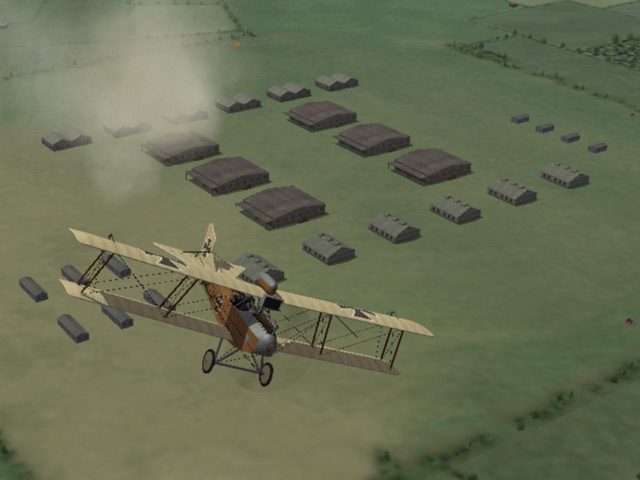
I am (slowly) working up to an Eastern Front campaign. I have uploaded a revised terrain for the Eastern Front. This is a revision of the Lemberg terrain. It has a lot more forest and grassland, I have removed all the trenches from the terrain (new terrain tiles), I have added some old battlefields, and removed some villages and airfields. A new feature is the addition of Supply Depots, these use the airfield terrain tile, but are covered with warehouses and other buildings. This addition increases the number of bombing targets in the game. I have also added more movement routes for trucks and tanks to increase the number of ground attack missions.
-
Sorry to hear about your PC crashing. I'm glad you didn't lose any data. Hope you're back online soon.
-
To Dave and whoever else was responsible: Thank you extremely much for getting Combat ACE back online. I didn't realize how much I depend on it until it gone.
-
View File Trucks for First Eagles I have made two generic trucks for First Eagles. Both have cabs, so it isn't so obvious that they don't have drivers when you see them from the air. The Russian Truck is loosely based on the Russian Garford-Putilov but is similar to the WFD and the Jeffrey. It had a high ground clearance and the engine was in the middle, under the bed, which made it good for driving on poor roads. The Austrian Truck is loosely based on the German Daimler-Marienfelde but is similar to many other trucks of the era. I have provided alternate skins, an olive color for the Russian, and a tan color for the Austrian, so you can convert them to use for other nations if you want. Installation Instructions You can install the trucks individually or both together. Unzip the file and move the folders you want into the FirstEagles/Objects/GroundObjects folder. Submitter Stephen1918 Submitted 05/13/2012 Category First Eagles - WWI and Early Years - Object Mods
-
These are great. I like the idea of using decals to change colors.
-
280 downloads
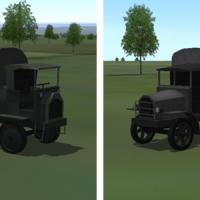
I have made two generic trucks for First Eagles. Both have cabs, so it isn't so obvious that they don't have drivers when you see them from the air. The Russian Truck is loosely based on the Russian Garford-Putilov but is similar to the WFD and the Jeffrey. It had a high ground clearance and the engine was in the middle, under the bed, which made it good for driving on poor roads. The Austrian Truck is loosely based on the German Daimler-Marienfelde but is similar to many other trucks of the era. I have provided alternate skins, an olive color for the Russian, and a tan color for the Austrian, so you can convert them to use for other nations if you want. Installation Instructions You can install the trucks individually or both together. Unzip the file and move the folders you want into the FirstEagles/Objects/GroundObjects folder. -
Thanks for all your work, Geo. I hope you'll be around and continue modding even if your site is closing down. I like your artillery and horse drawn wagons, does First Eagles recognize them as targets?
-

Stephen1918 any interest....and time?
Stephen1918 replied to whiteknight06604's topic in General Discussion
I've started working on an early version of the Aviatik, with the machine guns lower in the fuselage. But I want to avoid making quack74 modify all his skins, so I added a new part to cover the place where the guns were. There's no way I can match the hex pattern, so I'm using a part of the engine cowling to skin the new part. The guns happen to line up exactly with the ones painted on the fuselage and pick up all the detail quack put into them, they look pretty good. I haven't started the new cockpit yet.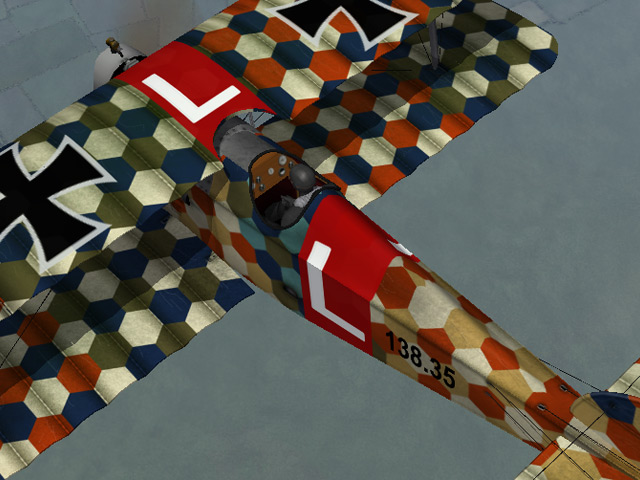
-
I've never tried the "demod" technique you're referring to, but I've heard of it. Each of the guns is made up of several pieces linked together, but removing the "parent" part should remove them all. The parent of the left hand Vickers is: VickersBody And the right hand Vickers is: VickersBody01 The left hand Lewis gun is: LewisGunBodyL The right hand Lewis is: LewisGunBodyR Let us know how it works.
-
Entschuldigen Sie, er dauerte so lang zur Antwort. I don't know if I can answer all your questions, but I might be able to help on a few of them. 1. In First Eagles, each plane has the dates it was in service. The Fokker Dr1 was not used for very long and it is possible it doesn't show up in the game because the dates are wrong. On the Single Mission screen you can set the date you want to fly. Try setting the Mission Date between October 1917 and July 1918 and see if it shows up then. 2. You can't get much information on enemy planes, in Easy mode, the screen display will give a rough idea of how far away the planes are, but other than that you have to guess. In World War I they didn't have radar or any kind of tracking, so the pilots had to estimate everything based on what they could see. First Eagles is highly realistic in that way. 3. I think you're asking if First Eagles moves the control stick to give you feedback through your hands, (computer people refer to this as haptics.) Frankly, I don't know, maybe someone else can answer that? 4. Sorry, I don't understand the question. 5. There are settings in the gundata.ini for each weapon that control the speed and accuracy. Things like pilot experience is also factored in for enemy pilots. It takes practice to develop the skill to become good. There is Forum at Combat ACE, auf Deutsch, if that would be more comfortable for you. You are always welcome here, of course.
-
Thanks Quack74, it always bothered me that no one was firing the guns
-
I discovered shadow glitches in the AAA guns caused by trapped faces in the mesh. I repaired them and uploaded a corrected version with all new LODs today. If you are using shadows for the ground objects, you'll need to download the corrected version. Sorry about that!
-
I neglected to put shadow settings into the ini files for the Anti-Aircraft Guns I uploaded on Friday. If you want the guns to cast shadows, you can add these four lines to the ini files for each gun: [shadow] CastShadow=TRUE ShadowCastDist=500 MaxVisibleDistance=500 I uploaded a new version a few minutes ago which has shadow settings included.
-
Yes! This is very cool. I especially like the Dux version of the insignia. I will definitely be using these. Thanks!
