


MigBuster
-
Posts
9,165 -
Joined
-
Last visited
-
Days Won
27
Content Type
Profiles
Forums
Gallery
Downloads
Store
Everything posted by MigBuster
-
With the service Packs its normally best to start again with a clean install of the game if you have modified your game a lot. If the only mods you have done are to add some 3rd party planes then you can patch it and they will still be there - the service pack adds and changes only some of the files. If you are not sure then copy/backup your entire existing game folder (with all the files) over to another folder - then do a fresh install. You can then move anything from the existing folder you just copied over back into the new install. Note: With SP4 you will need the latest version of the weapons editor to add extra weapons.
-
Hooray im back to playing again - still even half way through campaigns im still changing ini's sometimes. I felt sorry for the Migs and their useless missiles so I upgraded their missile parameters a bit and gave the Mig23's some flares - just to spice things up! Saying that would F-4M's and Mig 23's not have flares in 1979 anyway!
-
Maybe that used to be the case in the early days that and ghosting apparently - but i play on a Samsung 172x 17" TFT which is about 3 years old now and ive never had any problems. With a more recent TFT's I cant believe you would get any problems at all.
-
For LGB's - taking the F-4E as an example. Take a laser pod (AVQ-23) with you. select the target with the E key as normal fly to 5000ft - at about 2 miles drop them. You should also get a TV screen pop up on the radar screen to - well you do with WOV/WOE.
-
Radar modes of addon modern crafts for WOE
MigBuster replied to SandMartin's topic in General Discussion
Basically WOE introduced these modern radar modes and avionics (with avionics70.dll) - the add on planes you mention were created before then using what was available at the time (SF and WOV are 60's based technology). The authors of the planes could update them - or you could if you wish to experiment a bit with the planes avionics.ini file. One problem holding things up is that the newer avionics does not have an Air to Ground mode - which is fine for the F-15A - but not so good for the F-16A or F-18. You could try searching either here or SimHQ because modifications have been made to some of these planes already - Someone had upgraded the F-14 cockpit a few months back. -
Its losers day again over here - well for the cricket team anyway!
-
Welcome Stefano - hope you enjoy the site
-
I could only wish of seeing a house for that money - i'm about 30 miles out of London and currently renting a 2 bed house - which although is about 4 years old people from the US would no doubt laugh at the size of the rooms - anyway this place is worth >£170,000 (~$333,052 USD). be thankfull you live in the US :)
-
The property market has gone way out of control over 90% of the country - It just started going up and up about 7 years ago - to the point now where first time buyers are being priced right out of the market - You could blame the lack of space to build property - though I'm blaming an inept Labour government for making it so only the super rich can afford a mortgage (thanks guys). Forget buying in London - you could buy a Castle or 2 in France for the same price as a rabbit hutch in London - and if the housing market crashes like in the 80's so many people r gonna be truly ******
-
Am pretty sure #54 is a DeHaviland Hornet which was based on the Mosquito
-
You have put the same link in twice above Good jump by that bloke on the vid - I assume the F-18 made it back up again ?
-
amazing work they look great - dig the 2 seater model
-
Mig-27 won't work, damn lazy Mig!!
MigBuster replied to SayethWhaaaa's topic in Mods/Skinning Discussion
She looks great Bib! -
YEEEEEEEEEESSSSSSSSSSSSSSSSS Well - its been a long time coming but finally the day has arrived when I have actually won a contest!! A million thanks to the organisers for putting this on :biggrin: :biggrin: :biggrin:
-
When you get behind an aircraft make sure the AIM-9 is selected and then pitch the nose up and down a bit if you cant get a lock tone. There are some replacement lock tone files for download on this site if you need a clearer distinction. WOE and WOV are separate games - as in each can be bought and played separately. However if you install WOV first then install WOE afterwards the WOE installer gives you the option to merge WOE into WOV (am pretty sure this is the case!) This works because both games are based on the same underpinnings - which is why you will find that most of the Strike Fighters Mods on this site will work with both. Hope this makes sense
-
The sim also simulates the uselessness of 60's technology so dont expect the radar to always pick everything up. If you are having trouble getting on lock bvr then tilt your nose up and down until it appears on radar and dont forget to change the range - you should be in Search Mode too. In visual range switch to the Boresight mode and move the target with the red box into your HUD ps only the Sparrow needs a radar lock and early versions are hopeless close in! Here is a great article by a former pilot covering the different radar modes in Strike Fighters - which apply to WOV 100% http://www.simhq.com/_air/air_061a.html regards
-
View File Templates for Mirage Factory F-16A model Template set for the Mirage Factory F-16A model (2006) including a layer for the ADF model. Templates were created in GIMP but are included in both .xcf and .psd format for photoshop users. Before you do anything unhide all the layers to make sure it hasnt already been done! Also see the README file. regards Migbuster30 Submitter MigBuster Submitted 01/07/2007 Category Skin Templates / Decal Sets
-
View File F-16A 4TFS 'Fightin Fuujins' 2 Later 4TFS/388TFW 'Fightin Fuujins' F-16A skin for the Mirage Factory F-16A size: 1024x1024 Tested on (Mirage Factory): F-16A Block 1 (folder:F-16A_Blk1) F-16A Block 10 (folder:F-16A_Blk10-NDC) Please read the README file to ensure the decals are installed properly. Many thanks to the Mirage Factory for the F-16 Model. Tested in WoE but should work in SF and WOV Press the button below to download this skin and save it to your Desktop. Migbuster30/Coolhand29 Submitter MigBuster Submitted 01/07/2007 Category F-16 Fighting Falcon Skins
-
View File F-16A 4TFS 'Fightin Fuujins' 1 4TFS/388TFW 'Fightin Fuujins' F-16A skin for the Mirage Factory F-16A size: 1024x1024 Tested on (Mirage Factory): F-16A Block 1 (folder:F-16A_Blk1) F-16A Block 10 (folder:F-16A_Blk10-NDC) Please read the README file to ensure the decals are installed properly. Many thanks to the Mirage Factory for the F-16 Model. Tested in WoE but should work in SF and WOV Press the button below to download this skin and save it to your Desktop. Migbuster30/Coolhand29 Submitter MigBuster Submitted 01/07/2007 Category F-16 Fighting Falcon Skins
-
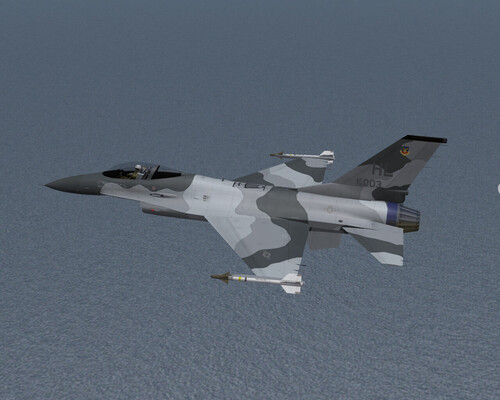
275 downloads
Template set for the Mirage Factory F-16A model (2006) including a layer for the ADF model. Templates were created in GIMP but are included in both .xcf and .psd format for photoshop users. Before you do anything unhide all the layers to make sure it hasnt already been done! Also see the README file. regards Migbuster30 -
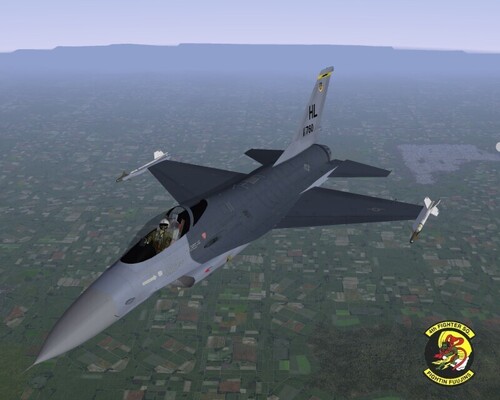
254 downloads
Later 4TFS/388TFW 'Fightin Fuujins' F-16A skin for the Mirage Factory F-16A size: 1024x1024 Tested on (Mirage Factory): F-16A Block 1 (folder:F-16A_Blk1) F-16A Block 10 (folder:F-16A_Blk10-NDC) Please read the README file to ensure the decals are installed properly. Many thanks to the Mirage Factory for the F-16 Model. Tested in WoE but should work in SF and WOV Press the button below to download this skin and save it to your Desktop. Migbuster30/Coolhand29 -
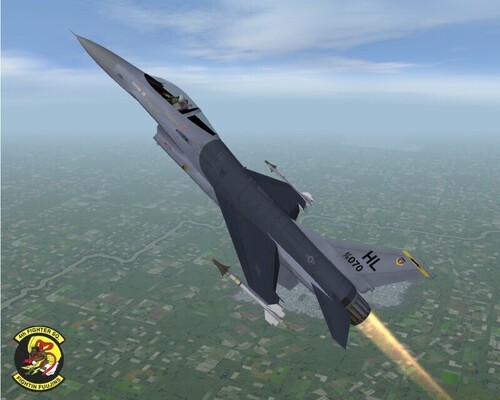
127 downloads
4TFS/388TFW 'Fightin Fuujins' F-16A skin for the Mirage Factory F-16A size: 1024x1024 Tested on (Mirage Factory): F-16A Block 1 (folder:F-16A_Blk1) F-16A Block 10 (folder:F-16A_Blk10-NDC) Please read the README file to ensure the decals are installed properly. Many thanks to the Mirage Factory for the F-16 Model. Tested in WoE but should work in SF and WOV Press the button below to download this skin and save it to your Desktop. Migbuster30/Coolhand29 -
View File F-16A Euro Camoflage This is an alternate EURO camo scheme for the Mirage Factory F-16A Block 1 and Block 10 based on the proposed F/A-16 colour scheme. size: 1024x1024 Tested on (Mirage Factory): F-16A Block 1 (folder:F-16A_Blk1) F-16A Block 10 (folder:F-16A_Blk10-NDC) Includes a WOE style Hangar screen and some Green Drop tanks that can be installed if wanted. Please read the README file to ensure the decals are installed properly. Many thanks to the Mirage Factory for the F-16 Model. Tested in WoE but should work in SF and WOV Press the button below to download this skin and save it to your Desktop. Migbuster30/Coolhand29 Submitter MigBuster Submitted 12/24/2006 Category F-16 Fighting Falcon Skins
-
View File F-16A Snow Camoflage scheme This is an alternate Snow camo scheme for the Mirage Factory F-16A Block 1 and Block 10 based on Navy's Top Gun colour scheme size: 1024x1024 Tested on (Mirage Factory): F-16A Block 1 (folder:F-16A_Blk1) F-16A Block 10 (folder:F-16A_Blk10-NDC) Includes a WOE style Hangar screen and some Grey Drop tanks that can be installed if wanted. Please read the README file to ensure the decals are installed properly. Many thanks to the Mirage Factory for the F-16 Model. Tested in WoE but should work in SF and WOV Press the button below to download this skin and save it to your Desktop. Migbuster30/Coolhand29 Submitter MigBuster Submitted 12/24/2006 Category Fictional/What If Skins