Crusader
-
Posts
4,184 -
Joined
-
Last visited
-
Days Won
40
Content Type
Profiles
Forums
Gallery
Downloads
Store
Everything posted by Crusader
-
SymbolType= sets/defines the type , e.g. FLIGHTPATH_MARKER, ATTITUE_BARS etc TextFormat= sets the format, e.g. thousands of knots ... if I got that right ... extract the F-15A_Avionics.ini from WOE , there you find most of the stuff
-
nice stuff ... note : AV-8.bmp = shows a British Harrier Mk.7 or 9 gr3.bmp = shows a " Mig-29.bmp = shows a Sukhoi Su-30 ... ? ;)
-
get the fix here : http://kreelin.free.fr/ done by kreelin, original thread at SimHQ : http://www.simhq.com/simhq3/sims/boards/bb...;f=145;t=004224
-
MF 15 has better shaped wing tips, they are too pointy on the WOE 15
-
There is a F-82 out, by Pasko. But his site is offline atm.
-
simply hit CTRL+R after you locked a target, this tells you what typ of aircraft it is
-
Radar Tutorial : http://forum.combatace.com/index.php?showtopic=11165
-
There's a "wall" which keeps you from flying off the map, the behavior shown in your pics is typical when you hit the invisible barrier. The "no fly" area is 80 km deep, all around the maps borders.
-
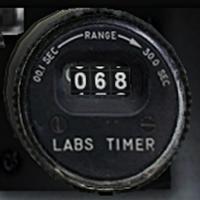
View File A-4 LABScounter Mod This mod converts the currently not working LABS counter into a Distance to Waypoint counter for the A-4C, E and F . Instructions are included in the zip-file. MJ Edit Jan. 2016 : screenshot picture taken from the A-4C_A SFP1 Malvinas/Flaklands Mod by Ariell Submitter Crusader Submitted 06/29/2006 Category Jet Cockpits
-
559 downloads
This mod converts the currently not working LABS counter into a Distance to Waypoint counter for the A-4C, E and F . Instructions are included in the zip-file. MJ Edit Jan. 2016 : screenshot picture taken from the A-4C_A SFP1 Malvinas/Flaklands Mod by Ariell -
http://forum.combatace.com/index.php?showtopic=11764 :)
-
add StaticMission=TRUE to the [GroundMissionXXX] block in the mission file just a WAG :)
-
you see Bibbo, just cool paint doesnt make it stealthy
-
hehe, we did the FAC thingo in Multiplayer a couple of months ago :) one guy was marking the targets, the other bombed it, after the primary target was gone, we targeted the AAA of a nearby airfield.....
-
http://forum.combatace.com/index.php?showtopic=11764
-
If I fly soviet aircraft I get metric values automatically , apparently it's controlled by the aircraft nation . As Capun said, the shown values can be changed in the options menu
-
Simmer, after unpacking the downloaded file for the F PF PFM pits you should have a sub-folder called "[1919]Cockpits_MiG_21_F_PF_PFM_V1.0" , it contains a Installation.txt and two exe files : SFP1.exe WOV.exe Installation.txt : MiG-21 F/PFM/PF Cockpits for SFP1 and WOV ----------------------------------------- BY: MAGO & BADGER the BAD ----------------------------------------- INSTALLATION ----------------------------------------- Back up your MiG-21(F/PFM/PFv).ini and MIG-21(F/PFM/PFv)_DATA.INI files. Extract the files from SFP1.exe (self extracting rar file) to your main Strike Fighters directory, that’s it. For Wings over Vietnam extract first SFP1.exe and then WOV.exe. ################################# Do as the readme says, if you want the MiG pits in WOV : 1. run the SFP1.exe, pointing it to your MAIN WOV folder 2. run the WOV.exe, pointing it to your MAIN WOV folder if it asks to overwrite files, let it do for the MF pit, after unzipping the file you have a subfolder with 2 exe files : Cabina.exe WOV.exe same procedure as with the F PF PFM pits 1. run the Cabina.exe (again pointing it to your MAIN WOV folder) 2. run the WOV.exe (as above)
-
MiG-21 cockpits by Badger the Bad and Mago F PFV PFM MF PF and SM pits too
-
ahh OK, yep, same thing here
-
flew an A-7B in WOV SP4, no probs with changing Sqd. insignia ...
-
In your main WOV folder, there's a folder called "Backup", with sub-folders ....good chanche that the stuff got relocated there, that's how it worked with previous patches, not sure if SP4 does it the same way.
-
in the keyboard commands menu, you can assign a button to switch between 3 settings of the HUD info (ALT+H is a good choice for the button) the 3 settings are 1. normal as with SP32, with left and right lower corner flight and enemy info 2. as above but with FPS counter on the upper screen edge ,center 3. ALL info removed (no more HUD data ini editing )
-
[internalFuelGauge] Type=INETERNAL_FUEL_QUANTITY_INDICATOR NodeName=needle_fuel01 MovementType=ROTATION_Z ValueUnit=LB Set[01].Position=170.0 <------position of the needle in degree, you have to finf out where's the needles "0" point, that is where it is build so you can get the right +- degrees Set[01].Value=0.0 <-- --- LB, Set[02].Position=-170.0 Set[02].Value=9560.0 Data INI says: [FuelCell] SystemType=FUEL_TANK FuelTankID=1 MaxFuelAmount=2762.00 <<pounds? liters? gallons? <--- in the data ini all values are metrical, fuel is in kilograms to fix the gauge, use Set[01].Position=0.0 <-- Set[01].Value=0.0 <-- and temporarily deactivate set2 //Set[02].Position=-170.0 //Set[02].Value=9560.0 fly, and take a screenshot then, from the now visible "0" position of the fuel needle get the position of the full and empty marks on the gauge and put them in the ini for the positions, Set[01].Position= is the empty mark for the value's convert the max. fuel amount (the 2762 or whatever) into pounds and put it in as Set[02].Value= xxxxx
-
you can try to tie the red smoke to an invisible object, wich can placed in missions like other groundobjects, even with time delay .... or use a visible object like an infantry squad or the shot down pilot, make a new version of it which has the smoke MovementEmitterName=RedWilliePeteGroundExplosion (or GreenWilliePeteGroundExplosion/ YellowWilliePeteGroundExplosion) MovementEmitterPosition=0.0,-3.07,0.50 <---- to get some offset for the smoke from the actual object uhmm...just occured to me that this would only work with moving objects.....hmmm it could be done with a stationary ground object (perhaps invisible) which has to be added to the terrain data and types ini, but it will be always there, stationary buildings have an effect like this one from the generator building : Effect=SmokeStackEffect EffectOffset=6.21,3.77,16.25 well, just some ideas
-