

Wrench
-
Posts
28,336 -
Joined
-
Last visited
-
Days Won
189
Content Type
Profiles
Forums
Gallery
Downloads
Store
Everything posted by Wrench
-
Kiwis inbound... (yes, the new model)
-
yes, Veltro's was removed some time ago (both A & B versions) well, with any luck, perhaps Veltro can be talked into redoing it. I put waaaaaaaaaaaaaaaaaaaaaaaaaaaaaaaaaaaaaaaaaaaaaaaaaaaay too much time into the nose arts alone to let it slip away
-
Doing the best I can Zur!! (with a lot of help from my Mod Mafia bros) I just hope more modelers start doing (or re-doing) stuff ... we need like 300 aircraft replaced by freeware versions
-
CAS missions bug with PTO terrains
Wrench replied to Ice Man's topic in Mission/Campaign Building Discussion
i'll bet money you have ships that are set in the GroundObjectRole= as TANK -
View File SF2 Canadair Sabre Mk.6, RCAF and AMI Canadair Sabre Mk.6 Pack, RCAF/AMI = For SF2, Any & All (Full-5 Merged Reccomended) = - version 2.0, updated 2/13/2016 - This package contains new or rebuilt Canadair Mk.6 Sabres, as used by the RCAF and Italian AMI in the mid-late 50s and 60s. Contained within are skin/decals for the following squadrons: RCAF: 442 Squadron (new) 444 Squadron (new skin rebuild, based on Tim Canada work) AMI: 2 Aerobrigata 4 Aerobrigata (new skin rebuilds, based off spitwulf's originals) and a "Generic" Euro camo (called, oddly enough "Euro" skin for any other NATO/European users (except South Africa). All the included skins are in the Euro camo pattern. New skins for all were created using ravenclaw's superb templates. All skins are in jpg format. Almost all markings are decals, excepting special vert fin/rudder RCAF unit IDs. Decal randomization is TRUE for all skins. New DDS damage textures are included. A new camo drop tank is supplied, but all rockets, bombs, etc can be found in the GunnyPak. The sounds included are the same ones as used on the RAF and RAAF Sabre Pak, recently released. An all new, SF2-compliant FM was created for these aircraft; it flys like it should! A new userlist ini is also included. Sharp eyes will note that "WGermany" is =NOT= included in the Userlist; the BLW aircraft were excellently handled by the GMG Group, and are downloadable here at CA. This one is slightly diferentiated; when in-game, you'll see "Canadair Sabre Mk.6" in the aircraft drop-down selection window As always, fairly easy to follow, yet detailed install instructions are included. Please READ them! Also, the "Notes" section for a more detailed change/correction list. The original readme from my SF/Wo* release is included, just for fun. Tim "Canada" Elliot's readme for the 414 skin is also included, as is one of Spitwulf's for the AMI skins. Happy Landings! Wrench Kevin Stein Changes for Version 2: updated hit boxes new "1" skin map, w/o A-G Panel new "CL-13 bits" (new for this model) Submitter Wrench Submitted 10/29/2012 Category F-86
-
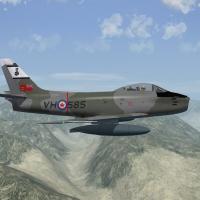
493 downloads
Canadair Sabre Mk.6 Pack, RCAF/AMI = For SF2, Any & All (Full-5 Merged Reccomended) = - version 2.0, updated 2/13/2016 - This package contains new or rebuilt Canadair Mk.6 Sabres, as used by the RCAF and Italian AMI in the mid-late 50s and 60s. Contained within are skin/decals for the following squadrons: RCAF: 442 Squadron (new) 444 Squadron (new skin rebuild, based on Tim Canada work) AMI: 2 Aerobrigata 4 Aerobrigata (new skin rebuilds, based off spitwulf's originals) and a "Generic" Euro camo (called, oddly enough "Euro" skin for any other NATO/European users (except South Africa). All the included skins are in the Euro camo pattern. New skins for all were created using ravenclaw's superb templates. All skins are in jpg format. Almost all markings are decals, excepting special vert fin/rudder RCAF unit IDs. Decal randomization is TRUE for all skins. New DDS damage textures are included. A new camo drop tank is supplied, but all rockets, bombs, etc can be found in the GunnyPak. The sounds included are the same ones as used on the RAF and RAAF Sabre Pak, recently released. An all new, SF2-compliant FM was created for these aircraft; it flys like it should! A new userlist ini is also included. Sharp eyes will note that "WGermany" is =NOT= included in the Userlist; the BLW aircraft were excellently handled by the GMG Group, and are downloadable here at CA. This one is slightly diferentiated; when in-game, you'll see "Canadair Sabre Mk.6" in the aircraft drop-down selection window As always, fairly easy to follow, yet detailed install instructions are included. Please READ them! Also, the "Notes" section for a more detailed change/correction list. The original readme from my SF/Wo* release is included, just for fun. Tim "Canada" Elliot's readme for the 414 skin is also included, as is one of Spitwulf's for the AMI skins. Happy Landings! Wrench Kevin Stein Changes for Version 2: updated hit boxes new "1" skin map, w/o A-G Panel new "CL-13 bits" (new for this model) -
didn't one of the patches a few year back have a limiter built in??? Cause I'm at July 2012, and can see 120+ on debug mod but truthfully, I think it's the ATI Bug hath returned
-
see post #3 ...prolly ain't gonna happen be easier to do cockpit ini edits, or simply don't look in that corner
-
you'll need access to the cockpit lod, a hex editor to locate the exact mesh name, and the cockpit ini to use the 'move / remove mesh trick' and since all the stock lods are locked away....
-
Souli´s T-33A & RT-33A Repaint World
Wrench replied to Soulfreak's topic in Mods & Skinning Discussion
WHAT!!!???? I thought I'd gotten EVERYTHING!! well, hell!!! upload them puppies!! -
with the 3W extractor, go into the FLightData.cat, and extract the HUDData.ini. Place it in the /FLight folder do this to the top section: [Debug] //DisplayDebug=FALSE DisplayDebug=TRUE that'll turn on the de-bug mode, and it'll show the name of the 'nearest target area' and the x/y corrdinates (not that that is that important) You'll also see a white X, that will give the offset from the 0/0 of the taget area (but again not that importnat) it'll look somewhat like the screenie below. you can turn OFF the debug by hitting Alt/D twice. 3 times will bring the info box back to the lower left corner. when done, you can reopen the HUDData.ini, and change it back to FALSE
-
them tanks are very cool Stary! --- since Russo has been showing off some Luft '46 burds ... thought that since we have a nice NEW MODEL, that my old skins could use a revamp ready for the Luftwaffe jets... (hisoticaly, 6 were flying round in the MTO to show off that "yes, we have jets too")
-
geary, activate the debug mode of the HUDData ini, and let me know what airfield that is. It's a 2 minute fix. (that is, of course, if you WANT if fixed!!! ) hard to tell which type of airfield that is from this view; could be anything! out of curiosity, is the targets ini the one I did an update on a few years bacK? or something else?
-
oh, hell!!! that's EPIC!!!! that's the kind of Easter Egg I try to build, and can't ever quite get!! (obviously, there's a SovietTruck on that airfled that shares the exact coordinates for the game generated parked planes. But still, rightously funnny!!)
-
the search function has always been a little flakey ... like, if you don't know exactly what your looking for, you might find nekked wemons (which isn't all THAT bad!!)
-
iirc, ordways POST dates mine; or did i fiddle with his?? been so long ago... like we used to say in the shop; if it work, don't fix it!!
-
Version 2.0 now up!!! Lots of subtle changes and that sorta thing
-
main screen ---> Options ----> Graphics you'll see the selections at the bottom right center of the screen
-
tha's weird...eveything is there, including the lod
-
@ Wrench, TOD file question for you sir.
Wrench replied to Icarus999's topic in Mods & Skinning Discussion
I should ammend what I posted, with the caveat that "I did't follow the roadway's in the tile screenie above", but you get my drift! (but did on the finished tile -- as one can see on the Eritrea map, where that tile is used - sea2city50) -
Keep safe in them winds and waters!! the ini and folder looks ok.... is the LOD in the cockpit folder??? (been a while since I used Ordway's pit)
-
@ Wrench, TOD file question for you sir.
Wrench replied to Icarus999's topic in Mods & Skinning Discussion
unfortunately, there is no tutorial ... can only be done the 3W TE... and follow the streets, to get "the grid" expect to spend 1 + hour per tile (cities are the worst) the screenies should show you the steps, pretty much. after opening 'texture map list', selcet the tile and go from there. it's the 'Terrain Object' box thingy in the lower right of pic 2 black objects buildings, white are trees. -
Souli´s T-33A & RT-33A Repaint World
Wrench replied to Soulfreak's topic in Mods & Skinning Discussion
ain't it nice having a decent, modern model with NO decal bleeds, and all the other DX10 eye candy??? Enrico did some fantastic work on these!!! -
The new Canadair Sabre 4 and the Mig 15bis NK....
Wrench replied to Heck's topic in General Discussion
the new cockpit will be in the F, but can be retrofitted to the E quite easily -
one way to elimiate seeing it would be the re-limit the max negative pitch in the cockpit ini (note: shown below NOT from the Turkey, just an example) MaxPitch=90 MinPitchFront=-45 MinPitchRear=-35 worth a shot, at any rate!!