


MigBuster
-
Posts
9,147 -
Joined
-
Last visited
-
Days Won
27
Content Type
Profiles
Forums
Gallery
Downloads
Store
Everything posted by MigBuster
-
KC-130F in SF1(V) post October 2008 patch
MigBuster replied to comrpnt's topic in Mods/Skinning Discussion
its using the stock C-130A models it looks like - so the hoses are part of the "bDouglas" model at a guess which should be in your weapons folder - and assume they dont have service dates?. if there is a bDouglas.ini file make sure the filename for the lod file is the correct case also check your weapondata.ini to see if modeltype is spelt correctly too -
The nukes is easy - find a nuke that works and compare the values - unfortunatley ive never used nukes so cant help there. So something screwed up when you used the the KMD?? not sure what that is. What carrier pack did you download? - I personally would be taking it out of the game and downloading and installing the bits from new again - its a mod or an old ini file from a previous version causing the problem basically.
-
SF/WOV/WOE/WOI are whats called the first generation of games - they probably wont be supported much longer by 3rd wire - so dont bother with them unless you decide to get WOV for YAP2. Basically the SF2 series are the new updated versions for Vista - they had to be redesigned to get round the UAC - they are just as rock solid and have new features, better avionics, better 3d pit models and new Aircraft. There are fewer mods because they only came out this year so most things will be put into them only now.
-
Have you patched your game since installing the mods?
-
Anti-ship mission using the Exocet missile
MigBuster replied to Ice Man's topic in General Discussion
At a guess - target the ship with the E key - then press fire -
or see section 1 here http://forum.combatace.com/index.php?s=&am...st&p=312185
-
Some people have all the luck - not only goes to the moon but gets to punch one of those ***** - best thing ive seen today!!
-
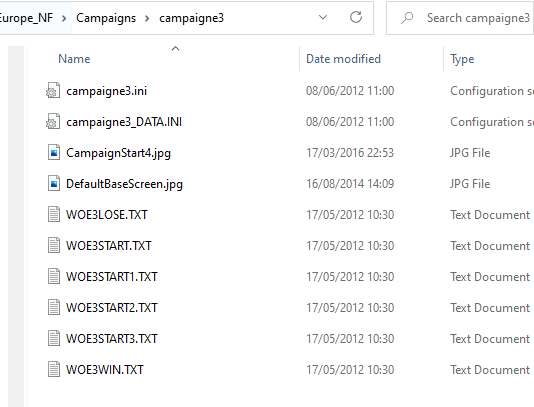
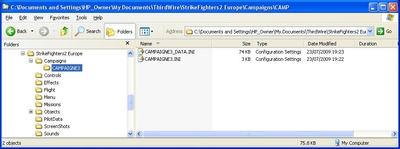
PLEASE NOTE: A simple Campaign Customiser DLC add on is now available to purchase from Thirdwires homepage. It won't give you the same flexibility as manual editing, but it will allow you to easily fly any jet in any campaign with no ini editing. If you have SF2 merged then it will also allow you to fly Merc campaigns in any setting. This is for SF2 games from patched to Sep 2011 or later. Adding Aircraft to Campaigns in SF2 Well when I say 'add' we are going to use the simple method of changing an existing squadron to use another Jet. IMPORTANT: If you alter the ini files and you are in the middle of playing that campaign - you will need to delete the campaign in game and start again - ONLY make the changes when you have finished playing the particular campaign. 1. New to SF2 2. Adding an Aircraft to a campaign 3. Upgrade Types 4. Re-basing a squadron 1. New to SF2 It seems Weapons loadouts for player squadrons do not have to be included in SF2 – that’s these bits: Supply[001].WeaponType=Shafrir1 Supply[001].Quantity=60 Supply[002].WeaponType=Matra530 Etc……… From 2010: If you do include them and want to limit the squadron supply to them set this line to TRUE in the campaigns data.ini [CampaignData] ..... LimitedSupplyList=TRUE ..... 2. Adding an Aircraft to a campaign 2.1 Extract the TWO campaign files you need: CAMPAIGNXX.ini CAMPAIGNXX_data.ini If you don’t know how to do this see my guide “Extracting Files from SF2 series “cat” files”– You need to extract the files from MissionDataxxx.cat which is in the "Flight" folder of the core game files. If you have a merged install then there will be more than one MissionData.cat file MissionData001.cat = SF2 MissionData002.cat = SF2V MissionData003.cat = SF2E MissionData004.cat = SF2I To see which campaign you have, open up CAMPAIGNXX.ini in notepad and it will be shown at the top. 2.2 Create a folder called Campaigns in your mod folders and put the files into a folder with the campaigns name. Note: See section 1 of my guide "Converting old planes to work in SF2" if you dont know where the modding folders are. For example – here I have extracted CAMPAIGNE3.ini and CAMPAIGNE3_Data.ini and put them into ......\Campaigns\CAMPAIGNE3\: 2.3 Now I open up CAMPAIGNE3_Data.ini and scroll down to the AirUnits section and pick a squadron I can change. I’m going to replace an F-4C with an add on F-106A Delta Dart with the minimum changes required: (note: this still applies to any plane) [AirUnit012] <--------------------------Note down this number AircraftType=F-4C <-----------------------change this Squadron=511TFS ForceID=1 Nation=USAF <------------------------------change nation if required StartDate=8/24/1968 DefaultTexture=USAFGrey1 <-----------change this ;BaseArea=RAF Lakenheath, UK BaseArea=Wiesbaden-Erbenheim Airbase BaseMoveChance=25 RandomChance=100 MaxAircraft=16 StartAircraft=16 MaxPilots=16 StartPilots=16 Experience=100 Morale=100 Supply=50 MissionChance[sWEEP]=25 <-------------change MissionChance[CAP]=50 <----change MissionChance[iNTERCEPT]=50 <----change MissionChance[ESCORT]=25 <----change MissionChance[STKE]=25 <----change MissionChance[CAS]=50 <-----change MissionChance[sEAD]=25 <----change MissionChance[ARMED_RECON]=25 <----change MissionChance[ANTI_SHIP]=0 <----change MissionChance[RECON]=10 <----change UpgradeType=FIXED <---------See below Upgrade[01].Date=08/31/1968 Upgrade[01].Type=F-4C_67 Upgrade[01].Texture=USAFCamo1 Okay - so I make the changes (In Bold) and end up with this: [AirUnit012] AircraftType=F-106A <----------must be exact name of your aircrafts folder Squadron=511TFS ForceID=1 Nation=USAF StartDate=8/24/1968 DefaultTexture=48 <---------- must be same name as skins folder ;BaseArea=RAF Lakenheath, UK BaseArea=Wiesbaden-Erbenheim Airbase BaseMoveChance=25 RandomChance=100 MaxAircraft=16 StartAircraft=16 MaxPilots=16 StartPilots=16 Experience=100 Morale=100 Supply=50 MissionChance[sWEEP]=10 MissionChance[CAP]=40 MissionChance[iNTERCEPT]=80 MissionChance[ESCORT]=0 MissionChance[STK]=0 MissionChance[CAS]=0 MissionChance[sEAD]=0 MissionChance[ARMED_RECON]=0 MissionChance[ANTI_SHIP]=0 MissionChance[RECON]=10 UpgradeType=NEVER Now add the line StartNumber=1 to the above unit for example: [AirUnit012] AircraftType=F-106A <----------must be exact name of your aircrafts folder Squadron=511TFS ForceID=1 Nation=USAF StartNumber=1 ..... This line forces the campaign to start at the first line of numbers.lst - if you do not put this in the campaign game engine often will not assign numbers and numbered decals on your jet. This is not required for stock a/c. Now Save and close that Note: In case you are wondering the MissionChance[] values are always a number between 0 and 100 - as in you have a greater chance of getting that mission type the closer you are to 100 - which is why [iNTERCEPT] is now 80 because thats the F-106s primary role. 2.4 Open up CAMPAIGNE3.ini I have altered AirUnit012 above – so now we scroll down and find the unit with a unit ID of 12 [uSAFUnit012] UnitName=92nd TFS Skulls ForceID=1 UnitID=12 StartDate=08/21/1968 DescFile=woe3Start.txt StartText=woe3Start2.txt AircraftType=F-4C So we have the right unit - we then change this: [uSAFUnit012] UnitName=92nd TFS Skulls ForceID=1 UnitID=12 StartDate=08/21/1968 DescFile=woe3Start.txt StartText=woe3Start2.txt AircraftType=F-106A That’s it just save - you can now play a campaign (if you did the above correctly ) You can add more squadrons etc – as long as they are numbered in sequence – pretty easy to work it out - but not going into that here. 3. Upgrade types You will see some squadrons have update types you can change - its pretty obvious what they do: UpgradeType=NEVER Jet wont be upgraded UpgradeType=ANY Jet will be upgraded to any type at any time UpgradeType=FIXED Upgrade[01].Date=09/01/1968 Upgrade[01].Type=F-4C_67 Upgrade[01].Texture=USAFCamo1 Jet will be upgraded to an F-4C_67 on the specified date with the specified skin. 4. Rebassing a squadron You can also rebase a squadron if you like using lines like this: Rebase[01].Date=6/1972 Rebase[01].BaseArea=Takhli RTAFB Rebase[02].Date=10/1972 Rebase[02].BaseArea=Udorn RTAFB etc...... have fun
-
- 2
-

-
From the album: MBs Album
-
jeez that side kick at the start!!
-
Do you think UAV's should replace pilots?
MigBuster replied to scouserlad13's topic in Military and General Aviation
UAVs are pretty much remote control planes - Unfortunately against someone who knows something about electronic warfare they would be useless - forget outflying anything if your signals don't get through - whats needed is a totally contained AI unit - like a robot - yes like science fiction - and that is a long way off - particularly in a world short of R&D money :) Andrew Ng at Stanford predicts that the AI grand dream is still possible but its a problem that might not be solved in the next 100 years!!! - whether they will be good enough to replace pilots before then - well u never know - but in most areas of life AI has not replaced humans its turned up to help us and thats defo not what was predicted in the 50s it seems! The sensors to ID targets still dont seem to be good enough - despite what the manus say - a blip on a radar even in 2003 proved to be a disaster not just once - with other near misses. of course its a few years on - but simple issues like sensitive electronics being thrown around - just does not help things that need to be 100% to work properly. -
The less experienced pilots will crash and stall its part of the game - and part of real conflicts too
-
Often caused by another program running in the background - switch off your Anti virus - or better still check for viruses - see whats running at start up too.
-
shame to hear this - not only unmatched but a real F-15 successor in every way. I suppose there are still enough to deter other airforces - and as said im sure the R&D wont be in vain - this could just be the F-102 to the new F-106 (lets hope its manned though hey!)
-
not yet - patience is the key
-
people, i think i just made vietnam look better...
MigBuster replied to orsin's topic in Mods/Skinning Discussion
nice one - any terrain work is most welcome here :) -
Dont know until someone plays it on the actual full version - even then it may not work with some graphics cards as before etc
-
You need to dial in your TACAN - which is a bit more than a few sentences on here im afraid - Firstly you need to go over practise mission 10 - and get familiar with it - this will give you some understanding so you can search some threads at frugals and take it from there really. - you may get lucky and find a tutorial about somewhere.
-
just search some old threads - it was never supposed to work with AF though so how well the latest version runs with it i cant say will say that AF is rock solid for stability at least :)
-
Some Fairford pics from today
MigBuster replied to MigBuster's topic in Military and General Aviation
Most of the crowd were defo there to see the Vulcan take off and do its stuff - the runway edge was packed with people trying to get a look -
Excellent thanks The Navy Helicopter salute was amazing - followed by the Harriers flying just over the top of them!!
-
Some Fairford pics from today
MigBuster replied to MigBuster's topic in Military and General Aviation
Yeah that paint scheme looks great i must admit - put on a good show! Just resize the photos to a lower resolution - say 800x400 for example - you need a program that can do it though. If not install gimp, open up the photo and go to image->scale image then "save as" .jpg - (as in don't save the original) - even better make a copy of the original then resize it! -
Not sure the England cricket teams been much good since about ...um Empire days - occasionally there is a Flintoff or Botham - but its barely a 3rd national sport over here anyway. What is the Aussies main sport anyway Rugby?
-
40th aniversary of those intrepid pioneers - genuine heroes!! interesting that the new spaceships will be more rocket and lander once the shuttles scrapped - apparently they got a lot of things right it has been said!!
-
Was an RAF GR4 it looks like http://news.bbc.co.uk/1/hi/world/south_asia/8158538.stm