


Wrench
-
Posts
28,322 -
Joined
-
Last visited
-
Days Won
188
Content Type
Profiles
Forums
Gallery
Downloads
Store
Everything posted by Wrench
-
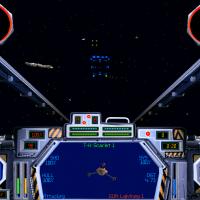
View File XvT/BoP - Imperial Operation: Heading to the Unknown XvT/BoP - Imperial Operation: Heading to the Unknown For XvT =WITH= BoP addon (original CD) or the newer GoG version Grand Admiral Thrawn, after crushing the traitorous Admiral Zaarin, and his defecting officers, was ordered by the Emperor himself to enter the Gammanck Regions at the far eastern arm of the galaxy, far from Coruscant, at the edge of the Unknown Region. Grand Admiral Thrawn assembled his fleet at the Rneekii systems, because Rneekiis had been moving their people, leaving the Outer Rim Territories to fortify themselves far from Imperial interference, and because they boardered the Gammanck, no one knows better the entrance than them. Sometime before the "Enemies of the Empire", the Emperor sent Admiral Bulcon and a small force to bring Imperial control to this Unknown Gammanck Region, but he never reported back. Grand Admiral Thrawn was sent to rescue Bulcon and his fleet if he is yet alive. As always, =PLEASE= read the install instructions. Also, the original builders and my notes at the bottom! Get to your ships Pilots! Wrench Kevin Stein original mission set by Mateus Soares Borges, circa 1990-something! Submitter Wrench Submitted 10/25/2015 Category Star Wars Games
-
14 downloads
XvT/BoP - Imperial Operation: Heading to the Unknown For XvT =WITH= BoP addon (original CD) or the newer GoG version Grand Admiral Thrawn, after crushing the traitorous Admiral Zaarin, and his defecting officers, was ordered by the Emperor himself to enter the Gammanck Regions at the far eastern arm of the galaxy, far from Coruscant, at the edge of the Unknown Region. Grand Admiral Thrawn assembled his fleet at the Rneekii systems, because Rneekiis had been moving their people, leaving the Outer Rim Territories to fortify themselves far from Imperial interference, and because they boardered the Gammanck, no one knows better the entrance than them. Sometime before the "Enemies of the Empire", the Emperor sent Admiral Bulcon and a small force to bring Imperial control to this Unknown Gammanck Region, but he never reported back. Grand Admiral Thrawn was sent to rescue Bulcon and his fleet if he is yet alive. As always, =PLEASE= read the install instructions. Also, the original builders and my notes at the bottom! Get to your ships Pilots! Wrench Kevin Stein original mission set by Mateus Soares Borges, circa 1990-something! -
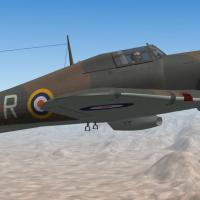 I fixed the "file name title". I didn't want people to think they'd be downloading YOU!!! :)
-
DA: to better SEE what's on the aircraft, try taking the screenshots at Noon, on a cloudless day. All these are pretty murky. And turn your Shadows on in the Options/Gameplay. You'll be surprised as to what turns up Do I see the white heat reflective on the nose of CaANG bird?
-
Klaxianti Dai-Shan/Shin Alien Aggressor Pack
Wrench replied to Viper63a's topic in File Announcements
not by model, I just fiddled with it. But thanks!! :) -
that's totally up to you
-
Indeed, it would be good to know exactly which aircraft the complaint is pointed to.
-
because the ship is the primary target, it spawns, irrc, at mission start. you're confusing GROUND objects with TERRAIN objects. Terrain objects are things like the runways, hangars, various building, that always exist on a terrain. Ground Objects are those items that in are in the GroundObject folder (ships, tanks, AAA, trucks, etc) if you place objects via their generic tags, they tend to work, and appear with the correct items In this example below, a fairly generic Soviet-style SAM battery, (more or less star shaped -- and many later versions (SA-3, SA-5, SA-6) don't actually use that style) you'll see I've given individual launchers the 1959 start date. this reflects the introduction of the SA-2. this was done as the EWR and AAA placements have a Year=0, so they'll always be there
-
Klaxianti Dai-Shan/Shin Alien Aggressor Pack
Wrench replied to Viper63a's topic in File Announcements
if you remove it from the folder, it'll just pull the one from the cat file. OTH, as blaze said, painting the R/G/B channels of the tga to match the body is a very easy thing you can try removing the canopy meshes Their node names are: port_canopy starboard_canopy add these new components in the >AircraftData< section: Component[010]=Remove1 Component[011]=Remove2 [Remove1] ParentComponentName=Fuselage ModelNodeName=Port_Canopy DestroyedNodeName=Port_Canopy DetachWhenDestroyed=TRUE HasAeroCoefficients=FALSE [Remove2] ParentComponentName=Fuselage ModelNodeName=Starboard_Canopy DestroyedNodeName=Starboard_Canopy DetachWhenDestroyed=TRUE HasAeroCoefficients=FALSE and se how that works -
um, aren't the TOS Enterprise and D-7 available in FastCargo's "Super Secret Mod"????? I really can't remember the name of it...
-
Klaxianti Dai-Shan/Shin Alien Aggressor Pack
Wrench replied to Viper63a's topic in File Announcements
I love it!!! -
OUTSTANDING!!! I actually did the 14 PRS when I made the Mk.XI for SF2. I even did PA-944!!! THIS is the sort of thing we modder live for!!
-
Some doubts from a newbie in modding
Wrench replied to Boresight's topic in Mods & Skinning Discussion
oh, thank YOU! You have no idea just how much I needed that laugh!! -
great pics! did you happen to notice HOW thick the armored box is for the bridge on the carriers?? I've been on the Hornet in Alameda, and was quite surprised at the level of armor proctection (at least 12 inches!)
-
that Shrike is REALLY nice!!!
-
Some doubts from a newbie in modding
Wrench replied to Boresight's topic in Mods & Skinning Discussion
AFAIK, there's no need to fiddle with the weapons, pilots, sounds, etc (unless you're replacing an older weapons with a newer version, like some of the things Ravenclaw has been creating). In that case, just rename the folder or create a "z-storage" sub-folder within the /Weapons folder, and move the older ones there. iirc, all pilot figures have "specific" names (RedAir1, Pilot36, USAFMod, etc) -
considering the price of MAX 2009.... then there's the learning curve....mapping and unwrapping the model to make the skin...the ini work, making sure all the shapes/meshes are correct; not open meshes to create shadow issues, bounding and hit boxes correct, damage modeling, distance lods. Then there the ini work; flight modeling, and on and on and on. I can't wait to start learning it! (no, really!) I have Max 2009...and at this point all I can do is view the 2 dozen plus models I have...
-
Some doubts from a newbie in modding
Wrench replied to Boresight's topic in Mods & Skinning Discussion
read this: http://combatace.com/topic/34386-adding-a-3rd-party-aircraft-where-a-stock-one-already-exists/ -
yes, there is a limit. Probabally around 999 individual objects. I would guess, that's a total number of individual items Remember, too, NOTHING spawns outside the 50km "bubble of reality" that surrounds the Player Aircraft . each and every object (SAM, EWR, SAM Radar, AAA gun, AAA engagement radars, etc) HAS TO BE PLACED VIA LOCATIONS IN THE TERRAINS _TARGETS.INI. They will also need corresponding entries in the terrain's _Types.ini trying to place with the mission editor is a waste of time. As all SAMs are networked (since the 08 patch for SF1), you need to place the missile launchers, search radars and missile engagement radars within the SAM battery. Even when a specific type is know to be at certain location, you cannot call that launcher and radar combo and "hand place" them in the targets ini. Due to faults in the Game Engine , this causes them to go into stealth mode. They will not show up on RWRs, either vector or TEWS. They will, however, still "see" you and blow the crap out you. Therefore, you are stuck with using the generic tags (SAMLaucher, SAMRadar, EWR, AAA, etc) and hope the hell the data ini has the correct service dates, export dates, and the userlist has the correct country users. All you need to do, is look at how I've done it several thousand times on various terrains
-
Some doubts from a newbie in modding
Wrench replied to Boresight's topic in Mods & Skinning Discussion
no. read what yakarov just wrote if the folder name does not match the name of the main ini, the object is now invisible to the game engine. the same is true by renaming the main ini, but not the folder. -
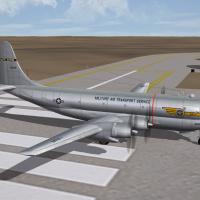
View File SF2 Boeing C-97 Cargo & HC-97 ARS Pak SF2 Boeing C-97 Cargo & HC-97 ARS Pak 10/16/2015 = For SF2 (Full 4 Merged or Full 5 RECCOMENDED) = This package contains 2 complete aircraft and skin/decal sets for cargo-carrying C-97s (of all marks, as their differences are negligible), and a version used by Air Rescue Service (later ARRS) Included are: C-97G (can be used for any cargo variant -A,B,C,D,E,F,G) MATS (generic) MAC (115th ATS (H), 146th ATW, Caifornia ANG) HC-97G: 303rd Aerospace Rescue & Recovery Squadron The SF2 date switch is used on the skins for the C-97, switching from MATS to MAC in 1961. Serial numbers, while generic in nature, ARE for the model depicted (KC-97G). 18 serial decals are included. Decal randomization is true. All markings are decals (excepting the HC-97's wing tips). Damage texture is in DDS. A template is included in a seperate folder, but was only partly redone for those areas I need to repaint. Skinners are encouraged to improve and expand on it. In the C-97's decals folder, you'll also find the psd to create the "nose lozenge" that carried the last 4 digits of the serial number. This style is/was used on a great number of other MATS/MAC aircraft. Crew entry door is operated by the Standard Animation Keystroke �, Shift/0 (zero). The rear cargo door & Loading ramps are operated by the standard bomb bay keystroke (Control/o (oh). As always, fairly easy to follow, detailed install instructions are included. So, please read them .... Happy Landings Wrench Kevin Stein *with special thanks to Veltro2k for building us a cargo-bird lod* ======== =Updated 5/25/2018 new, corrected hit boxes adding missing components, reassigned systems to 'new' component Submitter Wrench Submitted 10/19/2015 Category Other
-
440 downloads
SF2 Boeing C-97 Cargo & HC-97 ARS Pak 10/16/2015 = For SF2 (Full 4 Merged or Full 5 RECCOMENDED) = This package contains 2 complete aircraft and skin/decal sets for cargo-carrying C-97s (of all marks, as their differences are negligible), and a version used by Air Rescue Service (later ARRS) Included are: C-97G (can be used for any cargo variant -A,B,C,D,E,F,G) MATS (generic) MAC (115th ATS (H), 146th ATW, Caifornia ANG) HC-97G: 303rd Aerospace Rescue & Recovery Squadron The SF2 date switch is used on the skins for the C-97, switching from MATS to MAC in 1961. Serial numbers, while generic in nature, ARE for the model depicted (KC-97G). 18 serial decals are included. Decal randomization is true. All markings are decals (excepting the HC-97's wing tips). Damage texture is in DDS. A template is included in a seperate folder, but was only partly redone for those areas I need to repaint. Skinners are encouraged to improve and expand on it. In the C-97's decals folder, you'll also find the psd to create the "nose lozenge" that carried the last 4 digits of the serial number. This style is/was used on a great number of other MATS/MAC aircraft. Crew entry door is operated by the Standard Animation Keystroke �, Shift/0 (zero). The rear cargo door & Loading ramps are operated by the standard bomb bay keystroke (Control/o (oh). As always, fairly easy to follow, detailed install instructions are included. So, please read them .... Happy Landings Wrench Kevin Stein *with special thanks to Veltro2k for building us a cargo-bird lod* ======== =Updated 5/25/2018 new, corrected hit boxes adding missing components, reassigned systems to 'new' component -
Russ, you know more than a mouthful is wasted....
-
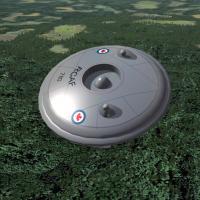
View File SF2 Avro VZ-9 Aerocar Pak SF2 Avro VZ-9 Aerocar Pak 10/15/2015 = For SF2 (Any & All, Full 4/5 Merged Reccomended) A "What If" aircraft for you enjoyment. ** Can be used in any install that has access to the A-4B & A-4E Skyhawks hence the need for either a Full 4 or Full 5 Merged Install, as both these cockpits are refrenced for the 2 aircraft. Also, serial number decals from the CF-104 and F-105D are used. You must have these aircraft to gain access to the various bits.** Some reworking of Simon Porter's Avro Aerocar from 2005, brings it (pretty much!) up to SF2 standards. Be advised, however, there are still a few small issues; most of which stem from the fact the aircraft is one continious mesh, with no sub meshes. This is the main reason that most markings are painted on. See "Change Log" for details. This pack contains 2 aircraft, and is based on the assumption (oh! that word!) the major bugs had been worked out, and it entered service with the RCAF and USAF for use as a battlefield scout and light attack aircraft. Aerocar Mk.I (VZ-9A) with 2 skins (1959 start date): RCAF USAF both in NM finish Aerocar Mk.III (VZ-9C) with 4 skins (1965 start date): RCAF USAF (both early, in NM) RCAF_L (late, overall dark green ala CF-104) USAFCamo (USAF Camo SEA T.O. 1-1-4) The 2 late skins the C use the SF2 "date switch" and will turn on in 1966 (USAFCamo) and 1973 (RCAF_L). All stock items are used, from cockpits, pilots, weapons, sounds, decal and whatnots. The other add-on items (fake pilot, radar pod, pylons) are included. While skins remain in bmp format, damage textures are in DDS. When in-game, you'll see on the Aircraft Selection Drop-down... VZ-9A Aerocar (Mk.I) and VZ-9C Aerocar (Mk.III) As always, fairly easy to follow, detailed install instructions are included. So, please read them. Simon Porter's original readme is included for historical purposes. Happy Landings Wrench Kevin Stein Submitter Wrench Submitted 10/19/2015 Category What If Hangar
-
145 downloads
SF2 Avro VZ-9 Aerocar Pak 10/15/2015 = For SF2 (Any & All, Full 4/5 Merged Reccomended) A "What If" aircraft for you enjoyment. ** Can be used in any install that has access to the A-4B & A-4E Skyhawks hence the need for either a Full 4 or Full 5 Merged Install, as both these cockpits are refrenced for the 2 aircraft. Also, serial number decals from the CF-104 and F-105D are used. You must have these aircraft to gain access to the various bits.** Some reworking of Simon Porter's Avro Aerocar from 2005, brings it (pretty much!) up to SF2 standards. Be advised, however, there are still a few small issues; most of which stem from the fact the aircraft is one continious mesh, with no sub meshes. This is the main reason that most markings are painted on. See "Change Log" for details. This pack contains 2 aircraft, and is based on the assumption (oh! that word!) the major bugs had been worked out, and it entered service with the RCAF and USAF for use as a battlefield scout and light attack aircraft. Aerocar Mk.I (VZ-9A) with 2 skins (1959 start date): RCAF USAF both in NM finish Aerocar Mk.III (VZ-9C) with 4 skins (1965 start date): RCAF USAF (both early, in NM) RCAF_L (late, overall dark green ala CF-104) USAFCamo (USAF Camo SEA T.O. 1-1-4) The 2 late skins the C use the SF2 "date switch" and will turn on in 1966 (USAFCamo) and 1973 (RCAF_L). All stock items are used, from cockpits, pilots, weapons, sounds, decal and whatnots. The other add-on items (fake pilot, radar pod, pylons) are included. While skins remain in bmp format, damage textures are in DDS. When in-game, you'll see on the Aircraft Selection Drop-down... VZ-9A Aerocar (Mk.I) and VZ-9C Aerocar (Mk.III) As always, fairly easy to follow, detailed install instructions are included. So, please read them. Simon Porter's original readme is included for historical purposes. Happy Landings Wrench Kevin Stein
