


Wrench
-
Posts
28,327 -
Joined
-
Last visited
-
Days Won
188
Content Type
Profiles
Forums
Gallery
Downloads
Store
Everything posted by Wrench
-
good one!!
-
there is NO compatibility. like putting a Ford distributor into a Nissan OTH, if the 3ds Max files (aka, source files) were available, then it could be rebuilt to SF2 spec. With LOTS of work
-
Agreed!! BoB and HA are classics! and adding Iron(y) Eagle??? hmm.. questionable
-
In other words, you need to BUILD a brand NEW cockpit from scratch, as the source file for the original pit prolly don't exist anymore.
-
you're welcome! and btw, Welcome to CombatAce!!
-
This is most likely your problem. Look around these forums, in the last week there are at least 2 different thread of Avast users having their SF2 game corrupted and destroyed
-
no, those are missing ALL the tiles. If it was a mismatch in the data ini the regular land tiles (not the sea-to-land transitions tgas) would be showing up. Untextured materials in SF2 show as black. Including terrain TFDs. Trust in the Terrain Guru's knowledge!! Veltro, so WHICH terrain is it exactly??? IcelandNA has no "real" tiles, but jpg textures assigned to the terrain lod. If another Iceland, which one (as there's 2, Gerwins and Baltika's (iirc) Could it be GermanyCE, with Stary's multi-season tile set??? Those use jpg tiles. That should be stated in the GermanyCE_Data.ini. A quick look inside will confirm that.
-
isn't that airliner like the one that crashed outside of Cardiff, full of zombies and Matt Damon in World War Z? -------- required screenie some soviet bombers have a very bad day from ADC Delta Darts and their Genie's
-
If my understanding of airfield structure is close, it means... remember the "basic" heading for all 3W runways, and the offsets from the 0/0 point are N/S (0/180). The runway lod should have it's world center set to north/south. [Runway001] Heading=0 Offset=0,0 Length=1200 Width=60 TouchDownHead=0, 518.5 <--- distance from north end of runway TouchDownTail=0, -518.5 <-- distance from south end of runway TakeOffHead=0, 530 <-- player or No1 aircraft take off position, from N end of runway (heading south) TakeOffTail=0, -530 <--- player or No1 aircraft take off positing from S end of runway (heading north) TaxiHead[01].Heading=90 TaxiHead[01].Offset=-40,-580 TaxiHead[02].Heading=90 TaxiHead[02].Offset=-70,-580 TaxiHead[03].Heading=100 TaxiHead[03].Offset=-99.54,-574.79 <<--- these positions for other aircraft in flight, on the taxiways. Minus (-) is south end of runway, Positive numbers are the north end. both the north and south taxiway will always have a westerly (270) direction. It doesn't make any difference in the facing (or compass heading of the runway, as all the offsets and directions are FIXED by the runway's 0/0 point and n/s world center. That's way you can change the heading from 0 to 255 if one wanted to, and all the objects are dragged around from the center point. maybe this diagram will help. The world center of TKs runway are exactly in the MIDDLE of the runway itself, all the "goodies" are off to one side (hence the offsets. one way to really see this, is fly from one the stock runways, that's n/s, with the HUDData.ini set to Debug=TRUE, and you'll see the offsets for the other aircraft in your flight
-
yes, they do. when people mess with things and extracting a NEW, fresh one would be the best course, no?? ---------------- To further enlighten, and illuminate the statements... The highlighted section is the pertinent one, right from the Mystre IVA's data ini [RightInnerWingStation] SystemType=WEAPON_STATION StationID=4 StationGroupID=2 StationType=EXTERNAL AttachmentPosition= 2.07,-0.70,-0.82 AttachmentAngles=0.0,-3.0,0.0 LoadLimit=510.0 AllowedWeaponClass=BOMB,RP,FT AttachmentType=NATO,FRANCE,UK ModelNodeName=inner_pylon_R PylonMass=45.0 PylonDragArea=0.02 FuelTankName=Tank625_Mirage FuelTankNodeName=fuel_tank_R that's the mesh that part of the physical aircraft model (aka, the Lod). OTH, it can be removed with the component hide trick, but that a lot of extra work.
-
yup, missing the tiles what terrain, and what terrain cat does the terrains main ini call for?? (Like below....) [Terrain] TerrainFullName=Eastern Mediterranean DataFile=NAfrica_data.INI TargetFile=NAfrica_targets.INI TargetTypeFile=NAfrica_TYPES.INI MovementFile=NAfrica_movement.INI NationsFile=NAfrica_nations.INI BriefingText=NAfrica_briefing.INI DogfightFile=NAfrica_dogfight.INI DogfightOnly=FALSE LimitedNations=TRUE WaterMap=NAfrica_Water.bmp CatFile=..\Desert\Desert.cat //CatFile=..\GermanyCE\GermanyCE.cat //CatFile=..\VietnamSEA\VietnamSEA.cat <<<--- these here Longitude=22.0 Latitude=32.0
-
delete the data in from the folder. you folks are forgetting that the drop tanks are PART of the aircraft lod ... if you remove their entries from the data ini, that mesh has no idea what it's supposed to do. Therefor, it will ALWAYS appear Leave it alone. Why to you think weapons pylons don't appear when nothing is loaded on them???
-
BEIF, anyone???
-
change transparency decals in Gimp
Wrench replied to slick cowboy's topic in Mods & Skinning Discussion
what I do when making the decals from their base bmp, is set transparency, or actually opacity, in the RGB layers when I cut/paste the lettering in to center them. For solid colors (like the black Buzznumbers or serials on NM), I use 90%. Depending on the base color on camo aircraft, you can vary that from no change (DGNB) to the 90% on say, RAF camos of ww2; depends on the theatre where the skin will be used and how weathered one wants it. The higher the number, the more "clear". The alpha will pick up that change, and "darken" itself to match think of the alpha as a "holdout matte", only allowing certain sections to show through this I just how I do it -
SF2 WW2 FAA Seafire Mk.IIIC Pak by Cocas Aircraft Factory & Co
Wrench replied to Wrench's topic in File Announcements
A minor mistake was made on this mod...I've used the wrong squadron. So, to fix, you should open the SeafireIII_CAF folder, and rename the 887 skin folder to 894 open the (now renamed) 894 skin folder, and open the textureset.ini. Change to read as follows: Name=No. 894 NAS HMS Indefatigable (BPF) save and close the ini Open the Decals ini, and do 'find and replace' for 887 to 894. Save an close Go down to the Decals folder, find the SeafireIII_CAF, and renamed the 884 folder to 894. Everything should work. A corrected version is being uploaded to fix this. For those that have downloaded it already, you can do the edits above, or just drop the new correct pack directly over, after deleting the 884 folder sorry about that!! It was a simple typo!! -
Didn't Dave delete them?? (it's a family site and all) Be nice to have them back!!
-
View File SF2 WW2 FAA Seafire Mk.IIIC Pak by Cocas Aircraft Factory & Co SF2 WW2 FAA Seafire Mk.IIIC Pak by Cocas Aircraft Factory & Co 9/25/2014 -- Something for the WW2 Fleet Air Arm players -- = For SF2, Full-5 Merged (Reccomended/Preferred) = *Note: this is designed for use in a PTO mods folder built from the SF2NA exe, as it has the proper carrier coding.* The package contains a =NEW= Seafire Mk.IIIC as issued to Royal Navy Fleet Air Arm squadrons in WW2. Skin(s) included with the package are: Royal Navy No. 894 NAS, BPF, embarked on HMS Indefatigable in 1945 All markings are decals and Decal Randomization is TRUE. Damage textures are in DDS format. The canopy operates via the Standard Animation Keystroke , Shift/0. Wingfold is operated also with the SAK, Shift/9. Guns also grouped, MGs in Group 1, the cannon in Group 2. Pilot figure, engine sound, and a 'new' drop tank are included, as are "box art" style Hangar and Loading Screens. Guns and bombs are not included, as these are the standard WW2 British types. The template is included for other Texture Artists to use (and to correct any of my mistakes) You'll find it in the folder marked "extras". This template also works on the CAF Spitfire Mk.Vs & Seafire Mk.II as well. When in game, you'll see: Seafire Mk.IIIC (CAF) on the aircraft selection dropdown menu. This will diferentiate =THIS= Seafire from any others you may (or may not) have. As always, fairly easy to follow, yet detailed install instructions are included. So, please read them. Good Hunting! Wrench Kevin Stein -for Cocas Aircraft Factory, Prop Works Division- with extra special thanks to Cocas and RussoUK!! EDIT: new version with corrected squadron number, and all ini corrections uploaded. Those that have download the first version, may want to use this or follow the editing instructions below Submitter Wrench Submitted 09/27/2014 Category Spitfire
-
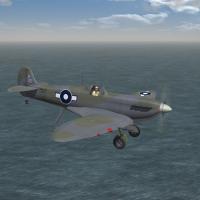
Version 1.1
185 downloads
SF2 WW2 FAA Seafire Mk.IIIC Pak by Cocas Aircraft Factory & Co 9/25/2014 -- Something for the WW2 Fleet Air Arm players -- = For SF2, Full-5 Merged (Reccomended/Preferred) = *Note: this is designed for use in a PTO mods folder built from the SF2NA exe, as it has the proper carrier coding.* The package contains a =NEW= Seafire Mk.IIIC as issued to Royal Navy Fleet Air Arm squadrons in WW2. Skin(s) included with the package are: Royal Navy No. 894 NAS, BPF, embarked on HMS Indefatigable in 1945 All markings are decals and Decal Randomization is TRUE. Damage textures are in DDS format. The canopy operates via the Standard Animation Keystroke , Shift/0. Wingfold is operated also with the SAK, Shift/9. Guns also grouped, MGs in Group 1, the cannon in Group 2. Pilot figure, engine sound, and a 'new' drop tank are included, as are "box art" style Hangar and Loading Screens. Guns and bombs are not included, as these are the standard WW2 British types. The template is included for other Texture Artists to use (and to correct any of my mistakes) You'll find it in the folder marked "extras". This template also works on the CAF Spitfire Mk.Vs & Seafire Mk.II as well. When in game, you'll see: Seafire Mk.IIIC (CAF) on the aircraft selection dropdown menu. This will diferentiate =THIS= Seafire from any others you may (or may not) have. As always, fairly easy to follow, yet detailed install instructions are included. So, please read them. Good Hunting! Wrench Kevin Stein -for Cocas Aircraft Factory, Prop Works Division- with extra special thanks to Cocas and RussoUK!! EDIT: new version with corrected squadron number, and all ini corrections uploaded. Those that have download the first version, may want to use this or follow the editing instructions below -
I gotta call "bullpup" on that Fury!!! Wish we could have finished it with the folding wings. Ah, well ...such is life!! re: the FT BuzzNums, who do you think made them all???!!! LOL!!!
-
the brick detailing is beautiful!!! why can't you upload it? If you want, I give it a go (after examining them, of course!! <grin>)
-
Trust me, I know more tricks than I telling. look at these 2 screenies ... carefully at the one with the B-17. Unfortuantely, it not large enough, but look at that top edge on Eastern Island. An "invisible" runway that's big enough to operate Forts from... the 2nd is at night, looked an Eastern & Sand (btw, the runway on Sand was added sometime in the last quarter of 1942, and was NOT there for the Battle of Midway)
-
Happy, if you do that to the Skyhawk cockpit, you'll leave a "hole" where the windscreen frame was. That part is 'cut', with the glass placed around it. Found that out ages ago, in 1stGens, so that trick won't work that specific pit
-
you're infantry (and other AFVs) should NOT have and Air_and_Ground targeting statement in their data inis, unless, like a tank/APC/etc, you have a co-ax MG that was designed for that When we were building the original DS mod in 08, we found that setting that statement OVERIDES any and all ground targeting. Meaning: vehicles engaged with each other will stop firing, and start shooting at aircraft (you or enemy CAS birds), to the detriment of the mission. Now, OTH, if within the data ini, you have a "solider" with a dedicated MANPADS, you might be able to change the statement for that weapon only. Unfortunately, that removes the squadmate that should be operating the anti-tank missiles. The purpose of CAS mission is to destroy enemy armor (ok, in this case Infantry, as they are classed as a TANK), not enemy aircraft
-
Thanks Raven! Right now, I don't even know what the menu bits are!! But I know that'll come in handy at some point!
-
all mine work, in every era. the problem are, basically, the short range of the weapons carried (rifles and SMGs), and how the movements ini in the terrain was set up. Most have their "route points" too widely spaced to allow the infantry weapon to be brought to bear. The rare exceptions are those equipped with rocket launchers (bazooka, LAW or RPG), as they have a slightly longer range then the rifles. So, in truth, it's not the grunt's fault!
