


Wrench
-
Posts
28,331 -
Joined
-
Last visited
-
Days Won
189
Content Type
Profiles
Forums
Gallery
Downloads
Store
Everything posted by Wrench
-
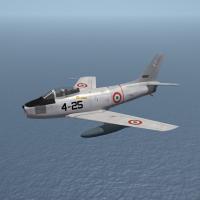
98 downloads
Canadair Sabre Mk.6 AMI NM Skinpak 9/21/2014 = For SF2 (Any & All, Full-5 Merged Prefered) = This package is designed for use on the Sabre 6 Pak available at the following URL: http://combatace.com/files/file/13497-sf2-canadair-sabre-mk6-rcaf-and-ami/ You'll need to have the above listed aircraft to add this skin pak to. This package contains 2 new skins, in Natural Metal , representing the following units as first delivered to the AMI: 2 Aerobrigata (8 Gruppo) 4 Aerobrigata (Cavallino Rampante) Included are updated texture set inis for the 2 AMI Euro camo skins, adding the "Start Default Date" SF2 switch, that will (hopefully!) turn on the camo skins in 1959 (best guess date). They have also had the "displayed name" changed, so you'll see, for example, either 2 AeB (NM) or 2 Aeb (Camo) Making it easier to select. As always, fairly easy to follow, detailed install instructions are included. So, please read them .... Happy Landings! Wrench Kevin Stein -
Well, if it's any consolation, I DID find the archived TE with the DS and IR terrains. It's a complete TE for just those 2 maps. On the down side, the DS data ini, texture list and TFD will need rebuilding to match the IR texture list (which is just a time-spent kind of thing) I could do it, but just don't have the time, inclination or desire to do so. I can, however tell you HOW to do it.. normal way : open the DS_data ini, leave it on the desktop. open the TE, and DS HFD. don't be alarmed it nothing shows open the Texture List tab, and "new texture list" reading from the DS_data.ini, start adding the tiles in the order they appear. You'll notice the terrain will start to fill itself in. Once all tiles are added, you can then start adding the 'special' from the IR texture list. THAT will be difficult part ------- Stratos: yes. on the WW2 Hawaii terrain, Ford Island is lod object, created by Geezer. Unfortuantely, the damn thing isn't working right in SF2
-
I'd very much like to find out WHO that could be. We really do have far too many of the "gimmies" and the "I wants". People that have contributed NOTHING to the community, even as they post their "wants". If those folks could all give 5 dollars (or local equilivant) things would be much better all around unfortunately, that happens no matter what (see a recent thread, iirc, at SHQ about the DS mod) There are ways, but as Erik has said, it's not what we all want to do.
-
should check out the Persian Gulf terrain, too. Nifty ports there, too (needs a better tile set though; used the stock desert ones, plus the usual "specials") Ports are blast, (pun intended). They are without a doubt the hardest to build and target. For example, below. That's 5 solid days of work; back and forth in and out of the game, back to the TE to fix something, back to PS to fix the tiles, back to the game to confirm....oh yeah. There are 435 individual entries for that city (not lines, target numbers. for the total lines, multiply by 3). And that only target area #25. There's 75 total, with no doubt with more to be added. Sometimes I think the 8 year old boy, that built elaborate "cities" with cardboard boxes and plastic Army Men , just to blow them up and burn them down, never quite grew up.
-
mapping warpage/misalignment at the wing root?
-
No apologies neede, Russ!! This new version is nice! ------------------ the C would need a new pit, with 2 MFDs I came across the pdfs of the NATOPS manuals for both the A and C models (unfortunately, a "read at this site only" kind of thing), and both the A and C appear to have a HUD of some kind I want to experiment a bit, using the F-100D_68 pit, that has the RWR, and add a hud. Won't have the MFD, but might look a bit better and just for grins and giggles, I did the skin below, for a more modern "in action" service. Obviously, some the decals (well, a LARGE number) will need redoing for the "Lo-Viz" style, but that's easy.
-
Pentagon to deploy 12 A-10s to Middle East
Wrench replied to dsawan's topic in Military and General Aviation
Sic 'em, boys!!! WK, keep safe!! -
thanks Russ! I'll check it out!
-
nope. stuff in sf2 broke it dead
-
actually, you CAN criticize the DS terrain -- it was fairly early in my terraforming career, and I KNOW it weren't right!! I'm on Win7 64, and have NO issues with the TE (other with using the flood/bucket tool - that will crash it). You DID install it to the root of C, right??? Texturelist inis are relatively easy to build. You start with the existing one (in the case of DS, the Desert texture list) and add the new tiles
-
all I gotta say is ... WOW!!! the comparison shots are amazing! love those open, 3-bay hangars. I can see many other uses for all the items!! (yah, I'm like that
-
no, sorry, I consufed myself...and you too! what I should have said, was you can use the tileset from IR2003 on the DS map, but it will a MAJOR undertaking. Since the targets inis needs a proper rework as well. Also having the proper charts and maps would be necessary
-
yah, ok Ed, you're right! ! My aged, pain addled brain confused cockpit ini with viewlist ini!!! I do wonder, if the 008 cat is for just plane jane SF2 (desert). Seems there's a LOT of duplication in the various object cats.
-
Just came to me... The Iran/Iraq 2003 map is essentially the DS map (well, not really...it's the iran/Iraq map), retiled. Shitloads of new tiles, rivers AND roads. Also, make sure you add the upgraded tile set terrain (original) http://combatace.com/files/file/12453-iraniraq-2003-terrain-for-sf2/ replacement tile set: http://combatace.com/files/file/14172-iran-iraq-replacement-desert-tileset/ these tiles could be readily adapted for the DS map; a hell of a lot of work though, but doable. You'd need a TE specially built for it. I'd have to check the archive, and see if I DID remember to zip it up and store someplace safe. the main problem with roads is, you have to FOLLOW them when building the movements ini, so the vehicles drive down them (more or less -- the formations can get a little "odd" sometimes)
-
I just sent some stuff to someone that expressed and interest. So, lets see what develops (evil grin)
-
15 minutes work. skin works on both my Sabre 4 and Sabre 6 (but will be released for the 4, as these are refurbished Mk.4 for the AMI later in the week, I'll upload it
-
the only problem I see (and it may be a personal one! ) is that painted on national markings will not activate the 'nation name display' on the loadout drop down. There should (ok, my opinion - MUST) be a least 1 level=0 decal to activate the nation affilation. however, I have a cheat for that; a decal that's very small, stuck on mesh that no one will notice (or see) Something like this, usually used as the LAST one listed: [Decal***] MeshName=LeftAileron DecalLevel=0 DecalFacing=BOTTOM FilenameFormat=Insignia Position=-0.0,0.00 Scale=0.0000001 DecalMaxLOD=1 and that works like a charm
-
Roads... somewhere in the neighborhood of 48-60 tiles, and their associated TODs. That should include all the various transitions Since I built the base DS map....and, admittedly an early effort. It needs expansion by 500+ km in ALL directions, as there's no sea room. And considering few, if any CVBGS actually operated in those shallow, confined & enclosed waters..... I would also think that somewhere in the region of 12-20 "specials" for the specific cities (read: ports) would be necessary. Horseshit! The TFD has nothing (really) to do with flattening are airfield. Althought, my preference is 'airfield specific' tiles, that (may) only have have things on the edges (TOD buildings and trees) For something in the middile of the wilderness, I would still use a specific tile (like I did on Gepard's PG terrain for SF2-- which has the roads still, btw. Needs better, more 'regional' looking tiles though.) You can flatten airfields individually, with a specific citylist ini. This is almost a daily chore for me. You don't have to list them all, but you DO have to visually inspect them all. One at a time. A simple "test mission", one for each side is needed. Quite easily done in the 3W TE. I think a wrote a small tutorial on something of this nature in the Old 1stGen KB. Marsh/wetlands are a nightmare ... there's no real way to simulate them. However, it can be done, after a fashion. Look on the OTC+ map, and you'll find the Everglades are somewhat 'swampy' (meaning they kind of have 'water'). Of course, they'd all be tgas, to get the water effect from the alpha channel
-
Bitching Betty used to work in 1stGen ... both the Falcons and Eagles. I still have the wavs laying around somewhere. But she gets SOOOOOOOOOOOOOOOOOOOOOOOOOOOO annoying, I deleted those lines from the data inis easiest, and simplest fix for the GAU-8, is open the gun's data ini (located in the /Objects/Guns folder, and change the following line: GunFireSound=Vulcan it ain't the Avenger cannon, sound, but it works fine
-
Ok, well that explains that! Most of us use the default location, due to the fact nothing in the 'core files' (ie: the main install) ever need modding/changing. Hence, it's ok to leave it in the Win7 "protected" regions. Only when patching or adding a DLC will anything (ok, most everything!) change. Part of the problem is, somebody * gave you the wrong cat. Viewlist ini in in FlightData.cat, located in the /Flight folder of the core install.. after extraction, create a NEW /Flight folder in your mods folder, and drop (copy/paste) it in there. Edit as needed. If it doesn't work, deleting the editied ini will allow the game to revert back to 'stock'. And, the extracted one stays in the extraction storage folder, if needed again. (* I'm gonna clown on brother fubar for that one!!! )
-
I'm pretty sure the 'euro' camo was the same; after all, weren't the Mk.4 & 6 built by Canadair?? <grin> The Mk.4 is an E equlivant, and the 6 more like the F I think (pretty sure) I did a 'blank' generic NM skin; just don't remember WHICH Sabre mod might have it! (after doing soooooooo many, even I forget sometimes!). I can find it, with a little effort, if you really need it. You could also reuse the AMI white decals on the silver skin * ; you simply repaint the R/G/B channels black. The Alpha, as it acts as a 'hold out matte', will allow the lettering to come through the correct (now black color, or any background color you wish!). 5 minutes worth of work! * forgot to mention, that you should move them to a new /D subfolder before painting them ... after all, they'd be for a whole new skin!!
-
loadouts are an easy fix. I've been fiddling with it a bit *, trying to realign the llights, and reposition the copilot/RIO jeanba, it that radar mentioned a standard air intercept type? Did it have ground mapping ability, etc? I can easily do up an avionics ini. However, if the front pit lacked the scope, another cockpit will have to "found" (*=matra RP, british 500 lber. easy to switch to French bombs -- which will have to come from a weapons pak. Even TK's stock Vulture uses the UK500lb) there should also be the brown/blue camo, too!
-
Six Russian fighter jets intercepted off Alaska
Wrench replied to allenjb42's topic in Military and General Aviation
and NO pictures? Davey, you're slipping!!! LOL!! -
WoP has REAL rain effects!!! Water streaming across the windscreen and canopy; pretty amazing! and Dover LOOKS like Dover ...
-
True, indeed. That's what a full-5 merged install looks like. Not counting the DLCs, which as you can see have their own folder. However, I'm quite surprised to see WHERE your's is installed to. By default, the 3W installers use the C:\Program Files (x86)\ThirdWire\Strike Fighters 2 pathway, with the mods folder in the C:\Users\*yournamehere*\Saved Games\ThirdWire\*name of game here* Just fer grins and giggles, check the C:\Program Files (x86) folder, just to be sure! (also, for info, 2,3,4,5,6 are 99.9% decals) IIRC, 7 is from SF2E.
