


Wrench
-
Posts
28,327 -
Joined
-
Last visited
-
Days Won
188
Content Type
Profiles
Forums
Gallery
Downloads
Store
Everything posted by Wrench
-
prolly the pre-production version that BAE used at the Royal Aircraft Establishment, Farnborough "BAE Evaluation" is pretty self explanatory -- BAE being the manufacturer, Evaluation the paint job they used to "sell" the plane Personally, I'd have expected a more "hi-viz" finish, as with most prototypes
-
as I used the Lightning cockpit (if one owns the SF2 that gave it to us) on the Sea Vixen sf2 update in 2011, I created this little illustration to explain the missile cues. This should help
-
Storm, you on win7 or later?? if so, this path (C:\Program Files (x86)\Strategy First\Falklands 1982\Objects\Weapons) aint' gonna work. That's the protected region of the HD, and not "usable" for modding things Move the whole SF directory/.../ to the ROOT of the C drive (ie: C:/WoE, for example) also, 7 & later has issues with ALL the 1stGen editors/extractors. Put them on you desktop, and try running from there. Or place the zips on the desktop, and run from inside the zipped thingy
-
Indeed. I'd be wary of pissing off the tail gunner, though!!!
-
the KAW mustangs (in the D/L section here) already have the relevant units -------------- Just had to try a FFAF Airacobra for the MTO
-
panel lines are still wwaaaaaaaaaaaaaaaaaaaaaaaaaaaaaaaaaaaaaaaaaaaaaaaayyyy to dark. Also, fade down the "blurred" panel lines. Maybe around 15-20% max
-
IIAF / IRIAF "Asia Minor" color code problems
Wrench replied to Centurion-1's topic in Mods & Skinning Discussion
the other is waaay to yellow; almost like RLM SandGelb wonder if RAF Middle Stone might not be closer?? Here's the RGB for it: 176 147 92 -
IIAF / IRIAF "Asia Minor" color code problems
Wrench replied to Centurion-1's topic in Mods & Skinning Discussion
Yah, seriously! You'd think the IRIAF would at least throw a tarp over it to keep it clean! Or park it in the garage!! don't forget, too, he uses a "noise" on the painted sections, where most of us a "clouds" layer. For mine I use 50% grey and 75% grey and fade to 10-15%, depending on the base colors- 14 replies
-
- 1
-

-
- asia minor
- color codes
- (and 3 more)
-
Rare Airacobra victory over The Canal (Ed's new P-39/P-400 coming soon!)
-
IIAF / IRIAF "Asia Minor" color code problems
Wrench replied to Centurion-1's topic in Mods & Skinning Discussion
this is the _2 map from the AilCat DLC -
BTW, Happy Birthday, WingZero!!!
-
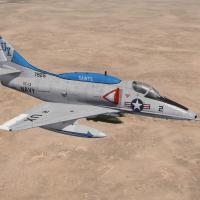
View File SF2 DLC #19: A-4L Skyhawk Skins/Ini Pak SF2 DLC #19: A-4L Skyhawk Skins/Ini Pak 5/29/2014 = For SF2, Full-4/5 Merged, =WITH= DLC #19 (Full-5 Reccomended/Preferred) = *DLC #19 is REQUIRED for this mod!!* **Please note, this pack is set up for the 3W A-4L Skyhawk DLC pack #19 ONLY!!! It is NOT be confused or USED with the Crab_02/Column5 mod. If you have the C2/C5 version, You are advised to REMOVE that mod COMPLETLY BEFORE installing this one!! It will cause conflicts, faults and General Mayhem. You have been warned!!!** This pack contains skins/decals for the following units: VC-13 "Fighting Saints" as based at NAS/MCAS Miramar VC-2 "Falcons" as based at NAS Oceana Several reworked inis included are: Data.ini (operable canopy, Standard Keystroke , Shift/0, landing light) Loadout ini (better offensive loadouts) main ini (A-4L.ini, with resequenced skin listings - these are now 1 & 2) All markings, excepting the squadon tail codes and VC-13's hump, are decals. The tail markings for both are painted on the skin. Decal randomization is TRUE, but be advised there's only 7 Modex for VC-2, and 12 for VC-13. This IS historically correct. When installing, just allow the overwrite of the inis. I've fiddled with the skin listing order, to make them more user friendly. However, if you wish to keep the original order, BACKUP THE MAIN, A-4L.INI -=BEFORE=- INSTALLING THIS MOD!!! *REMINDER!!! You =MUST= have DLC #19 to access the aircraft and it's other associated files.* As always, fairly easy to follow, yet detailed install instructions are included. So, please -READ- them!! In fact, unzip the archive FIRST, read the instructions, and then install it. Best to be safe, eh? Happy Hunting! Wrench Kevin Stein Submitter Wrench Submitted 05/29/2014 Category A-4
-
113 downloads
SF2 DLC #19: A-4L Skyhawk Skins/Ini Pak 5/29/2014 = For SF2, Full-4/5 Merged, =WITH= DLC #19 (Full-5 Reccomended/Preferred) = *DLC #19 is REQUIRED for this mod!!* **Please note, this pack is set up for the 3W A-4L Skyhawk DLC pack #19 ONLY!!! It is NOT be confused or USED with the Crab_02/Column5 mod. If you have the C2/C5 version, You are advised to REMOVE that mod COMPLETLY BEFORE installing this one!! It will cause conflicts, faults and General Mayhem. You have been warned!!!** This pack contains skins/decals for the following units: VC-13 "Fighting Saints" as based at NAS/MCAS Miramar VC-2 "Falcons" as based at NAS Oceana Several reworked inis included are: Data.ini (operable canopy, Standard Keystroke , Shift/0, landing light) Loadout ini (better offensive loadouts) main ini (A-4L.ini, with resequenced skin listings - these are now 1 & 2) All markings, excepting the squadon tail codes and VC-13's hump, are decals. The tail markings for both are painted on the skin. Decal randomization is TRUE, but be advised there's only 7 Modex for VC-2, and 12 for VC-13. This IS historically correct. When installing, just allow the overwrite of the inis. I've fiddled with the skin listing order, to make them more user friendly. However, if you wish to keep the original order, BACKUP THE MAIN, A-4L.INI -=BEFORE=- INSTALLING THIS MOD!!! *REMINDER!!! You =MUST= have DLC #19 to access the aircraft and it's other associated files.* As always, fairly easy to follow, yet detailed install instructions are included. So, please -READ- them!! In fact, unzip the archive FIRST, read the instructions, and then install it. Best to be safe, eh? Happy Hunting! Wrench Kevin Stein -
gimme a base OD/Grey skin ... I gots buttloads of decals!!!
-
here's VC-2 "Falcons" still have to exactly dial in the fuse stripe, but 98.6% there! I also fixed the loadouts; they just weren't right. and the window opens, too.
-
ok, so I went and spent the 3 buck and bought the DLC A-4L. It's mapped 100% identical to the A-4F below is the start of the VC-13 "Saints" skin ... just have to figure out the mesh names for the hump for the "SAINTS" decal (which I"ll have to make), and the mapping for the light blue paint job on it as well
-
IIRC, FastCargo gave detailed instructions, pretty much like what I wrote above, in the FakePilot download. Sometimes, however, it's easy to forget things!
-
the mapping SHOULD be the same; the mesh names also as any A-4E (with hump) extract a full base set of one skin (all 4 maps), and the decals ini. And maybe the squadron list ini; if one the Loadout screen (or the aircraft's main ini lists any squadrons). I'd buy the A-4L, but I just don't feel like rebuilding all the WW2 installs --- cause all the 'core files' get updated whenever a patch or DLC is installed. It's not that hard; just rename the mods folders to hide them, delete the old exes and create new ones, run the games, delete the "new" mods folder -except the Options and Version inis. I'm just getting lazy
-
You're very welcome!!
-
AFAIK, when a DLC is added, and it uses specific squadrons, the "patch path" rebuilds whatever inis are necessary. Malibu, I'd already rebuilt the E_67 to the L, using the 'remove component trick' and other ini edits to delete the outer pylons. But after finding out there's a DLC A-4L, quit working on it. figuring out the mapping for the various squadrons, in particular on the hump, would be a bugger. OTH, doing it like TK does, with decals, would be the next best alternative
-
Indeed! A Russo D Jug. It'll be a BEAUTY!
-
oh! good one Brian!!!
-
If the "addon" parts are disappearing on parked aircraft, then someone had done the 'fake pilot mod' incorrectly. the additional part added is used as the PILOT SEAT, not the pilot himself -- and seats always show up in the aircraft, parked or not. For example, below is the statement I used to add a centerline pylon to Wolf's P-39 Airacobra: [PylonC] SystemType=Pilot_Cockpit Position=0.0,0.0,0.0 PILOTMODELNAME=FakePilot SeatModelName=T-28_PylonR SeatPosition=0.000,0.256,-0.90 SeatID=2 the 1st position listed places the "fake pilot figure" at the world center of the model -- where it's completely hidden from view. The 2nd, or SeatPosition= is the location of the item being added. the "fake pilot" lod and and it's associated stuff are just there to create a "pilot figure" for the game to load. The actual item itself, is a 1 pixel square box, literaly invisible in game. The "seat" is the item added. Which as you can see above, has to be positioned accordingly ============================== Edit: Ok, I had to download it and see. WoW. A waaaaaaaaaaaaaaaaaaay oversized mod. Converting the skins to jpg would reduced it by at least 50% or MORE. Nobody need skin maps in bmp format that are 12+ megs. EACH Anyway, here is where you screwed up: [50] SystemType=PILOT_COCKPIT PilotModelName=IIIR Position=0.0,0.0,0.0 CanopyNodeName= SeatID=2 compare this statement, to mine above. The differences become readily apparent. Make the necessary additions/adjustments and the problem will be solved. Of course, you'll have to reupload the aircraft. Which is what I'd suggest.
-
maybe so, "but a good coat of paint hides a multitude of sins" It looks fine in my installs!! and as pretty much all the AAF Airacobras were out of service by the end of 1943, it's a small matter. Unless one counts the Free French or Italian (after switching to the Allied side) in the MTO
-
we have a WHOLE Forum for "What Ifs..." we have several hundred REAL aircraft that need replacements; leave the fantasy shit out of this veltro's Airacobra nearing completion