


Wrench
-
Posts
28,327 -
Joined
-
Last visited
-
Days Won
188
Content Type
Profiles
Forums
Gallery
Downloads
Store
Everything posted by Wrench
-
isn't FOTF closed? There's on active links anymore
-
Attempting bringing the A-37B into SF2 Vietnam
Wrench replied to Jug's topic in Mods & Skinning Discussion
that is looking REALLY good man!! Be a GREAT addition when it's done!! -
No. 1stGens (SF, WoE/I/V) are completely incompatable with SF2. For all intents and purposes. The SF2 series is designed for the Vista/Win7/Win8 environements. They will run on XP, excepting SF2NA, which in Win7 only. While they will run in XP, they are DX10/11 based, so users in XP won't get all the visual enhancements. But in truth, the original 4 (SF2 - SFP1. SF2E -WoE, SF2V - WoV, SF2I -Isreal) use mostly the same "bits" and terrains. There are differences; things like new aircraft, effects, various visuals like specular and bump mapping, downloadable (read: you can buy them) aircraft and things -but that's been slightly modified by TK, but that's a whole nuther story and issue, not relevant here. To answer the main question, 98.6% of all 3W users have gone to SF2. That's why you see so little being done for SF/Wo*. The last "patch" was an expansion pack for WoI, that brought ONLY that game to almost to SF2 levels, but only as far as the original SF2 release. Not to be hurtful or rude, or an asshole in general, only those few folks with dinosaur computers are "stuck" with 1stGens. We've all evolved. Think of SF2, and SF2NA in particular, as that asteroid in the Cretaceous; it was the final Death Blow to 1stGens.
-
View File SF2 WW2 ETO B-17E Flying Fortress Pak SF2 WW2 ETO B-17E Flying Fortress Pak 5/10/2014 -- Something for the WW2 ETO players -- = For SF2 ONLY, Full-5 Merged (Reccomended/Preferred) = **Note: Having any SF2 series game is HIGHLY reccomended, as this mod references the stock destroyed An-12. Also, due to modifications to various inis, this mod will probably -NOT- work in 06/08 level 1stGen game installs. This has not/cannot be tested by me.** *This is a "Theatre Specific" release of Veltro2K's NEW!!! B-17E Flying Fortress Heavy Bomber. This package =ONLY= represents E-model Forts used in the ETO.* There is 1 skins/decal set in this pak: AAF42/43 - OD/NG representing aircraft as they first arrived in Theatre in June 42 (star/ball insignia, yellow outline). It is "representative" of the 97th BG (no particular squadron) before it was transfered to the Med. As such, it's an accurate depiction of early 8th AF heavy bomber squadrons, before squadron markings and color IDs were adopted (and the immenent arrival of the F model). The Skin is in jpg format. All new (theatre specific) serial number decals were created. The serials ARE historically accurate (100%), and matched to the appropriate nose arts. All markings are decals. All lighting is historically correct. Damage textures are in DDS format. It should be noted, do =NOT= use this mod in an PTO-centric mods folder; European Forts have different operational dates than those in the Pacific. When in-game, you'll see: B-17E Flying Fortress (V2K) on the aircraft selection dropdown. While no other E models exist, this is simply done as a convenience. As always, fairly easy to follow, yet detailed install instructions are included. PLEASE read them!!! PLEASE read the "Notes" section for other important notations. Happy Landings!! Wrench Kevin Stein with thanks to Veltro !!! Submitter Wrench Submitted 05/22/2014 Category B-17
-
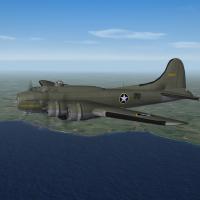
387 downloads
SF2 WW2 ETO B-17E Flying Fortress Pak 5/10/2014 -- Something for the WW2 ETO players -- = For SF2 ONLY, Full-5 Merged (Reccomended/Preferred) = **Note: Having any SF2 series game is HIGHLY reccomended, as this mod references the stock destroyed An-12. Also, due to modifications to various inis, this mod will probably -NOT- work in 06/08 level 1stGen game installs. This has not/cannot be tested by me.** *This is a "Theatre Specific" release of Veltro2K's NEW!!! B-17E Flying Fortress Heavy Bomber. This package =ONLY= represents E-model Forts used in the ETO.* There is 1 skins/decal set in this pak: AAF42/43 - OD/NG representing aircraft as they first arrived in Theatre in June 42 (star/ball insignia, yellow outline). It is "representative" of the 97th BG (no particular squadron) before it was transfered to the Med. As such, it's an accurate depiction of early 8th AF heavy bomber squadrons, before squadron markings and color IDs were adopted (and the immenent arrival of the F model). The Skin is in jpg format. All new (theatre specific) serial number decals were created. The serials ARE historically accurate (100%), and matched to the appropriate nose arts. All markings are decals. All lighting is historically correct. Damage textures are in DDS format. It should be noted, do =NOT= use this mod in an PTO-centric mods folder; European Forts have different operational dates than those in the Pacific. When in-game, you'll see: B-17E Flying Fortress (V2K) on the aircraft selection dropdown. While no other E models exist, this is simply done as a convenience. As always, fairly easy to follow, yet detailed install instructions are included. PLEASE read them!!! PLEASE read the "Notes" section for other important notations. Happy Landings!! Wrench Kevin Stein with thanks to Veltro !!!- 1 review
-
- 1
-

-
View File SF2 Post-WW2 P-38L Lightning, FAH & CAEC SF2 Post-WW2 P-38L Lightning, FAH & CAEC 5/14/2014 - For SF2 (Any/All - Full 5 Merged Reccomended) == Post War Lightnings, Part 3, "Latin American Lightnings" == * Note: will most likely NOT work in 1stGen SF/Wo*, with out some modifications/tweeking. Use in 1stGen games has not, and cannot, be tested by me * This is a revamp of Spitwulf's 1stGen Post-WW2 Latin American P-38 Lightnings. It is based on Wolf257's Lightning. This pack contains 2 complete aircaft, updated (as much is as possible) for SF2 usage. All sounds, weapons and a pilot figure are included. Guns you should already have. In this pack, you have P-38L, Honduran Air Force (FAH) P-38L, Cuban Army Avaition Corp (CAEC) The NEW skins, in jpg format, was created (now with rivets!). All Spitwulf's original decals were reused, excepting the national markings, which use stock 3W decals. All markings are decals, and decal randomization is TRUE. Please take note, even with randomizaion, you only have serials for 6-7 aircraft, as is historically correct. You =WILL= run out of numbers. Unfortunately, that's just the way it is. When in-game, you'll see: P-38L Lightning (FAH) (w) P-38L Lightning (Cuba) (w) on the aircraft dropdown menu. The (W) is for Wolf, diferentiating this P-38 from any others you may (or may not) have. As always, fairly easy to follow, yet detailed install instructions are included. So, please =READ= them!!!. Spitwulf and Wolf257's original readmes are included in each of the aircraft's main folders. Happy Landings! Wrench Kevin Stein Submitter Wrench Submitted 05/22/2014 Category P-38
-

147 downloads
SF2 Post-WW2 P-38L Lightning, FAH & CAEC 5/14/2014 - For SF2 (Any/All - Full 5 Merged Reccomended) == Post War Lightnings, Part 3, "Latin American Lightnings" == * Note: will most likely NOT work in 1stGen SF/Wo*, with out some modifications/tweeking. Use in 1stGen games has not, and cannot, be tested by me * This is a revamp of Spitwulf's 1stGen Post-WW2 Latin American P-38 Lightnings. It is based on Wolf257's Lightning. This pack contains 2 complete aircaft, updated (as much is as possible) for SF2 usage. All sounds, weapons and a pilot figure are included. Guns you should already have. In this pack, you have P-38L, Honduran Air Force (FAH) P-38L, Cuban Army Avaition Corp (CAEC) The NEW skins, in jpg format, was created (now with rivets!). All Spitwulf's original decals were reused, excepting the national markings, which use stock 3W decals. All markings are decals, and decal randomization is TRUE. Please take note, even with randomizaion, you only have serials for 6-7 aircraft, as is historically correct. You =WILL= run out of numbers. Unfortunately, that's just the way it is. When in-game, you'll see: P-38L Lightning (FAH) (w) P-38L Lightning (Cuba) (w) on the aircraft dropdown menu. The (W) is for Wolf, diferentiating this P-38 from any others you may (or may not) have. As always, fairly easy to follow, yet detailed install instructions are included. So, please =READ= them!!!. Spitwulf and Wolf257's original readmes are included in each of the aircraft's main folders. Happy Landings! Wrench Kevin Stein -
something screwed up somewhere Now, remember, most of us haven't fooled around with 1stGens for quite some time, so there's a lot I don't remember. So, I guess, we'll try the "clean slate". Uninstall the game completely, delete the shortcut. Reinstall the game, patch to 08, new shortcut, fly and test the "clean game" Check the M$ site, and make sure your DX 9 is the latest one (don't remember how exactly to check) then, add JUST the 2 Vipers one at a time and test -- don't worry about weapons. We want to narrow it down to being an aircraft or ??? Do NOT add the various inis from ODS (the ones from the /Objects folder). A possibility exists they may be faulted. other than that, I'm really out of ideas
-
well, safe to say The Warrior isn't flying for the 99th FG!!! Odd, though about the differences in my B & C models ... I thought I'd done them exactly the same! Raven, for my version of the Apache, iirc, I used the dive brake specs off the A-4 !! don't forget, the Allison isn't going to have the altitude performace, but SHOULD stay with or beat the Merlin 'stangs below 15K
-
panel and rivet lines far too pronounced ... lighten them up
-
Was looking for something else in my "Library" today, and came across this USAF manual/report/what ever thingy thought it might be relevant to this discussion.
-
that's up to you. But I'd clean it out, so to speak. If you've added any /Effects from that previous weapons pak, you can dump that whole folder. If you have any old weapons & gun editors, dump them too. 08 has different ones. But I doubt you'll be needing them, ever.
-
don't forget, Hugh, GregoryP was building "1%" FMs. Yes, they're VERY complicated!!!
-
ok...I THINK I may have figured out a way for YOU to do this. Taken my a while to find a way around, through the back or side doors I'm going to tell you what to do, perhaps not step-by-step, but with enough info you should be able to figure it out.. FIRST OFF: DELETE that Chilean F-16. It ain't even close to what you want. DELETE the Weapons Pak you've installed -- EVERYTHING associated with it. It's going to be replaced. SECOND: download and install the October 2008 patch I'd linked to before. This will bring the game to it's final level. After installing the pach, you'll have to reset all your preferences (graphics, sounds, possibly Pilot -if you've created one- and the controls. This is all done off the Options tab on the main screen. After doing that, fly a few mission anywhere, in any airplane, just to make sure things are still workings. THIRD: Go to the SF/Wo* Missions and Campaigns downloads section. This link should (with luck), put you on the page with the 3 parts of the ODS mod (Operation Desert Strom). http://combatace.com/files/category/339-user-made-campaigns/?sort_order=DESC&sort_key=file_submitted&num=10&st=40 You're going to download ALL 3 parts. Download them to safe location, like a "Temp" folder on the C drive. Create one, if one doesn't exist. FOURTH: Unzip all the parts to this temp folder. Now, you'll soon see that each part is a executable (.exe). Don't worry about that. Run EACH of the exes in turn -- this is an important part -- into this temp folder. You'll have to select the destination folder from the window that opens when it asks where your WoE install is. DO NOT INSTALL THIS TO YOUR WoE GAME INSTALL!!!!! You're going to "install" this INTO the temp folder, and NO WHERE ELSE After running each of the exes, you may get a warning pop-up that 'the items didn't install properly". Again, don't worry about that. Just hit the 'cancel' button and proceed down the line until all 3 parts exes have been run. After all 3 parts have been "exed", you should see the same folder structure as a regular game, like below ------------------- What you're going to do next, is open the /Objects folder, and the the /Aircraft subfolder. Inside you'll find 2 F-16C. Them's the ones you want Copy/Paste the 2 aircraft folders over into you're newly patched WoE game install. From the /Aircraft folder, you'll see a bunch of pilot and seat bits. It's up to you if you want to grab them all, or just pick out the one's marked "F-16" and you WILL be needing those!! Copy/Paste the /Flight folder from ODS into your newly patched WoE Game install Copy/Paste the /Effects folder from ODS into your newly patched WoE game install Copy/Paste the /Weapons folder from ODS into your newly patched WoE game install. Copy/Paste the /Sounds folder from ODS into your newly patched WoE game install. Also, from the root of the /Object folder, you'll want to copy the following files to you WoE Game install's /Object folder: BulletObject.ini GunData.ini MissileObject.ini ObjectList.ini WreckObject.ini GunData.dat just ignore the Guns and Weapons editor stuff .. you won't be needing them. Now that you have this, you can pick and choose anything else in there that suits your fancy. (Eagle, Hornets, Tomcats, whatever. To say nothing of the Ground Objects and the ODS terrain) That should just about do it.
-
-
-

From the album: Wrench's Stuff - More
-
Base visit @ Fliegerhorst Laage - TaktLwG 73 „S“ (GE)
Wrench replied to dutchaviaphoto37's topic in Digital Recon
great shot! thanks for sharing!!! -
A reminder folks: This is for PTO ONLY!! (like it says). Meaning: New Guenia, Solomons, etc ETO and RAF CC versions will follow in short order
-
well, there's a set of decals already done for the 524th FBS Apache's (MTO) in the mod of Wolf's P-51A. I don't remember if it's in 1stGen or SF2 (actually, I don't recall updating it for SF2). You're welcome to them! Also, if you need the Detail & Scale on Early Mustangs (A/B/C), and the Squad/Signal "Allison Engined Mustangs Walkaround", just shout!
-
P-51A or A-36??
-
No He don't go in for the 'lo-viz'. Basically, because those would become "active" well past 1984, ALL the games usual end point Remember the stock 3W A-6 and A-7 lo viz skins I did a couple of years back? They only exist because I took the time and MADE templates on my own. Someone would have to do the same for the Tomcat.
-
here's a listing of them from the F-14A.ini this is from the F-14A_77:
-
link please?? remember, the aircraft itself is a STOCK 3W product. All there are for that one, is skins and inis.
-
did you really expect one??? Seems like all us Modders got hung out to dry. Only "customer service" issues seem to get anwswer over the last 12-14 months. what I did was change the USAF formations pointer BACK to stock: [Nation002] Name=USAF DisplayName=U.S. Army Air Force Alignment=FRIENDLY PlayerFlyable=TRUE PilotNameList=NamesUSAF.lst RankList=RanksUSAF.lst CallsignList=CallsignsUS.lst Formation.Fighter=USFighter Formation.Attack=USFighter Formation.Bomber=USBomber Formation.Transport=USBomber Formation.Tank=USTank Formation.MobileAD=USAD PilotTrainingStandard=EXCELLENT GenderRatio=0 DebriefSuccessMusic=DebriefSuccess.wav DebriefFailMusic=DebriefFail.wav DebriefKilledMusic=DebriefKilled.wav SpeechFile=USAFSpeech.cat SpeechTextFile=USAFSpeechText.cat Medals=MedalsUSAF.ini MedalTextFile=MedalsUSAF.str UseFAC=TRUE and in the Formations.ini, sorta rearranged things: [FormationType002] Name=USBomber FormationType=AIR BaseLevel=6 Level[01].Name=BombGroup Level[01].Size=3 Level[01].Formation[01]=WW2USBomberBG Level[02].Name=Flight Level[02].Size=3 Level[02].Formation[01]=WW2USBomberSq Level[03].Name=Element Level[03].Size=3 Level[03].Formation[01]=WW2USBomberElm mind you, I'm still using the "ww2" type formations ini, but only with changes to the US bombers. UK, RA, Japanese and Luftwatte could possibly be the same. Or, have the Axis (Italy, Germany, Japanese Empire and IJN) use the Soviet bomber formations. The damn odd thing is, when you DON'T fly bombers, the AI has the correct formations. It's only when player-flown that the screw up occurs.
-
I've been away from it for a number of days for reasons not really important (eye issues) Here's the weird thing ... occasionaly, I've been getting the flight of 3 in single missions; other times, it's back to 2. There's NO rhyme or reason. I'll keep fiddling/testing as I can