


Wrench
-
Posts
28,328 -
Joined
-
Last visited
-
Days Won
188
Content Type
Profiles
Forums
Gallery
Downloads
Store
Everything posted by Wrench
-
Well, work is proceeding apace (taking a break from Veltro's Liberator -which I'm having problems with!) needs some help with the Danish airfields though. I've been able to locate some of them, but am having problems with others. Please forgive my spelling... Knivholdt (looks like near Frederikshaven?) Aalborg (done) Thisted See (done) Rum Grove Vandel (done) Esbjerg (done) Handersleben Tirstrup Vaerlose (done) Aune most of these seem to be on the Jutland peninsula It also appears there's PLENTY of room for stuff in northern Germany/Netherlands like Leeuwards, Cuxhaven, Kiel, etc (although I DON'T relish having to rebuild those ports again, to say nothing of the Kiel Canal...) so, so guidance please! thanks!
-
Summer tiles for Jan Tuma's seasonal upgrade
Wrench replied to quack74's topic in General Discussion
TE's not hard to set up at all. Use the WoE terrain editor, even for 'desert' tiles -- of the two (and both suck) it's the better one. Having the texture list ini is the important thing -- which may need to be (re)built by hand. Time consuming, but fairly easily done. Just follow the tile sequence from the terrains original _data.ini I could send you my WoE-Based FE Terrain Editor, if you want Quack. Right now, it's got the old Gibralter terrain/tiles in it, so you may have make some "adjustments" (like, creating a separate one for Jan Tuma's tile --which is HIGHLY recommended!!) TOD creation takes some practice, and I've never learned the ins-and-outs of importing new 3d objects for buildings and such. -
None of the original (Zur) Sabres have animated canopies. The nodes were never cut, as that wasn't a "thing" back in 2003 (?) when they were released
-
screenshot??? It's kinda required
-
as I said, delete it on ANY land tiles that means **farm, **desert, **mountain, ** city ... etc anything that doesn't have Sea2*** and those, reduce the Height = to 2.00 EDIT: in fact, instead of screwing around with it anymore, why not just download the fixed and targets expanded version?? http://combatace.com/files/file/7430-isreal2-ver-25-by-gepard/ don't even bother with the Suez map. Isreal2 covers it all, and is 100% scale. Suez in NOT - it's 63% scale
-
I'd posted that fix right after the Mustangs and Spitfire first came out. They're ALL fighters
-
it's a HeightField issue, either in the data ini itself or the HFD do the desert tiles (or, to be exact ANY land tiles -NOT sea/land transitions) have an associated _hm.bmp? If so, what is the height sepecified? As so: [Texture015] Filename=desert1.BMP HasWater=0 HeightMap=desert1_hm.BMP HeightMapScale=20.000000 Color=0.858675,0.710850,0.489428 SolidObjectTexture= AlphaObjectTexture= if so, you'll have to either delete those to line or comment them out Thusly: [Texture015] Filename=desert1.BMP HasWater=0 //HeightMap=desert1_hm.BMP //HeightMapScale=20.000000 Color=0.858675,0.710850,0.489428 SolidObjectTexture= AlphaObjectTexture= the rebuilt versions I did, have this already done cause it simply don't work right (as you see)
-
how COOL!!!!
-
View File SF2 F-16A Falcon (3W), 138th TFS, NYANG SF2 F-16A Falcon (3W), 138th TFS, NYANG 10/20/2013 = For SF2, Full 4/5 Merged RECCOMENDED! = *For the 3rd Wire F-16A as repainted for USAF/NATO/Etc Users* *Note: you MUST have SF2:I as part of your merged install for this to work. Designed for use =ONLY= on this pack: http://combatace.com/files/file/12643-f-16a-falcon-generic-usafnato-gray-skindecalini-pak/ This is a skin and decal set representation the 138th TFS "The Boys from Syaracuse", New York Air National Guard F-16A as seen in the late 70s/Early 80s. As always, fairly easy to follow, yet detailed install instructions are included. PLEASE read them!!! Also, give the "Note" section a read, in particular on operational usage, and the FM. Happy Landings! Wrench Kevin Stein Submitter Wrench Submitted 10/22/2013 Category F-16
-
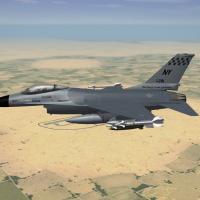
195 downloads
SF2 F-16A Falcon (3W), 138th TFS, NYANG 10/20/2013 = For SF2, Full 4/5 Merged RECCOMENDED! = *For the 3rd Wire F-16A as repainted for USAF/NATO/Etc Users* *Note: you MUST have SF2:I as part of your merged install for this to work. Designed for use =ONLY= on this pack: http://combatace.com/files/file/12643-f-16a-falcon-generic-usafnato-gray-skindecalini-pak/ This is a skin and decal set representation the 138th TFS "The Boys from Syaracuse", New York Air National Guard F-16A as seen in the late 70s/Early 80s. As always, fairly easy to follow, yet detailed install instructions are included. PLEASE read them!!! Also, give the "Note" section a read, in particular on operational usage, and the FM. Happy Landings! Wrench Kevin Stein -
download the Horten Ho-229 or the "What If" F-79 Manta flying wings. STUDY the data ini, and all should become clear
-
you can't add pylons to the MAIN model without the MAX files. This has been asked and answered several thousand times over the years. IF you add pylons via the fake pilot method (and it works just fine, thank you very much) In SF2, they are permanently attacked to the aircraft. Quite easily done
-
already handled, but thanks for the advice. as for the map, you may have heard of this strange thing called "building the targets ini"
-
Ed; Gotta be a Dennis story. Nobody else is/was that nuts!
-
why not just edit the targets ini, and make the NEUTRAL? That will preclude any and all incidents against "The Wall". They were left out of my original build for a reason...
-
they may need some ini editing to bring them to SF2 standard (well, 08 standard, too). Mostly, that'll be in the main ini, adding iirc, one line example: [GroundObjectData] ObjectFullName=3.7 In.AA ObjectDataFile=37InchAA_DATA.INI if it looks like that, it's good to go
-
Another one just washed up in Oceanside (north of San Diego) http://gma.yahoo.com/second-sea-serpent-washes-california-001622390--abc-news-topstories.html I fear we're in for a Megladon infestation (or another sharknado)
-
Skin Request for TW F-16A, 138TFS, NYANG 174th TFW
Wrench replied to Stick's topic in Mods & Skinning Discussion
absolute best I can do...frakking checks!! -
Skin Request for TW F-16A, 138TFS, NYANG 174th TFW
Wrench replied to Stick's topic in Mods & Skinning Discussion
NP, brudda!! =========================== been messing with it on and off most of the day. This is the best I can do. Just can't get those frakking checks right!! They're painted on, as is the "NY" (and that's yet another brain buster! stupid me couldn't get the 'reverse, upside down backwards ' letters right, then it just "popped" into place) have to figure out a way to use a decal for the checks.... -
we fixed that a llllllllllllllllllllllllloooooooooooooooooooooooooooooooooooooooooooooooooooooooooooooooooooooong time ago. just remove the runway statements. I think I even posted a modified targets ini back in 06 or 07 about that. Don't even remember, now. Age and all. Geary, now you go me thinking. Maybe it don't!!!!
-
Skin Request for TW F-16A, 138TFS, NYANG 174th TFW
Wrench replied to Stick's topic in Mods & Skinning Discussion
for the 3rd Wire F-16A, made from the Netz??? that's what he's asking about there's one for the C model in the Blk 25/30 Viper pak well, if he really wants, the templates (for the 3W Netz) have been in the d/l section for at least 2 years... might be a good time to start learing how to skin, perhaps?? I found one I'd started for the A-16, but never finished. Couldn't get the damn tilted "NY" tags right on the right side, and the triple cursed checks on the fin....eeeeeeeerrrrrrrrrrr. gave up on it -
yeah, use it only in SF2 did you change all the shader statements in the _data ini, BACK to 1stGen style?? go the SF2 KB, look for the thread on "How To Make Terrains Work in SF2" (or something like that), and follow the instructions BACKWARDS (seriously!)
-
yah, it WOULD have been nice to have a read me ... that IS a requirement
-
Skin Request for TW F-16A, 138TFS, NYANG 174th TFW
Wrench replied to Stick's topic in Mods & Skinning Discussion
probably easily made; just a matter to fin flash decals and tail codes. Any other markings, again, easily done with decals -
it's DEFINATELY not SF2/NA ready. missing all the proper MissionData and GroundObjectData usage statemens, names list (required even for 1 ship classes), radar statements, parking slots, collision lod,. I haven't looked at the weapons fit, but if KJakker says it's off...well... The built-in parked airplanes have to go...so the game can generate the proper nation-specific parked birds other than that, it's nice looking, and nice to have a proper ship.
