


Fubar512
-
Posts
8,418 -
Joined
-
Last visited
-
Days Won
42
Content Type
Profiles
Forums
Gallery
Downloads
Store
Everything posted by Fubar512
-
something realy weird
Fubar512 replied to ronan's topic in Thirdwire: Strike Fighters 1 Series - General Discussion
Hell, Sparko... If I were your wingman, I'd shoot you down, just on GP. -
Try this one: http://www.thirdwire.net/files/dl/WeaponEditor_022008.zip
-
F-104G tip tanks
Fubar512 replied to Spinners's topic in Thirdwire: Strike Fighters 1 Series - Mods/Skinning Discussion
LOL, yes. There was a thread recently, regarding a workaround to that issue. -
NEED HELP...MIG-29A
Fubar512 replied to Przybysz's topic in Thirdwire: Strike Fighters 1 Series - Mods/Skinning Discussion
Wow! That's just 336 Hours! I can hardly wait! -
Thanks for your support, MK2. Please don't be a stranger!
-
Help finding a terrain mod
Fubar512 replied to Dasas's topic in Thirdwire: Strike Fighters 1 Series - General Discussion
Did you set the objective IDs? -
Help finding a terrain mod
Fubar512 replied to Dasas's topic in Thirdwire: Strike Fighters 1 Series - General Discussion
1) First off, You must keep two things in mind before you begin: A) You cannot launch from a carrier in a randomly (system generated) mission. B) You can only do so from a scrited (loadable) mission. 2) You need to download and install a carrier (SF & WoE, WoV comes with two carrier types by default) 3) You need to create a mission that includes that carrier, and you must set it as your starting point. Now, what title are you working with? SF, WoV, or WoE? -
Newbie-Install Question
Fubar512 replied to Akmatov's topic in Thirdwire: Strike Fighters 1 Series - General Discussion
Do not load any weapons pack with NF1 or 2 unless you really know what you're doing. -
Any of the afterburner effects files (including the default ones which are part of the particlesystem.ini), have a "LightRange=" declaration and value. You can comment out the line ( ;LightRange=x), or experiment by lowering the value to a few meters or less. The other one, is simplicity itself. It's in the options menu under "subtitles"
-
Thanks for sharing that, Dave.
-
Illuminated Tracers
Fubar512 replied to Fubar512's topic in Thirdwire: Strike Fighters 1 Series - File Announcements
Someone else had that issue, which is curious, as the effect makes a callout to a default tga file. If you experience an issue similar to mueseli's, the "Tracersmoke.tga" is located in the flightdata.cat file, and can be extracted from there and placed in the effects folder. The default tracer smoke effect is located within the particle system.ini file, which in turn is contained in the flightdata.cat. The system reads effects files from the effects folder first. If there are no files meeting the callout data there, the game engine then uses the entries in the particlesystem.ini file. -
WOE CTD after mission
Fubar512 replied to rzlez7's topic in Thirdwire: Strike Fighters 1 Series - General Discussion
A possible solution is in the knowledge base -
Help
Fubar512 replied to Stick's topic in Thirdwire: Strike Fighters 1 Series - Mission/Campaign Building Discussion
The location name is set in XTERRAIN_nations.ini file, and is what determines boundaries (ie, enemy, friendly, etc). I suspect that if a target is declared as "friendly", and it lies within what's otherwise defined as enemy territory, it will revert to enemy control. -
Help
Fubar512 replied to Stick's topic in Thirdwire: Strike Fighters 1 Series - Mission/Campaign Building Discussion
I've never claimed to be a terrain guru, but I'll take a stab at it. Perhaps it has to do with the location value? -
They're BS.
-
Nike Problem
Fubar512 replied to MAZ69's topic in Thirdwire: Strike Fighters 1 Series - General Discussion
The Nike was a designed to be a nuke-tipped bomber killer with proximity fusing. Proximity in this case being defined as anything inside of 1 NM! Later versions that were sold to our allies and sported conventional warheads were (maybe) about as accurate as an SA-2B....but I have my doubts about that. That's what the Hawk is for.... -
OMG, I'd forgotten about that show....lol April of 1978....premium gasoline was 60 cents per gallon, I was making almost $7.00 per hour (a great salary for a 19 year old in 1978), and a brand new, loaded Pontiac Firebird Trans Am could be had for under $7,000. But we had crummy, campy, TV shows..... As I recall, they produced perhaps 4 or 5 episodes of "Spiderman" in the Spring of '78, and maybe 4 or 5 during the '78-'79 season. I guess it couldn't compete well with the likes of "The Incredible Hulk".
-
And the castration should be public, better yet, it should be televised. And NO anesthesia should be used.
-
Wov Questions
Fubar512 replied to vikbell's topic in Thirdwire: Strike Fighters 1 Series - General Discussion
1. Check the knowledge base for tips on Vista compatibility 2. In a word, No. The developer of this series sets the rendering limit to 1 pixel (which, is of course, the limiting factor in any display). Most other flight sims utilize a bit of a cheat to compensate, by allowing distant aircraft to be represented by "dots", that consist of several pixels. -
What's Different?
Fubar512 replied to Fubar512's topic in Thirdwire: Strike Fighters 1 Series - Mods/Skinning Discussion
Uploaded and approved: http://forum.combatace.com/index.php?autoc...p;showfile=6876 -
692 downloads
Illuminated Tracer Smoke Emitter by: Fubar512 Tested on every ThirdWire sim up to (and including), Wings over Israel with patch 1. To install: Simply drop the TracerSmokeEmitter.ini file into your ThirdWire Sim's effects folder To uninstall: Delete the TracerSmokeEmitter.ini, and the sim will revert to using its original tracer smoke emitter. Notes: To adjust the distance at which the tracer illuminates objects, adjust the following value [EmitterType001] LightRange=100.0<---ADJUST It's in meters, I've found that a value of 100.0 meters seemed to be the best compromise in terms of realism and visibility. Also, you'll notice that I've modified the smoke emitter itself. Tracers now leave undulating smoke rings, or "snakes" (as they're referred to by those who've been on the receiving end). -
Illuminated Tracers View File Illuminated Tracer Smoke Emitter by: Fubar512 Tested on every ThirdWire sim up to (and including), Wings over Israel with patch 1. To install: Simply drop the TracerSmokeEmitter.ini file into your ThirdWire Sim's effects folder To uninstall: Delete the TracerSmokeEmitter.ini, and the sim will revert to using its original tracer smoke emitter. Notes: To adjust the distance at which the tracer illuminates objects, adjust the following value [EmitterType001] LightRange=100.0<---ADJUST It's in meters, I've found that a value of 100.0 meters seemed to be the best compromise in terms of realism and visibility. Also, you'll notice that I've modified the smoke emitter itself. Tracers now leave undulating smoke rings, or "snakes" (as they're referred to by those who've been on the receiving end). Submitter Fubar512 Submitted 06/25/2008 Category Single Ordnance Files
-
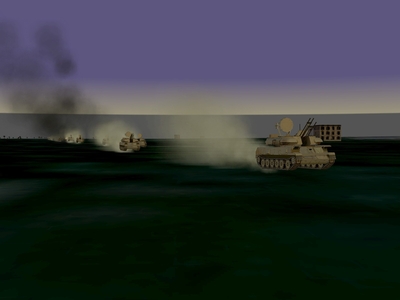
Sometime ago, Dave asked me to send him a few groundobject mods that I'd been teasing him about. So, I decided to play a trick on him and sent him a new "transport" to strafe while on armed recon missions.... A day or so later, he contacted me, and cursed me out....lol Here's a column of the "transports" that I'd sent him So, anybody want to confess to pulling a mean trick like that?
-
-
What's Different?
Fubar512 replied to Fubar512's topic in Thirdwire: Strike Fighters 1 Series - Mods/Skinning Discussion
Yes, illuminated tracers