


dtmdragon
-
Posts
2,123 -
Joined
-
Last visited
-
Days Won
28
Content Type
Profiles
Forums
Gallery
Downloads
Store
Everything posted by dtmdragon
-
Mirage Factory IDF F-4E Kurnass 2000 for Strike Fighters 2
dtmdragon replied to dtmdragon's topic in File Announcements
Try re-downloading it and re-installing it. I've just installed a freshly downloaded copy into an empty mods folder to check it and there are no issues with the IRM rails. The problem must be with your download or install sorry. -
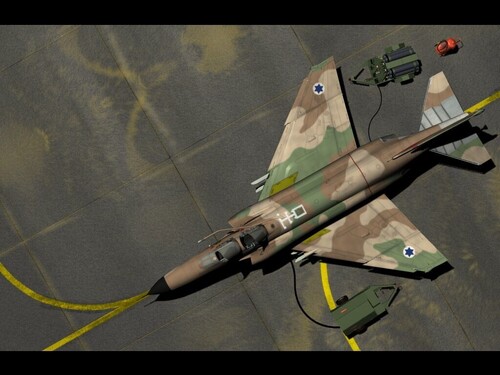
View File Mirage Factory IDF F-4E Kurnass 2000 for Strike Fighters 2 Mirage Factory Israeli Air Force F-4E Kurnass 2000 for Strike Fighters 2 This is a brand new SF2 mod of the Israeli F-4E Kurnass 2000 with a new 3D model. This mod has its origins in the SFP1 Mirage Factory F-4E Kurnass but most of the 3D work to create the Kurnass 2000 model has been done by Sundowner. The majority of the .ini work is new and specifically for the SF2 environment. Features: - Accurate Kurnass 2000 3d model - Modernized cockpit and avionics - Modernized weapons capability - Most advanced version of the F-4E used by the Israeli Air Force - Extensive RWR.TGA files and updated RWR.LST - All weapons from loadout file included http://www.f-4.nl/f4_35.html INSTILATION: Drop files in to appropriate folders, override when asked to. NOTE: Has only been tested/used in a merged install of ALL SF2 titles Credit goes to Bunyap and Chaser617 for the F-4EJ Kai cockpit / Avionics which we used as a base for the Kurnass 2000 Cockpit and Avionics. Also credit goes to The Viper Team for their IAF F-16C/D/I which some of the weapons came from. And of course the Mirage Factory Team. Submitter dtmdragon Submitted 10/22/2012 Category F-4
-
View File Mirage Factory F-4E(s) Shablol Updated for SF2 This is the Mirage Factory F-4E(s) Shablol for SF1 Updated for SF2. The original 3d model has also been updated with a few corrections such as pylon mounted Chaff/ Flare launchers and the .ini files have had a going over or been totally redone. The 3d model was updated by Sundowner (who gave permission for this update) and I did all the .ini work Credit goes to the Mirage Factory for the original aircraft. Note: 1, The Shablol was a modified F-4E Kurnass airframe so we have retained a limited ability to carry air-to-ground ordnance however they were not used operationally for anything other than reconnaissance. 2, The radar mode key will bring up the reconnaissance camera displays. 3, The gun sight has been turned off on purpose. Cheers, Dan (dtmdragon) http://www.f-4.nl/f4_15.html Submitter dtmdragon Submitted 10/22/2012 Category F-4
-
View File Third Wire Stock F-4E Kurnass Upgrade/ Realism Pack Third Wire Stock F-4E Kurnass Upgrade/ Realism Pack. This mod will upgrade all the stock Third wire F-4E Kurnass Aircraft with historically accurate weapon loads, more detailed ejection seats, nuclear weapons capability as well as improvements to the sounds and effects. Instillation: Simply copy and past into your mods folder, you MUST click override when prompted for example the export start year on the stock ALQ-101 is incorrect for Israeli service etc Notes: 1, Most bombing and attack loadouts will only have one or two sidewinders for self defense. You will also notice that the bomb on the TER closest to the loaded sidewinder is not loaded. This is exactly how the Israeli Air force did it to avoid clearance issues. Also when the center station MER is loaded with M117 bombs the front center bomb is not loaded. Again this is how the IAF did it the time. If you want to use fully loaded TERs and have four Sidewinders you can simple load them on at the load out screen. 2, Israeli Phantoms stopped carrying the AIM-7 in the late 70s/ Early 80s when the F-15 took over the air-to-air role for the IAF. You will notice this with the loadouts of the F-4E Kurnass 78. Instead of Sparrows a single Python 3 IRM was carried on a specially modified pylon in the right front sparrow bay. Extra chaff and flare dispensers were carried in the rear sparrow bays. However If you want to carry the AIM-7 you can select a loadout with them in the single mission editor (not the loadout screen) since presumably the ability to carry them remained. Credit goes to Strahi, MGunny 331KillerBee's Ordnance Shop II, Mirage Factory for the sounds and whoever did the updated Mk7 ejection seats sorry. Cheers, Dan (dtmdragon) Submitter dtmdragon Submitted 10/22/2012 Category F-4
-
Version 1.2
912 downloads
Mirage Factory Israeli Air Force F-4E Kurnass 2000 for Strike Fighters 2 This is a brand new SF2 mod of the Israeli F-4E Kurnass 2000 with a new 3D model. This mod has its origins in the SFP1 Mirage Factory F-4E Kurnass but most of the 3D work to create the Kurnass 2000 model has been done by Sundowner. The majority of the .ini work is new and specifically for the SF2 environment. Features: - Accurate Kurnass 2000 3d model - Modernized cockpit and avionics - Modernized weapons capability - Most advanced version of the F-4E used by the Israeli Air Force - Extensive RWR.TGA files and updated RWR.LST - All weapons from loadout file included http://www.f-4.nl/f4_35.html INSTILATION: Drop files in to appropriate folders, override when asked to. NOTE: Has only been tested/used in a merged install of ALL SF2 titles Credit goes to Bunyap and Chaser617 for the F-4EJ Kai cockpit / Avionics which we used as a base for the Kurnass 2000 Cockpit and Avionics. Also credit goes to The Viper Team for their IAF F-16C/D/I which some of the weapons came from. And of course the Mirage Factory Team. -
_Hangar.thumb.jpg.1cee9809774a465a5264f82d9ab927c2.jpg)
Version 1.0
395 downloads
This is the Mirage Factory F-4E(s) Shablol for SF1 Updated for SF2. The original 3d model has also been updated with a few corrections such as pylon mounted Chaff/ Flare launchers and the .ini files have had a going over or been totally redone. The 3d model was updated by Sundowner (who gave permission for this update) and I did all the .ini work Credit goes to the Mirage Factory for the original aircraft. Note: 1, The Shablol was a modified F-4E Kurnass airframe so we have retained a limited ability to carry air-to-ground ordnance however they were not used operationally for anything other than reconnaissance. 2, The radar mode key will bring up the reconnaissance camera displays. 3, The gun sight has been turned off on purpose. Cheers, Dan (dtmdragon) http://www.f-4.nl/f4_15.html -
Version 1.2
564 downloads
Third Wire Stock F-4E Kurnass Upgrade/ Realism Pack. This mod will upgrade all the stock Third wire F-4E Kurnass Aircraft with historically accurate weapon loads, more detailed ejection seats, nuclear weapons capability as well as improvements to the sounds and effects. Instillation: Simply copy and past into your mods folder, you MUST click override when prompted for example the export start year on the stock ALQ-101 is incorrect for Israeli service etc Notes: 1, Most bombing and attack loadouts will only have one or two sidewinders for self defense. You will also notice that the bomb on the TER closest to the loaded sidewinder is not loaded. This is exactly how the Israeli Air force did it to avoid clearance issues. Also when the center station MER is loaded with M117 bombs the front center bomb is not loaded. Again this is how the IAF did it the time. If you want to use fully loaded TERs and have four Sidewinders you can simple load them on at the load out screen. 2, Israeli Phantoms stopped carrying the AIM-7 in the late 70s/ Early 80s when the F-15 took over the air-to-air role for the IAF. You will notice this with the loadouts of the F-4E Kurnass 78. Instead of Sparrows a single Python 3 IRM was carried on a specially modified pylon in the right front sparrow bay. Extra chaff and flare dispensers were carried in the rear sparrow bays. However If you want to carry the AIM-7 you can select a loadout with them in the single mission editor (not the loadout screen) since presumably the ability to carry them remained. Credit goes to Strahi, MGunny 331KillerBee's Ordnance Shop II, Mirage Factory for the sounds and whoever did the updated Mk7 ejection seats sorry. Cheers, Dan (dtmdragon) -
Is that a Kurnass 2000 Phantom on the way Sundowner? (Fingers crossed!!..lol) Screenshot: Near miss!
-
Cheers but it is built into the whole aircraft in that mod. I was hoping ther might be a 3d model of just the TISEO that can be added on to any aircraft with the fake pilot method or as a weapon etc. I was to use it on the stock F-4E Kurnass_78 to make my Kurnass 2000 mod more accurate.
-
Does the ASX-1 TISEO for the F-4 Phantom II exist anywhere as a weapon object or pilot object with the fake pilot method? Cheers, Dan.
-
I've just added four extra hard points (sparrow IRM station + pylon & rear sparrow station countermeasure pods) to the stock F-4E 78 Kurnass. They do not show up in the loadout screen but all have the correct weapon in the game as specified by the loadout.ini file. New Folder (2).zip
-
Nice work, any plans for the British or Dutch skins? Hint hint wink wink lol!
-
Any more info on this paint scheme in real life? Last I heard it was just a trial being tested in the states and on ops in the middle east?
-
Using the Fletcher from your WWII ships pack did the trick. Would you mind please posting a download of all the ships you have updated to SF2NA standards as there are still lots of terrains out there that want to use ships as targets etc? Thanks mate, Dan.
-
Egyptian F-4 plus Egyptian and Syrian Mig-21 would be the only stock aicraft I think. Having said that the F-4 might be from SF2E not SF2I. However there are modern Syrian aircraft in the downloads section... You could also try the War For Israel Campaign mod...
-
Cheers wrench, fingers crossed for tomorrow
-
Has anyone got an A-4E/F/G/K Skyhawk template kicking around?
-
Looks just the same as the FREE Mirage Factory A-7H available right here at CA to me...
-
Ok thanks I will try that. Out of curiosity does editing the types.ini folder by removing the ship have a negative effect? I have done it to other terrains to solve this issue. I have done it by simply copying and pasting the data for the type from the bottom of the list into the place of one of the ships in the list and re numbering it. I repeat this until all the ships have been removed.
-
I got a crash at 80% loaded every time so I removed all the ships from the types.ini file and it worked fine after that...?
-
RNZAF air combat wing was disbanded in 2001. These repaints, along with the F-16C/D Blk 52+ at the top of the page, represent the possibilities if a competition for a re-activated air combat wing aircraft was announced tomorrow- one can dream! lol
-
The Gripen came a close second but the F-16C/D was selected based on a 'mates rates' price with training package (pilots + ground support) from the US: Also in the running were 2nd hand BAE GR.9 Harriers from the UK; 2nd hand upgraded General Dynamics/ Lockheed Martin F-16AM/BM; 2nd hand McDonnell Douglas/ Boeing F-4E Phantom II's upgraded by Israel Aerospace Industries; 2nd hand upgraded McDonnell Douglas/ Boeing F/A-18A/B Hornets; And on the wish list were the Boeing F/A-18E Super Hornets; And the Chief of the Airforce's wet dream, the Lockheed Martin F-35 Lightning II: Eliminated early on was a rotor wing CAS only option, the Boeing AH-64D Apache:
-
Winner of the 2012 Royal New Zealand Airforce (Air Combat Wing) Re-activation Competition: Lockheed Martin F-16C/D Block 50/52 Plus...
-
Reference list of RWR detection frequencies?
dtmdragon replied to dtmdragon's topic in General Discussion
Not quite I'm after the frequency range of each different type of RWR eg the AN/ALR-67(V)2 detects, identifies and displays radars and radar-guided weapon systems in the C to J frequency range (0.5 to 20 GHz). I was just hoping someone knew a link to a site that might have listed them all in one place etc. -
Is there a reference list somewhere of what the detection frequencies are for the different Radar Warning Receiver models out there? Cheers, Dan
