


Stephen1918
-
Posts
1,183 -
Joined
-
Last visited
-
Days Won
19
Content Type
Profiles
Forums
Gallery
Downloads
Store
Everything posted by Stephen1918
-
I've been making buildings and learning how to do other ground objects, let me know if you need planes, buildings, or other 3D stuff. The Middle East would be a great addition to FE.
-
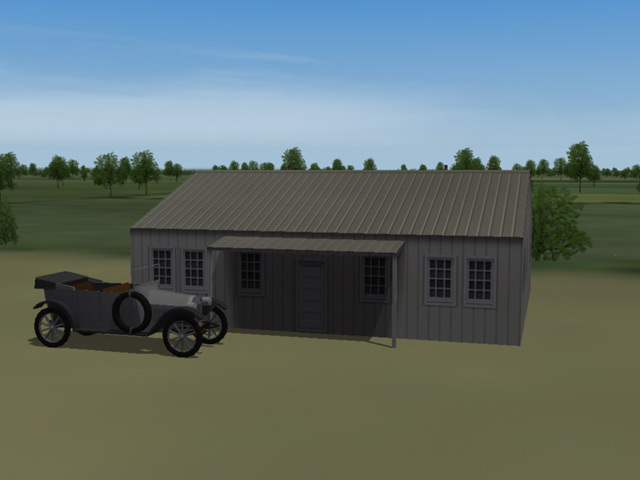
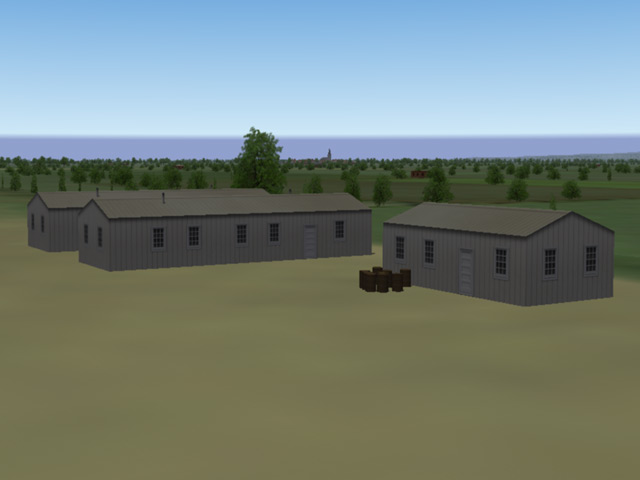
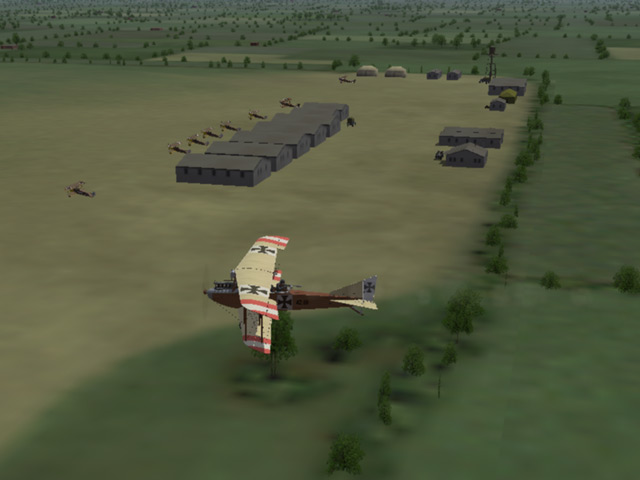
I updated the Lemberg terrain. This version has level airfields and some new buildings for the airfields, including two hangars, a barracks, and a headquarters building. I also created a staff car. This version completely replaces the original version. Your comments and criticisms are welcome.

-
These are sweet. The Hanriot is one of my favorite planes.
-
Thanks whiteknight, I've been interested in the Eastern Front for some time. It isn't perfect but it will do until someone makes a real one.
-
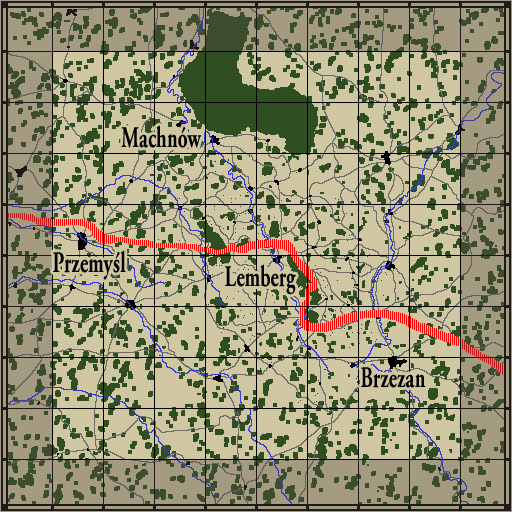
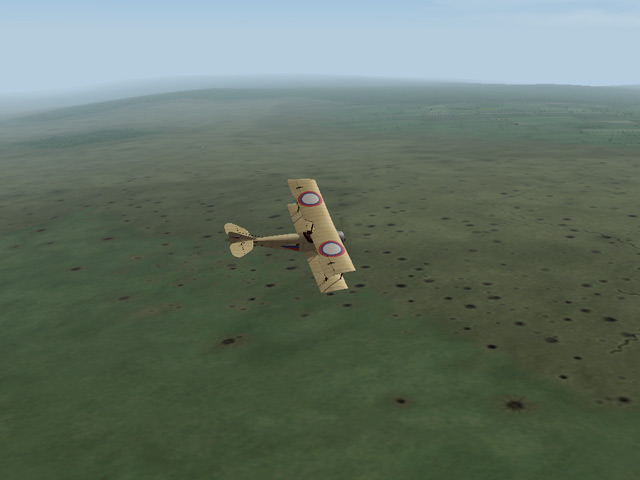
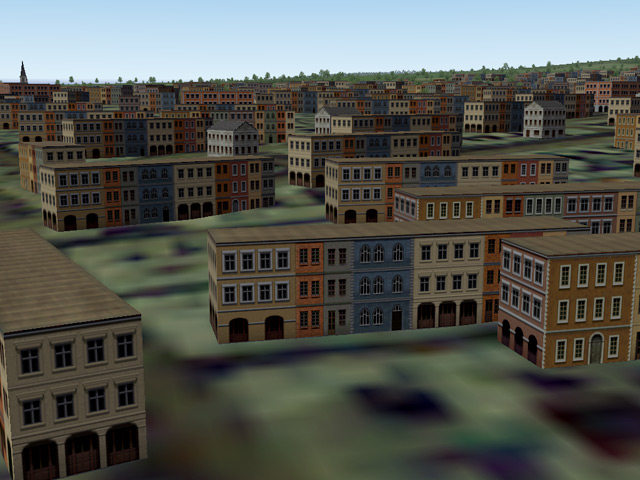
I've uploaded an Eastern Front Terrain, sort of... I took the Verdun Terrain, changed the names and made a few other cosmetic changes - including minor changes to the terrain tiles, some new building skins, and new building LODs to replace 2 of the stock buildings. Most of it remains the same as the stock Verdun. (I wanted a place to fly my Russian and Austro-Hungarian planes.)

-
View File Galicia - Eastern Front NOTE - This terrain is a complete revision of the Galicia Terrain. I recommend that you delete the original before installing Galicia Version 2. Version 1 Notes: Galicia was the name of a territory in northern-eastern Hungary and was the scene of major fighting during the First World War. It was invaded by the Russians early in the war, and was then recaptured by the Austro-Hungarians later. It was also a battleground after the war, first in fighting between Poland and the Ukraine, and later between Poland and The Soviet Union. Today the district is part of both Poland and the Ukraine. My Galicia terrain is based on the Verdun terrain, using the Cambrai.cat file, from First Eagles. It is a cosmetic change and is not geographically correct. Everything is the same as the stock Verdun terrain except for the following changes: - I have renamed all the locations in the Target.ini and Movement.ini with actual Hungarian place names from World War I. I did my best to match town locations with the terrain coordinates, but I couldn't always find an exact match. - I modified the terrain tiles to make the trench line narrower. I have included new terrain tiles with all the trenches removed from all the no-mans-land and trench terrain tiles. - Since the Eastern Front was much more fluid than the Western Front, I added some old battlefields to the terrain. Flying over a cratered area does not necessarily mean that you're flying over the front line! - I added much more forest and grassland. This terrain requires the Cambtai.cat file because Verdun doesn't have the grassland terrain tiles. I also removed some of the villages and airfields. - I have added Supply Depots. These use the airfield ground tile, but are covered with warehouses and other buildings, making them high value bombing targets. - I created new briefing maps with the new place names. - I swapped "Enemy" and "Friendly" locations to put Russia to the north. - I replaced two buildings with my own LODs. "vCity7" was a gray cube with rounded corners and randomly scattered windows. I have replaced it with a town hall style building. "FrTownBuilding4" was a three story village building. I have replaced it with something more like a hotel. These building have their own skins. - I created new buildings to replace most of the tents and canvas hangers. I made a Barracks building, a Headquarters building, a Storage building, and two hangars. I also made a (static) staff car for each airfield. - I made new skins for some of the buildings. These skins use some components from max188's Hi-Res Buildings and from mauricepiesligeros's Gilbraltar Buildings. I have altered them pretty extensively and added my own details. - All the airfields have been flattened and the surrounding terrain has been smoothed. - Since the Eastern Front had less air-to-air combat, I made more ground targets. I added factories to many of the cities to increase the number of bombing targets. I added a few more balloons for balloon busting missions, I added some truck routes for armed recon missions, and I added some ground attack routes for army co-operation missions. Everything else is the same as the stock Verdun Terrain. I have deliberately kept this as minimal as possible. Anything that works with Cambrai should also work with this, so you should be able to upgrade however you wish. I haven't tested it, but it should be possible to use the Cambrai seasonal tiles with the Galicia terrain (but the trenches will reappear during the other seasons.) Version 2 revisions: - I removed the duplicate airfield - I revised the hangars so they cast shadows now - I added SpinyNorman's Air Raid Warning Ambulances to all airfields - I repositioned some of the Anti Aircraft guns so they're not inside buildings - I made tweaks to some of the building skins and terrain tiles and I fixed the trees so they only have one trunk - I revised the Nations.ini, Targets.ini, and Movement.ini to be more compatible with the Eastern Front campaign - I added some airfields with wider aircraft spacing for bombers to take off without colliding Installation Instructions: If you haven't already done so, download and install SpinyNorman's Air Raid Warning Ambulances Unzip the file and move the folder named "Galicia" into your FirstEagles/Terrain folder. NOTE - You must have the wwiCambrai terrain installed (which came with FE Gold) in order for the Galicia terrain to work. Any mods you may have made to your Cambrai terrain should not affect Galicia. OPTIONAL - On my computer I made a separate install of First Eagles for the Eastern Front. I made map icons which use Russian insignia (instead of French) for "Friendly" planes and airfields. I have included those icons with this download and you can install them if you wish. - Warning! - installing these will change the map icons on all your other terrains as well. To install the map icons, open the folder named "OptionalFlightFolder" and copy the two files into your FirstEagles/Flight folder. Submitter Stephen1918 Submitted 12/20/2011 Category First Eagles - WWI and Early Years - Terrain and Environmental Mods
-
Version Version 2
546 downloads
NOTE - This terrain is a complete revision of the Galicia Terrain. I recommend that you delete the original before installing Galicia Version 2. Version 1 Notes: Galicia was the name of a territory in northern-eastern Hungary and was the scene of major fighting during the First World War. It was invaded by the Russians early in the war, and was then recaptured by the Austro-Hungarians later. It was also a battleground after the war, first in fighting between Poland and the Ukraine, and later between Poland and The Soviet Union. Today the district is part of both Poland and the Ukraine. My Galicia terrain is based on the Verdun terrain, using the Cambrai.cat file, from First Eagles. It is a cosmetic change and is not geographically correct. Everything is the same as the stock Verdun terrain except for the following changes: - I have renamed all the locations in the Target.ini and Movement.ini with actual Hungarian place names from World War I. I did my best to match town locations with the terrain coordinates, but I couldn't always find an exact match. - I modified the terrain tiles to make the trench line narrower. I have included new terrain tiles with all the trenches removed from all the no-mans-land and trench terrain tiles. - Since the Eastern Front was much more fluid than the Western Front, I added some old battlefields to the terrain. Flying over a cratered area does not necessarily mean that you're flying over the front line! - I added much more forest and grassland. This terrain requires the Cambtai.cat file because Verdun doesn't have the grassland terrain tiles. I also removed some of the villages and airfields. - I have added Supply Depots. These use the airfield ground tile, but are covered with warehouses and other buildings, making them high value bombing targets. - I created new briefing maps with the new place names. - I swapped "Enemy" and "Friendly" locations to put Russia to the north. - I replaced two buildings with my own LODs. "vCity7" was a gray cube with rounded corners and randomly scattered windows. I have replaced it with a town hall style building. "FrTownBuilding4" was a three story village building. I have replaced it with something more like a hotel. These building have their own skins. - I created new buildings to replace most of the tents and canvas hangers. I made a Barracks building, a Headquarters building, a Storage building, and two hangars. I also made a (static) staff car for each airfield. - I made new skins for some of the buildings. These skins use some components from max188's Hi-Res Buildings and from mauricepiesligeros's Gilbraltar Buildings. I have altered them pretty extensively and added my own details. - All the airfields have been flattened and the surrounding terrain has been smoothed. - Since the Eastern Front had less air-to-air combat, I made more ground targets. I added factories to many of the cities to increase the number of bombing targets. I added a few more balloons for balloon busting missions, I added some truck routes for armed recon missions, and I added some ground attack routes for army co-operation missions. Everything else is the same as the stock Verdun Terrain. I have deliberately kept this as minimal as possible. Anything that works with Cambrai should also work with this, so you should be able to upgrade however you wish. I haven't tested it, but it should be possible to use the Cambrai seasonal tiles with the Galicia terrain (but the trenches will reappear during the other seasons.) Version 2 revisions: - I removed the duplicate airfield - I revised the hangars so they cast shadows now - I added SpinyNorman's Air Raid Warning Ambulances to all airfields - I repositioned some of the Anti Aircraft guns so they're not inside buildings - I made tweaks to some of the building skins and terrain tiles and I fixed the trees so they only have one trunk - I revised the Nations.ini, Targets.ini, and Movement.ini to be more compatible with the Eastern Front campaign - I added some airfields with wider aircraft spacing for bombers to take off without colliding Installation Instructions: If you haven't already done so, download and install SpinyNorman's Air Raid Warning Ambulances Unzip the file and move the folder named "Galicia" into your FirstEagles/Terrain folder. NOTE - You must have the wwiCambrai terrain installed (which came with FE Gold) in order for the Galicia terrain to work. Any mods you may have made to your Cambrai terrain should not affect Galicia. OPTIONAL - On my computer I made a separate install of First Eagles for the Eastern Front. I made map icons which use Russian insignia (instead of French) for "Friendly" planes and airfields. I have included those icons with this download and you can install them if you wish. - Warning! - installing these will change the map icons on all your other terrains as well. To install the map icons, open the folder named "OptionalFlightFolder" and copy the two files into your FirstEagles/Flight folder. -
Somebody mentioned the idea in one of the forums earlier this year, I can't remember who and I can't find the post. Was it you Ojcar? It was a good idea, the hardest part was looking up all the place names, but it went pretty fast. Maybe someone can do an Italian Front so we can put Quack's fantastic skins to good use.
-
Wonderful skins, I'm looking forward to flying them! I've been working on an Eastern Front (Austria vs Russia) and I'm very close to posting it. I modified the Verdun terrain, renaming all the cities was very tedious.
-
This is a very unusual plane. I've looked into it and there seems to be a lot of info around for this. It looks like the entire wing rotated to control lift. The FE pilot won't fit in it, his legs would be sticking out the bottom of the plane.
-
Excellent work. You have an incredible amount of detail in these skins. Did you do the skins for the trucks too? (I see a Red Cross truck in some of the shots.) How do you get screen shots of the airfield?
-
Coming down is a lot faster... The screen shots are at around 450 meters.
-
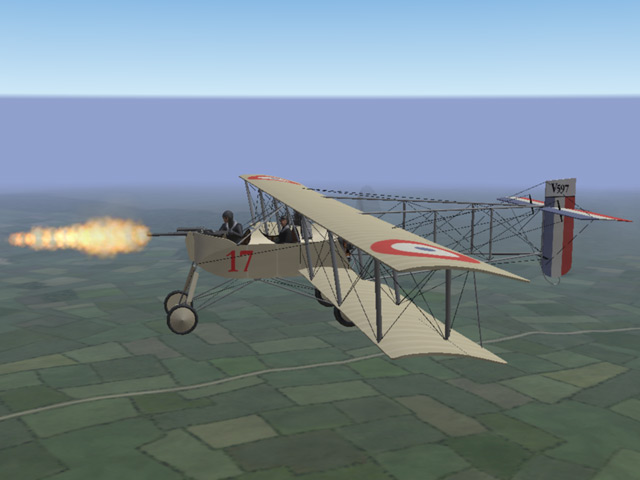
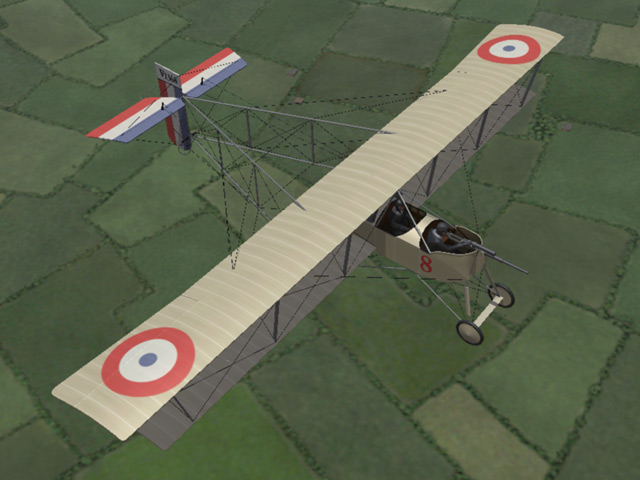
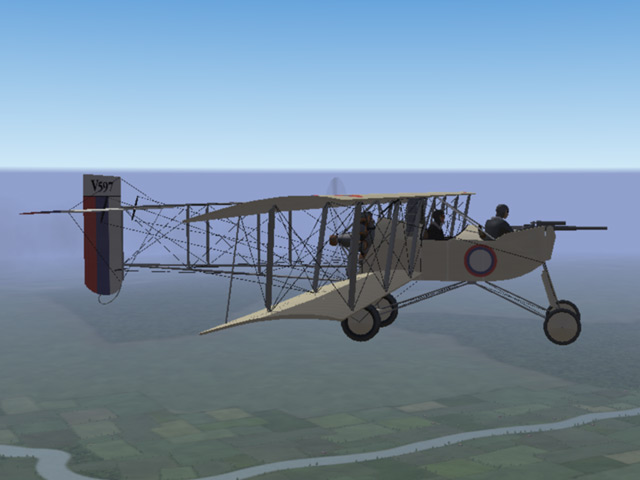
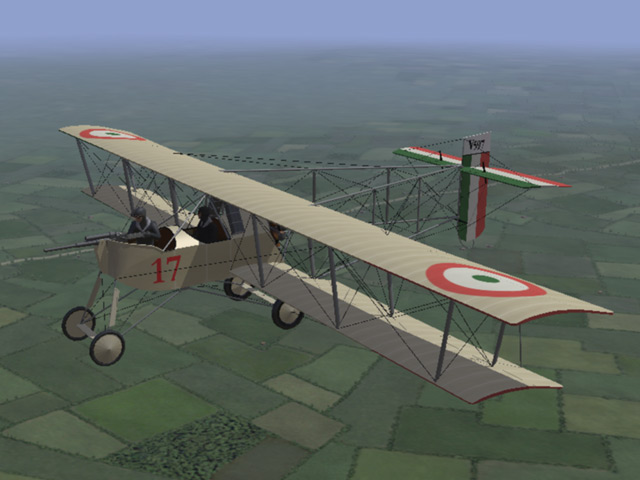
Ojcar and I have modified the Voisin III to make a Voisin V with a nose mounted cannon. The cannon is rigged as an internal gun so the pilot can fire it. No bomb loadouts on this one, but it should be great for ground attack missions.
-
View File Voisin Type V with 37mm cannon The Voisin Type V was a slightly improved version of the Voisin III, with minor changes to the 150hp Salmson engine, a more streamlined nacelle, and staggered wings. It was first used in 1915, but was not a significant improvement over the Voisin III and served alongside it rather than replacing it. Some Type Vs were equipped with a a 37mm Hotchkiss cannon mounted in the nose and were successfully used for ground attack missions. In my model, the 37mm cannon is rigged as an internal gun, so the pilot can fire it. The gunner would normally sit or stand directly behind the cannon, but I have placed him to the side so you can get a clear view of your target. As a result, some of the cockpit details have been altered, but are still reasonable. Ojcar has created the data file for the plane, and spent some time tweaking the gun data to get it to perform more realistically. (You will have to reload between shots.) I have included three skinning options for the plane, identical except for the decals. The Italian Linen uses the Italian insignia with red and green underwing panels. The Russian Linen uses the Russian insignia and includes stripes on the tail planes. The Standard Linen can be used for all the other Entente powers. This plane uses the national markings that come with First Eagles, so you can easily change nationalities (in the Standard Linen skin only.) I have included all my skinning templates. This is slightly different from the Voisin III and the skins are not interchangeable. I have also included decals for serial numbers which will be applied randomly. Historical Notes: The serial numbers are fictious, but more or less in the correct range for the Voisin Type V. The Russians used different national markings on the tail planes, If you use my Russian skin, you will have white, blue, and red stripes on the tail planes. If you use the Standard skin for the Russians, you will get roundels on the tail planes. Details of the gunner and gunner's cockpit have been altered to make it possible for the pilot to fire the gun. Credits: My thanks to Ojcar for making the data file for this plane, and for massaging the data for the gun to get a more realistic effect. Installation instructions: For FE1: Unzip the file and move the folder named "Voisin5" into the FirstEagles/Objects/Airplanes folder. For FE2: Unzip the file and move the folder named "Voisin5" into the FirstEagles/Objects/Airplanes folder. Then in the FirstEagles/Objects/Decals folder, create a new folder named "Voisin5". Move the folder named "D" from the Airplanes/Voisin5 folder into the Decals/Voisin5 folder you just made. A note about Effects - I have used the 37mm Hotchkiss 1885 cannon in my plane. In First Eagles, this is usually used as a ground object and the gun fire animation is quite large. If you have a slow computer, you may not be able to see the fire effect unless you have shadows turned off. If you have downloaded p10ppy's SPAD XII, then you already have a nice fire effect for an aircraft mounted cannon (with smoke blowing back over the cockpit). The effect is in a file named "37mmSPAD.ini" in your Effects folder and is named "37mmFireEffectEnH". You can edit the GunData.ini for the 37MM_HOTCHKISS_1885 to use the better effect by changing the effect name to read: GunFireEffect=37mmFireEffectEnH Submitter Stephen1918 Submitted 12/01/2011 Category Other Entente Aircraft
-
516 downloads
The Voisin Type V was a slightly improved version of the Voisin III, with minor changes to the 150hp Salmson engine, a more streamlined nacelle, and staggered wings. It was first used in 1915, but was not a significant improvement over the Voisin III and served alongside it rather than replacing it. Some Type Vs were equipped with a a 37mm Hotchkiss cannon mounted in the nose and were successfully used for ground attack missions. In my model, the 37mm cannon is rigged as an internal gun, so the pilot can fire it. The gunner would normally sit or stand directly behind the cannon, but I have placed him to the side so you can get a clear view of your target. As a result, some of the cockpit details have been altered, but are still reasonable. Ojcar has created the data file for the plane, and spent some time tweaking the gun data to get it to perform more realistically. (You will have to reload between shots.) I have included three skinning options for the plane, identical except for the decals. The Italian Linen uses the Italian insignia with red and green underwing panels. The Russian Linen uses the Russian insignia and includes stripes on the tail planes. The Standard Linen can be used for all the other Entente powers. This plane uses the national markings that come with First Eagles, so you can easily change nationalities (in the Standard Linen skin only.) I have included all my skinning templates. This is slightly different from the Voisin III and the skins are not interchangeable. I have also included decals for serial numbers which will be applied randomly. Historical Notes: The serial numbers are fictious, but more or less in the correct range for the Voisin Type V. The Russians used different national markings on the tail planes, If you use my Russian skin, you will have white, blue, and red stripes on the tail planes. If you use the Standard skin for the Russians, you will get roundels on the tail planes. Details of the gunner and gunner's cockpit have been altered to make it possible for the pilot to fire the gun. Credits: My thanks to Ojcar for making the data file for this plane, and for massaging the data for the gun to get a more realistic effect. Installation instructions: For FE1: Unzip the file and move the folder named "Voisin5" into the FirstEagles/Objects/Airplanes folder. For FE2: Unzip the file and move the folder named "Voisin5" into the FirstEagles/Objects/Airplanes folder. Then in the FirstEagles/Objects/Decals folder, create a new folder named "Voisin5". Move the folder named "D" from the Airplanes/Voisin5 folder into the Decals/Voisin5 folder you just made. A note about Effects - I have used the 37mm Hotchkiss 1885 cannon in my plane. In First Eagles, this is usually used as a ground object and the gun fire animation is quite large. If you have a slow computer, you may not be able to see the fire effect unless you have shadows turned off. If you have downloaded p10ppy's SPAD XII, then you already have a nice fire effect for an aircraft mounted cannon (with smoke blowing back over the cockpit). The effect is in a file named "37mmSPAD.ini" in your Effects folder and is named "37mmFireEffectEnH". You can edit the GunData.ini for the 37MM_HOTCHKISS_1885 to use the better effect by changing the effect name to read: GunFireEffect=37mmFireEffectEnH -
Thanks everyone, this has become my favorite plane so far. With Ojcar's FM it's a sweet plane to fly.
-
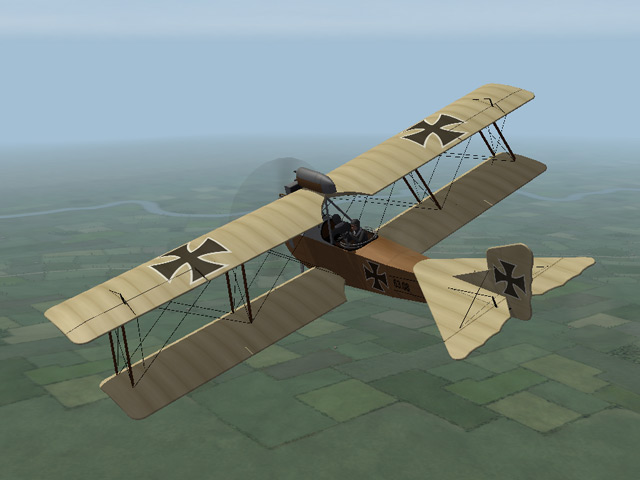
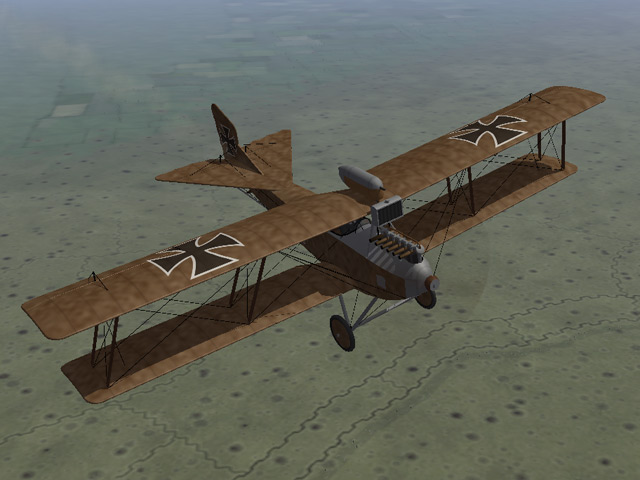
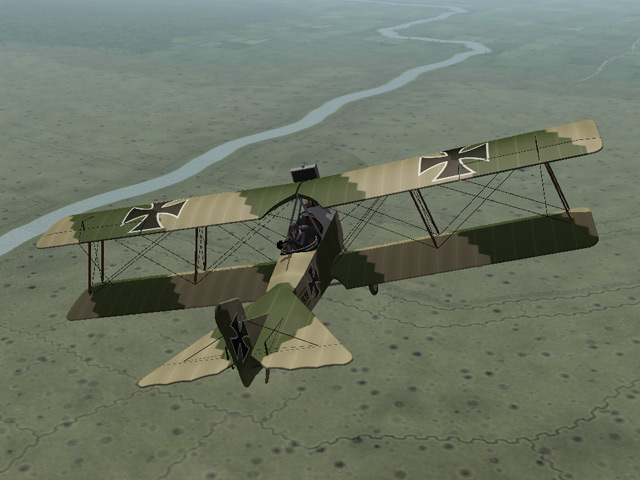
The Hansa-Brandenburg C.I has been uploaded. This download contains three separate planes, with a different model, FM, loadouts, and skins for each plane. It's a big file (20 megs, sorry) but worth the time, if I say so myself. Ojcar has created 3 different data files, and two new guns for this plane. Nix has provided 3 engine sounds for the different versions. My thanks Ojcar and Nix, and to Sinbad and Quack74 who provided information and resources for this plane.
-
View File Hansa-Brandenburg C.I - 3 pack The Hansa-Brandenburg C.I was an Austro-Hungarian two seater, similar in size and configuration to the German Albatros. It was introduced in 1916 and used throughout the war, with more powerful engines in later versions. The HB C.I was used primarily for reconnaissance and light bombing, although it saw service as a fighter early in the war. Early versions of the plane carried a gun pod on the upper wing. After a better synchronization system was developed, the gun was moved down to the left side of the fuselage. I have included three different versions of the plane with this download. Ojcar has created FM's for the 160hp, 200hp, and 230hp engines, and Nix has provided the engine sounds for all three. There are three slightly different models, with different loadouts, different serial number decals, and different skins for each plane, so there are three complete planes which can be installed individually or all together. The skins are interchangeable, except for the serial numbers, but you may see some stretching on the nose of the 230hp version. Each skin has a "Standard" version which will allow you to change nationalities, and an "Austrian" version with the cross at mid wing. The Austrian version won't let you change the national insignia. I have included my skinning templates. Ojcar has also provided two new guns for this plane. For FE1, we have included Peter01's GunData.ini with Ojcar's guns added. To load the new guns you will need the Gun Editor available from the Combat Ace download area, (I have provided a link at the end of this page.) For FE2, Ojcar has provided the necessary files. Credits: My thanks once again to Ojcar for making three excellent data.ini files and two new gun data files for this plane - and for teaching me how to add guns to First Eagles. My thanks to Nix who created the engine sound files for the Austro-Daimler 160, 200, and 230 horse-power engines. Thanks also to Sinbad and Quack74 who provided reference materials for the Hansa-Brandenburg C.I Installation instructions: For FE1: Unzip the file and move the three folders named "HBC1_160" "HBC1_200" and "HBC1_230" into the FirstEagles/Objects/Airplanes folder. Move the three sound files named "Austro-daimler160.wav" "Austro-daimler200.wav" and "Austro-daimler230.wav" into the FirstEagles/Sounds folder. To add guns you'll need the Gun Editor program (available in the Combat Ace Downloads area.) Move the newGundata.ini file into the FirstEagles/Objects folder. Open the Gun Editor and click the Open button. Find the Gundata.ini you just installed and open it. Make sure the new guns are there (the last one in the list should be "8MM_SCHWARZLOSE_M0712" Click the Save button and close the Gun Editor. You have the new guns! For FE2: Unzip the file and move the three folders named "HBC1_160" "HBC1_200" and "HBC1_230" into the FirstEagles/Objects/Airplanes folder. Then in the FirstEagles/Objects/Decals folder, create three new folders named "HBC1_160" "HBC1_200" and "HBC1_230". Move the folder named "D" from the Airplanes/HBC1_xxx folders into the corresponding Decals/HBC1_xxx folders you just made. Move the three sound files named "Austro-daimler160.wav" "Austro-daimler200.wav" and "Austro-daimler230.wav" into the FirstEagles/Sounds folder. To add the guns move both gun folders ("8MM_SCHWARZLOSE_M0712" and "8MM_SCHWARZLOSE_M0712_Gunner") into your Guns folder (in your mod files folder) and you're done! This is the URL for Gun Editor I use for FE1: http://combatace.com/files/file/103-sf-gun-editor-for-strike-fighters/ Submitter Stephen1918 Submitted 11/22/2011 Category Other Central Powers Aircraft
-
629 downloads
The Hansa-Brandenburg C.I was an Austro-Hungarian two seater, similar in size and configuration to the German Albatros. It was introduced in 1916 and used throughout the war, with more powerful engines in later versions. The HB C.I was used primarily for reconnaissance and light bombing, although it saw service as a fighter early in the war. Early versions of the plane carried a gun pod on the upper wing. After a better synchronization system was developed, the gun was moved down to the left side of the fuselage. I have included three different versions of the plane with this download. Ojcar has created FM's for the 160hp, 200hp, and 230hp engines, and Nix has provided the engine sounds for all three. There are three slightly different models, with different loadouts, different serial number decals, and different skins for each plane, so there are three complete planes which can be installed individually or all together. The skins are interchangeable, except for the serial numbers, but you may see some stretching on the nose of the 230hp version. Each skin has a "Standard" version which will allow you to change nationalities, and an "Austrian" version with the cross at mid wing. The Austrian version won't let you change the national insignia. I have included my skinning templates. Ojcar has also provided two new guns for this plane. For FE1, we have included Peter01's GunData.ini with Ojcar's guns added. To load the new guns you will need the Gun Editor available from the Combat Ace download area, (I have provided a link at the end of this page.) For FE2, Ojcar has provided the necessary files. Credits: My thanks once again to Ojcar for making three excellent data.ini files and two new gun data files for this plane - and for teaching me how to add guns to First Eagles. My thanks to Nix who created the engine sound files for the Austro-Daimler 160, 200, and 230 horse-power engines. Thanks also to Sinbad and Quack74 who provided reference materials for the Hansa-Brandenburg C.I Installation instructions: For FE1: Unzip the file and move the three folders named "HBC1_160" "HBC1_200" and "HBC1_230" into the FirstEagles/Objects/Airplanes folder. Move the three sound files named "Austro-daimler160.wav" "Austro-daimler200.wav" and "Austro-daimler230.wav" into the FirstEagles/Sounds folder. To add guns you'll need the Gun Editor program (available in the Combat Ace Downloads area.) Move the newGundata.ini file into the FirstEagles/Objects folder. Open the Gun Editor and click the Open button. Find the Gundata.ini you just installed and open it. Make sure the new guns are there (the last one in the list should be "8MM_SCHWARZLOSE_M0712" Click the Save button and close the Gun Editor. You have the new guns! For FE2: Unzip the file and move the three folders named "HBC1_160" "HBC1_200" and "HBC1_230" into the FirstEagles/Objects/Airplanes folder. Then in the FirstEagles/Objects/Decals folder, create three new folders named "HBC1_160" "HBC1_200" and "HBC1_230". Move the folder named "D" from the Airplanes/HBC1_xxx folders into the corresponding Decals/HBC1_xxx folders you just made. Move the three sound files named "Austro-daimler160.wav" "Austro-daimler200.wav" and "Austro-daimler230.wav" into the FirstEagles/Sounds folder. To add the guns move both gun folders ("8MM_SCHWARZLOSE_M0712" and "8MM_SCHWARZLOSE_M0712_Gunner") into your Guns folder (in your mod files folder) and you're done! This is the URL for Gun Editor I use for FE1: http://combatace.com/files/file/103-sf-gun-editor-for-strike-fighters/ -
This is a good idea. I will update the Voisin LAS as a 2 pack with two completely separate planes, then I can make different loadouts for the 120hp plane.
-
Very nice!
-
These are good looking planes. Nice work, and thanks!
-
Well, it's nice to be wanted. :) I am currently doing the Hansa-Brandenburg C.I. After that, the Vickers Gunbus has been promised. So I could do the DH9 or the BE2 after that. They're both interesting planes and saw a lot of action.
-
I took 33Lima's original RE8.ini file and copied and pasted the whole thing into a new Notepad document and that worked fine. I also had to copy the skins and Decal.ini from the original (First Eagles version) RE8 folder into 33Lima's RE8 folder. Everything worked fine in FE Gold after that. I wasn't aware of Peter01's version, but I'm still flying in "Easy" mode all the time anyway.
-
I have FE1 Gold and it works in that.

