

Menrva
-
Posts
4,632 -
Joined
-
Last visited
-
Days Won
48
Content Type
Profiles
Forums
Gallery
Downloads
Store
Everything posted by Menrva
-
I'm planning to see it. I had the impression it was an interesting movie, and it is based on a true story as well.
-
 Beautiful! Thanks for sharing yet another masterpiece, yakarov79!
 -
Terrain package updated to Version 1.01. Minor tweaks here and there, it might be worth re-downloading.
- 25 replies
-
- 3
-

-
- desert fox
- desert shield
- (and 8 more)
-
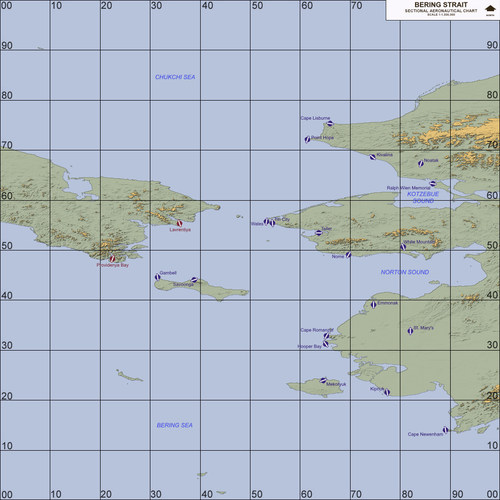
View File Alaska, Bering Strait (1955-2018) Alaska, Bering Strait (1955-2018) Terrain April 13th, 2017 (1st Release) by Menrva >For Strike Fighters 2: Europe, Recommended Full-5 Merged This is a complete remake of the DBS terrain made by Major Lee and further tweaked by Wrench. Wrench kindly allowed me to improve upon his work; the entire map has been retargetized and retiled using a whole new tileset, combining tiles from Brain32 and Stary. Some water bodies, lakes and rivers have been hand-tiled. Most of the terrain has been hand-tiled to a great extent. Numerous target areas have been added in order to expand playability, targets of opportunity and year range. This terrain features a fresh new 250m resolution heightmap (instead of the stock 500m resolution), allowing for greater details and precision in elevation changes; overall it provides the whole terrain with a better look. The terrain spans from June 22, 1955 (the date of the first known Cold War incident in the Bering Straits between the U.S. and the Soviets) to December 31, 2018. I didn't bother to add all of the possible RL airports. However, when compared to the original DBS terrain, this one has a lot more to offer, especially on the Blue Side. The Soviets (Red Side) only have two flyable airfields. Don't even try to fly Red Side long-range bombers from said small airfields. Reason for this is that the original DBS terrain was rather fictional and included airbases which in reality didn't and don't exist. I made major researches and what I am providing here is a realistic representation of the area, given the terrain engine limitations. Anyway, I added some Off Map Airbases for both Blue Side and Red Side; if you have SF2NA, you can benefit from this addition, as long range AI flights can be generated from such airbases. The area in reality is pretty barren, so don't expect a terrain with much targets. Still, you can enjoy CAS missions at St. Lawrence Island and Lopp Lagoon being invaded by Soviet forces, and the usual dogfights over the Bering Straits. Ground Objects are not included. You can obtain them from Wrench's original DBS terrain release. Only very few of them should be needed anyway. >Credits (in no particular order): -Major Lee, who came up with the idea of recreating such an interesting scenario in the Strike Fighters world. -Wrench, who kindly allowed me to improve upon his work by giving me a blank cheque and trusting my capabilities. Thank you, sir! -swambast, who provided me with invaluable help in tracking and fixing common and uncommon bugs. -gerwin, whose TFDtool has proved to be essential in today's terrain making. If the terrain is pretty accurate to RL it's also because of him. I included his very nice Airfield 7+8 Addon Pack, too. -mue, for the improved shaders he made, which I have included and reworked for the terrain, and for the tools he made for SF2 modding. -luk1978, for the snowy runway textures he made for his Korean terrain repaint (unofficially released) and the waternormal bitmap he shared at the SF2 screenshots thread. Your mods are very interesting! -MigBuster, I have included some of his great hi-res textures for runways. -Brain32, for the original hi-res DBS tileset he made and which I have expanded with my bad transition tiles. -Stary, because his tilesets are pure art. I borrowed a TOD and few tiles from his excellent Kamchatka tileset repaint. -Gepard, for his great tutorials about terrain making, in the SF1 Knowledge Base at CombatACE. It's a gold mine! -krfrge, who has produced a tutorial for recreating SF2-like planning maps, which prompted me to work on templates and my own high quality planning maps. Thank you very much! -comrpnt, for his Approach and Airfield Lighting Pack mod packages for SF1 series, which I reworked and included. Because the original terrain was born from Major Lee and was later tweaked a number of times by Wrench, I included the ReadMe files from the original packages, to the end of giving proper credit to everyone involved directly or not. >Disclaimer: This is a freeware; yet it can be redistributed ONLY in other CombatACE mods/mod packages. Any changes to the terrain package's files and/or any copy-and-paste attempts of their contents are NOT authorized if you plan to release them in other mods. But permission might be granted to those who request it to me at CombatACE. This terrain may NOT in any way, shape or form be used in any payware additions. Submitter Menrva Submitted 04/13/2017 Category Full Terrains
-
Version 1.06
1,562 downloads
Alaska, Bering Strait (1955-2018) Terrain April 13th, 2017 (1st Release) by Menrva >For Strike Fighters 2: Europe, Recommended Full-5 Merged This is a complete remake of the DBS terrain made by Major Lee and further tweaked by Wrench. Wrench kindly allowed me to improve upon his work; the entire map has been retargetized and retiled using a whole new tileset, combining tiles from Brain32 and Stary. Some water bodies, lakes and rivers have been hand-tiled. Most of the terrain has been hand-tiled to a great extent. Numerous target areas have been added in order to expand playability, targets of opportunity and year range. This terrain features a fresh new 250m resolution heightmap (instead of the stock 500m resolution), allowing for greater details and precision in elevation changes; overall it provides the whole terrain with a better look. The terrain spans from June 22, 1955 (the date of the first known Cold War incident in the Bering Straits between the U.S. and the Soviets) to December 31, 2018. I didn't bother to add all of the possible RL airports. However, when compared to the original DBS terrain, this one has a lot more to offer, especially on the Blue Side. The Soviets (Red Side) only have two flyable airfields. Don't even try to fly Red Side long-range bombers from said small airfields. Reason for this is that the original DBS terrain was rather fictional and included airbases which in reality didn't and don't exist. I made major researches and what I am providing here is a realistic representation of the area, given the terrain engine limitations. Anyway, I added some Off Map Airbases for both Blue Side and Red Side; if you have SF2NA, you can benefit from this addition, as long range AI flights can be generated from such airbases. The area in reality is pretty barren, so don't expect a terrain with much targets. Still, you can enjoy CAS missions at St. Lawrence Island and Lopp Lagoon being invaded by Soviet forces, and the usual dogfights over the Bering Straits. Ground Objects are not included. You can obtain them from Wrench's original DBS terrain release. Only very few of them should be needed anyway. >Credits (in no particular order): -Major Lee, who came up with the idea of recreating such an interesting scenario in the Strike Fighters world. -Wrench, who kindly allowed me to improve upon his work by giving me a blank cheque and trusting my capabilities. Thank you, sir! -swambast, who provided me with invaluable help in tracking and fixing common and uncommon bugs. -gerwin, whose TFDtool has proved to be essential in today's terrain making. If the terrain is pretty accurate to RL it's also because of him. I included his very nice Airfield 7+8 Addon Pack, too. -mue, for the improved shaders he made, which I have included and reworked for the terrain, and for the tools he made for SF2 modding. -luk1978, for the snowy runway textures he made for his Korean terrain repaint (unofficially released) and the waternormal bitmap he shared at the SF2 screenshots thread. Your mods are very interesting! -MigBuster, I have included some of his great hi-res textures for runways. -Brain32, for the original hi-res DBS tileset he made and which I have expanded with my bad transition tiles. -Stary, because his tilesets are pure art. I borrowed a TOD and few tiles from his excellent Kamchatka tileset repaint. -Gepard, for his great tutorials about terrain making, in the SF1 Knowledge Base at CombatACE. It's a gold mine! -krfrge, who has produced a tutorial for recreating SF2-like planning maps, which prompted me to work on templates and my own high quality planning maps. Thank you very much! -comrpnt, for his Approach and Airfield Lighting Pack mod packages for SF1 series, which I reworked and included. Because the original terrain was born from Major Lee and was later tweaked a number of times by Wrench, I included the ReadMe files from the original packages, to the end of giving proper credit to everyone involved directly or not. >Disclaimer: This is a freeware; yet it can be redistributed ONLY in other CombatACE mods/mod packages. Any changes to the terrain package's files and/or any copy-and-paste attempts of their contents are NOT authorized if you plan to release them in other mods. But permission might be granted to those who request it to me at CombatACE. This terrain may NOT in any way, shape or form be used in any payware additions. -

OffMapAirbase; how to determine (negative) coordinates?
Menrva replied to Menrva's topic in Mods & Skinning Discussion
Hmm, pity. Well, doesn't matter, surprise is about to be released as is! -
Ever find something interesting in the woods?
Menrva replied to MigBuster's topic in Military and General Aviation
Wow! I miss the Tomcat real bad! At least there are quite some Phantoms out there still flying. -
I am working on a surprise terrain remake, which I am planning to release shorty. I still need to finetune things here and there. I added Off Map Airbases (pretty much like in the IcelandNA stock terrain). However, I have no idea how to determine with accuracy the values for coordinates. In the stock IcelandNA terrain. I noticed that various negative coordinates have neen used. How to determine those? gerwin's mighty TFDtool shows positive coordinates in detail, but if I place the cursor outside the terrain limits (in the surrounding black area, so to speak), it simply shows the values -1,-1. Any clues or ideas? It would speed up development and terrain's release. All help is much appreciated!
-
I agree 110%. Everyone is free to believe in gods and idols. But, the value that should be always in our hearts and minds, is to be respectful to other human beings. That value exists within us, there is no need to believe in a superior entity, a god, for it to exist. If you don't comply with that simple value, you can't be treated as a human being, but as a threat for mankind. Mankind has wasted centuries believing in gods of all kinds; the ancient Greeks, the Romans, etc. There's a common thing, that war and hatred have always existed. And believing in such entities surely didn't help prevent those. Rather, it's the contrary.
-
Strangely painted buildings ans trange trees.
Menrva replied to Stratos's topic in Mods & Skinning Discussion
Wrong TODs or wrong texture assignments in the terrain's _DATA.ini. Reinstall the mod. -
I wish... Fact is that both IS and Assad are despicable bastards, and not the only ones. And the soldiers, and the rebels and even the terrorists are nothing but pawns of a bigger, sick game between superpowers (US, Israel, Turkey, Russia, Saudia Arabia, Iran, ...). It's been six years already of bloodshed, will this madness ever end? Syria's become the meeting boardroom for warmongers and personal agendas. //Sadness for the world mode: ON
-
Amazing, that is the Italian FIAT 600 Multipla, produced between 1956 and 1967. Ugly, but somewhat modern for its times, if you consider that certain Le Mans prototype racecars almost use the same principle (the back of the car seems to be front and viceversa). Proud to be Italian, LOL! Good photos, nice to see that M5 Tank. I'm wondering if it had been used during WW2, maybe during Operation Husky. Turns out that after WW2, the Italian Army had been given some Stuart tanks for training.
-
Yep, PFunk. AC7 will let you use joysticks (at the time of the PS2 trilogy there was a special bundle of AC5 with a PS2 compatible HOTAS stick). AC7 runs on the Unreal Engine 4, so it'll be heavy on resources, at least for my low-end PC.
-
I rather wait for Ace Combat 7, it's coming for PC too.
-
I find it interesting, but far from being that viable. Taking off from such a runway would be a mess, especially for heavy cargo planes. But for military aircraft, I don't know, it is kind of appealing.
-
http://www.bbc.com/news/magazine-39284294 Interesting concept. At the end of the video it is said that there were also military tests in this regard during the 1960s. Any info on that?
-
Don't worry, Wrench. I've got the entire planet Earth in DEM files, I have all of them. Also, they are divided in parts according to latitude and longitude values. I simply have to take a look at the area with Google Earth, a few minutes of trial and error, and I can make a new heightmap, and flatten everything as usual. @PFunk, my offer is still valid, I can help with your heightmap too.
-
Well, I'm here to help, I'd be very glad! I can even attempt making a whole new 250m heightmap from DEM files, for the DBS terrain, it's been on my mind for quite some time. That way we can get realistic altitudes (IIRC the map seems to have suffered the smooth heightfield treatment in the TE). Just shoot me a PM and I will look into it.
-
PFunk, do you have a older version of the heightmap, one that was not resized? The heightmap should be modded and flattened only at the end, if you work on it more and more time, it gets broken and less detailed. If you wish I can provide help, just send me a PM, and I'll show you my way to resize and make 250m heightmaps (without using .act palettes and other "unuseful" stuff). I can also make a brand new heightmap that matches your exact area, so that you won't need to replace targets locations or retile it, etc. (see what I've done for FRPignon's Europe terrain). I noticed that you flattened lakes with height=0, as if they were sea. It's better to flatten lakes and rivers, etc. as if they were part of land, the same thing we do with airbases flattening. IMHO it's not worth inverting the colours of the palette at this time, but it can be done easily; it's better to work with a heightmap bitmap exported with TFDtool (the one that is black and white) instead of the ones you have showed before. Open with Photoshop, simply invert colours. Now, sea areas will be white instead of black, so next step would be to export (always with TFDtool) a tilemap bitmap. From it, select by colour (there is a tool in each paint program for this) the sea areas. Copy and paste them over the heightmap, and turn them completely black. Some small tweaks here and there, and it's done. Believe me, once you understand how it works, it's a five minutes job. Ah, even if the bitmap is black and white, just save it as a 8bit bitmap, and you can import it into TW's TerrainEditor. This is also what Stary explained in his tutorial for 250m heightmaps. I no longer see the utility of working with .act palettes, now that we can use both TFDtool and the TE together. Again, heightmaps should be the last thing to mod, it's better to place targets and tiles first, flattening is the last thing to do (I suggest using gerwin's TFDtool, for all kinds of flattening, lakes, rivers, airbases). So, if possible, I suggest reverting to a precedent heightmap if you have it, even a 500m one. It can be easily converted into a 250m at the end.
-
What a beautiful, moving thing, my best wishes to this guy and the organization! Having suffered from bullying and (subsequent) depression, I know how difficult it is for someone to recover. I once thought there was no one that cared about me, and that was a big mistake. There were loved ones I didn't notice or forgot about. I wish there were organizations like this in my country, today's threat is cyber-bullying as well.
-
The avionics .dll has only to do with the aircraft avionics, it has nothing to do with speechpacks. It's the NATIONS.ini in the Flight folder that controls which speechpack is activated, according to the chosen "nation". IIRC Hawkeye appears by default when flying for USN and USMC, that's it. Not to mention how bad and incomplete Hawkeye's speech is, the fact that other flights still call for Red Crown instead of Hawkeye, etc. Red Crown is historically accurate for the Vietnam era, AFAIK. I miss the AWACS voices from Jane's USAF, they were cool and rather professional.
-
I too have found lots of unused parameters inside the dlls, through an Hex editor. From what I've seen most if not all of the unused stuff doesn't work. Keep us informed with any findings, EMCON360. Maybe there is something working in the code.
-
Thanks for the reply, EMCON360. Unfortunately it's not what I was looking for. The parameters you posted are relative to the comms box, the one we use to communicate orders to flights and to ask the TACC for help. From what I have seen, it's all hardcoded, there is no way to change colour to the flights subtitles. That blue is too dark for my likings. Yellow and red are still visible under various conditions, those are ok.
-
FRPignon, did you flatten airbases with TW's TerrainEditor function? Such oddities are caused by it. That's why I resorted to use gerwin's mighty TFDtool for almost everything; with it you can tweak the heights of single tiles, and you can create small, simple flat tiles unlike TW's big circular ones.
