


Stary
-
Posts
8,500 -
Joined
-
Last visited
-
Days Won
100
Content Type
Profiles
Forums
Gallery
Downloads
Store
Everything posted by Stary
-
I noticed them Brain, working on some cockpits as we speak, I have the outside fuselage/canopy mesh rendering without culling, so it must be this, I tried messing with these clipping settings to no avail. Only workable solution was to disable ShownFromCockpit entries in the aircraft I put my test work into. With all the popular terrain/weather/treemods available is it so hard for TK to finally have a look at the alpha materials/z-buffer conflict? (as usual NOT being negative, the workable code for fading is something I allways wanted, but I'm trying to move the gddamn rendering a bit further past few evenings without luck. Checking the TerObjectAlpha.fx shader line by line, experimenting, nothing so far)
-
anyone..?
-
I'm worried that this might be the permanent, untweakable TK's "solution" that solves the trees vs. clouds materials rendering bugs...
-

P4 DEVELOPMENT SCREENSHOTS Discussion
Stary replied to DukeIronHand's topic in WOFF UE/PE - General Discussion
improvements over P3 are clearly visible Pol, love the new cockpits any word on FM and DM improvements? (and please do something about the tracers ) -
it works for both XP and Vista and 7 (the latter preferably) BUT you'll get much better performance and certain eyecandy features like normal and specular mapping for aircraft, better lightning and effects with Dx10 shaders with Vista and 7
-
soo true Dave
-
priceless!!! love the Scots and Spanish ones
-
pardon my ignorance but it there a way to have multi/sub-object materials exported from Max11? I used all the standard 24 slots in Max Material Editor (all standard bitmap materials, some with alpha for transparency or self-illumination maps) but when applying the multi materials on meshes they export as black using latest exporter..? Also using standard baking creates shell material with both original one and baked so doing experimental baking resulted in whole (cockpit) mesh black sans glass
-
one can try porting to series2 himself -the biggies are weapons needing new folders structure and data,some FMs might be off too, terrains work without problems so far (testing this bit by bit now)
-
True Gr.Viper I noticed this also, buildings already "faded away" but their shadows are still rendered with ugly flicker
-
right Kevin, SF2 also, my bad
-
yes they fade the same way as trees IMO, I'm scratching my head trying to make them fade at longer (at least x2) distance instead. I like this fading, I just HATE anything that pop-up be it 2 or 12 kilometers away
-
-
me on 7 too -are you launching then the game using the new WW2.exe? Do you have any new (era-specific) planes added to the Aircraft folder? Hmmm... works for me. And yes if you use SF2 Expansion2.exe it does have all titles + both xp included.
-
simplest way is to use current installation's StrikeFighters2 Exp2.exe file to create new install -to do so copy this file (StrikeFighters2 Exp2.exe) and rename the copy to for example WW2.exe. Then run it -after briefly doing nothing (in fact it does create new folder called as the exe WW2 in your Saved Games folder, where all the SF-related mod folders reside) it will run. Close. Now go to your user/saved games/Thirdwire/ and locate newly created WW2 folder -you may want to delete all the stock Aircraft and Ground Objects folders (so these won't be seen or used by game engine). Next locate Options.ini in this WW2 folder and change the patches references at the bottom of the file (if they don't already point to ...Saved games/Thirdwire/WW2/) that's quick and dirt, but easy way to create new separate install. This install is at the same patch-level as was the StrikeFighters2 Exp2.exe when you copied and renamed it
-
also all the parts detached due to damage of components, it's kinda cool to have wing flying towards ground long after it was torn of, I have mine set to 120 in one of my installs (seconds)
-
yes, at DAT's site: http://www.cplengineeringllc.com/SFP1/ of course valid account there reqired
-
No it makes nice fireball that two heat seeking missiles after you fly through and continue the lockon flying at treetop level... oh, wrong movie As for jettisoned ordnance I allways hated the short period of time it's presence in the world (defaults to 5sec, adjustable in one ini file) and missed sort of dust cloud (or water splash) at ground impact, so it's ok for me
-
try light grey with a tiny bit of blueish tint in it: 214,220,226 in RGB for example
-
CG-47 Ticonderoga class Aegis cruiser
Stary replied to WhiteBoySamurai's topic in File Announcements
awesome for 1st mod WBSamurai -
From WOA install
-
it does? I allways wanted it to go off in a way
-
Sorry for yesterday rant, but you know me Baltika. I have nothing agains use of my work in such cumulative mod-packs, just giving credit seems fair. TODs are both from Madagascar aswell as my (stock) Desert/Suez 2 visual update. Oh, and my WW2 wooden hangars for yours BOB have some use too. Nice selection of planes in the pack
-
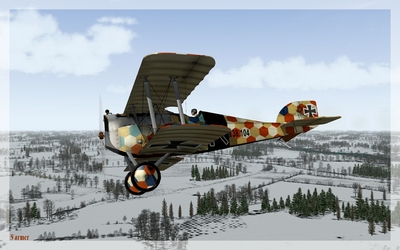 nice... as allways Farmer
 -
So... trees rendering fade distance is somewhere in the TerAlphaObject.fx and TerSolidObject.fx shaders, on 3rd party terrains that don't have these shaders in their directories trees don't fade but pop up as they used to. BUT apart from this, they pop up at also short distance, regardless of Flightengine ini DetailMeashSize setting. I'll try something about it tomorrow. Is it me or generally terrain textures have nicer mipmapping and overally somehow look nicer, be it stock or mods?
