


Wrench
-
Posts
28,322 -
Joined
-
Last visited
-
Days Won
188
Content Type
Profiles
Forums
Gallery
Downloads
Store
Everything posted by Wrench
-
no problem! however, after grabbing Nyghtfall's new pack I noticed it points to the avionics 70 dll -- make sure you edit both your main inis (early & late) back to avionics 60, or the radar and rwr won't work!! also, with the new pack, the wings seem to have disappeared from the cockpit view!! (and yes, the ShowFromCockpit=TRUE is true!) I just dropped the 3 skin folders into the aircraft folder, dropped the decals into the /decals folder and it all worked!
-
oh, sure NOW the real fixes come along, after I just uploaded the old set!! Rene, you rock in man!!!. Maybe I should just update the whole package??? But what I don't know is, if they Fast FACs had the straight or bent probe (not like it matter all that much!) yes, the cockpit in both mods references the stock A-4F cockpit, so that's a MUST have!! ps: I fixed/adjusted ALL the hit boxes on this "new" one
-
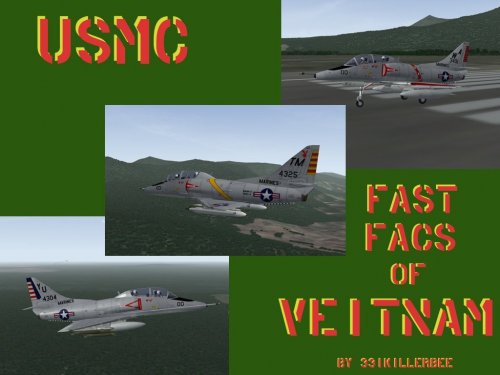
Version 1.0.0
185 downloads
SF2 TA-4F Skyhawk "Fast FACS" by 331Killerbee & Co. This is the full package (all necessary parts included), originally created by 331Killerbee in 2008. It has been fully updated to SF2 standards, with various small changes to the aircraft and the data ini. As with my other SF2 "fixes" for the TA-4 series, some components have been 'removed' to stop the shadow tractor beams. The FM is at the latest SF2 standard (latest patch level) Other changes include (but not limited too): resetting all hit boxes randomization of decals "fake insignia" decal to activate Nation displayed name. All weapons used are stock 3W. Killerbee's original readme (well, actually this document!) is included for historical purposes, and it's historical background on the Fast FACs. Have fun!! Wrench Kevin Stein -
View File SF2 TA-4F Skyhawk "Fast FACs" SF2 TA-4F Skyhawk "Fast FACS" by 331Killerbee & Co. This is the full package (all necessary parts included), originally created by 331Killerbee in 2008. It has been fully updated to SF2 standards, with various small changes to the aircraft and the data ini. As with my other SF2 "fixes" for the TA-4 series, some components have been 'removed' to stop the shadow tractor beams. The FM is at the latest SF2 standard (latest patch level) Other changes include (but not limited too): resetting all hit boxes randomization of decals "fake insignia" decal to activate Nation displayed name. All weapons used are stock 3W. Killerbee's original readme (well, actually this document!) is included for historical purposes, and it's historical background on the Fast FACs. Have fun!! Wrench Kevin Stein Submitter Wrench Submitted 10/31/2017 Category A-4
-
yeah, they sure do!! mostly, it the shader statements. Open a regular 1stGen terrain's data ini, and look for those with the ".fx" suffix.
-
Chinese territorial claims
Wrench replied to Ice Man's topic in Mission & Campaign Building Discussion
for those if us that still have a working Photoshop, any chance of a tutorial on "How To Make 3W style Planning Maps??? (pretty please????) -
I'm surprised that it wasn't in Eburgers SF2V expansion packs. It should be (almost) fully usable, but will need the usual editing for SF2; like moving the decals to a /Decals folder (and double check the decal pathways), and most importantly, the FM will need to be updated to SF2 standards. The lod is the question mark -- iirc, there were several shadow issues on the original. What would be needed to be done, is check Nyghtfall's newest TA-4 version, to see if the lod has been "repaired" or ??? If you want, I can get it set up for SF2 in fairly short time. It would probably be a good thing for the SF2V players.
-
Comet SR.1s (GOR-339) of No.14 squadron on a training sortie, circa 1965
-
Korea 3 works in 1stGens (minus carrier operations). you just need to downgrade it. instructions in the knowledge base, just follow them backwards (converting 1stGen to SF2). btw, that 1stGen POS is one of the most inaccurate, incorrect and just plane wrong terrains around. Things aren't even CLOSE to where they're supposed to be
-
as with most things, a little reasearch and brain sweat goes a long way if one has the dash 1 manual at their disposal... http://www.avialogs.com/en/aircraft/usa/lockheed/f-104starfighter/1-14404-1-f-104g-flight-manual.html#download
-
what about just desaturate to "b&w" or try a sepia filter?
-
you're going ass backwards...completley different ships with completly different locations for EVERTHING If you have WoV, just extract everything with "scb125" in the name. BTW, it you have WoE, all the bits are in it's object cat as well. you'll just need the "main ini", which you might have to create to be placed in a newly created SCB-125 folder.
-
probably not without folding up like a paper airplane. Wasn't stressed for that in game, maxed out a 7.3
-
google not working?? how about we combine all these threads into ONE, instead of opening new a one every time a question arises?
-
Timor Sea 1970 HMAS Melborne with 724 NAS Super Furys and 805 NAS Skyhawks embarked, on excercise
-
stock in WoV
-
just to let you know that the only individual screens are the 'hangar screens'. you can have one for each skin, when they're placed in the respective skin folders. for all the menu screens, they're "global", and can't be tailored to individual aircraft. locked in by the game's code. but these do look nice!
-
USNF Lives Again! Good project!! required screenshot
-
good job! IIRC, that's how I got started in modding! After several thousand hangar screens..... my only suggestion is to make the aircraft smaller, so it won't cover up the "mission" text. On this style hangar screen, I usually use somewhere around 40% opacity for the drop shadow (see below for example, albeit for SF2)
-
those statements ONLY work in SF2. It's called "year specific loadout" (we can also do them for specific nations, too) you didn't tell us you were trying to adapt an SF2 mod downhill to a 1stGen you'll have to load the gunpod by hand when the Genie's service years run out
-
suggestion: for the various carts, and other non powered vehicles, sometimes the "truck destroyed lod" and 'vehiclefire effect' for the secondary works good! maybe for the privy , "AmmoDumpExplosion" -- yes, pun intended!!!
-
oh, I LIKE the cover art!!! sometimes, all it takes is understanding the question, and coming up with a crazy answer!! I"m glad that worked for you Jackson!! Happy Flying!!
-
Campaign Building Tutorial location
Wrench replied to alexis99's topic in Mission/Campaign Building Discussion
yeah, apparently his old site in not longer in existence. We (Dave and I) tried contacting him in April 2015 to try and get his max files for the La9/11, so we could get someone to fix the various issues, but to no avail. sorry it didn't work out! -
you can't have both. the gunpod take over the genie station. learn to read data ini station numbering
-
just make sure that the TODs leave room to add targetable "terrain objects". I've found that densley populated TODs make it almost impossible to get "the usual suspects" added to a terrain. but, MAN THEY LOOK GREAT!! (is Quack's city walled??? It looks like battlements around the city's edge!!!!)
