


Wrench
-
Posts
28,326 -
Joined
-
Last visited
-
Days Won
188
Content Type
Profiles
Forums
Gallery
Downloads
Store
Everything posted by Wrench
-
UH-60 Blackhawks: Is anyone working on 'em right now?
Wrench replied to 9specter528's topic in Mods & Skinning Discussion
I'm sure they're on Yakarov's "to-do" list.- 11 replies
-
- 1
-

-
- bin laden raid
- blackhawk
- (and 11 more)
-
.
-
move the CG to the position shown in my data ini or just try redownloding the original from 12 years ago...it was built for 1stGens, so should really not have any issues (other than the obvious ones)
-
???? so... ??? any better?
-
Kittyhawks and Coconuts - RNZAF in the PTO
Wrench replied to dtmdragon's topic in World War II Forum
forgot about that ... while updating the VEnturas and Harpoons, started on the Hudson's hit boxes and FM...must revisit it! -
wow!! I know it's an early wip, but looks GREAT!! (needs the armored seat back, but that's nitpicking!!!) I'll glady donate any of my books on pdf, if you need anything! And please feel free to use any of the decals from my FW190 skins on the A series!!
-
EE Thunderbolt F.1
-
Mue's Tool Box is beyond awesome!! The Lod viewer alone is worth it's weight in gold-pressed latnium when working on new aircraft. yes, the SF1 original infantry squads have a "destroyed model" of scattered dead dudes. I guess I've just watched too many zombie movies and tv shows!!
-
to reiterate, there really ISN'T such a thing a a "seperate" install. . . ALL THE SF2 SERIES USES THE SAME CORE FILES LOCATED IN THE /PROGRAM FILES (X86) SECTION. ALL THE DLLS, CATS, EXES, ETC ARE LOCATED THERE. What you have as "seperate installs" are actually the Mods folders, created by the individual executables, and located in the /Users/Saved Games. . . folder ABOVE the C drive (look at my screen shots above). So, you have all 5 SF2 games? Which means you DO have SF2 (the basic, plain one, with the Desert terrain)? You can select this terrain to fly on?? Let's try this -- copy/paste the text into a response here, of the EXACT instructions you used to install the terrain, from it's read me. AND...give us a screen capture of the folder structure of you mods folder (just like mine above.) also, taking a closer look at your original post's screen caps, I'm not even SEEING a mods folder in the directory tree
-
I KNEW Sundowner and I had done this set up for a what-if Phantom FRG.3. It should be in the download section, but haven't been able to find it!!
-
that detail on the engine valve train is amazing!!
-
you forgot to add the DestroyedEffect statements to some items... Since I'm such a ghoul *, I like to use the "VehicleFireEffect" for ah, well, people and such. For the destroyed model, you can use either the original figure, or change it to one of the crater lods. (is there a 'small crater' in FE/FE2?) but good work on this listing! * being polite -- I've been called a sick f**k a few time about this!!
-
The difference between ANSI formatting of the LOD or Unicode formatting of the LOD. 1stGens can't see Unicode LODs.. SF2 is Unicode, but reads both. FE2, iirc, also used unicode for the stock lods. 3rd party users (may) have the choice when exporting to use either. What I"m not sure of, is the "latest" TW Exported for MAX still give you that option. (never got mince set up!) in any case, these China Skies birds look awesome!
-
any chance for the 190A series??? The one's we have, are from 2005, and are badly in need of updating!! these look GREAT! Can't wait to add them to my ETO mods folder!
-
Beauty!!
-
Give this a try. I've included a 'backed up" copy of the data ini, so you don't have to save yours. I also took the liberty of resetting all the hit boxes, and gave it new engine sound. While the Napier Sabre isn't perfect, it's the closest we have the Centarus (I've heard a real one in a Sea Fury at an airshow in Chino many years ago, and it's pretty quite for big radial!) what I don't remember is, if 1stGens can use the /Pilots sub folder in /Objects main folder. There's a FakePilot (tm) antenna included, so do whatever! You can always edit the data ini, and remove it. It's listed in the //Crew section of the data ini sea fury fixes.7z
-
check CG positioning check thrust angle also, let me check my archives, I redid the FM in 2012
-
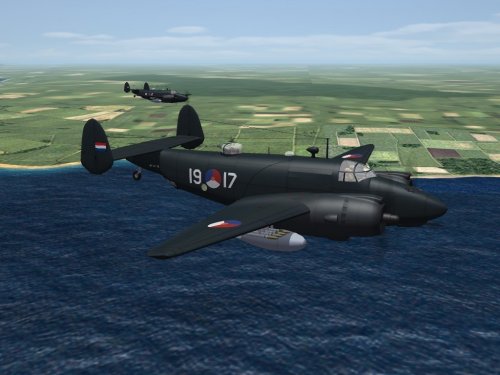
Version 1.0.0
45 downloads
SF2 MLD PV-2 Harpoon Skin Pack 9/5/2017 = For SF2 (Full 5 Merged RECCOMENDED) = This package contains a new skin for Veltro2k's Lockheed PV-2 Harpoon naval patrol bomber. This skin/decal set represents the 18 as used by the Royal Netherlands Naval Air Service (Marineluchtvaartdienst) or MLD. The MLD recieved 18 Harpoon in 1950, and were used in the Martime Recon, and Search & Rescue until their replacement by P2V Neptunes in the early 1960s. The skin is in jpg format, in overall "Dark Gloss Navy Blue" finish. All markings are decals, and decal randomization is TRUE. Displayed serial numbers are 100% historically correct for the aircraft depicted, as used by the MLD. Also included is the updated (and a backup copy) of the data ini for those that have not updated their WW2 versions. If you've done so, you need not install these 2 files (they're the same as in the update pack, so no harm will come if you do). You will still need the aircraft itself, available at the following URL: https://combatace.com/files/file/15018-ww2-pto-pv-2-harpoon-package/ As always, unzip this to a temp folder or your desktop, and you'll have access to the rest of the readme for the install instructions. *Please note, that even though the aircraft is WW2 vintage, THIS use is Cold War, which is why it's been placed here* Happy Landings! Wrench Kevin Stein -
View File SF2 MLD PV-2 Harpoon Skin Set SF2 MLD PV-2 Harpoon Skin Pack 9/5/2017 = For SF2 (Full 5 Merged RECCOMENDED) = This package contains a new skin for Veltro2k's Lockheed PV-2 Harpoon naval patrol bomber. This skin/decal set represents the 18 as used by the Royal Netherlands Naval Air Service (Marineluchtvaartdienst) or MLD. The MLD recieved 18 Harpoon in 1950, and were used in the Martime Recon, and Search & Rescue until their replacement by P2V Neptunes in the early 1960s. The skin is in jpg format, in overall "Dark Gloss Navy Blue" finish. All markings are decals, and decal randomization is TRUE. Displayed serial numbers are 100% historically correct for the aircraft depicted, as used by the MLD. Also included is the updated (and a backup copy) of the data ini for those that have not updated their WW2 versions. If you've done so, you need not install these 2 files (they're the same as in the update pack, so no harm will come if you do). You will still need the aircraft itself, available at the following URL: https://combatace.com/files/file/15018-ww2-pto-pv-2-harpoon-package/ As always, unzip this to a temp folder or your desktop, and you'll have access to the rest of the readme for the install instructions. *Please note, that even though the aircraft is WW2 vintage, THIS use is Cold War, which is why it's been placed here* Happy Landings! Wrench Kevin Stein Submitter Wrench Submitted 09/19/2017 Category Other
-
- 4
-

-
-
if you leave one each "modern" aircraft from player and non-player usable, the Game Engine (tm) will not repopulate the others. Been that way in my WW2 installs since 2005 So, just dump all the others.
-
not that I've ever seen!! I thought it was strange, too!
-
Defeats the purpose....all things in cats are referenced from the main game install. what you seem to be trying to do, is create a "theater specific install" While written with WW2 in mind the basic instructions are pretty much the same might want to consider giving this a read through... Short version: remove any and everything from the Aircraft or GroundObjects folders that do NOT the area/region or time frame. A simple rename of their main folders (ie: xA-4B or XSA-2) will suffice
-
Fictional / Ace Combat Themed Skins : Taking Requests
Wrench replied to zachtan's topic in Sci-Fi/Anime/What If Forum
been there, done that (Turtledove Universe)- 15 replies
-
- 1
-
-
- ace combat
- fictional
- (and 3 more)
-
Format for Decals used with Ground Objects
Wrench replied to flameout513's topic in General Discussion
you mean the FileFormatName= same as aircraft