Wrench
-
Posts
28,327 -
Joined
-
Last visited
-
Days Won
188
Content Type
Profiles
Forums
Gallery
Downloads
Store
Everything posted by Wrench
-
In Due Time
-
Oppseyy! The new lod changed a couple of things... go to the link below for "how to fix my fix" http://combatace.com/topic/65419-the-tips-tweeks-and-tricks-thread/?p=661745
-
Decals and Loadout Tweeks at the link below: http://combatace.com/topic/65419-the-tips-tweeks-and-tricks-thread/?p=661745
-
Fixs & Tweeks for Veltro2k's Hawker Typhoon IB (early) -Decal Fix: If you're using the decal trick I posted here http://combatace.com/topic/82405-spinners/ AND you're using the new lod, with the fixed shadow issue (called Typhoon-v2k.lod, dated 4/13/2014), you'll need to rewrite ALL the decal inis, as a new mesh has been added, called Tail. This is for the "early" camo skin, which I've renamed in my install to the correct squadron(s). But you should get the general idea. Back up the original decals ini for Saftey's Sake!!! You'll also have to do this for the later skin, the one with the D-Day Invasion Stripes. Like in the above linked post, this adds the Type c1 roundel over the painted on fues roundel. I've also attached the zip containing the roundel here, too. Just drop the zip into the /Objects/Decals/Typhoon-v2k main folder, and unzip to there. You'll have to do this for any or all skins you have the Tiffy. -Loadout Tweek for Tiffy: This adds the drop tanks as seen in many photos. The 44 gallon tanks themselves are from Raven's Hurricane, and are also used on several Spitfire mods (both Coca's Mk.Vs and the stock 3W Mk. IX) First, back up the Tiffy's data ini. This is an important Safety Tip!! Find the weapon stations callouts, and copy/paste the text below DIRECTLY OVER THE EXISTING TEXT this adds the drop tank callout, and rearranges the groups a bit more logicly In the loadout ini, which you should also back up for Saftey: copy/paste the text below over the whole thing: If you want to increase your "time on station" for CAP, just copy/paste the LongRange statements into the AirToAir section above it. That should do it!! FRoundel.7z
-
and there's something wrong with the Mk 5s that Daniel (Cocas) and I released recently?? (not speaking of my camo-pattern line up foul ups!)
-
Rends, since I haven't yet installed it (yah, I know ... my bad!), I can only guess that the TODs for each season are IN each seasons subfolder? Or are they ONLY in the main /GermanyCE? If they're in ALL the seasonal folders, I'd do one of 2 things (after first backing up the entire GermanyCE terrain folder -- safety first!): find which has the smaller trees, and copy/paste them into each seasonal sub-folder or remove all the TODs from those seasons exhibiting the "mutant" trees, and use only the tgas in those seasonal subfolders, with all the TODs residing in the MAIN part of the GermanyCE folder. hope that makes more sense!
-
same as since Win95 .. hit the PrtScn button, it'll hold the image in the clipboard, open your imaging program of choice (Paint.net, Photoshop, etc) go "New"... and drop/paste in the image. save a jpg, and attach here
-
he's talking about the later mark Tiffys with bubble tops (IB, irrc), not cockpits. Which, if we're very lucky and bribe him with expensive liquors, may also give us a Tempest. With judicious ini editing, and perhaps the "OpenCockpit=TRUE" statement, you can have the framing show.
-
note the pathway in my screenie above: C:\Users\Kevin\Saved Games\ThirdWire\PTO\Objects\Decals\P-61B\Black\D Can you take a screenshot of the Baz's decal folder, just like I've shown above? That'll really help in running this down Spinners raised a valid point ... it's possible that you've run off the end of the numbers list .ini. Without the decal randomization = true tag (given to us in 2012? iirc), and the size (or amount) of the decals, could be why you've nothing on the bird. Here's what we need: What does the texturelist ini look like inside? How many level 2 decals are there (look for these BlueCBazSN***.tga -- there should be numbers starting with 000 and going to ??where??? Are the folders actually where they're supposed to be? Meaning: is there actually a named aircraft folder (F-15C_Baz_85) INSIDE the /Objects/Decals folder? The texture list ini should should something like this: I'm just using the P-61, as that's what I'm working on. It's just a name to work with. You'll see the Randomization statements Again, without knowing EXACTLY how the folders are placed on you machine, severely limits what we can "see"
-
here's a quickie ... that skin has too much 'noise' and other strange colorations to make it easy to clone the colors. To really fix it would require the templates So try this: add at the bottom of ALL decals inis (I've got 4 skins to fix!) drop the zip into the ROOT of the Tiffy's decal folder (you know the drill) and unzip the FRoundel.tga there, just like the pathway above The roundel is the same one from the newest Beaufighters Daniel and I have been doing I've sized it so it covers the painted on marking, and has the side effect -being a Level 0- to activate the NationName display on the Loaout screen. Speaking of screens, I'll have to upload them, or anyone interested can grab them from the update/mod/fixit pak I did for the DATs old Tiffy http://combatace.com/files/file/14097-sf2-ww2-eto-hawker-typhoon-mk1b-dat/ one can even consider this a permanent fix, since no one but the RAF used them... (non exported aircraft do NOT need a Userlist)
-
Alfie, as per your request/statement on the DAT site. Give me a day or so to relayer/repaint/redecal the fuselage to fix those blurred markings. Decals make like SOOOOOOOOOOOOOOOOOOOOOOO much easier. the "normal" regular use ID stripes are also missing, but I'm not going to do those
-
search this forum for more information; someone else has asked that question before and I answered it. also, several (mainstream) mods already exist for torps for SF2. All the torps in the mods I've uploaded over the last 2 years or so work just fine. and the real answer: CM I'd look at the Beaufighters Cocas and I did, plus the Upgrade pak on the DAT Beaufort (ETO)
-
you mean the 3d objects built in to the TOD. THOSE maybe off scale on those particular seasons (it's happened before!)
-
KJ, next you'll say we should smell these colors!! to the OP: yes, changing engine sounds is a simple text edit of the aircraft's data ini. However, it WILL need to be extracted from the relevant ObjectData cat, and placed into the aircraft to be changed main folder Alfia, Zipper J-79s don't sound even close to Rhino J-79s!!
-
did you place the appropriate folder into the Objects/Decals/ folder??? If possible, post a picute of the Objects/Decals folder of the aircraft (like below) Pay particular attention to the full path written at the top sf2 runs their decals a bit different thank 1stGens
-
working the night shift...
-
and DO try to keep the terminology straight .. WoI2 and WoE2 are things that do NOT exist... this is part of the confusion created SF2:I - isreal SF2:E - Europe everything in the "NextGens" is SF2 ** (name of wherever). So, keeping the names straight helps us in trying to figure out your problem. and DO read the threads in the Knowledge Base. While things in SF2 do set up the same, folder structure wise, as mentioned they ARE in different locations.
-
Good work!! I, too, wish he'd come back!!
- 1 reply
-
- 1
-

-
Getting closer! and the damage textures work, too!!
-
I would never discount "old technology". Given a 'golden BB', even a Brown Bess could take down an F-22!!
-
great pics! thanks!
-
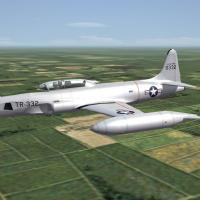
View File SF2 Lockheed RT-33A Shooting Star Pak by ErikGen SF2 Lockheed RT-33A Shooting Star Pak by ErikGen 3/25/2014 = For SF2, Full-5 Merged (Reccomended/Preferred) = This package contains a new aircraft for SF2. Originally part of the KAW F-80/T-33A/RF-80 pak, it somehow slipped under the radar (which Recon birds are supposed to do!!). *Note: as this aircraft were built with the latest 3W exporter, it will =NOT= work in SF/Wo* 1stGen Installs at any patch level.* Like the other Shooting Stars, this is a complete pak with everything needed. The skins included are: USAF (Generic style markings) Natural Metal (uses stock 3W decals; generic for everyone else) Skins and damage textures are in DDS format. Decal randomization is TRUE. The USAF skin uses painted on national marking, the "Natural Metal" does not; all marking will be decals. Generic "plane-in-group" decals reference stock 3W numbers. Serial numbers are 100% historically correct for T-33s, but should be considered generic in nature, as they represent no particular unit or aircraft within a particular unit. The "Generic NM" skin will be a good, blank canvas for other users to be created. All decal positions are pre-plotted on the included decals ini. Some adjustments may be necessary for specific country users, but that's a simple matter of creating a new, country specific skin and replotting the decal locations. It's also know to me that Soulfreak has some other skins in the works; when released, these will be great additions for your flying pleasure! Drop tanks are 'built in' to the aircraft lod; weapons folders for the drop tanks are included, as are the pilot figures and seat. As this is a recon bird, it's limited to ONLY RECON, and carries no weapons or guns of any kind. The canopy is controlled via the Standard Animations Keystroke , Shift/0. As always, fairly easy to follow, yet detailed install instructions are included. So, please read them. Also, give the "Notes" section a read too. There are "Operational Notations" with other impertinant data you should know. Happy Landings! Wrench Kevin Stein Submitter Wrench Submitted 04/12/2014 Category F-80
-
358 downloads
SF2 Lockheed RT-33A Shooting Star Pak by ErikGen 3/25/2014 = For SF2, Full-5 Merged (Reccomended/Preferred) = This package contains a new aircraft for SF2. Originally part of the KAW F-80/T-33A/RF-80 pak, it somehow slipped under the radar (which Recon birds are supposed to do!!). *Note: as this aircraft were built with the latest 3W exporter, it will =NOT= work in SF/Wo* 1stGen Installs at any patch level.* Like the other Shooting Stars, this is a complete pak with everything needed. The skins included are: USAF (Generic style markings) Natural Metal (uses stock 3W decals; generic for everyone else) Skins and damage textures are in DDS format. Decal randomization is TRUE. The USAF skin uses painted on national marking, the "Natural Metal" does not; all marking will be decals. Generic "plane-in-group" decals reference stock 3W numbers. Serial numbers are 100% historically correct for T-33s, but should be considered generic in nature, as they represent no particular unit or aircraft within a particular unit. The "Generic NM" skin will be a good, blank canvas for other users to be created. All decal positions are pre-plotted on the included decals ini. Some adjustments may be necessary for specific country users, but that's a simple matter of creating a new, country specific skin and replotting the decal locations. It's also know to me that Soulfreak has some other skins in the works; when released, these will be great additions for your flying pleasure! Drop tanks are 'built in' to the aircraft lod; weapons folders for the drop tanks are included, as are the pilot figures and seat. As this is a recon bird, it's limited to ONLY RECON, and carries no weapons or guns of any kind. The canopy is controlled via the Standard Animations Keystroke , Shift/0. As always, fairly easy to follow, yet detailed install instructions are included. So, please read them. Also, give the "Notes" section a read too. There are "Operational Notations" with other impertinant data you should know. Happy Landings! Wrench Kevin Stein -
this might be the best bet. don't forget, even in the NA environment, CVBGs act distinctly "odd", when not on the IcelandNA map. Code glitches that have never been properly addressed, or even questions on the answered. even on the Persian Gulf map, where I have them (more or less) in the right places, they don't properly generate -- sometimes in the Quatarn desert. and don't forget the Hawkeyes always orbit out 200 miles from the carrier, making it important that Iran be NEUTRAL
-
I stumbled across a pdf of the pilot's flight manual. didn't download it -like a dummy! I guess I can try and find it again, and attach. would be cool to have! EDIT: nuts! It's for the A model!!!