


Wrench
-
Posts
28,327 -
Joined
-
Last visited
-
Days Won
188
Content Type
Profiles
Forums
Gallery
Downloads
Store
Everything posted by Wrench
-
Sure, NOW you tell me!!! That's good news Martin! Well, when you get it ready, I'll delete this original mod. now harm, no foul!! On the bright side, all the decals and screens can be reused! LOL!! (btw, did you unlink the flaps animation from the gear? They should be separate! thanks!)
-
Hugh, I'm going to pin this topic, so it don't get lost! thanks for the work!!
-
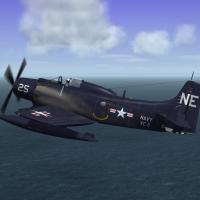
View File SF2 AD-4W/AEW.1 "Guppy" SF2 AD-4W/AEW.1 "Guppy" 4/1/2014 = For SF2, Full 5 Merged RECCOMENDED! = **Note: Actually, SF2NA is actually -REQUIRED- in merged installs, due to NA coding used for this aircraft's operational statements. It is also HIGHLY SUGGESTED!! that this be =ONLY= used in the NA envrionment (read: in SF2:NA only). It was tested only in the NA environment, but there are a few issues (see Notes below).*** A rebuild of MontyCZ's A-1H Skyraider give us the AD-4W "Guppy" Naval Airborne Early Warning aircraft of the 1950s. Included are 4 skins, representing the aircrft from 1950 through 1960. They are: USN: VC-11 USMC: VMC-1 British Royal Navy (AEW.1) No 849 Naval Air Squadron; in 'normal' garb No 849 NAS, HMS Albion, during the Suez Crisis (with Suez 'Invasion Stripes') The USN/USMC skins use a painted on fueselage national marking (not enough meshes for all decals); All other markings are decals. All aircraft are in 'standard' Dark Gloss Navy Blue. For the RN skins, ALL markings are decals. Serial numbers are 100% historically accurate for the model depicted, and Decal Randomization is TRUE. As there is no possible way to run down the US serials, they should be considered 'generic' in nature. However, you may experience some 'unusual' shuffling' of the CV and Flight letter codes on the Royal Navy (non Suez) skin. Further explinations for this are in the 'Notes' Section. The Suez skin depicts 849's "C" flight as embarked during Operation Musketeer, and are 100% correct. Skins remain in lo-rez bmp format, but new DDS damage textures are supplied (just in case). Each skins has it's own hangar screen. As always, fairly easy to follow, yet detailed install instructions are included. So, please read them. As mentioned above, give the "Notes" section a read too. Happy Landings! Wrench Kevin Stein Submitter Wrench Submitted 04/08/2014 Category A-1
-
408 downloads
SF2 AD-4W/AEW.1 "Guppy" 4/1/2014 = For SF2, Full 5 Merged RECCOMENDED! = **Note: Actually, SF2NA is actually -REQUIRED- in merged installs, due to NA coding used for this aircraft's operational statements. It is also HIGHLY SUGGESTED!! that this be =ONLY= used in the NA envrionment (read: in SF2:NA only). It was tested only in the NA environment, but there are a few issues (see Notes below).*** A rebuild of MontyCZ's A-1H Skyraider give us the AD-4W "Guppy" Naval Airborne Early Warning aircraft of the 1950s. Included are 4 skins, representing the aircrft from 1950 through 1960. They are: USN: VC-11 USMC: VMC-1 British Royal Navy (AEW.1) No 849 Naval Air Squadron; in 'normal' garb No 849 NAS, HMS Albion, during the Suez Crisis (with Suez 'Invasion Stripes') The USN/USMC skins use a painted on fueselage national marking (not enough meshes for all decals); All other markings are decals. All aircraft are in 'standard' Dark Gloss Navy Blue. For the RN skins, ALL markings are decals. Serial numbers are 100% historically accurate for the model depicted, and Decal Randomization is TRUE. As there is no possible way to run down the US serials, they should be considered 'generic' in nature. However, you may experience some 'unusual' shuffling' of the CV and Flight letter codes on the Royal Navy (non Suez) skin. Further explinations for this are in the 'Notes' Section. The Suez skin depicts 849's "C" flight as embarked during Operation Musketeer, and are 100% correct. Skins remain in lo-rez bmp format, but new DDS damage textures are supplied (just in case). Each skins has it's own hangar screen. As always, fairly easy to follow, yet detailed install instructions are included. So, please read them. As mentioned above, give the "Notes" section a read too. Happy Landings! Wrench Kevin Stein -
Desert 4 Mountain Regions + Addon V.1.0
Wrench replied to 1977Frenchie's topic in Mission & Campaign Building Discussion
they might to be frightened of you to show up!!! alternatively, in the targets ini, you can do this: [TargetArea052] Name=Muthala Airbase (D1) <---- add back in the D or P numeric designation Position=191000.00,803000.00 Radius=6000 ActiveYear=0 Location=1 Alignment=FRIENDLY AirfieldDataFile=desert_airfield1.ini NumSquadrons=3 -
Rusty, have you LOOKED in the Knowledge Base??? http://combatace.com/forum/189-adding-weapons/ now, some issues may be present with 1stGens running in Win7, but this should at least get you started in the right direction
-
Desert 4 Mountain Regions + Addon V.1.0
Wrench replied to 1977Frenchie's topic in Mission & Campaign Building Discussion
airfield names you're showing are printed on the map IF the names of said airfields have been changed in the Desert4_targets.ini, a completely NEW set of planning maps should be generated. But... you'll loose the "aeronautical chart" look, as the only tool around to do that is Gerwins TFD tool. You can, of course, try extracting the 3 planning map, and using a clone stamp tool (like in Photoshop), try and remove the D* and P*, then using layers add the corrected names. More work than it's worth. the other stuff, I can't help with, sorry! -
Anatolia Update & Make Object's for SF
Wrench replied to acesfakia's topic in KB - Unorganized Topics
Best advice I've seen in a LOOOOOOOONG time! -
Anatolia Update & Make Object's for SF
Wrench replied to acesfakia's topic in KB - Unorganized Topics
all of which were scrapped at the end of ww2, those that survived. And were never exported -
New Style Vietnam war
Wrench replied to Gulfwarfighter's topic in Mission & Campaign Building Discussion
what you seek could probably be in the menu cat, as those are menu screens -
depends on which Mark, and which series, I guess. At least 2 and possibly 3 different types of mid-upper turrets, too! I have the Warpaint on the Halibag, which has some pretty good diagreams and photos, if you need it!
-
thanks! that template will help! yah, I'd finally figured out WHERE it was on the map; the "sides" section. So, I just duplicated the layer, and trimmed it down a bit! I know the feeling about having too many templates!!
-
ok, thanks for the updated templates, but I've still got a weird bit here on the fin. Using the 11/22/2013 P-40K-5 lod. It's only on the right side, left side is OK So, my question: where is this mapped to? tail_add? tail? ???? got 3 skins and/or whole aircraft mods that do this (the other 2 are 23rd FG in China) thanks brudda!! (btw, glad to have you back!) edit: forgot picture!
-
I guess the old "Tunisia" terrain doesn't work?? (NOT the DAT one from their WOA mod) (it's actually in for overhaul; being retiled and have the targets "repaired" to fit the new tiles)
-
yes, it's folder is called "CL-83", and it's a Cleveland class light cruiser. (possibley called "Manchester" ???) been available since KAW came out 2-3 years ago (but NOT is post-refit config)
-
thank you gents, thank you Very much!!
-
the Cuba map or the Guppy? VC-11 (it'll have 1 USN, 1 USMC 2, FAA -standard RN and 1 Suez) (btw, nice Tigershark! looks familiar! LOL!!
-
I know these ALL too well!!!
-
looks like one of mine ... just judging by the object placements in the port. and juding by the 'beach' and the city tile, I'd go with Cuba OTC+ ---------- required screenie: Suez Guppy
-
PWP / PR smoke effects problem
Wrench replied to ravenclaw_007's topic in Mods & Skinning Discussion
looks like a wonky tga, but first check in the that effect's ini has the right shader statements for SF2 (had this myself, with the 'parachuting pilot mod' -- didn't work in sf2 until I added the new shader statements) -
How Can I find the coordinates of a map location?
Wrench replied to Stratos's topic in Mods & Skinning Discussion
true, Ant. forgot about Gerwin's tool. IIRC, Gerwins' tool saves the new HFD/TFD DIRECTLY in the terrain folder; so if you screw up you have NO way to restore from a backup copy, like with the TE, that stores the new ones within itself. (smart terraformers always back up the tfd/hfd in the terrain folder BEFORE adding the new ones!!) OTH, I can do it in TE in less than 90 seconds!! -
How Can I find the coordinates of a map location?
Wrench replied to Stratos's topic in Mods & Skinning Discussion
you can ONLY change tiles via the terrain editor; the same way you flatten --which MUST be done-- an airfield. You CANNOT just add a tile to the terrain data ini, drop the bmp/tga into the terrain folder and expect it to work. You must add it to that terrain's texture list, place it on the map, and generate a new TFD. Ain't no other way to do it. as to locating a 'region'... http://combatace.com/topic/44621-adding-objects-to-your-target-areas/ -
never seen any US aircraft in CBI that used letter codes ... that was strictly ETO and MTO (and MTO stopped in late 44)
-
Cooliooo!!! more targets. Thanks to Veltro and Paulo!! add this to the AircraftData section, in both data inis: DestroyedModel=B-52_Destroyed.LOD DestroyedEffect=VehicleFireEffect this'll give you the dead barbecued bird on the ground
-
I'd wondered what had happened to the Bison! --- since I got the AdA -4N Skyraiders, figured I'd (re)build the USN -4NL off the 3W SPAD as well for Korea. must find time to dial in the bits for the Guppy Martin did, too.
