Wrench
-
Posts
28,327 -
Joined
-
Last visited
-
Days Won
188
Content Type
Profiles
Forums
Gallery
Downloads
Store
Everything posted by Wrench
-
View File SF2 DLC #28: F-104A Starfighter, Pakistani Air Force SF2 DLC #28: F-104A Starfighter, Pakistani Air Force 3/10/2014 = For SF2, Full-4/5 Merged, =WITH= DLC #28 (Full-5 Reccomended/Preferred) = *DLC #28 is REQUIRED for this mod!!* A remod skin/decal set for the DLC F-104A, recreates the Starfighter as used by the PAF. The decals are re-used from my Indo-Pak Mod, that was based on Ajundair's old 1stGen A Zipper. Now, we're using the newest model (you all know how I hate to waste decals.... ). Included are 98.6% historical serial numbers (albeit 2 are for 104Bs ...) as used by No. 9 Squadron, PAF. Decal randomization is set to TRUE. Also included are several inis with some additions and corrections. The inis are: Data.ini (operable canopy, standard keystrokes, Shift/0) Loadout ini main ini Hangar screen (an SF2 revamped version of the 1stGen's F-104G) Loadout image (bmp) Avionics. ini Cockpit.ini, (with working secondary ADI and oil pressure gauges, ala F-104G) *REMINDER!!! You =MUST= have DLC #28 to have access to the aircraft's LOD.* As always, fairly easy to follow, yet detailed install instructions are included. So, please -READ- them!! Happy Landings! Wrench Kevin Stein Submitter Wrench Submitted 03/13/2014 Category F-104
-

161 downloads
SF2 DLC #28: F-104A Starfighter, Pakistani Air Force 3/10/2014 = For SF2, Full-4/5 Merged, =WITH= DLC #28 (Full-5 Reccomended/Preferred) = *DLC #28 is REQUIRED for this mod!!* A remod skin/decal set for the DLC F-104A, recreates the Starfighter as used by the PAF. The decals are re-used from my Indo-Pak Mod, that was based on Ajundair's old 1stGen A Zipper. Now, we're using the newest model (you all know how I hate to waste decals.... ). Included are 98.6% historical serial numbers (albeit 2 are for 104Bs ...) as used by No. 9 Squadron, PAF. Decal randomization is set to TRUE. Also included are several inis with some additions and corrections. The inis are: Data.ini (operable canopy, standard keystrokes, Shift/0) Loadout ini main ini Hangar screen (an SF2 revamped version of the 1stGen's F-104G) Loadout image (bmp) Avionics. ini Cockpit.ini, (with working secondary ADI and oil pressure gauges, ala F-104G) *REMINDER!!! You =MUST= have DLC #28 to have access to the aircraft's LOD.* As always, fairly easy to follow, yet detailed install instructions are included. So, please -READ- them!! Happy Landings! Wrench Kevin Stein -
FR.5, for SF2 only it may be convertible to 1stGens, but as almost no one mods for them anymore... http://combatace.com/files/file/13475-sf2-fairey-firefly-pak-post-ww2-korea-post-korea-by-simon-porter/
-
yes although, sometimes the "defending" side doesn't move at all, and just waits for the 'attackers' to close. which is why, on some of the WW2 maps, I've put atry batteries nearby
-
all routes are "there" all the time; unfortunately, you can't turn them on and off via a ActiveDate= (like in the targets ini). Wish we could! start and end points can be anywhere "near" anything, based on the radius of the closest target area you also want to keep them (end/start point) within 2 tiles of each other, otherwise the opposing forces won't have the necessary closure to engage each other (as artillery and tank guns seem to have an excessively limited range) for examples, look at the Kamchatka movements ini, in your example, you may need to have "something" on that island to define a point for whichever side (even the oilbarrel1 works, or just have a flag -- see the CubaOTC+ terrain for an example). AFAIK, you must have someplace to start/end from
-
problem with Mirage2000 foreign operator pack (update)
Wrench replied to bandina's topic in Mods & Skinning Discussion
something that's one of my MAJOR pet peeves, is modders NOT arranging things that match the 3W folder structure, so the End User just simply has to drag and drop their new toys into the appropriate Mods Folder. That, and vague and uninformative and confusing install instructions. The "KISS" principle should be the rule of thumb well, as long as you got it working, all's well in the end -
Foxfang - The new Soviet Superfighter
Wrench replied to Spinners's topic in Sci-Fi/Anime/What If Forum
just upload the template to the downloads section - there should be a category for them; saves time and effort!! -
problem with Mirage2000 foreign operator pack (update)
Wrench replied to bandina's topic in Mods & Skinning Discussion
you can find the 'fake pilot' all over the place (used a LOT on my Ww2 aircraft, like the FW-190s or the TMF Spitfire Mk.VIII once again, now that we have the full list, the items in BOLD must have a folder within the /PIlots folder: [Pilot] SystemType=PILOT_COCKPIT PilotModelName=MODusaf Position=0.0,3.74,0.71 SeatModelName=MB_MK10 SeatPosition=0.00,3.688,0.173 MinExtentPosition=-0.25, 2.8,-0.2 MaxExtentPosition= 0.25, 3.9, 1.02 CanopyNodeName=canopy CanopyAnimationID=5 [Canopy] SystemType=ANIMATION InputName=ANIMATION_1 DeploymentMethod=MANUAL AnimationTime=2.0 AnimationID=5 [Dash5_Tandem_Ant] SystemType=PILOT_COCKPIT PilotModelName=fakepilot PilotHeadNodeName= Position=0.0,0.0,0.0 SeatModelName=Dash5_Tandem_Ant SeatPosition=0.0,2.0,0.75 [HAF_ECM] SystemType=PILOT_COCKPIT PilotModelName=fakepilot PilotHeadNodeName= Position=0.0,0.0,0.0 SeatModelName=HAF_ECM SeatPosition=0.0,-4.62,2.36 [HAF_Tail_RWR] SystemType=PILOT_COCKPIT PilotModelName=fakepilot PilotHeadNodeName= Position=0.0,0.0,0.0 SeatModelName=HAF_Tail_RWR SeatPosition=0.0,-4.92,2.74 and just to save everyone a butt load of time, attached is the actual 'fake pilot' -
it's known as "the SF2 Double Cockpit Issue", and there should be a post in the KB about it (someplace!!)
-
problem with Mirage2000 foreign operator pack (update)
Wrench replied to bandina's topic in Mods & Skinning Discussion
in other words, within your /Pilots folder you need the following sub-folders: fakepilot antenna_bottom HAF_Spine_Ant HAF_Tail_RWR and the attendant files within those folders. if these items do NOT exist, you'll have the issue your reporting -
not a problem with a terrain-specific nations ini. easy enough to define red and blue sides with that
-
wilches, where do you think the F-86F cockpit for KAW came from??? better make funeral arrangements!!!
-
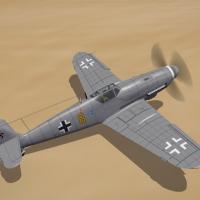
View File SF2 WW2 DLC #28 S-99 (Bf-109G) Mod Pak SF2 WW2 DLC #28 S-99 (Bf-109G) Mod Pak 3/10/2014 -- Something for the WW2 players -- = For SF2, Full-5 Merged (Reccomended/Preferred) = *You =MUST= have DLC #28 to gain access to the stock 3W S-99 Lods* Some modifications to the DLC Avia S-99, 'backdate' it to its WW2 beginnings. The aircraft has had several modifications, not the least of which is the renaming to BF-109. The skin is a 'base' light grey (RLM 81?). All new panel and rivet lines have been drawn in. There is NO camoflague pattern, nor are the control surfaces fabric lines drawn in. The templates I created ARE included, in the hopes someone can make use of them and finish off the aircraft. Due to the resolution of the stock skins I used, I was unable to see the control surface lines well enough, or to find a drawing that matched well enough to try drawing them. Several ini mods add a 'fake pilot' belly rack, so the drop tank or single bomb will have something to attach too (as the Lod does NOT have this mesh). Some modification to FM statements try to bring it closer to published data. It may need further tuning by experts. Canopy opens with the Standard Animation Keystroke (Shift/0) The skin included is a 'base' Luftwaffe (albeit, again with no camo). The markings represent 11/JG 77 in late 1944. All markings are decals, and decal randomization is TRUE. When in-game, you'll see: Bf-109G10 (3W) As always, fairly easy to follow, yet detailed install instructions are included. So, please =READ= them BEFORE installing this mod!!!. With any luck, one of our Expert skinners will grab this, and give us some nice Luftwaffe skins. Happy Hunting! Wrench Kevin Stein Submitter Wrench Submitted 03/10/2014 Category BF-109
-
448 downloads
SF2 WW2 DLC #28 S-99 (Bf-109G) Mod Pak 3/10/2014 -- Something for the WW2 players -- = For SF2, Full-5 Merged (Reccomended/Preferred) = *You =MUST= have DLC #28 to gain access to the stock 3W S-99 Lods* Some modifications to the DLC Avia S-99, 'backdate' it to its WW2 beginnings. The aircraft has had several modifications, not the least of which is the renaming to BF-109. The skin is a 'base' light grey (RLM 81?). All new panel and rivet lines have been drawn in. There is NO camoflague pattern, nor are the control surfaces fabric lines drawn in. The templates I created ARE included, in the hopes someone can make use of them and finish off the aircraft. Due to the resolution of the stock skins I used, I was unable to see the control surface lines well enough, or to find a drawing that matched well enough to try drawing them. Several ini mods add a 'fake pilot' belly rack, so the drop tank or single bomb will have something to attach too (as the Lod does NOT have this mesh). Some modification to FM statements try to bring it closer to published data. It may need further tuning by experts. Canopy opens with the Standard Animation Keystroke (Shift/0) The skin included is a 'base' Luftwaffe (albeit, again with no camo). The markings represent 11/JG 77 in late 1944. All markings are decals, and decal randomization is TRUE. When in-game, you'll see: Bf-109G10 (3W) As always, fairly easy to follow, yet detailed install instructions are included. So, please =READ= them BEFORE installing this mod!!!. With any luck, one of our Expert skinners will grab this, and give us some nice Luftwaffe skins. Happy Hunting! Wrench Kevin Stein -
the Calcutta docks use the Vietnam SC50 and SC75 tiles (based on those 2 from Stary's GH3
-
if that's the case, one wonders if the mapping is the same, and if so, then they (the SF2 skins/decals) could probably be used in IL2 Barnsey, if you're a 3d guy, talk to us!! There's a "substantial" number of ww2 aircraft we're in need of 100% Freeware versions!!! (check the "What Freeware Aircraft" thread sticked above. And ground objects, too!! thanks!
-
the language I use is usually a little bit harsher and one reason to use 110 -120 % when creating the original HFD/TFD (63% x 2 = ????). And STILL the damn scale is off!! Wilches is abso-frakking-lutely correct in his answer to that. It's Real World History, it happened and that's all there is too it.
-
did you copy/paste the alps off the sea1 tile, then paint in the black parts? That's the easiest way to do it! That leave the "sea" sections to match the open ocean, and neighboring transition tiles here's another desert sc25 port tile, and the 2 impounded docks are those in Calcutta (Kidderpur and King George's), in VNSEA for the ww2 east asia map (still very much on The Factory Floor at Magrethea)
-
problem with Mirage2000 foreign operator pack (update)
Wrench replied to bandina's topic in Mods & Skinning Discussion
copy and paste the /Pilots FOLDER supplied with the mod, into the Objects/Pilots main folder basically, what I see happening here, is the original mod maker did NOT set thing up following the standard 3W folder structure below, is what your folder structure should look like. If it doesn't make it so! -
I'm still holding out for the Antarctic ...
-
View File SF2 WW2 MTO USAAF P-40F Pak (Raven) SF2 WW2 MTO USAAF P-40F Pak 2/24/2014 -- Something for the WW2 MTO players -- = For SF2 ONLY, Full-5 Merged (Reccomended/Preferred) = *Note: this pak MAY be usable in 1stGen SF/Wo* game installs. However, some features (decal randomization and FM adjustments and several other things) will =NOT= be functional. Use in 1stGens has not, and cannot be, tested by me.* **Notex2: this mod is designed for use =ONLY= in a MTO-Centric mods folder** At first, I was just going to do a simple skin/decals pack. But with all the "modifications" made to fit into SF2 chose to take the "lazy man's way out" and am just uploading the entire aircraft. So, if you already have Raven's P-40F in your MTO-centric mods folder, best to back it up someplace. You can, of course, re-add any other skins at your convience. This is the full aircraft, with my 'tweeked' sf2-ish data ini. The skin included is for... 64th FS, 57 FG "Black Scorpions" as seen from late 1942 in North Africa. Skins remain in their bmp format. New DDS damage textures (usable on all Raven's Warhawk/Kittyhawk in SF2 only) are included! All markings are decals, and Decal Randomization is TRUE. There are no nose arts. Also, via the use of my (patent pending) fake "SqTail" decal, the squadron name display is now active on the Loadout Screen. No weapons are included, except an SF2 Version of the drop tank (for those that haven't converted it yet). New theatre-specific Hangar and Loading screens are included, too. Actually, you have 2 loadings screens to choose from. When in-game, on the aircraft selection drop-down, you'll see P-40F-5 CU (Raven) This will diferentiate this for any other Warhawks you may (or may not) have. As always, fairly easy to follow, yet detailed install instructions are included. PLEASE read them!! Good Hunting!! Wrench Kevin Stein Submitter Wrench Submitted 03/09/2014 Category P-40
-
- 1
-

-

202 downloads
SF2 WW2 MTO USAAF P-40F Pak 2/24/2014 -- Something for the WW2 MTO players -- = For SF2 ONLY, Full-5 Merged (Reccomended/Preferred) = *Note: this pak MAY be usable in 1stGen SF/Wo* game installs. However, some features (decal randomization and FM adjustments and several other things) will =NOT= be functional. Use in 1stGens has not, and cannot be, tested by me.* **Notex2: this mod is designed for use =ONLY= in a MTO-Centric mods folder** At first, I was just going to do a simple skin/decals pack. But with all the "modifications" made to fit into SF2 chose to take the "lazy man's way out" and am just uploading the entire aircraft. So, if you already have Raven's P-40F in your MTO-centric mods folder, best to back it up someplace. You can, of course, re-add any other skins at your convience. This is the full aircraft, with my 'tweeked' sf2-ish data ini. The skin included is for... 64th FS, 57 FG "Black Scorpions" as seen from late 1942 in North Africa. Skins remain in their bmp format. New DDS damage textures (usable on all Raven's Warhawk/Kittyhawk in SF2 only) are included! All markings are decals, and Decal Randomization is TRUE. There are no nose arts. Also, via the use of my (patent pending) fake "SqTail" decal, the squadron name display is now active on the Loadout Screen. No weapons are included, except an SF2 Version of the drop tank (for those that haven't converted it yet). New theatre-specific Hangar and Loading screens are included, too. Actually, you have 2 loadings screens to choose from. When in-game, on the aircraft selection drop-down, you'll see P-40F-5 CU (Raven) This will diferentiate this for any other Warhawks you may (or may not) have. As always, fairly easy to follow, yet detailed install instructions are included. PLEASE read them!! Good Hunting!! Wrench Kevin Stein -
my advice also use 7z as you compresser of choice. it does a better (read: tighter/smaller) job then either RAR or regular zip another suggestion, is break into parts say, tiles in one (if retiled) 'terrain objects' (the new buildings) in another ground objects in still another but, as always, do what's easiest for YOU!!
-
since I'm still using them "square" monitor, I've never done screen templates for the wide-screens. But I think (operative word=not quite remembering!) someone did widescreen screens SF2:Z "Planes vs Zombies" (don't forget, I did a 'zombie infantry' mod -- they even moan and groan. never did a 'brains ... brains...' wav for them!!
-
problem with Mirage2000 foreign operator pack (update)
Wrench replied to bandina's topic in Mods & Skinning Discussion
also, is there a "fake pilot" mod being used on in it anywhere?? If the pilot legs are hanging out near the center, you're missing the object needed for the "fake pilot" system to work My money is on a pylon or something similar a screenshot of the guy hanging out would be of help!!