Wrench
-
Posts
28,331 -
Joined
-
Last visited
-
Days Won
189
Content Type
Profiles
Forums
Gallery
Downloads
Store
Everything posted by Wrench
-
OUTSTANDING!!! Great work man!!
-
I second that motion!!!
-
LOL! I'd debated putting "some kind of bridge" over the Canal on my WW2 maps; but didn't want to have it bombed (as I'd never found any references to that ever happening!!) then, the problem is, would you have it raised or lowered??? !!!! pity we can't get shipping lanes to work properly down rivers/canals (yes, I've experimentated with it ... damn formations is what messes it up!) Don't want "the ships that sail over land and sea" (ala Elric)
-
RAAF Beau's in action off Lae, PNG
-
any plans for the Rendsburg High Bridge, over the canal?
-
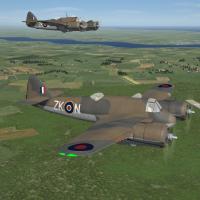
View File SF2 WW2 ETO Bristol Beaufighter Mk.1 series (Early), v.9 by Cocas SF2 WW2 ETO Bristol Beaufighter Mk.1 series (Early), v.9 by Cocas 2/10/2014 -- Something for the WW2 ETO players -- = For SF2, Full-5 Merged (Reccomended/Preferred) = *This mod will =NOT= work in SF/Wo* 1stGen game installs, at any patch level. It was built for SF2 ONLY!! Also, some statements for anti-ship/naval strike require having SF2NA as part of your merged install (meaning: your WW2 ETO mods folder built from the SF2NA exe).* *Note x2: This mod represents Beau Mk.1s for Northern Europe ONLY! Seperate versions are in the works for MTO, PTO and CBI usage, as their start/end dates tend to differ.* These are BRAND NEW aircraft, brought to you by Cocas Aircraft Factory & Co. This is the first of a set of Beaufighters. This package contains 3 aircraft, representing the early production Beaufighters. These have the flat or no dihedral horizontial stabs. We are calling this "version 0.9", as there exists the possibility of more work being required. But, we wanted to get them out into the hands of our WW2 End Users for their examination and so forth. This pack contains the following aircraft & skin/decal sets: Beaufighter Mk.1F (Day Fighter) No. 25 Squadron Beaufighter NF Mk.1 (Night Fighter) No. 604 Squadron "County of Middlesex" Beaufighter MK.1C (Coastal Command) No 143 Squadron No. 236 Squadron Please note, on the 1C, you'll switch from the Standard Day Scheme (dark green/light earth/sky) to the CC Sea Camo (MSG/DSG/sky) in 1942. The Squadron Crest for each is used as the paint chip seen on the Loadout Screen. Skins are in jpg format, as are the bump maps. Damage textures are in DDS. Everything is included, excepting the guns (you should have all these already). All markings are decals, and decal randomization is set to TRUE. When in-game, you'll see: Beaufighter Mk IF (Early) (CAF) Beaufighter NF Mk.I (Early) (CAF) Beaufighter Mk IC (CAF) for the 3 aircraft. The "CAF" (for Cocas Aircraft Factory) will differentiate these Beaus from any others you may or may not have. As always, fairly easy to follow, yet detailed install instructions are included. So, please =READ= them!!!. Also, give the "Notes" section a read too. Happy Hunting! Wrench Kevin Stein - for Cocas Aircraft Factory - Submitter Wrench Submitted 02/16/2014 Category Other
-
176 downloads
SF2 WW2 ETO Bristol Beaufighter Mk.1 series (Early), v.9 by Cocas 2/10/2014 -- Something for the WW2 ETO players -- = For SF2, Full-5 Merged (Reccomended/Preferred) = *This mod will =NOT= work in SF/Wo* 1stGen game installs, at any patch level. It was built for SF2 ONLY!! Also, some statements for anti-ship/naval strike require having SF2NA as part of your merged install (meaning: your WW2 ETO mods folder built from the SF2NA exe).* *Note x2: This mod represents Beau Mk.1s for Northern Europe ONLY! Seperate versions are in the works for MTO, PTO and CBI usage, as their start/end dates tend to differ.* These are BRAND NEW aircraft, brought to you by Cocas Aircraft Factory & Co. This is the first of a set of Beaufighters. This package contains 3 aircraft, representing the early production Beaufighters. These have the flat or no dihedral horizontial stabs. We are calling this "version 0.9", as there exists the possibility of more work being required. But, we wanted to get them out into the hands of our WW2 End Users for their examination and so forth. This pack contains the following aircraft & skin/decal sets: Beaufighter Mk.1F (Day Fighter) No. 25 Squadron Beaufighter NF Mk.1 (Night Fighter) No. 604 Squadron "County of Middlesex" Beaufighter MK.1C (Coastal Command) No 143 Squadron No. 236 Squadron Please note, on the 1C, you'll switch from the Standard Day Scheme (dark green/light earth/sky) to the CC Sea Camo (MSG/DSG/sky) in 1942. The Squadron Crest for each is used as the paint chip seen on the Loadout Screen. Skins are in jpg format, as are the bump maps. Damage textures are in DDS. Everything is included, excepting the guns (you should have all these already). All markings are decals, and decal randomization is set to TRUE. When in-game, you'll see: Beaufighter Mk IF (Early) (CAF) Beaufighter NF Mk.I (Early) (CAF) Beaufighter Mk IC (CAF) for the 3 aircraft. The "CAF" (for Cocas Aircraft Factory) will differentiate these Beaus from any others you may or may not have. As always, fairly easy to follow, yet detailed install instructions are included. So, please =READ= them!!!. Also, give the "Notes" section a read too. Happy Hunting! Wrench Kevin Stein - for Cocas Aircraft Factory - -
Populating Existing Terrains?
Wrench replied to ignacioc91's topic in Mission & Campaign Building Discussion
have fun!!! also, if you're replacing the stock hangars with those from Stary's hangar pack, they're reversed. Meaning, if you want it facing west (270), you have the set the heading to east (90). Just a little quirk they have! -
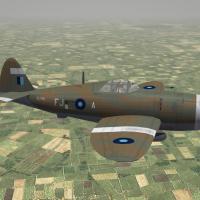
View File SF2 WW2 CBI RAF Thunderbolt Mk.I & Mk.II SF2 WW2 CBI RAF Thunderbolt Mk.I & Mk.II 2/10/2014 -- Something for the CBI players -- = For SF2, Full-4/5 Merged (Reccomended/Preferred) = *There is a possibility that this mod =MAY= work in SF/Wo* 1stGen game installs; However, due to the excessive modifications made to fit them into the SF2 environment, not all things will work. End Users do so at their own risk.* **Notex2: These aircraft should =ONLY= be used in a seperate CBI-centric mods folder to prevent them from showing up where, historically, they shouldn't. The Aircraft/GroundObject sets for CBI are substantially different from the Central or SouthWest Pacific areas.** This pack contains modifications/reskin/redecaling/etc of Wolf257's P-47D aircraft (both Razorback & BubbleTop), and create a nation-specific version for use in the China-Burma-India Theatre (SEAC) by the RAF. This is the complete aircraft, with everything needed. This pak contains a skins for: Thunderbolt I: No. 261 Squadron, RAF Thunderbolt II: No. 5 Squadron (after converting from Mohawks) No. 60 Squadron (after converting from Hurricanes, after converting from Blenheims) 261 and 5 Squadrons are finished in standard SEAC camo (Temprate Day); 60 squadron is finished in Natural Metal, as they didn't start Thunderbolt operations until May, 1945. That particular skin does NOT use the SF2 "start date" switch, as many of the squadrons continued in camo until VE-Day. You can select it from the drop-down in the usual manner. All markings are decals, making it very easy for skinners to create other squadrons by simply making a new squadron code letter. Decal randomization is set to TRUE. The Squadron Crest is used for the paint chip on all 3 skins. A new (semi)compliant SF2 FM was assembled (as used on my other P-47 Mods). As has become expected, the FM is NOT perfect, and needs further fine-tuning by Experts. New "box art" style hangar & loading screens (when art was locatable), New DDS damage textures. The skins are in jpg format, As is usual, all lighting is 100% historically correct. Serial numbers are also historicaly correct for these Jugs, but should be considered "generic" in nature, as they represent no particular aircraft with the unit(s) depicted, But are correct for the model variants. When in-game, you'll see: Thunderbolt Mk.I (W) Thunderbolt Mk.II (W) on the aircraft selection drop down menu. The "W" is for "Wolf". This will diferentiate them from any other Jugs (RAF, USAAF or otherwise) you may or may not have. As always, fairly easy to follow, highly detailed install instructions are included. So, please read them. Good Hunting! Wrench Kevin Stein Submitter Wrench Submitted 02/15/2014 Category P-47
-
150 downloads
SF2 WW2 CBI RAF Thunderbolt Mk.I & Mk.II 2/10/2014 -- Something for the CBI players -- = For SF2, Full-4/5 Merged (Reccomended/Preferred) = *There is a possibility that this mod =MAY= work in SF/Wo* 1stGen game installs; However, due to the excessive modifications made to fit them into the SF2 environment, not all things will work. End Users do so at their own risk.* **Notex2: These aircraft should =ONLY= be used in a seperate CBI-centric mods folder to prevent them from showing up where, historically, they shouldn't. The Aircraft/GroundObject sets for CBI are substantially different from the Central or SouthWest Pacific areas.** This pack contains modifications/reskin/redecaling/etc of Wolf257's P-47D aircraft (both Razorback & BubbleTop), and create a nation-specific version for use in the China-Burma-India Theatre (SEAC) by the RAF. This is the complete aircraft, with everything needed. This pak contains a skins for: Thunderbolt I: No. 261 Squadron, RAF Thunderbolt II: No. 5 Squadron (after converting from Mohawks) No. 60 Squadron (after converting from Hurricanes, after converting from Blenheims) 261 and 5 Squadrons are finished in standard SEAC camo (Temprate Day); 60 squadron is finished in Natural Metal, as they didn't start Thunderbolt operations until May, 1945. That particular skin does NOT use the SF2 "start date" switch, as many of the squadrons continued in camo until VE-Day. You can select it from the drop-down in the usual manner. All markings are decals, making it very easy for skinners to create other squadrons by simply making a new squadron code letter. Decal randomization is set to TRUE. The Squadron Crest is used for the paint chip on all 3 skins. A new (semi)compliant SF2 FM was assembled (as used on my other P-47 Mods). As has become expected, the FM is NOT perfect, and needs further fine-tuning by Experts. New "box art" style hangar & loading screens (when art was locatable), New DDS damage textures. The skins are in jpg format, As is usual, all lighting is 100% historically correct. Serial numbers are also historicaly correct for these Jugs, but should be considered "generic" in nature, as they represent no particular aircraft with the unit(s) depicted, But are correct for the model variants. When in-game, you'll see: Thunderbolt Mk.I (W) Thunderbolt Mk.II (W) on the aircraft selection drop down menu. The "W" is for "Wolf". This will diferentiate them from any other Jugs (RAF, USAAF or otherwise) you may or may not have. As always, fairly easy to follow, highly detailed install instructions are included. So, please read them. Good Hunting! Wrench Kevin Stein -
I really like the 2nd picture ... looks almost photographic. Very nice!
-
Populating Existing Terrains?
Wrench replied to ignacioc91's topic in Mission & Campaign Building Discussion
dingdingding!! give that man a cigar!! EVERYTHING (offsets and headings) on stock 3W airbases is based off the north/south heading. You add the objects with the runway heading north (as it's the 0/0 point), at whatever offset and heading that sets them way you want, then rotate the runway, and it'll "drag" all the objects with it. several hundred examples of additional structures to airfields exist an dozens of terrains, with the runways at various angles. Just look through the target inis -
India-Pakistan Terrian fixes and issues
Wrench replied to santroM's topic in Mods & Skinning Discussion
you're also forgetting the massive amount of work re-targeting; moving all the target areas, and their attendant items, BACK to their 'correct' placements within the various 'new' city tiles Took me months to get it where it is now ....and I'd have thought our Resident Expert that worked on the project would have said something before we released it, as he lives in Mumbai. so, best to start learning the TE, get it set up properly -and it ain't that hard to do- (follow Gepards' tutorials), and go from there. I'm too far buried to revisit something already finished and released. -
I could use some help cleaning the house... walls need washing, windows cleaned, car waxed. that don't really work; without excessive tweeking to the object itself (it can be done, however) If the terrain object buildings are built in MAX with self-illuminating tgas, they can. (see Stary's lighthouses) would be the best way. more WW2 planes, but that's all MAX work
-
Distant objects render in white through hills...Why?
Wrench replied to quack74's topic in General Discussion
I recall a similar issue in the KAW map (but it was water rendering at hill tops), but don't exactly remember what the fix was, but I think it was something in these statements: [HeightField] DetailScale=1.0 DetailFrequency=1.0 MaxHeight=1000 MinHeight=0 [HeightOffset] LowDetailMesh=-1.5 WaterMesh=0.8 but, again, I'm not really sure! -
India-Pakistan Terrian fixes and issues
Wrench replied to santroM's topic in Mods & Skinning Discussion
no it won't a complete rebuild as he's proposing, is best done only the TE. You can manipulate mass amounts of tiles all at once iirc, centurion-1 is rebuilding the Iran/Iraq already, and is well along in progress -
Populating Existing Terrains?
Wrench replied to ignacioc91's topic in Mission & Campaign Building Discussion
http://combatace.com/topic/44621-adding-objects-to-your-target-areas/ would have thought this would have been a pretty good descriptor edit: ahha! I knew I'd done a WoI targets upgrade, in 2008 http://combatace.com/files/file/6274-woi-israelme-targets-enhancement-pak/ -
iirc, the 48-56 campaign was built for SF2I ONLY- not built for anything else, as several needed/required items will be missing
-
PLEASE!!! In-Game screenshots, NOT photographs of the real item thank you
-
very nice! but, wouldn't they moor parallel (usually bow on) to the stream, and not at right angles??? Even though the Thames has a lower flow rate than many rivers, being moored broadside to the stream in not a good idea. Unless there's breakwaters or impounded docks
-
London docks already done -- on 2 different ww2 maps (EAW Euro WW2 and BoB). with MUCH more period correct terrain objects (them stock cranes are awful! and are for container lifting) ------ a rare sight over Singapore...
-
Everything but their proprietary lods can be uploaded. As can be seen in the WW2 aircraft downloads here. of course, that's exceedingly unfair to those without DAT access. then again, anyone with a modicum of skill could add those decals to Wolf's Lightning (mind you, some data ini work to create a nation specific version would be required. )
-
in your /Options, is the GroundObjects set to unlimited??
-
basic tiling done, now to start on targeting. new 'specials' for Calcutta -- King George's Docks and Kidderpore Docks (best and safest representations given the game engine...sigh...)
-
View File SF2 WW2 CBI RAF Mohawk Mk.IV SF2 WW2 CBI RAF Mohawk Mk.IV 2/5/2014 -- Something for the CBI players -- = For SF2, Full-4/5 Merged (Reccomended/Preferred) = *There is a possibility that this mod will =MAY= work in SF/Wo* 1stGen game installs; However, due to the excessive modifications made to fit them into the SF2 environment, not all things will work. End Users do so at their own risk.* **Notex2: These aircraft should =ONLY= be used in a seperate CBI-centric mods folder to prevent them from showing up where, historically, they shouldn't. The Aircraft/GroundObject sets for CBI are substantially different from the Central or SouthWest Pacific areas.** This pack contains modifications/reskin/redecaling/etc of Wolf257's P-36 aircraft, and create a nation-specific version for use in the China-Burma-India Theatre by the RAF. This pak contains a skin for: No. 5 Squadron, RAF As seen in the Assam & Imphal Valleys, and Eastern Bengal in late 1941 thru 1942 (end of service approx 1944). It is finished in standard Temperate Day Scheme, with full color markings. A new (semi) compliant SF2 FM was cobbled together. As has become expected, the FM is NOT perfect, and needs further fine-tuning by Experts. New "box art" style hangar screen, New DDS damage textures, New (AvHistory) Engine sound, and a new 20# RAF bomb. The skin remains in BMP format, and decal randomization is set to TRUE. As is usual, all lighting is 100% historically correct. Serial numbers are also historicaly correct for th Mohawk II/III/IV, but should be considered "generic" in nature, as they represent no particular aircraft with the unit depicted. All markings are decals, making it easier for other skinners to replicate the other Mohawk units in the CBI. When in-game, you'll see Mohawk IV (W) on the aircraft selection drop down menu. The "W" is for "Wolf". This is done as a 'just in case' Raven is working on a newer version (which I believe to be the case, maybe?). As always, fairly easy to follow, highly detailed install instructions are included. So, please read them. Happy Hunting! Wrench Kevin Stein Submitter Wrench Submitted 02/08/2014 Category Other