


Wrench
-
Posts
27,734 -
Joined
-
Last visited
-
Days Won
156
Content Type
Profiles
Forums
Gallery
Downloads
Store
Everything posted by Wrench
-
did you create a textureset.ini for new skin???? the game engine will not recognize it without them. also, what format did you save the skin as? bmp? jpg? All stock lods can use both, as the engine (tm) reads those formats. no matter what they say, size really does not matter. we have skins here in 4096x that work just fine.
- 26 replies
-
- 1
-

-
- black texture
- skin
- (and 2 more)
-
deactivate permadeath in campaigns?
Wrench replied to Buddha's topic in Mission & Campaign Building Discussion
and don't let them give you a blood transfusion. To answer the actual question: Nope. You dead. Have to start the campaign over with a new pilot. Been that way since Day 1 -
Russ has a 110 in the works. You'd have to ask him about any expected release date. IIRC, he was also working on a proper He-111H cockpit too.
-
View File SF2 F-102A (v2k) Greek Air Force Skin Pack SF2 F-102A (v2k) Greek Air Force Skin Pack 6/19/2021 -For SF2 =ONLY= (Full 4/5 Merged Reccomended) Two new skins for Veltro's F-102A Delta Dart Interceptor. These represent the Greek Air Force versions from 1968 until their retirement in 1979. The skins are: ADC Grey SEA 3 Tone All markings are decals, and decal randomization is TRUE. All 20 Serial numbers are 100% historically correct. The SF2 'date switch' is used to swap from the Grey to 3 Tone in 1974. Also included are: Updated data ini with minor FM adjustements (a backup of the original is also provided for safety's sake) Updated Loadout ini with F-102 specific weapons The F-102 specific weapons themselves (just to be safe!) Updated Userlist with Greece & Turkey added Damage Tgas (finally!) Main ini (F-102A.ini) with the "v2k" tag added to the displayed name. This will differentiate this model from that by Razbam, for those that may have that payware version. This means that you'll see... F-102A Delta Dagger (V2K) on the aircraft selection drop down on the main mission screen. A backup of this ini is also provided. The new ini included here is "clean", with no texture listings. When the game is started, it will automatically re-populate with YOUR skins. This mod package is designed to be applied to MigBuster's Upgraded Version available at the following URL: https://combatace.com/files/file/9446-f-102a-delta-dagger-veltro2k/ As is always recommended, unzip to a temp folder or your desktop to give easy access to the rest of this readme for it's install instructions. PLEASE read them, before installing!!! Also, the Notes section has more details on the changes. Happy Landings! Wrench Kevin Stein Submitter Wrench Submitted 06/22/2021 Category F-102
-
- 1
-
-
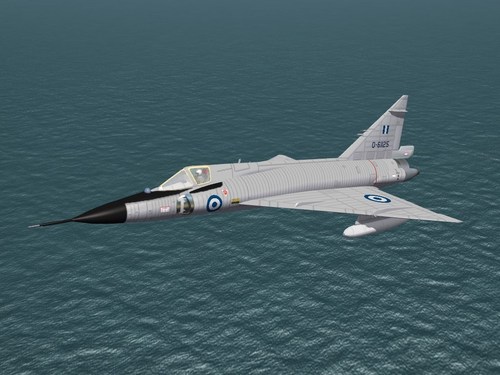
Version 1.0.0
51 downloads
SF2 F-102A (v2k) Greek Air Force Skin Pack 6/19/2021 -For SF2 =ONLY= (Full 4/5 Merged Reccomended) Two new skins for Veltro's F-102A Delta Dart Interceptor. These represent the Greek Air Force versions from 1968 until their retirement in 1979. The skins are: ADC Grey SEA 3 Tone All markings are decals, and decal randomization is TRUE. All 20 Serial numbers are 100% historically correct. The SF2 'date switch' is used to swap from the Grey to 3 Tone in 1974. Also included are: Updated data ini with minor FM adjustements (a backup of the original is also provided for safety's sake) Updated Loadout ini with F-102 specific weapons The F-102 specific weapons themselves (just to be safe!) Updated Userlist with Greece & Turkey added Damage Tgas (finally!) Main ini (F-102A.ini) with the "v2k" tag added to the displayed name. This will differentiate this model from that by Razbam, for those that may have that payware version. This means that you'll see... F-102A Delta Dagger (V2K) on the aircraft selection drop down on the main mission screen. A backup of this ini is also provided. The new ini included here is "clean", with no texture listings. When the game is started, it will automatically re-populate with YOUR skins. This mod package is designed to be applied to MigBuster's Upgraded Version available at the following URL: https://combatace.com/files/file/9446-f-102a-delta-dagger-veltro2k/ As is always recommended, unzip to a temp folder or your desktop to give easy access to the rest of this readme for it's install instructions. PLEASE read them, before installing!!! Also, the Notes section has more details on the changes. Happy Landings! Wrench Kevin Stein -
goforit!!!
-
thanks paulo! but I finished the decals 2 weeks ago! just waiting for final testing and certifications before release!!
-
that is damn strange ... the link leads to the right place, skins, spad. something must have went wrong somewhere's . let me and Erik look into it.
-
Questions about modifying / adding national decal (.tga)?
Wrench replied to Eagle114th's topic in Mods & Skinning Discussion
check in the downloads, skins, templates. look for the f-100 template by hgbn. it's bomb! everything is all set up, layer-wise -
Personally, I think "Darmok" is only surpassed by "The Inner Light". The 2 best TNG episodes
-
Tanagra? I keep forgetting that was one of the main bases. Wonder if Darmok has been there .... ducks and runs..................................................
-
Unfortunately, sharing payware is not allowed here at CombatAce. Sorry to say, you're stuck with the stock 3rd Wire one from WoV (imported if you're talking about SF2 usage)
-
the 2 seat Tub, not the single seat interceptor. What I've been trying to find out is .... Did the Greek AF ever have their whole fleet (5 birds) in the ADC Grey before switching to SEA 3 tone? I ask, because my research has only turned up 1 in grey; all the others are camo Along that line, my research seems to indicate that the Turks (11 birds) kept their IN the grey throughout their service life. even the Detail & Scale book is letting me down on this ... and the internet just confuses me. more than usual. so, if anyone can shed some light on this; as the mod in nearing completion, I want to know if need to add those skins for the Greeks & Turks TIA!!!
-
aaahhhhhhhhhhhhh shit!!! i forgot about that!!!
-
Some of you may have noted the creation of a new private developer's Forum. We at Coyote Aerospace are looking for volunteers with certain specific skill sets that will move our projects forward. It is our goal to bring you an ever widening variety of aircraft from all over. We need a "unwrapper" to help with the UV mapping for our models. This will aid and abet the fine, talented texture artists we already have and make it easier for us to create the necessary accurate paint jobs seen in the Real World (tm) versions of what we're building. We could also use an experienced Flight Model Guru, to help us fine tune some of the more esoteric parameters (ie: carrier landings and the like) that we've been having some difficulties with. Those with the skills, and who are willing to work for the Greater Glory (tm) of the SF2 series, please contact myself or Veltro2k Thanks In Advance!
- 8 replies
-
- 12
-

-
like the K-14 reticle on Mustangs, etal??
-
and the loviz skins I've done, as well
-
it uses a Mr. Fusion. similar to the proposed nuculear powered bomber of the 1950, the fusion reactor's waste heat is used to spin the intake turbines, with futher compresses the air, just like a regular jet. Or, the electric current generated spins the turbines, or whatever. it would still need a verti-jet for lift
-
and the real beauty is, we can (re)use all the stock 3W decals!!!! (yeah, even I get lazy!)
-
man, don't think I wouldn't have killed to have that one on the Mid West USA map -- well, hell, these days McDs is everywhere ... theyr'e the AK-47 of fast food!!!
-
thing is, i know I have it somewhere; i just cant find the archive CDs. don't remember where I put them
-
the one at C5's site is/WAS capuns. it was created before The Great Schism
-
you put it directly into the terrain folder itself, yes??? yo can open the bmp, and see it, right?? I've zipped it up' see if this one works. the pits should look like the image below Pit1.7z
-
I believe so. At least, that's what the "visual" evidence over the last several hundred years seems to support <gr>
-
Cause I"m pretty sure I did that for the K3 terrain (I recognize my own work -- the large sun shelters were a dead giveaway that one ain't mine) use the attached bmp. just drop it into the terrain folder. Be advised, it will change ALL the arming pits, for all time Pit1.BMP
