

Wrench
-
Posts
28,059 -
Joined
-
Last visited
-
Days Won
167
Content Type
Profiles
Forums
Gallery
Downloads
Store
Everything posted by Wrench
-
Another thought occured to me... do you have ALL the AAA units??? The game only comes with, what? 4? 5? There's a boatload in Pasko's SAMs and Vehicles Paks, avaliable here and at my site. To really make things nasty...try networking them with a Fire Can.... Wrench kevin stein
-
Actually, your half right.... they ARE called out in the data ini, and MUST be listed in the SystemName= sections, but they are global measurments; ie, from 0.0 on the LOD. the lights don't care what compenent they're attached to. You can have the LandingLight callout in the fuselage statement, for example, as long as the coordinates are spelled out in the Lights section Explination of coordinate system: All measurments in meters 00.00,1.50,3.5 00.00 is your left/right of center, negative numbers (ie: -6.5) would be on the left wing 1.50 is your fore/aft distance from the center of the model; negative numbers are aft 3.5 is your verticle distance from the center of the model; again, negative numbers are BELOW the centerline. Having dialed in several hundred lights...this is something I know! For an example, look at these from the P-51D: Now, I'm not going to post the component sections, but if you look at the Fuselage sctions for the Mustang, you'll see it lists the system "BottomRedLight", where the coords definately show it placed on the right wing. Hell, I started the adding landing light trend 4 years ago.... looking for a specific aircraft??? I probably already got it Wrench kevin stein
-
Increase your enemy air defense level to HARD or HEAVY (whichever it is)...and get back to us. I think you'll see some differences.... Wrench kevin stein
-
What he said!! That "NAVAL_BASE" thing is good to know...looks like I'm making a few changes in the Okinawa types ini...take the smoke out (which might not be good, as there are ships at convoy stations that need it...hmmmmm). More things to experiment with! Wrench kevin stein
-
WP and NATO are not used as 'mainline' countries in the weapons pak. They're used for 'oddball' stuff (like the Fresco radar bubble) and for other countries. That's just how wpnsgt set it up. Doing it as above will work perfectly, trust me!! (yeah, and the Czech's in the mail! -- the German is in the plate armor -sorry, old D&D joke) NationName has to be Pakistan; we're creating a nation specific aircraft; like the Indian Fishbeds, Egyptian MC-205s, whatever! It's no longer ours, it's one of 'theirs' Wrench kevin stein
-
Ok...quick and dirty; please don't laugh at the skin, I just grabed one to use, for to be checking weapons loadings Interesting to note, there dosen't seem to be Paki Sabre skin in downloads section...I was SURE we had one! bombs, M117: rocketpods, LAU3A, 19 shot: data ini: make use PAKISTAN is the NationName=; don't know the operations years-you all can figure that out. Like I said, this is just a quick weapons fix hardpoint data: No need to worry about the HVAR stations, they aren't used you'll note I left the IRM stations intact, even though I think the PAF didn't use them. There are Pakistani AIM-9Bs in WePak, if needed. loadout ini: There was no CAS mission loadout (ATTACK), so I made a new one. new 19 shot Pak LAU-3A: In theroy, thought I didn't test this, you might be able to load the PAK SNEB pods, or any of the other PAK specifc weapons (FAB and RBK bombs). Don't know the historicality of their usage, but there ya go! There's also an reasonably nice Hangar Screen for a Paki Sabre; Ghostrider should have all of them I made 'ways back. Wrench kevin stein
-
Next question: do you want to have a Paki LAU-3 19 shot RP, or use my already made 7 shot pod? what the heck...it only takes a few minutes to make one! Wrench kevin sten
-
Because Pakistan is a semi-friendly country???? No, seriouslly... Pakistan has it's own attachment type (WP I think), and nation specific weapons. BTW, drop tanks don't care who they work for...there's not nation specifice attachment for them (ie: P-51 tanks showing up on Me-109s, etc) didn't I do the Paki Sabres in the Loadouts Thread???. I'll check and if I didn't I'll get something up later today. Plenty of Paki weapons to choose from in the WepPak! Wrench kevin stein
-
Embedding them in the terran makes double damn sure they show up!! Expecially for docked ships. Oddly enough, in the WW2 maps, at least the PTO one's I'm fiddling with, I have most of the ships set to "UseGroundObject=TRUE", and they show up. As for the destroyed lods, for the stock items, they're inside the terrain cat. (I should know -- I pulled most of them out to make them 'standard' terrain objects for destroyed cities and such) As to the lod extension, it dosn't seem to be used, even on stock items, like the barracks shown. My understanding is, that if it's a vehicle, say the M35 truck, since it uses the GroundObject, the GO's data ini info is used damaged and destroyed models. Personally, I always add the destroyed and secondard effects when working in the terrain types ini: The 'smallrocketgroundexplosion' gives a nice effect. As to docked ships, ALWAYS check in the data ini for the vessel, as they won't have their stack's smoking. Depengind on how you want them, you'll have to pull the effects off the data ini: Here, you'll note the LODs called out. OTH, it seems like the game engine dosen't seem to care... I know this isn't anwsering your questions; but it looks like it might work both way. Docked/parked/moored/whateve ships I've always used the extensions, and they seem to work. Biuldings and such, I don't think it matters. Wrench kevin stein
-
Indo / Pakistan Air War Campaign
Wrench replied to lazboy's topic in Mission/Campaign Building Discussion
Mike, I've updated ALL of howling1's InAF Fishbeds ... they're all here (someplace!), check either in the 'cold war aircraft' section under MiG-21 or somewhere in that general vicinity! There should be some pretty good hangar screens floating around for Indo-Pak stuff, if I do say so myself (execpting the Marut, which I forgot to do!!!) Right, Ghostrider??? Wrench kevin stein -
Haven't these already been done? The Fort would be easy enough...have the use the 17F,due to the lack of nose guns (and historically, ALL the turrets) and just re-decal it. ==EDIT: forgot I had this- Somethng like this: all guns, excepting the chin turret have been removed. Tail, ball, waist, upper ... all gone. The chin turret should actually be a rounded bulge, for a secondard radar. Same for the Hawkeye; I dont' recall seeing any in camo - course, that don't mean there weren't any. Whisky Cobra, same thing - do it with decals. T-6 has been done for several years -- actually, it's a Harvard. Done by me. Somewhere around her allenjb has an Israeli AF aircraft listing -- it should have all actually used, plus a few 'odd-balls'... Wrench kevin stein
-
On Star my ass!!! Get a Lo-Jac!!! "Mr Stein, this is On Star. It appears you RF-4C has been stolen. We're dispatching SAR teams to it's location, but don't hold your breath that it hasn't been parted out to keep other Phantoms airborne" So, that's what that little blue button on the mirror does..... Wrench kevin stein
-
"Cobra 1 check fire! Check fire! Friendly fire reported in your area" Opps...did I just shoot down Snoopy.......again??? Never have seen that twerp do his job! (as in a previous thread here) Sparky, have you checked AS missions in the WW2 maps??? Just for S&Gs, run a few and let me know. They all seem to be working for me. Wrench kevin stein
-
WW2 Solomons Islands Upgrade View File Solomons Islands Terrain Upgrade: For WW2 PTO mods The first of several... This mod is a relatively small upgrade to Edward's WW2 Solomons Islands terrain. What I've done is add several new targets and target areas, and replaced several airfields with a newly repainted "desert airfiled 1", which is now a medium dirt runway. You'll be getting new targets and types inis, along with a host of goodies to drop into the terrain's folder. It has been tested in SF, WoV and WoE, using their cats pointed to the terrain's main ini. As the new objects will be residing directly in the terrain folder, you should have no problems. All necessary items are included, so there should be no worries here. You MUST have ALL the Pacific Objects (ground units, ships, AAA, etc) already installed in you PTO version of the game; otherwise things won't be appearing. This is especially important for the ships -- make sure you have the barges, the Liberty ship, and all warships, both Allied and Japanese. Don't forget to check Geo's page for more WW2 goodies ... there's a lot of stuff that's usable here as well. It is also reccomended that you have installed (in this terrain ONLY) CA_Stary's WW2 hangars and buildings. They have a nice worn green wood-ish texture, and look really good in the SoWesPac! It is NOT included in this package. Edward's "Pacific Terrains.txt" readme is also included. = MAKE SURE YOU HAVE THE LATEST, WW2 NATIONS INI IN YOUR FLIGHT FOLDER = = MAKE SURE YOU HAVE THE LATEST WW2 FORMATIONS INI IN YOUR FLIGHT FOLDER = == MAKE SURE YOU HAVE THE LATEST WEAPONS PAK FOR THE WW2 WEAPONS!! = If you follow the instructions below, you should have no (or minimal) problems...just remember - BACKUP your originals! And follow the fairly simple instructions in the enclosed readme. Of course, the general notes sections might be interesting to read; a full listing of credits, and my very public Thank You to Edward for creating the PTO terrains in the first place!!! Sorry, folks, no screenie. You all should know what SoWesPac looked like by now!! Happy Hunting! Wrench kevin stein Submitter Wrench Submitted 01/18/2008 Category Terrains
-
387 downloads
Solomons Islands Terrain Upgrade: For WW2 PTO mods The first of several... This mod is a relatively small upgrade to Edward's WW2 Solomons Islands terrain. What I've done is add several new targets and target areas, and replaced several airfields with a newly repainted "desert airfiled 1", which is now a medium dirt runway. You'll be getting new targets and types inis, along with a host of goodies to drop into the terrain's folder. It has been tested in SF, WoV and WoE, using their cats pointed to the terrain's main ini. As the new objects will be residing directly in the terrain folder, you should have no problems. All necessary items are included, so there should be no worries here. You MUST have ALL the Pacific Objects (ground units, ships, AAA, etc) already installed in you PTO version of the game; otherwise things won't be appearing. This is especially important for the ships -- make sure you have the barges, the Liberty ship, and all warships, both Allied and Japanese. Don't forget to check Geo's page for more WW2 goodies ... there's a lot of stuff that's usable here as well. It is also reccomended that you have installed (in this terrain ONLY) CA_Stary's WW2 hangars and buildings. They have a nice worn green wood-ish texture, and look really good in the SoWesPac! It is NOT included in this package. Edward's "Pacific Terrains.txt" readme is also included. = MAKE SURE YOU HAVE THE LATEST, WW2 NATIONS INI IN YOUR FLIGHT FOLDER = = MAKE SURE YOU HAVE THE LATEST WW2 FORMATIONS INI IN YOUR FLIGHT FOLDER = == MAKE SURE YOU HAVE THE LATEST WEAPONS PAK FOR THE WW2 WEAPONS!! = If you follow the instructions below, you should have no (or minimal) problems...just remember - BACKUP your originals! And follow the fairly simple instructions in the enclosed readme. Of course, the general notes sections might be interesting to read; a full listing of credits, and my very public Thank You to Edward for creating the PTO terrains in the first place!!! Sorry, folks, no screenie. You all should know what SoWesPac looked like by now!! Happy Hunting! Wrench kevin stein -
Having templates would probably be a good place to start...and there, unfortunately, aren't any. For the stock WoV or ADs; not that I've ever seen. They could be made however...with much work. Personally, I can't think of a more useless aircraft for the IDF ... what would they use it for? To replace the Vatours? Remember, it was originally designed as a low-level nuclear strike aircraft (and I can see the neighbors getting more than a little worried about THAT - to say nothing of the Bear in the far North*). As a bomber, it would be a great penetrator to hit the pesky targets across the Suez Canal, or up into Syria... but it's defensablity if low, when compared to others they had (Mirage IIIC comes right to mind) Not saying it couldn't fight...you just don't want to risk mixing it up with all the Frescos and Fishbeds (and yes, I KNOW Thuds killed some MiGs is SEA). Believe me, as the King of What If..., it's already been considered. (there's an IDF Hunter available...) Wrench kevin stein * can you say 'one-way mission'??? I remember, as a kid -possibly during the 73 war- when things were looking reaaaly bad, some speculation of IDF Phantoms reaching as far as Moscow, armed with Nukes. To say nothing of Damascus, Cario, Bagdad,.....etc. If push came to shove, and the end was near... well, my cousins tend to remember Masada, the Warsaw Ghetto...
-
Which version of the game? SF? WoV? WoE??? My revamped Lybia has a serious problem with anti-shipping missions. There's an upgrade to my upgrade that, iirc, fixes that. I never did figure out why it pointed me to the middle of Sahara desert...aliens maybe?? If you create 'convoy' stations via the targets ini, you can be tasked to hit them. (WW2 Lybia does this) Do you get a error message with the CTD??? If your missing the ships, that'll happen. If routes aren't defined, that'll happen. If the terrain dosen't support AS missions (Range, Red Range, ANW series), that might happen. The stock SF campaign had AS missions -- I remember playing them. Never played the campaing in WoE, but they're there in single missions. WoV, oth, propably don't -- not much to shoot at in Southeast Asia (don't want to offend the Russkies and Chinese folks whilst blowing up their ships as they bring impliments of dee-struction to the enemy - no, sorry, can't do it!) Wrench kevin stein
-
Lockheed P-38 Lightning series (by Wolf257 and Others) Whilst tweeking the PTO terrains this week, I finally figured out just why I couldn't get the drop tank and bombs and etc to show on the various marks of the P-38. It'd been staring me in the face for almost 3 years now...which goes to prove that even I'm still human...what a horrible thought!!! Anyway, it resloved down to a simple misspelling, or actually mis numbering in the loadout ini. In the data ini, just make sure that "USAF" is the ONLY attachment type availble. No other edits are needed there... If anyone want to know what the glitch was, the "0" was missing in front of the loadout numbers... Loadout ini: my P-38F mod: P-38H/J/L You'll note I've given you drop tanks for ALL air-to-air missions. This may not be historicall correct for all theatres of operation. But, I've chosen to err on the side of 'having more fuel for them long over-water flights'. You can always remove them, if you wish, for the shorter ranged missions. Also, don't forget that the rocket 'Christmas Tree' isn't available before 1944, and only on the later models. Wrench kevin stein
-
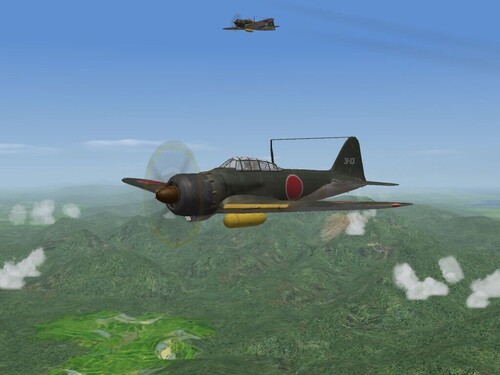
View File A6M5 Zero Skin and Ini Update Pak A6M5 Zero Skin and Ini Updates: for SF/WoV/WoE WW2, PTO installs This little modification includes several small changes to the several inis and a re-skin for ArmorDave's A6M5 "Zeke" IJN fighter. Included are tweeked data, loadout, cockpit and main inis with adjustments to the latest standards. All the running lights have been re-positioned. The aircraft IS carrier-capable, already having the tailhook. The skin, from a new template created by me from the original Volks & Lansen skins, is included. It represents 331 Kokutai sometime in 1944. All panel and rivet lines have been redrawn, with all the little 'detail' and 'interior' bits from the originals - so they get credit too!!! Included are individual aircraft number decals for approx 36 aircraft, with a filler for the "off the list" numbers. I've also given you some other gunsight tgas, so you can choose between them. = You MUST have the latest Weapons Pak installed for the WW2 Weapons!!! = And, obviously, you must have AD's Zero's installed to use the package.... Please read the enclosed readme for full install instructions; The Son of Heaven, His Imperial Majesty requests that you do so....and we all know what a request from the Emperor means Happy Hunting! Wrench Kevin Stein Submitter Wrench Submitted 01/17/2008 Category Japanese AF/Navy
-
201 downloads
A6M5 Zero Skin and Ini Updates: for SF/WoV/WoE WW2, PTO installs This little modification includes several small changes to the several inis and a re-skin for ArmorDave's A6M5 "Zeke" IJN fighter. Included are tweeked data, loadout, cockpit and main inis with adjustments to the latest standards. All the running lights have been re-positioned. The aircraft IS carrier-capable, already having the tailhook. The skin, from a new template created by me from the original Volks & Lansen skins, is included. It represents 331 Kokutai sometime in 1944. All panel and rivet lines have been redrawn, with all the little 'detail' and 'interior' bits from the originals - so they get credit too!!! Included are individual aircraft number decals for approx 36 aircraft, with a filler for the "off the list" numbers. I've also given you some other gunsight tgas, so you can choose between them. = You MUST have the latest Weapons Pak installed for the WW2 Weapons!!! = And, obviously, you must have AD's Zero's installed to use the package.... Please read the enclosed readme for full install instructions; The Son of Heaven, His Imperial Majesty requests that you do so....and we all know what a request from the Emperor means Happy Hunting! Wrench Kevin Stein -
For the upgrade, everything will be included. As mentioned, the "Factory Place" for some items. Everhtying else comes right out of the WoV or WoE terrain cats. Which is why I'm including them, as some of these objects arn't in SF at all. Uses the same terrain tiles, etc. Just make sure you have all the PTO objects in the Ground Objects folder, plus a few other WW2 veicles (I'm using Geo's Opel Blitz just for show -- several parked vehicles will be the standard Commie Trucks) Hopefully, the Solomons and New Guiena upgrades may be out by the weekend. They're the easiset, as there's no major industrial centers to build (like in Japan). Sparky, I'm glad you found it! I couldn't find it yesturday. Wonder if it'd be OK to upload the original here, too. I'll have to check with the other moderators/admins/owners. We should have it here, available for all Oh, Edward, if you're reading this -- ok to upload here??? Wrench kevin stein
-
Use the 'moves' and twist the canopy frame out of sight....that's how the original F-16 pits were done 2-3 years ago (based of F-4). Once you find the mesh name,drop if from sight edit: Rats, my Spainish is really bad (as in only bad words!!) Since we don't have the out file to translate, I can't find the framing mesh names. I think it's related to these: IIRC, 'abre' is OPEN (one of my favorite phrases is "abre las ojos" (sp?). MandoVertical and MandoHorizontal might be the frames...but which ones?? Windshield, or canopy? once those are found, you'd do something like this: (this is borrowed from the old F-16B IAF) and then add the new 'insturments' at the end of the llist: of course, having the correct node name. Maybe Paladrain can tell us?? This isn't much different than what Lexx_Luthor has been doing with is cockpit mods (and what he usef for that Corsair Nightfighter cockpit he modded for me!) Wrench kevin stein
-
Happy Birthday Guys!!! Have one for me!! Wrench kevin stein
-
Here's some idea as to how I've dressed it up a bit... Nagoya docks: close up of the beached fishing boats: Trying to re-create those famous gun camera films of strafing the docked ships. Other than the usual add-on (the famous Factory Place), I've tried to use all stock items. Now, I'm sure a few of the additional target items are NOT historically placed...but it will give you something else to do. Wrench kevin stein
-
Yes, indeed....the path tool is something I must learn ... I've never used it before (strange, huh??) Wrench kevin stein