


Wrench
-
Posts
28,224 -
Joined
-
Last visited
-
Days Won
183
Content Type
Profiles
Forums
Gallery
Downloads
Store
Everything posted by Wrench
-
F-89D Scorpion, 75th FIS Skin, Ini, Weapons Upgrade Pak
Wrench replied to Wrench's topic in File Announcements
Excellent!!! thank you Paladrain...that's exactlly the kind of feedback I was looking for.... they originally have 'convergence' , but they crossed over each other at about 1/2 in front, so I set them to 0. Which meant a lot of wasted rockets. I glad someone came up with a fix! Wrench kevin stein -
'rar' is a compression type, kind of a 'zip'. Youll need winrar to open (or unzip or decompress or whatever). I think yo can get it at 'winrar.com' or something like that. What I ALWAYS do, is uncompress (unzip) the files to a temp folder. This prevent accidential overwriting. (I use this same instruction with every upload I've ever done -- save a lot of grief) Not having the original version installed, I can't tell yo what other editing will be necessary (ala weapons for both sides -- the game does NOT allow enemy nations to use friendly weapons -- which would mean, as I said before, new ones for the Argentinians.) Remember, too, the new version is only a few months away. So, people...cast your vote here: should I upload these fixes/rebuilds/new birds? I'm pretty sure I'll re-up nosecones, as it now works superbly with the new edits and pathways. Wrench kevin stein
-
Here's the other 2 skins, both are Marcello's. I made a few little mods in the decals ini, removing some odd references. Simple matter of new datainis, etcs, Created 3 whole "new" airplanes, without using anything from the originals. A-4C: A-4P: both will need new decals and such. But these last 5-6 hours of work is basically a one-handed exercise, as I'm duplicating what's already being done by the Falklands Mod Team. This is just to show, it can be done with a little work. As for the later A-4R...thats a whole 'nother kettle of eels..... Wrench kevin stein
-
How do you know those tents aren't disguised humidors, containing Castro's Secret Stash of Cigars??? 'rolled on the thighs of virgins'....sigh.... Do you realize the value of those items you just "smoked"???? Wrench kevin stein
-
I sure did, I just have to pass it on to the admins, to see what they thinks. Personally, I LIKE the idea, even if I can't bomb for poop!! Wrench kevin stein
-
WOE Terrains with BIG CITIES, do they exist?
Wrench replied to ShinKazama88's topic in General Discussion
To answer the second question first, no. None that I've seen come with the Large, Medium or Small Urban Modules. Buildings can be added 2 way: 1) built into the terrain tiles (all stock terrains,and most add-ons use this plus...) 2) defining target areas in the ***_targets.ini, and adding the structure items Like I told Brother Brainless a while back, you might want to check out my 'shipwreck' object...there's a nice little illustrated turotial for placing targets on the map. Time to start learning, Little Brother!!! It really isn't that hard to add targets to the map :yes: Wrench kevin stein -
The gun was never inplimented, due to a vibrations problem. I experimented with it before Dave released it, and he decieded that it wasn't worth the trouble. Also, no lod was available that didn't hit the nose gear. Wrench kevin stein
-
The standard, as issued, default command is Alt-H. No real need to do any reassignement of the keystrokes Wrench kevin stein
-
You can delete the pak (ie: the new weapons folder and the gundata ini and gundata.dat, which should have been placed in the /objects folder) and the game should revert back to stock. Then you can try again Oh, and afterwards you'll be a needin' to go here: How To Edit Loadouts for Weapons Pack <--this be a link! This is in anticipation of the follow on question of "Why don't my MiGs/Su/Tus/etc have any missiles/bombs/rockets/ or other impliments of de-struction" Wrench kevin stein
-
Fix for All Skyhawk Avionics 'Humps & Bump' This here is the definitave fix to make sure the proper 'hump' loads, and is associated with the correct aircraft. This is for the following aircraft: A-4E(L) A-4L A-4H/N (IDF 'Ahit' mod) A-4K 'Kahu' The following aircraft are no longer available: A-4C_A A-4P A-4Q but for those attempting to build their own Argentine versions, I'm including the fixes for those specific humps/bumps. You've probably guessed by now, this is the now famous "pod as jammer" fix, that works so well with so many things. The data below is to be copied directly over the existing data listing in your weaponsdata ini, which is why I'm leaving the number listing intact...make it easier for yo to find them: [WeaponData1069] TypeName=A4F FullName=APS-107B RHAW ModelName=A4F Mass=100.000000 Diameter=2.000000 Length=4.000000 AttachmentType=USN NationName=USN StartYear=1965 EndYear=1975 Availability=3 BaseQuantity=8 Exported=TRUE ExportStartYear=1965 ExportEndYear=1975 ExportAvailability=3 WeaponDataType=4 StoreType=0 JammerStrength=1.000000 [WeaponData1070] TypeName=A4K FullName=ALQ-100 HUMP A4K ModelName=A4K Mass=100.000000 Diameter=2.000000 Length=4.000000 AttachmentType=NATO NationName=NewZealand StartYear=1965 EndYear=2005 Availability=3 BaseQuantity=8 Exported=TRUE ExportStartYear=1968 ExportEndYear=2005 ExportAvailability=3 WeaponDataType=4 StoreType=0 JammerStrength=1.000000 [WeaponData1071] TypeName=VA204 FullName=ALQ-100 RHAW VA204 ModelName=VA204 Mass=100.000000 Diameter=2.000000 Length=4.000000 AttachmentType=NATO NationName=USN StartYear=1969 EndYear=1975 Availability=3 BaseQuantity=8 Exported=FALSE ExportStartYear=0 ExportEndYear=0 ExportAvailability=0 WeaponDataType=4 StoreType=0 JammerStrength=1.000000 [WeaponData1072] TypeName=A4L FullName=ALQ-100 RHAW ModelName=A4L Mass=100.000000 Diameter=2.000000 Length=4.000000 AttachmentType=NATO NationName=USN StartYear=1969 EndYear=1975 Availability=3 BaseQuantity=8 Exported=TRUE ExportStartYear=1968 ExportEndYear=1975 ExportAvailability=3 WeaponDataType=4 StoreType=0 JammerStrength=1.000000 -- [WeaponData1074] TypeName=A4E FullName=ALQ-100 RHAW/AVI HUMP ModelName=A4E Mass=100.000000 Diameter=2.000000 Length=4.000000 AttachmentType=NATO NationName=USN StartYear=1965 EndYear=1975 Availability=3 BaseQuantity=8 Exported=FALSE ExportStartYear=0 ExportEndYear=0 ExportAvailability=0 WeaponDataType=4 StoreType=0 JammerStrength=1.000000 [WeaponData1075] TypeName=A4Q FullName=A-4Q Dorsal Faring ModelName=A4Q Mass=80.000000 Diameter=2.000000 Length=4.000000 AttachmentType=NATO NationName=Argentina StartYear=1966 EndYear=1988 Availability=2 BaseQuantity=8 Exported=FALSE ExportStartYear=0 ExportEndYear=0 ExportAvailability=0 WeaponDataType=4 StoreType=0 JammerStrength=1.000000 [WeaponData1076] TypeName=A4Pcamo FullName=A-4P Dorsal Faring ModelName=A4Pcamo Mass=80.000000 Diameter=2.000000 Length=4.000000 AttachmentType=NATO NationName=Argentina StartYear=1966 EndYear=1988 Availability=2 BaseQuantity=8 Exported=FALSE ExportStartYear=0 ExportEndYear=0 ExportAvailability=0 WeaponDataType=4 StoreType=0 JammerStrength=1.000000 [WeaponData1077] TypeName=A4P FullName=A-4P Dorsal Faring ModelName=A4P Mass=80.000000 Diameter=2.000000 Length=4.000000 AttachmentType=NATO NationName=Argentina StartYear=1966 EndYear=1988 Availability=2 BaseQuantity=8 Exported=FALSE ExportStartYear=0 ExportEndYear=0 ExportAvailability=0 WeaponDataType=4 StoreType=0 JammerStrength=1.000000 [WeaponData1078] TypeName=A4CACamo FullName=A-4C Dorsal Faring Camo ModelName=A4CACamo Mass=80.000000 Diameter=2.000000 Length=4.000000 AttachmentType=NATO NationName=Argentina StartYear=1974 EndYear=1998 Availability=2 BaseQuantity=8 Exported=FALSE ExportStartYear=0 ExportEndYear=0 ExportAvailability=0 WeaponDataType=4 StoreType=0 JammerStrength=1.000000 [WeaponData1079] TypeName=A4CA FullName=A-4C Dorsal Faring ModelName=A4CA Mass=80.000000 Diameter=2.000000 Length=4.000000 AttachmentType=NATO NationName=Argentina StartYear=1974 EndYear=1998 Availability=2 BaseQuantity=8 Exported=FALSE ExportStartYear=0 ExportEndYear=0 ExportAvailability=0 WeaponDataType=4 StoreType=0 JammerStrength=1.000000 -- [WeaponData1083] TypeName=A4DF FullName=A-4K Dorsal Faring ModelName=A4DF Mass=80.000000 Diameter=2.000000 Length=4.000000 AttachmentType=NATO NationName=NewZealand StartYear=1970 EndYear=2001 Availability=2 BaseQuantity=8 Exported=FALSE ExportStartYear=0 ExportEndYear=0 ExportAvailability=0 WeaponDataType=4 StoreType=0 JammerStrength=1.000000 [WeaponData1084] TypeName=A4Pc222 FullName=A-4P Dorsal Faring c222 ModelName=A4Pc222 Mass=80.000000 Diameter=2.000000 Length=4.000000 AttachmentType=NATO NationName=Argentina StartYear=1966 EndYear=1988 Availability=2 BaseQuantity=8 Exported=FALSE ExportStartYear=0 ExportEndYear=0 ExportAvailability=0 WeaponDataType=4 StoreType=0 JammerStrength=0.000000 [WeaponData1085] TypeName=A4N FullName=ALQ-100 HUMP IAF ModelName=A4N Mass=100.000000 Diameter=2.000000 Length=4.000000 AttachmentType=NATO NationName=ISRAEL StartYear=1968 EndYear=1999 Availability=3 BaseQuantity=8 Exported=FALSE ExportStartYear=0 ExportEndYear=0 ExportAvailability=0 WeaponDataType=4 StoreType=0 JammerStrength=1.000000 You'll note the 'break' in the sequence, that means there's other items in the way, so to speak, so I've skipped over them. Then, do the usual ini dance, saving after each one, to make sure all are updated. You can also see I changed the listing for the A-4Q's fairing to generic "Argentina" (this after my little problem earlier today). Specific aircraft loadouts are handled on their own, via the individual data and loadout inis. EDIT: don't forget to open the weaponsdata.ini with the Weapons Editor, open any weapon, and SAVE. This will re-initialze the weaponsdata.dat file, and should now allow the new '0-strength jammer' hump to automatically load.. Problems or question, feel fee to contact me. Wrench kevin stein
-
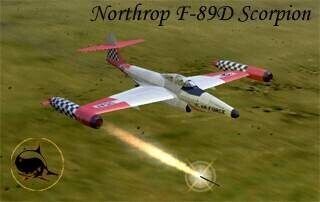
View File F-89D Scoprion by MontyCZ F-89D Scorpion for Strike Fighters Project 1 build 03-02-2004 BETA 1 This is the original version of the F-89D, as created by MontyCZ ohh so long ago. I'm uploading this, as to make the entire aircraft available, as there'd been a few problems in acquiring it. Monty's original readme is included in the zip. Enjoy! Wrench Kevin Stein Submitter Wrench Submitted 12/09/2007 Category US Air Force Aircraft
-
1,195 downloads
F-89D Scorpion for Strike Fighters Project 1 build 03-02-2004 BETA 1 This is the original version of the F-89D, as created by MontyCZ ohh so long ago. I'm uploading this, as to make the entire aircraft available, as there'd been a few problems in acquiring it. Monty's original readme is included in the zip. Enjoy! Wrench Kevin Stein -
WOE Terrains with BIG CITIES, do they exist?
Wrench replied to ShinKazama88's topic in General Discussion
Oh, I think I have something like that..... get ready...ready???? Where *** are, repectively, target area number, target area name target area coordinates target area location (1= friendly, 2=enemy, etc, as defined in terrain nations ini) It's called the "Large Urban Module", originally created by Polak, iirc. Now, let's see some products, instead of just talk Wrench kevin stein -
At least, I thinks that's what they're called. ie: Soviet Tactical numbers. What determines what color goes on which airplane, as below: (21MF) I've got a full set of the original SovietNums repainted to the blue seen here (the stock ones). I know the Flagon's 'seemed' to use them more, but I've seen profiles/pictures of Fishbeds with them as well. Also seen yellow, a lighter blue and black. What's the rhyme or reason behind it? Inside or out of the Soviet Union, type of aircraft and/or aircraft role?? Can't seem to find anything that might explain it! BTW, that's a new skin in 1024x1024, from a new psd template I just finished. Is there any interest in it?? If not, I'll just dump it -- yeah, like that's gonna happen!! Wrench kevin stein
-
Ok...that took a lot longer than I thought....over an hour and half. Mostly, becuase of the damn hump was set wrong nationwise (I guess I don't have ArgentineNavy in my Weapons Testing Install's Nations ini!!)* After rebuilding the data ini, creating a avionics ini for the audio-only RWR, fixing the hump, rebuilding the decals and creating a texture set ini (hmm...didn't I just do this for noscones RAAF Phantom????), renaming a few decals, and shortening the path name's...this is what I got: Still have to fine tune the position of the top anti-colision light to match the humps; but I added a landing light! The only thing I truely wonder about, and this is Game World ONLY - and not a slight to our Southern Hemisphere Members -, Argentina is set as a "Friendly" nation (as is RAF/RN), so loading the USN/USAF weapons poses no problem. Otherwise, new, nation-specific weapons might need to be created, and the AttachementType= be adjusted to maybe WP (like Canada!!!). I'm sure when the final version of the new Falklands mod is released, it'll be addressed. At any rate, there you have it! Wrench Kevin Stein *= interestering to note, all the other Argentine Scooter humps/bumps/thumps are set as "Argentina", which shows as "Argentine Air Force"
-
Is that 6 or 7?? I remember there being a patch needed for fixing how 7 handles the alpha. I have both, but use 6 exclusively for decals and the like. I just don't like the menus in 7... Wrench kevin stein
-
It could go both ways...asking Marcello if the skin could be included or just a package of inis, and let the end user go and grab them for themselves I "KNOW" I'd seen Richard's skins...in fact somewhere I should have the beta (being part of the Dev A-Team), but can't find anything - in none of my archives (external HD, CDs, whaterve!). There's a possiblity it was 'lost' in a data move I did a few month back. No biggie...it means we all get the new package when it's done next year. I was thinking that, too. I'm actually surprised that someone didn't think of it before. The C_A & Q could all easily be resurected with just a few minutes work. Literally. The P I'd have to check on....disremember the differences, and what skin it used But, like was said in The 13th Warrior, "It is a small matter..." Wrench kevin stein
-
Not ever actually having done this, please take this with a grain of salt (meaning I'm not sure if this is how...) I think you have to add the alpha channel on top and then convert to tga via Photoshop, PSP, Gimp or whathave you. Similiar to making a decal. Masking or unmasking the parts you want to show; like a shoreline tile. Hopefully, someone with more info will chime in with the right answer.... Wrench kevin stein
-
F-89D Scorpion, 75th FIS Skin, Ini, Weapons Upgrade Pak
Wrench replied to Wrench's topic in File Announcements
Glad you found it! Interestering to note, the F-89C is here, in it's original format, but not the D. Took a while to find it, too. "cold war aircraft, US Air Force" I'll have to check my archives, and see if I can find an un-modified original version, and then check with the Admins about uploading it. Wrench kevin stein -
I'd forgotten about Marcello's and nosecone's skins...hmmm.... with those, and about 10-20 minutes of data ini edits, you can re-create the missing FAA Scooters. All the needed bits for the little hump thingy's are already in the weapons pak, and should be tweeked into Zero-strength jammers (my fix!). If not, I'll post the weapons tweeks in the "Weapons and Loadout Fixes" thread in the knowledge base. I even have a really nice Hangar Screen for the FAA Skyhawks.... (note to self: Kev, you should post those fixes any way, as some folks probably haven't heard of them, or done it) Wrench kevin stein
-
the WoV timeline can be extended with a simple text edit... But like Streak said, it's just a matter of copying files/folder. I got WoV for the carriers (upon which I crash most spectaularly), and when WoE came out, just transfered the terrain over there. I haven't touched WoV in a looooong time. Given the choice, based on available funds , start with WoV and then move up to WoE. All the game are good! All are modable to the infinite! Wrench kevin stein
-
I disremember the exaxt URL, but try 'calendardepot.com' I've ordered many of my aviation art calenders there. Also, check HistoricAvaition.com ... great selection of books on all kinds of things that fly. In my somewhat largeish collection I really don't remember seeing to many of the A-26 Invader (as Capun said, post-war B-26), but one of the old one, 2001 or 2002 had a B-26 maruader artwork, I think by Roy Grinnell. Belive me, Invader art is VERY hard to come by!!! Wrench Kevin Stein
-
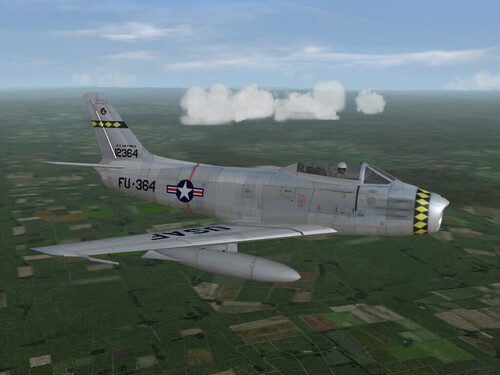
View File F-86F-40, 461st FDS, USAFE F-86F-40 Sabre, 461st FDS, USAFE skin for SF/WoV/WoE Just a simple, natural metal skin for Zur's Sabre as used by the 461st Fighter Day Squadron (ex-527th FBS) after the experiment with camoflague ended, and the aircraft were transfered to the new unit. Timeframe is approx 1956-58-ish. Included are new serial and buzz number decals. The Black Bar/Diamonds is borrowed from USAFMTLs camo version for the 527th. The serial numbers are actual F-86F serials, but I claim no historical accuracy if they were used by this squadron. See the enclosed readme for super easy install instructions (for a change!) Happy Landings! Wrench kevin stein Submitter Wrench Submitted 12/08/2007 Category F-86 Saber/FJ-2/3 Fury Skins
-
284 downloads
F-86F-40 Sabre, 461st FDS, USAFE skin for SF/WoV/WoE Just a simple, natural metal skin for Zur's Sabre as used by the 461st Fighter Day Squadron (ex-527th FBS) after the experiment with camoflague ended, and the aircraft were transfered to the new unit. Timeframe is approx 1956-58-ish. Included are new serial and buzz number decals. The Black Bar/Diamonds is borrowed from USAFMTLs camo version for the 527th. The serial numbers are actual F-86F serials, but I claim no historical accuracy if they were used by this squadron. See the enclosed readme for super easy install instructions (for a change!) Happy Landings! Wrench kevin stein -
It's a thingy called Names***.lst (where *** is the country) You'll still need the extractor, and you go into the MissionData.cat, in the Flight folder. There you'll find a host of Names***.lst. They're broken down by, well I guess it's country type. African Argentine RAF Russian Thai USN etc etc and fo course, etc looks like at least 2 dozen of them, by a quick look in the cat They're broken down into 3 sections, LastName MaleFirstName FemaleFirstName when and how they appear is based on the "GenderRatio=" for each nation, which is specified in the Nations.ini Simple text lists, so they're pretty easy to edit in Notepad. Which means, by adjusted taht ratio, you could convievebly run into a modern version of The Night Witches.....of a host of very nast Amazons... Wrench kevin stein