


Wrench
-
Posts
28,213 -
Joined
-
Last visited
-
Days Won
183
Content Type
Profiles
Forums
Gallery
Downloads
Store
Everything posted by Wrench
-
I just used whatever was in Wolf's original data ini; all the mathematical calculatory stuff is beyond me!! Adding/adjusting harpoints is easy...figuring flight paramaters...wheee!!! as the the distance, it's in KM...all the measurements in the game are metric (well, in particular, in releating to aircraft size, HP, fuel in liters, etc
-
You can have an AG gunsight...just reference it in the cockpit ini. Take a look at the Post-War Mustang I just released; it has the K-14 aerial gunsight, and a 'ladder' sight for bombing. Rockets, however, go back to the standard sight. You might need to adjust the 'rocketboresightangle' in the data ini of the aircraft in question. Wrench kevin stein
-
Another cockpit glass color question
Wrench replied to DoctorQuest's topic in Mods/Skinning Discussion
I'd think that most, if not all, the stock 3rdW birds use pretty much the same canopy tga...I think it's stored in the objects cat Wrench kevin stein -
Ok, quick test results.... first shot, I forget to rename the HUD tgas, but commented them out of the cockpit ini: 2nd shot, without HUD data tgas.. It does work, after a fashion. Kukulino, you just might be on to something here... Wrench kevin stein
-
That typo is gonna haunt me forever..... As to permissions, USAFMTL was on the SabreDog team, and he said he didn't care if we tweeked it for the Corsair NF; AD's pretty much left the community (real life commitments, etc)....I'll have to ask the other moderators/owners of the site if we can consider the Fitter Pit as 'abandonware', and start putting this together. Also have to see if I can't find the original readme for the Su-17, and see if there's anything in there about fair usage.... Failing that, I guess I'll have to learn to think/write in Russian and try to make some Cyrillic gauges..... Wrench kevin stein
-
don't even need to do that....just have use the existing FarmerD/E avioncs ini, and transfer over the radar bmps btw, it was FoxMonter's original aircraft and cockpit. We (Dev A-Team) just finished it off. Wrench kevin stein
-
We also don't have the 'symbology' used for Soviet HUDs...but that should be a relatively easy fix, by just creating new tgas for them, and assinging them in the avionics ini (just like the stock F-15, or MF' Hornet, or etc) As the the moves...again, I must reccomend Lexx's superb thread over at the 3rd Wire Forums, Basically, what the 'move' does, is well, move the item in question. In our discussion for the the F4U-2 Corsair NF, Lexx has told me you can only move items up/down or left/right (x or z axis). -edit: actaullly, you can also 'rotate' an item to make it invivible...this was done on the Phantom pit for the original realease 2+ years ago for the F-16. To know exacty what node or 3d mesh your moving requires 1) a hex editor to open the cockpit lod to search for the suspected node or 2) the cockpit OUT file, which is generated by 3dMax. It lists the nodes in a family-tree orientation, just like Windows Explorer does ie: Panel gauge1 gauge2 needle 1 needle 2 Unfortunatley, the Fishbed pits didn't come with their OUT files in the zip (nor for that matter, do we have acsess to any of the stock 3rdW pit OUTs), which means a lot of work on someone's part to figure out the exact node/mesh name. Just like doing decals on an aircraft...you need to mesh name to apply the decal What makes is more difficult, is naming conventions....not everyone uses the obvious. Below is from AD's Fitter pit OUT: How is one supposed to know what gauge 'cylinder67' is? In another example, this one is from the Yak-3: You can see, these are pretty clearly marked, mind you, these are just the instrument needles, but you get the idea. A LOT of guesswork is still involved. The cockpit ini also of great help, as it usially list what insturment is what node; again this if from the Yak-3: And there's STILL going to be a lot of trial and error....... It's something I'd love to duplicate....recreate as close as possible that Flogger D pit in the screenie, by somehow using the Phantom pit, removing all the 2nd engines gauges, moving the radar display over and up, and so forth. We can only hope Paladrain, or some other 3d modeler takes up the challenge. Wrench kevin stein
-
Kinda thought so....all the more reason to be impressed that he's flying Hogs!!!! When they say you can't retire...wow, they really mean it!!! Wrench kevin stein
-
Why not just unzip it from your original, downloaded, archived version???? (hence, the need to keep things stored somewhere) Or just d/l it again. Or, extract the stock one from the object cat???? Wrench kevin stein
-
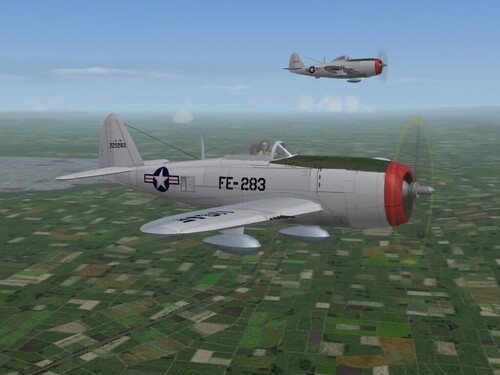
232 downloads
P-47D-25, Generic Post-WW2 Skin for SF, WoV & WoE A "simple garden variety" natural metal skin for Wolf's P-47D-25 'Bubbletop' Thunderbolt. This is a 'representative' skin for the F-47D Thunderbolt, in the post-1947 era, right after the formation of the US Air Force. As they were still a few around for a few years, mostly in the Air National Guard, I thought I'd throw together a little something. Now, mind you, these are NOT ANG aircraft, but should be considered as 'front line', as I didn't create ANG style decals. The tail serial numbers are actual P-47D serials, just so's your tail fin don't look and feel so neeked. I've also created the "buzz numbers" so prevelant in the post-war period, and into the Korea War, so this skin set will fit nicely into a "Cold War Gone Hot: 1948" scenario. There are a few changes in the cockpit ini, adding a new sight tga (USAAF Mk.8). Instructions are below, in the "To Install" section. And, once again, all the lights have correct positions, colors, including a landing light. A new, WoE style Hangar Screen is also provided. Information of 'fixing' the loadout problem with the Triple-Bazooka launchers is also supplied == You MUST also have the latest weapons pak to make use of the WW2 weapons.== PLEASE read the enclosed readme for full, detailed install instructions, along with other notes of interest. Happy Hunting! Wrench Kevin Stein -
View File F-51D Mustang, Generic Natural Metal, Skin & Ini Pak P-51D-30, Generic Post-WW2 Skin and Ini Update for SF, WoV & WoE A "simple, plain old garden variety" natural metal skin for Wolf's P-51D-30 Mustang, that uses the "P-51D30_V3.LOD", or in other words, the latest version that's available in the "Planes Pak", to be found at CombatAce . This is a 'representative' skin for the F-51D Mustang, in the post-1947 era, right after the formation of the US Air Force. I did some experimentation with 'paneling'. I just used various verrry light tones of gray to try and create the differing panel sections. The skin itself was created from Wolf's original template, with cleaned up and redrawn panel lines, my 'interperative' rivets, and a new look for the cowl vent/air filter inlet. The tail serial numbers are actual P-51D serials, just so's your tail fin don't look and feel so neeked. I've also created the "buzz numbers" so prevelant in the post-war period, and into the Korea War, so this skin set will fit nicely into a "Cold War Gone Hot: 1948" scenario, or even a Korean War one. As everybody knows how I hate to waste good decals, and just for fun, I transfered over and positioned a whole bunch of the various nose arts from other aircraft. So there's something to look at; and most surely against the Regs in the post-war era....there may be some partial or semi-nudidity on some some of them. A few changes in the cockpit ini, added 2 new sight tgas (K-14 AA and AG sights). Instructions are below, in the "To Install" section. And, once again, all the lights have correct positions, colors, and that nice little retractable landing light lens that Wolf provided for us, in now actually the landing light. --- really, this is the last time I'm fixing it!!!! A new, WoE style Hangar Screen is also provided, for those wishing to use the aircraft/skin in a CWGH: 48 style install. == You MUST also have the latest weapons pak to make use of the WW2 weapons.== As stated above, there here highly detailed, step-by-step install instructions -- so PLEASE read them, ok??? Enjoy! Wrench kevin stein Submitter Wrench Submitted 11/12/2007 Category P-51
-
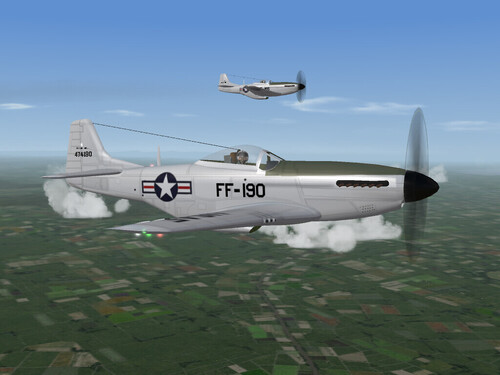
412 downloads
P-51D-30, Generic Post-WW2 Skin and Ini Update for SF, WoV & WoE A "simple, plain old garden variety" natural metal skin for Wolf's P-51D-30 Mustang, that uses the "P-51D30_V3.LOD", or in other words, the latest version that's available in the "Planes Pak", to be found at CombatAce . This is a 'representative' skin for the F-51D Mustang, in the post-1947 era, right after the formation of the US Air Force. I did some experimentation with 'paneling'. I just used various verrry light tones of gray to try and create the differing panel sections. The skin itself was created from Wolf's original template, with cleaned up and redrawn panel lines, my 'interperative' rivets, and a new look for the cowl vent/air filter inlet. The tail serial numbers are actual P-51D serials, just so's your tail fin don't look and feel so neeked. I've also created the "buzz numbers" so prevelant in the post-war period, and into the Korea War, so this skin set will fit nicely into a "Cold War Gone Hot: 1948" scenario, or even a Korean War one. As everybody knows how I hate to waste good decals, and just for fun, I transfered over and positioned a whole bunch of the various nose arts from other aircraft. So there's something to look at; and most surely against the Regs in the post-war era....there may be some partial or semi-nudidity on some some of them. A few changes in the cockpit ini, added 2 new sight tgas (K-14 AA and AG sights). Instructions are below, in the "To Install" section. And, once again, all the lights have correct positions, colors, and that nice little retractable landing light lens that Wolf provided for us, in now actually the landing light. --- really, this is the last time I'm fixing it!!!! A new, WoE style Hangar Screen is also provided, for those wishing to use the aircraft/skin in a CWGH: 48 style install. == You MUST also have the latest weapons pak to make use of the WW2 weapons.== As stated above, there here highly detailed, step-by-step install instructions -- so PLEASE read them, ok??? Enjoy! Wrench kevin stein -
Vulcan B2 anti-collision and instrument lights WiP
Wrench replied to comrpnt's topic in Mods/Skinning Discussion
I think - and I"m not totally sure- that it's the standard x=left/right, y=fore/aft, z=up/down. I know on one of my P-38's, the arc for the wingtip lights is wrong, and it illuminates down the wing, back toward the nacelles, instead of outward. As to cockpit lighting, you can change that in the cockpit ini... (below from the stock E Scooter) LightRange=1.5 LightInnerConeAngle=43 LightOuterConeAngle=60 LightAngles=0.0,-35.0,0.0 DiffuseLightFactor=0.5 <-possibly as seen from outside? or internally? NightLightOn=0.25 <- I know this is a 'time' thing 0.55 turns all on eariler NightLightColor=0.5,0.2,0.3 this is the 'lamp' color, also changable I just don't remeber what the conversion is (Deuces used to have a rgb to whatever converter at his site, but I can't find it again) Or are you trying something like Pasko did with the Twin Mustang?? Had a seperate 'running' light in the cockpit, to illuminate it? Wrench kevin stein -
I thought this was funny title for a topic... I was wondering if the Hornets were corrupting (rusting, corroding, rotting), or a comment on bureacrats!! Brainless, did you get it fixed?? Wrench kevin stein
-
That's what I had to do for the ASA-M Starfighter...switch up to the later avioncs dll. After that, it worked great! Think I did that on one of the late-Fishbed Skyhawk pit mods too; have to look around and see if I can find it, buried amongst all the crap and clutter...(wait, didn't Gerald14 do this in his bis Pak??) Wrench kevin stein
-
Lou Rawls is now flying Hogs???? Giving up a perfectly good music career....I'm impressed Wrench kevin stein
-
Inside the /cockpit FOLDER (not the cockpit ini you posted), you'll see a bunch of files (make sure you have extensions turned on in Windows Explorer) You should see somethin glike dis: It'll be one of the tga files; which everone Dave said it was in the post in the KB Then you just need to rezise it to a square (128x128 or something like that). Hopefuly, your imaging program won't damage the alpha channel. Wrench kevin stein
-
ah, yeah. Most definately will cause a problem Remember, terrains are all supposed to be in their OWN folder. You'd better restore that desert terrain to it's base state. Instead of copying/renaming the cat, have you tried this little tweek, in the Mideast's main ini?? this is from my Israel2 terrain intall, in WoE adjust the pointer for use of whichever original terrain cat is needed. Using that line will save you around 50-60 megs in HD space, by simply NOT having to create a copy of terrain cat There is also a distinct possiblitly that the Yom Kippur campaign WON'T work due to inconsistencies in the campaign file due to weapons pak, aircraft loadouts, the obvious terrain issues, ground objects...etc, etc, and of course, etc. Having never used, it, isn't it based of the original SF desert map, and NOT any of the Isreali terrains??? If so, there's another problem to be solved... More information, please. I'm assuming the Nesher works fine in the stock desert map (before you messed that up??) Wrench kevin stein
-
The only substitute for horsepower is.... MORE!!!! Wrench kevin stein
-
I wonder how one gets over there to see them...we're going be in Vegas over the Thanksgiving holiday. I always try to get to Nellis to see the Thunderbirds facility...always something cool going on. Tours on Tuesdays and Thursdays. Plus that superb Ferris mural in the conference room Wrench kevin stein
-
If I remember right, when C5 got his vette, it's a mid-80's version (yes??) I disremembe offhand, but some may NOT have the vac advance, in which case all the advance is controled via the PROMs look up tables in the PCM, via the software. In that case, you'll have to -here's the fun part- locate and unplug the brown/white wire for the EST/ESC feed to the computer (floor, pass side???), to drop the timing back to initial. Adjust as normally done Plug wire back together, clear codes. I DO remember the mid-70s to early-80s used a thermal vac switch to NOT allow vaccum advance until the engine reached full operationg temps. Then, half the time they didn't work anyway This is, of course, assuming a 'factory' setup with the stock manifold, Rot-chester carb (can't even count how many computer and non-computer controled 4Ms I'd rebuilt!!)., and all emission controls are "intact and in an operating conditon" (that straight from the Calif Smog Techs Manual) Vetts still Rule, though!!! -- Most freightening ride of my life was in a 69 L-88 427 Tri-power...got it sideways on the little sidestreet by the shop, which curved around (of course, opposite the directing I was sliding in...just from standing on the gas. Backed off, and straightened right out. Gottaa love posi!!! As to recurving ... if it's EST, then get the Hi-Po Proms. Gads...I can actually remember USING a distributor machine to check advance curves...I must be old...... Wrench kevin stein
-
DUH!!! Excepting it was designed for a Mig-27, NOT a 23. follow the thread...the 23's project their data onto the HUD glass, not on a dash mounted CRT. In the pic you posted, look at the size and thickness of the columinator/reflector glass...hell of a lot bigger than a 'normal' gunsight. The tweek we're using now (in the Mirage Factory Floggers) roughly simulates this, but as stated elsewhere, it really can't be done properly. (I'm sure somebody will find a work around similiar to what we have, but not right away). As for the cockpits at Marcfighters, they date back to the origins of SF..they're simply repainted stock pits. AND, you'll still need to extract the relevant cockpit inis to make the adjustments to the pilot positons, as they're just a bit off (I don't acually remember it the cockpit inis are included --been too damn long!) Not to denegrate the original builder, but we've learned an awful lot since then....in adjusting views, angles, positons and avionics tweeks. There are times I think we know more of what's going on 'under the hood', than TK does!!! As the Mig-3, all my WW2 soviet stuff has been converted to the Yak pit. As to the Feather, using the Yak3 pit works just fine, as it's 98.6% closer than anything else. Remember, historically, the Feather is just a Yak 9 with jet engine shoved into it. Wrench kevin stein
-
What's great about it, is it uses all stock bits, excepting for the MiG rwr sounds Assuming you've used the newest version of the F-104G_cockpit ini, with the addition of the "ADI2" in it's pitch and roll modes, and "OilQuantityGauge", and have already adjusted the pilot's positon to match the Fishbed's data ini....here's watcha do: Add to the avionics ini, at the top where the /textures are listed, the following: RWRTexture=cockpit\f-4j_rwr.bmp Also, to be making sure the following is either already existing or add to the avionics ini: [RWR] Type=3_RING AirSearchTexture=RWRair1.tga AirTrackTexture=RWRair2.tga AirLockTexture=RWRair2.tga GroundSearchTexture=RWRground1.tga GroundTrackTexture=RWRground2.tga GroundLockTexture=RWRground2.tga SearchPosition=0.90 TrackPosition=0.55 LockPosition=0.15 SearchSize=0.075 TrackSize=0.075 LockSize=0.075 SearchFlash=FALSE TrackFlash=TRUE TrackFlashRate=0.2 LockFlash=TRUE LockFlashRate=0.1 TrackSound=MiGRWRS.wav LockSound=MiGRWRL.wav <--note, that I've used those nice Soviet sounds [RWRTrackSound] Priority=HIGH 3DSound=FALSE Looped=TRUE NumBuffers=1 [RWRLockSound] Priority=HIGH 3DSound=FALSE Looped=TRUE NumBuffers=1 Save and close... copy/paste the "f-4J_RWR.bmp" from the Phantom into the MiG's /cockpit folder Open the F-104G_cockpit ini, and make the following adjustments: Instrument[050]=RWR //Instrument[050]=ADI2_Roll //Instrument[051]=ADI2_Pitch Instrument[051]=OilQuantityGauge (note the commented out ADI2 units, and renumbered Oil Quantity Gauge) add to the bottome of the cockpit ini: [RWR] Type=RWR NodeName=ADI2 //[ADI2_Roll] Type=BANK_INDICATOR NodeName=ADI2 MovementType=ROTATION_Y ValueUnit=DEG Set[01].Position=0 Set[01].Value=0 Set[02].Position=-360.0 Set[02].Value=360.0 //[ADI2_Pitch] Type=PITCH_INDICATOR NodeName=ADI2 MovementType=TEXTURE_V ValueUnit=DEG Set[01].Position=0.5 Set[01].Value=-90 Set[02].Position=0 Set[02].Value=0 Set[03].Position=-0.5 Set[03].Value=90.0 make sure you've commented out the ADI2 sections...they may already exist in the newest version; as mine was an updated older cockpit ini. And there you have it...it should look something llike this... Of course, the image is the G Zipper, but it don't make no difference...the end result is the same. The only thing that bothers me about it, is the gauge is so far over to the left side. Hey, but it works!! Wrench kevin stein
-
Very nice! that'll make Ghostrider883 very happy too!! Wrench kevin stein
-
I'm one of those weird perverted people...I just have a thing for flying boats & amphibs. Got to see plenty of them on the news couple of weeks ago with the big fires we had here in SoCal...hell, they even brought down one of the Mars boats from up north...very cool to see that on the nightly news!! Wrench kevin stein