

Wrench
-
Posts
28,213 -
Joined
-
Last visited
-
Days Won
183
Content Type
Profiles
Forums
Gallery
Downloads
Store
Everything posted by Wrench
-
Ok...got the PM from Mab about the targets, got the so-called "Cyprus Campaign"...and looked them over. That original thing is unfortunately built around the stock SF desert map...viturally unusable for what's wanted. The only map even remotely close would be Gepard's Israel 2...but still lacks mainland Turkey. The only thing that may be able to be done, is have Turkish AF bases in Syria or Lebanon. I can add target areas, with no real problems...but I can't flatten the ground for an airfield. A Master Terrain Guru would be needed for that, I'm just an acolyte! Which means, of course, the entire campaign ini would need rebuilding from scratch, as NOTHING that exists now is usable. Wrench kevin stein
-
F-94B Starfire, 449thFIS Skin and Upgrade Pak (P)
Wrench replied to Wrench's topic in File Announcements
I forgot to mention, this was made with Major Lee's DBS mod in mind. Next Up: upgraded 75th FIS F-89D Scorpion, with WORKING A-A unguided rockets!!! It's a repaint of the original skin, with new decals and inis. Weapons editor work will be necessary, so get ready... Time Frame: Less than 2 weeks!! Wrench kevin stein -
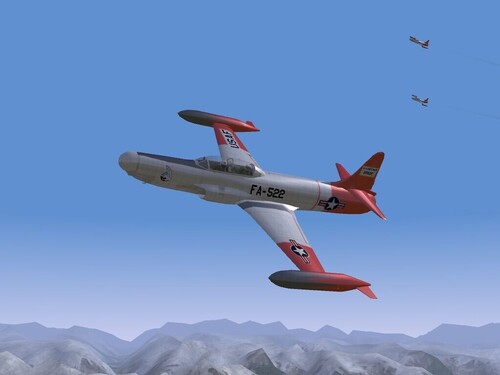
View File F-94B Starfire, 449thFIS Skin and Upgrade Pak (P) For Pasko's F-94B "Starfire" 449th FIS Skin, Decal & Ini Updates for SF, WoV & WoE Hello Fellow Fliers!! This little package will update the original skin for the 449th FIS, by adding new individual aircraft serial and buzz numbers for 26 aircraft. There are also 2 replacement skin bmps, as I had to repaint them to remove the painted on lettering. It is designed to =replace= the existing skin, with the addition of the new decals. Some of the original decals are reused, and therefore are NOT included. See below in the "TO INSTALL" section for full instructions. This will give you a nice skin, with the Arctic Red trim for those especially cold climates...such as found in Alaska or NW America. --- and let me tell, ya it really looks good against the snowy backgrounds!!! Historical accuracy is ONLY claimed on the first 4 serial & buzz numbers, as they were the only ones I had photos of. Also included is an updated data ini and the cockpit ini that will allow you to use the F-86D cockpit in your Starfire. The cockpit itself is NOT included, you'll have to copy over the cockpit folder from your Sabre-Dog. All inis and a few usefull bmps are provided, to make the switch over as easy as possible. This is Lexx_Luthor's fix, and all credit goes to him PLEASE!!!! read the enclosed readme for full, detailed, step-by-step instructions, and listing of credits. Enjoy! Wrench Kevin Stein Submitter Wrench Submitted 12/04/2007 Category F-89 Scorpion/F-94 Starfire Skins
-
176 downloads
For Pasko's F-94B "Starfire" 449th FIS Skin, Decal & Ini Updates for SF, WoV & WoE Hello Fellow Fliers!! This little package will update the original skin for the 449th FIS, by adding new individual aircraft serial and buzz numbers for 26 aircraft. There are also 2 replacement skin bmps, as I had to repaint them to remove the painted on lettering. It is designed to =replace= the existing skin, with the addition of the new decals. Some of the original decals are reused, and therefore are NOT included. See below in the "TO INSTALL" section for full instructions. This will give you a nice skin, with the Arctic Red trim for those especially cold climates...such as found in Alaska or NW America. --- and let me tell, ya it really looks good against the snowy backgrounds!!! Historical accuracy is ONLY claimed on the first 4 serial & buzz numbers, as they were the only ones I had photos of. Also included is an updated data ini and the cockpit ini that will allow you to use the F-86D cockpit in your Starfire. The cockpit itself is NOT included, you'll have to copy over the cockpit folder from your Sabre-Dog. All inis and a few usefull bmps are provided, to make the switch over as easy as possible. This is Lexx_Luthor's fix, and all credit goes to him PLEASE!!!! read the enclosed readme for full, detailed, step-by-step instructions, and listing of credits. Enjoy! Wrench Kevin Stein -
Along the lines of 'lighted radio towers'....how about lighting up the oil drilling towers??? And.... you know you can define someplace as a runway, even without the airfield, as in having the 'runway' as a terrain object.... Now, I'm wondering if we could do that in reverse....have an airfield set to non-usage; ie, as in the comment out sections "NumSquadrons=0" I do remember something like this being done in the orignal DRV map, and it had to be eliminated, due to planes trying to take off from inside warehouses and the like. Or....modifying the airfield ini, to remove references to aircraft, and just allow it to 'be' there, so the lights can come on. This could be something interestering to explore....have a lighted oil field and refinery complex would look pretty damn good in the Iran/Irag, DS, and those I added to the ANW series.... Just some thoughts I'm not sure how to impliment... Wrench kevin stein
-
Avionics Fix for F3H-2M "Demon" (by Fox Montor) This actually came about accidentely, as I was looking at this cockpit for possible use on some of the Red Air birds badly needing some kind of radar-equiped cockpit -- we're still lacking a decent twin-engined one, btw (other than my repainted Phantom pits) At any rate, I was testing the radar on intercept mission, and noticed there wasno way to lock up targets for the Sparrows!!! The radar was simply acting ONLY in search mode, even though TRACK was listed. So, after comparing it with some other contemporay aircraft, I made the following changes.... It should be noted here, that I claim NO historicaly accuracy for this fix -- it is simply done to allow the missiles to work. First off, backup your original F3H-2M_avionics.ini. The simplest way to do this is, is open it in notepad and do a "save as..." and re-title it "ori-F3H-2M_avionics ini" Now, reopen the original, and copy/paste ALL the data below OVER all the existing data: You'll also want to activate the audio-only rwr (which was in the original), by copy/pasting the "F-4J_RWR.bmp" into the /cabina folder. What I had discovered was the "TrackCapabilities=" section was blank!!! Without this, the game engine couldn't use the radar lock-on bits in the avionics dll, so you couldn't lock a target, making your Sparrow's worse than useless (well, moreso than normal! ) The addition of the "BORESIGHT" mode is a guess on my part, but it is available on all the other USN/USAF radar equiped fighters from the same era (F-86D, F-94, F-89, possibly early F-8s), to say nothing of the birds on the other side of the fence; in fact the 17PF/19P/19PM seemed to only have search and borsight mods for the RP-1 and RP-5s. Happy Hunting! Wrench kevin stein
-
1) convert bmp to jpg, and upload to the Gallery here or a) to a free picture hosting site -- using those HUGE bmps costs bandwidth...let's try and keep it resonable, please? 2) weren't Bullpups retired in early 1980s???? I'd personally go with Hellfire, to be closer to the Dreamland versions, adding the needed internal laser designator (and possibly in internal bay ala Hammerheads), but that's just me. Also, I seem to remember The Great and Powerful Zur saying he'd be doing a better armed version. Wrench kevin stein
-
I stand corrected...and looking at mine own installs, it IS a ground object, and set as a static AAA BUT.... I only have the Flak DD, and no Flak CA (and still can't find the chickens...) Perhaps there's a Krieg Cruiser floating around out there...that's set as a warship, and will definatley still shoot at you You can still make it a terrain object, like having it docked at Le Harve or Bremerhaven or wherever...you just add it to the types.ini, with the "UseGroundObject=" set to TRUE Set the "TargetType=" to MISC; it'll still shoot at you, and it'll show up when the game selects targets for strikes (did this in the WW2 Lybia mod and my now defucnt Modern Darwin.) Naval warships, while 'parked' will engage you with either their guns or in later years, SAMs (if equiped) Capun's got a Giant Eagle, he made for his kids...something could be done with that. Hmm..."The Giant Claw", anyone?? As for the ship story, I was still waiting for something to come up out the sea....The Great Behemouth, Godzilla, Nessie, whatever.... I think I've figured out what' wrong with this game....it needs more monsters. Wrench kevin stein
-
Hmm..then you'd have to add the 'fakewinders' Ok, it took longer to get the aircraft down, than it did to fix it....there is definately something going on with our d/l speeds...and I'm on cable. First off, lets fix the fuel tank weapons data itself... Use the text below to replace Frature's data (only the names have been changed to protect the JP-4) Where **** is the next number is sequence, Since it IS essentially a stock 300 gallon Scooter tank, this keeps the naming conventions similiar. in the data ini, this will fix your weapons stations (note the changed name of the drop tank). And like Florian said, the drop tank type name HAS to be specified in the data ini; which should be noted is the TypeName=, not the FullName=. The FullName is what's displayed on the loadout screen, the TypeName is what tells the game engine what to load (and btw, this is covered somewhere in my thread in the KB): The only thing I haven't done yet is add the landing light to the starboard outer gear door...I'll get that later. As to the mission types: Notice what's missing???? All the Air-to-Air roles! The TA-4 are NOT the same as Kahu, and therefore not used the same (unless, as Typhoid said, in DACT) Also, the use of ATTACK means the aircraft will use a different formation type, say, from those set as FIGHTER. And there you have it...it took me less than 10 minutes (not counting d/l time) to fix it. Note to Fracture -- I dig the cockpit mod! That's cleaver!!! I'd have never thought of dropping something over the radar screen. Well done on this aircraft....she's a beaut!!! Enjoy! Wrench kevin stein
-
It's in the terrain folder in Edwards WW2 maps (Europe, MTO, etc) Wrench kevin stein
-
The KFC is a AAA item, not a ship per se. (or fried chicken, depending...) Perhaps a different ship should be used...I offer the one seen in the top of the picture....also, very easy to switch over the flag to the KM one...simple bmp Placing them on the map, is jus the same as any other object. Below, Bremerhaven from 'modern' WoE: nothing to it, really!!! Wrench kevin stein
-
I like that skyscraper...and we WILL need a big monkey for (also I guess we'll need some Vought OSU-1s, too) An object placer would be a superb tool...whilst updating the DS and Iran/Iraq maps (to say nothing of some fo the target areas I added to the updated Range and ANW terrains)...one can go quite mad trying to get proper placements, even with hud debug on. The continious need to go back in game, and then find the target area again....check position, back out, move it, back in, find it again....aaaaarrrrGGGGHHHH!!!! As to measuring object 'footprints', I've been using this little jpg, from either Gepard or Polak.... Unfortunately, it's only the stock Strike Fighters items, and dosen't include the newer objects from WoV and WoE. But it's still very helpfull!! Wrench kevin stein
-
Well...lets see.... First off, it's an ATTACK aircraft, not a fighter, so having an A-A loadout is sort of superflous (sp?). It shouldn't have any of the fighter mission statements (CAP, SWEEP, INTERCEPT, ESCORT) defined in the data ini. Guess I"ll have to download it (which I've forgotten to do in any case), and do a little hand holding to see what you all are talking about btw: you DO notice you're standard A-A load is missing the pointers for the winders, right???? Wrench kevin stein
-
how to use america nw without desert.cat.
Wrench replied to Shin_kazama's topic in General Discussion
Yup, been up there for a while. I think it was Capun that discovered it, somewhere around patch 3's release... In fact, this works for ANY terrain in ANY of the 3 game (SF, WoV, WoE). Haven't tried it in FE, since there's only like 2 addons, and none of the other SF/WoV/WoE terrains work as yet in it. In fact, last night I went through a couple of my 17 installs, and cleaned out the old cats...got back 150+ megs of HD space doncha just love quick and easy fixes???? And ain't it amazing what's in the KB???? Wrench kevin stein -
MiG-17F Fresco 1024x Skin Templates View File MiG-17 Fresco 1024x Skin template: These are new templates, based off and resized from the original little itty bity ones as originally issued by 3rd Wire. I call these "semi-HiRez, as they are now resized to 1024x1024...to me HiRez is anything OVER 2048!! This set is designed to allow you to create new skins, either natural metal or camoflague types. I have NOT plotted out the overlaps for camos, but this can easily be done in you imaging program (Photoshop, Gimp, PSP, etc) by enlarging the camo skin bmps, and adding them as another layer. Repainting should be relatively easy after that. I've redrawn, as best I can, all the panel, rivet lines, inspection plates, etc. Some of the rivet placement is a 'best guess', as the original size of the bmp was ONLY 256x256, and are badly blurred. (apparantly, the original builders like to add a lot of "noise" to the skin map) Please read the enclosed readme for more note from General Interest (an fascinating sort of fellow!!) Happy SKinning! Wrench kevin stein Submitter Wrench Submitted 12/03/2007 Category Skin Templates / Decal Sets
-
239 downloads
MiG-17 Fresco 1024x Skin template: These are new templates, based off and resized from the original little itty bity ones as originally issued by 3rd Wire. I call these "semi-HiRez, as they are now resized to 1024x1024...to me HiRez is anything OVER 2048!! This set is designed to allow you to create new skins, either natural metal or camoflague types. I have NOT plotted out the overlaps for camos, but this can easily be done in you imaging program (Photoshop, Gimp, PSP, etc) by enlarging the camo skin bmps, and adding them as another layer. Repainting should be relatively easy after that. I've redrawn, as best I can, all the panel, rivet lines, inspection plates, etc. Some of the rivet placement is a 'best guess', as the original size of the bmp was ONLY 256x256, and are badly blurred. (apparantly, the original builders like to add a lot of "noise" to the skin map) Please read the enclosed readme for more note from General Interest (an fascinating sort of fellow!!) Happy SKinning! Wrench kevin stein -
Su-7BM Fitter-C 1024x-1024 skin templates View File Su-7BM Fitter-C 1024x Skin template: These are new templates, based off and resized from the original little itty bity skins as originally issued by 3rd Wire. I call these "semi-HiRez, as they are only resized to 1024x1024...to me HiRez is anything OVER 2048!! This set is designed to allow you to create new skins, either natural metal or camoflague types. I have NOT plotted out the overlaps for camos, but this can easily be done in you imaging program (Photoshop, Gimp, PSP, etc) by enlarging the camo skin bmps, and adding them as another layer. Repainting should be relatively easy after that. I've redrawn, as best I can, all the panel, rivet lines, inspection plates, etc. Some of the rivet placement is a 'best guess', as the original size of the bmp was ONLY 256x256, and are badly blurred. The base skin color is a 10-15% gray. Please read the enclose readme for more notes of general interest! Happy Skinning!! Wrench kevin stein Submitter Wrench Submitted 12/03/2007 Category Skin Templates / Decal Sets
-
130 downloads
Su-7BM Fitter-C 1024x Skin template: These are new templates, based off and resized from the original little itty bity skins as originally issued by 3rd Wire. I call these "semi-HiRez, as they are only resized to 1024x1024...to me HiRez is anything OVER 2048!! This set is designed to allow you to create new skins, either natural metal or camoflague types. I have NOT plotted out the overlaps for camos, but this can easily be done in you imaging program (Photoshop, Gimp, PSP, etc) by enlarging the camo skin bmps, and adding them as another layer. Repainting should be relatively easy after that. I've redrawn, as best I can, all the panel, rivet lines, inspection plates, etc. Some of the rivet placement is a 'best guess', as the original size of the bmp was ONLY 256x256, and are badly blurred. The base skin color is a 10-15% gray. Please read the enclose readme for more notes of general interest! Happy Skinning!! Wrench kevin stein -
I plan on uploading the 17's templates, along with new ones for the Su-7 sometime later tonight. Wrench kevin stein
-
Didn't we just cover this in the recent past???? I quote meself: "The thing you downloaded is probably just a skin and ini update. The aircraft itself is ONLY available in WoV, so without the lod files, you won't have anything to fly" Hence, also, the necessity of conscise, fully informative readmes...... Wrench kevin stein
-
I'd say so... Why would you be fiddling with the prop tgas??? There's nothing wrong with the one it has.. It just has the wrong nose (and can't be fixed) As for skinning, well...let's just say my 109G template is over 75 megs....lots of layers Wrench kevin stein
-
My site only, on the "new aircraft & skins' page. Please remember, that it's still using the 109G10 body, so we don't have the correct nose and propeller. Also, since Capun posted the beta models....there's this in the works too. This is just the first pass on painting it...it'll need to be totall redone as I've now got the correct colors and patterns from 'a friend' Wrench kevin stein (link down here in my sig)
-
Elmendorf AFB: What is this structure?
Wrench replied to Major Lee's topic in Military and General Aviation
Pulls out 'Work in Progress' list...better update that Arctic skin for the Scorpion.... Wrench kevin stein -
Two choices on the weapons fit:: 1) Leave as USN, no problems 2) Adjust for Oz use (WP), also no problems -- all the needed bits for RAAF and RAN are already in the weapons pak Wrench kevin stein
-
And, you can find an Avia S-199 'Mule' stand-in over at my site!!! (109G10 body used) Wrench kevin stein