


Wrench
-
Posts
28,056 -
Joined
-
Last visited
-
Days Won
167
Content Type
Profiles
Forums
Gallery
Downloads
Store
Everything posted by Wrench
-
Iraqi AF F-7A (Export) Fishbed (by Bob 'howling1' Hauser) Hopefully, you've applied the fixes listed somewhere above to straighten out the misplaced pilot, decals, afterburner emitter an other oddities induced during patching. If not...better get to it!! This is an Iraq nation-specific aircraft, so double check the data ini for the proper dates and mission statements: NationName=IRAQ ServiceStartYear=1979 ServiceEndYear=1999 AircraftRole=FIGHTER AircraftCapability=DAY_ONLY Availability=COMMON 1999 is a 'best guess' end year on my part, given the destruction of the IqAF during Gulf Wars 1 & 2. weapons sections: [LeftWingStation] SystemType=WEAPON_STATION StationID=1 StationGroupID=1 StationType=EXTERNAL AttachmentPosition=-2.10,-0.58,-0.39 AttachmentAngles=0.0,0.0,0.0 LoadLimit=500.0 LengthLimit=3.0 AllowedWeaponClass=BOMB,RCKT,RP,IRM AttachmentType=WP ModelNodeName=WingPylon_L PylonMass=60 PylonDragArea=0.02 LaunchRailNodeName=MissileRail_L LaunchRailHeight=0.10 LaunchRailMass=25 [RightWingStation] SystemType=WEAPON_STATION StationID=2 StationGroupID=1 StationType=EXTERNAL AttachmentPosition=2.10,-0.58,-0.39 AttachmentAngles=0.0,0.0,0.0 LoadLimit=500.0 LengthLimit=3.0 AllowedWeaponClass=BOMB,RCKT,RP,IRM AttachmentType=WP ModelNodeName=WingPylon_R PylonMass=60 PylonDragArea=0.02 LaunchRailNodeName=MissileRail_R LaunchRailHeight=0.10 LaunchRailMass=25 [CenterlineStation] SystemType=WEAPON_STATION StationID=3 StationGroupID=2 StationType=EXTERNAL AttachmentPosition=0.0,0.08,-0.71 AttachmentAngles=0.0,-1.0,0.0 LoadLimit=500 AllowedWeaponClass=BOMB,FT,RCN AttachmentType=WP ModelNodeName=FuselagePylon PylonMass=40 PylonDragArea=0.02 FuelTankName=Tank490_MiG21 Loadout ini: [AirToAir] Loadout[01].WeaponType=IRAQ AA-2 Loadout[01].Quantity=1 Loadout[02].WeaponType=IRAQ AA-2 Loadout[02].Quantity=1 Loadout[03].WeaponType=Tank490_MiG21 Loadout[03].Quantity=1 [AirToAirLongRange] Loadout[01].WeaponType=IRAQ AA-2 Loadout[01].Quantity=1 Loadout[02].WeaponType=IRAQ AA-2 Loadout[02].Quantity=1 Loadout[03].WeaponType=Tank490_MiG21 Loadout[03].Quantity=1 [Attack] Loadout[01].WeaponType=IRAQ UV16 Loadout[01].Quantity=1 Loadout[02].WeaponType=IRAQ UV16 Loadout[02].Quantity=1 Loadout[03].WeaponType=Tank490_MiG21 Loadout[03].Quantity=1 Loadout[01].WeaponType=NASR-250 Loadout[01].Quantity=1 Loadout[02].WeaponType=NASR-250 Loadout[02].Quantity=1 Loadout[03].WeaponType=Tank490_MiG21 Loadout[03].Quantity=1 [Anti-Ship] Loadout[01].WeaponType=NASR-250 Loadout[01].Quantity=1 Loadout[02].WeaponType=NASR-250 Loadout[02].Quantity=1 Loadout[03].WeaponType=Tank490_MiG21 Loadout[03].Quantity=1 [Recon] Loadout[01].WeaponType=IRAQ AA-2 Loadout[01].Quantity=1 Loadout[02].WeaponType=IRAQ AA-2 Loadout[02].Quantity=1 Loadout[03].WeaponType=IRAQ RecPod_MiG21 Loadout[03].Quantity=1 You'll note the addition of a new 'weapon'...an Iraqi ReconPod. You'll be doing some weapons editing, so get ready. What is basically is, is the standard Fishbed recce pod, with an Iraq attachment. Where **** is the next number in sequence, copy/paste the info below into you weaponsdata ini [WeaponData****] TypeName=IRAQ RecPod_MiG21 FullName=MiG-21 Recon Pod ModelName=RecPod_MiG21 Mass=150.000000 Diameter=0.500000 Length=1.000000 AttachmentType=WP NationName=IRAQ StartYear=1965 EndYear=2020 Availability=2 BaseQuantity=24 Exported=FALSE ExportStartYear=0 ExportEndYear=0 ExportAvailability=0 WeaponDataType=4 StoreType=6 CameraFOV=2.000000 CameraPosition=0.000000,0.000000,0.000000 CameraYaw=0.000000 CameraPitch=0.000000 CameraRoll=0.000000 SightTexture= EODisplayFlags=268435456 Then, do the 'add weapons dance' via the weapons editor. This pod is also used on the MF's as well. Wrench kevin stein
-
Iraqi Air Force Mirage F-1EQ (by The Mirage Factory) With a resurgent interest in the Iran/Iraq Total Conversion mod, and some recent posts about weapons problems, I figgured it was time to let the cat out of the bag. All of these fixes will be seen in the Desert Storm mod, once it's relased. And don't forget, the Iranian AF is covered earlier in this thread ... don't forget to make the needed changes and additions to them as well. Iraq has it's own, country specific weapons. Data ini: [sidewinderStation1] SystemType=WEAPON_STATION StationID=1 StationGroupID=4 StationType=EXTERNAL AttachmentPosition=4.074,-2.9,0.15 AttachmentAngles=0.0,0.0,-90.0 LoadLimit=127.0 AllowedWeaponClass=IRM AttachmentType=WP ModelNodeName=Rail_Magic_R PylonMass=45.0 PylonDragArea=0.04 [sidewinderStation2] SystemType=WEAPON_STATION StationID=2 StationGroupID=4 StationType=EXTERNAL AttachmentPosition=-4.074,-2.9,0.15 AttachmentAngles=0.0,0.0,90.0 LoadLimit=127.0 AllowedWeaponClass=IRM AttachmentType=WP ModelNodeName=Rail_Magic_L PylonMass=45.0 PylonDragArea=0.02 [LeftWingStation1] SystemType=WEAPON_STATION StationID=3 StationGroupID=3 StationType=EXTERNAL AttachmentPosition=-2.9,-2.2,-0.05 AttachmentAngles=0.0,0.0,0.0 LoadLimit=500.00 AllowedWeaponClass=BOMB,RP,EP,IRM AttachmentType=WP ModelNodeName=LeftOuterPylon LaunchRailNodeName=Rail_Magic_L01 PylonMass=55 PylonDragArea=0.02 [RightWingStation1] SystemType=WEAPON_STATION StationID=4 StationGroupID=3 StationType=EXTERNAL AttachmentPosition=2.9,-2.2,-0.05 AttachmentAngles=0.0,0.0,0.0 LoadLimit=500.00 AllowedWeaponClass=BOMB,RP,EP,IRM AttachmentType=WP ModelNodeName=RightOuterPylon LaunchRailNodeName=Rail_Magic_R01 PylonMass=55 PylonDragArea=0.02 [LeftWingStation2] SystemType=WEAPON_STATION StationID=5 StationGroupID=2 StationType=EXTERNAL AttachmentPosition=-2.08,-1.83,-0.1 AttachmentAngles=0.0,0.0,0.0 LoadLimit=1270.0 AllowedWeaponClass=BOMB,QAD,MER,TLR,RP,SAHM,FT AttachmentType=WP,FRANCE ModelNodeName=LeftPylonWing PylonMass=163.2 PylonDragArea=0.03 FuelTankName=Tank_RP35D [RightWingStation2] SystemType=WEAPON_STATION StationID=6 StationGroupID=2 StationType=EXTERNAL AttachmentPosition=2.08,-1.83,-0.1 AttachmentAngles=0.0,0.0,0.0 LoadLimit=1270.0 AllowedWeaponClass=BOMB,QAD,MER,TLR,RP,SAHM,FT AttachmentType=WP,FRANCE ModelNodeName=RightPylonWing PylonMass=163.2 PylonDragArea=0.03 FuelTankName=Tank_RP35D [CenterlineStation] SystemType=WEAPON_STATION StationID=7 StationGroupID=1 StationType=EXTERNAL AttachmentPosition=0.0,-1.45,-0.85 AttachmentAngles=0.0,0.0,0.0 LoadLimit=2040.0 AllowedWeaponClass=RCN,MER,BOMB,FT,GP,QAD,SAHM,EOGB,EOGR,ARM,EP,CGR,ASM,RCG AttachmentType=WP,FRANCE ModelNodeName=centerlinepylon PylonMass=108.9 PylonDragArea=0.02 FuelTankName=Tank_RP35D You'll note that FRANCE is still listed...I'm pretty sure AdA weapons will NOT load on an enemy aircraft Loadout ini: [AirToAir] Loadout[01].WeaponType=IRAQ R-552 Loadout[01].Quantity=1 Loadout[02].WeaponType=IRAQ R-552 Loadout[02].Quantity=1 Loadout[03].WeaponType=IRAQ R-552 Loadout[03].Quantity=1 Loadout[04].WeaponType=IRAQ R-552 Loadout[04].Quantity=1 Loadout[05].WeaponType=IRAQ R-530F Loadout[05].Quantity=1 Loadout[06].WeaponType=IRAQ R-530F Loadout[06].Quantity=1 Loadout[07].WeaponType=Tank_RP35D Loadout[07].Quantity=1 [AirToAirLongRange] Loadout[01].WeaponType=IRAQ R-552 Loadout[01].Quantity=1 Loadout[02].WeaponType=IRAQ R-552 Loadout[02].Quantity=1 Loadout[03].WeaponType=IRAQ R-552 Loadout[03].Quantity=1 Loadout[04].WeaponType=IRAQ R-552 Loadout[04].Quantity=1 Loadout[05].WeaponType=Tank_RP35D Loadout[05].Quantity=1 Loadout[06].WeaponType=Tank_RP35D Loadout[06].Quantity=1 Loadout[07].WeaponType=IRAQ R-530F Loadout[07].Quantity=1 [sEAD] Loadout[01].WeaponType=IRAQ R-552 Loadout[01].Quantity=1 Loadout[02].WeaponType=IRAQ R-552 Loadout[02].Quantity=1 Loadout[05].WeaponType=Tank_RP35D Loadout[05].Quantity=1 Loadout[06].WeaponType=Tank_RP35D Loadout[06].Quantity=1 Loadout[07].WeaponType=IRAQ ARMAT Loadout[07].Quantity=1 [FAC] Loadout[01].WeaponType=IRAQ R-552 Loadout[01].Quantity=1 Loadout[02].WeaponType=IRAQ R-552 Loadout[02].Quantity=1 Loadout[03].WeaponType=IRAQ UV16 Loadout[03].Quantity=1 Loadout[04].WeaponType=IRAQ UV16 Loadout[04].Quantity=1 Loadout[05].WeaponType=IRAQ UV16 Loadout[05].Quantity=1 Loadout[06].WeaponType=IRAQ UV16 Loadout[06].Quantity=1 Loadout[07].WeaponType=Tank_RP35D Loadout[07].Quantity=1 [Attack] Loadout[01].WeaponType=IRAQ R-552 Loadout[01].Quantity=1 Loadout[02].WeaponType=IRAQ R-552 Loadout[02].Quantity=1 Loadout[05].WeaponType=NASR-250 Loadout[05].Quantity=4 Loadout[05].RackType=QAD Loadout[06].WeaponType=NASR-250 Loadout[06].Quantity=4 Loadout[06].RackType=QAD Loadout[07].WeaponType=Tank_RP35D Loadout[07].Quantity=1 Loadout[01].WeaponType=IRAQ R-552 Loadout[01].Quantity=1 Loadout[02].WeaponType=IRAQ R-552 Loadout[02].Quantity=1 Loadout[05].WeaponType=NASR-250 Loadout[05].Quantity=4 Loadout[05].RackType=QAD Loadout[06].WeaponType=NASR-250 Loadout[06].Quantity=4 Loadout[06].RackType=QAD Loadout[07].WeaponType=Tank_RP35D Loadout[07].Quantity=1 [Anti-Ship] Loadout[01].WeaponType=IRAQ R-552 Loadout[01].Quantity=1 Loadout[02].WeaponType=IRAQ R-552 Loadout[02].Quantity=1 Loadout[03].WeaponType=IRAQ UV16 Loadout[03].Quantity=1 Loadout[04].WeaponType=IRAQ UV16 Loadout[04].Quantity=1 Loadout[05].WeaponType=Tank_RP35D Loadout[05].Quantity=1 Loadout[06].WeaponType=Tank_RP35D Loadout[06].Quantity=1 Loadout[07].WeaponType=IRAQ AM39 Loadout[07].Quantity=1 [Recon] Loadout[01].WeaponType=IRAQ R-552 Loadout[01].Quantity=1 Loadout[02].WeaponType=IRAQ R-552 Loadout[02].Quantity=1 Loadout[05].WeaponType=Tank_RP35D Loadout[05].Quantity=1 Loadout[06].WeaponType=Tank_RP35D Loadout[06].Quantity=1 Loadout[07].WeaponType=RCN Loadout[07].Quantity=1 It should also be noted, there is NO recon pod for this aircraft. Wrench kevin stein
-
Oh, gosh oh jeez!!!! Stop it, you'll turn my head!!! You not gonna make me miss "Torchwood" are you???? It's episode 3 tonight on BBC America!!! If you need (or still want) the updated Irakian loads, I'll get them on the Loadout Thread later tonight (can't miss Capt Jack Harnkess and the rest of the crew in Cardiff!!) Wrench kevin stein
-
Well, given he was a black Labrador (sp?), and given the racial epithats/nicknames prelevant in the 1940s, let's just say is started with the letter "N". The original movie uses it, mind you it was made in the late 40s/early 50s, and as it's an English film, I don't think the word had/has the same connotations as it does here in the States.... If they change W/C Gibson's dogs name to "Blackie", I won't have a problem with historical accuracy/PC with that; I personally don't believe in the whole 'political correctness' crock ... as long as they get the aircraft, mission, and all the other military details right. I'm actually hoping they do it justice...and the inevetiable comparisons to the original will always be there. As with any remake. Wrench kevin stein
-
See, I know MK was on top of this! If anybody needs me, I'll be watching TV!!! Wrench kevin stein
-
Peter Jackson's going to do it (of LOTR fame). I just wonder if the dog's name will be changed for 'political correctness'... I'm just angry the original (Richard Todd) version is only available on DVD in the UK as PAL format ... I don't have a multi-region machine or I'd get it!!! but back on the subject.... I don't think there's a way to create the Wallis Bouncing bomb...anything that hits the water, just drops in. I don't think there's a way to make them skip....unless you change the Min/Max spec on it (above my pay grade, that one is!) The altitude aiming lights would pose a small problem...you could have something like 2 landing light, but change the angles to downard, and perhaps reduce the beam spread to a small spot. Getting them to align at 60 feet would be the major problem requiring LOTS of testing. A new Lanc would be needed with the necessary bomb bay modifications. Hell, we've got the Grand Slam and Tallboy...just use those!!! Then, of course, we'd need the Rhur dams themselves, and have them 'destructable' That should be the easy part for a 3d modeler... Then have the proper lakes/resivours placed on the maps.... Doable, but with a LOT of work on the part of many. I never had the CFS version, did they have the lights and all?? Wrench kevin stein
-
Using the weapons pak, are we???? Bet the commies haven't updated their info for the latest version Time to hit the data and loadout ini's for make the needed adjustments. IIRC, there should be nation specific weapons (NVN) in the list (near the end). edit: A quck check show this to be true: NV AA-2, etc WP attachment type. The the NVPAF weapons are prefixed with "NV". Wrench kevin stein
-
As to the water problem, it's probably caused by liquifaction. Strong impact/vibrations with a very high water table, and unstable soils will cause the water to migrate to the surface, breaking the bonding between the soil grains, forming essentially a 'quicksand' effect. It's most prevalent with sandy, loose ground or that built over landfills. Very similiar as to what happend in San Francisco's Wharf District during the Oakland quake some years back (97? 98?) where whole building (and blocks thereof) sunk up to 1-3 meters.* The decal problem for the Fishheads is a well known, caused by the last patch, it moved the positions of all the wing insignia. As well as the pilot position and afterburner emitter. A quick search should find you the answer, probably search for "fishbed decal fix". It may also be in the KB in the "loadout thread'. If not, let me know , and I'll get it posted. Wrench kevin stein *can't tell I live in Earthquake Country, huh??
-
Gentleman, there you have it: the new CombatAce motto!!! As to the original question....I'm not even try to reply to that. The evidence speaks for itself, as CSI Grissom would say Wrench kevin stein
-
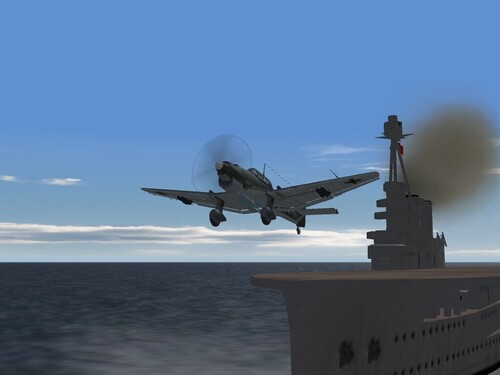
View File KM Ju-87T Stuka KM Ju-87T mod for SF/WoV/WoE: WW2 ETO This is a modification of Pasko's Ju-878B Stuka into the proposed version to be used on the aircraft carrier "Graf Zeppelin" and it's brothers. This pak contains almost everything you'll need to create this new version, minus a few critical files that you'll need to copy from the original Ju-87. In other words: THIS IS NOT A COMPLETE AIRCRAFT PACKAGE -- YOU =WILL= BE TRANSFERING FILES FROM THE ORIGINAL STUKA --- You must have the latest Weapons Pak to make use of the WW2 Bombs and Guns!!! --- You'll find in this zip: 1 skin folders labeled "KM" (this is a re-decaling of the original skin. I've repainted only the 'body.bmp, to remove the insigina...so it still get's originators credit) Ju-87T.ini Ju-87T_DATA.INI (with the necessary naval mods) Ju-87T_LOADOUT.INI Ju87B_loadout.bmp ju87t_readme.txt (this file) KM Stuka Hangar screen -- only available in this mod!!! various damage tgas "_holes.tga" "KM" skin folder (minus 3 original bmps; you'll need to copy them from your Ju-87B - see below for details) =the skin folder contains all the decals, textureset and decals ini= I HAVE included Kesselbrut's Stuka cockpit, to make things just a little bit easier. You'll need Pasko's original JU-87B for the following files and folders: Ju 87B.lod Ju 87B_001.lod Ju 87B_002.lod Ju 87B_Shadow.SHD Skin files: LeftWing.bmp RightWing.bmp Tail.bmp More, detailed instructions are in the enclosed readme -- so read it!!!!! Don't be lazy!!! Happy Hunting! Wrench Kevin Stein Submitter Wrench Submitted 09/19/2007 Category Axis Fighters
-
View File ETO RAF Tomahawk Mk.1 (BoB) Curtiss-Wright Tomahawk, #54 Squadron, RAF, Battle of Britan, circa 1940 For SF, WoV & WoE ETO installs What we have here is a skin representing RAF 54 Squadron, had it been given Tomahawks, instead of their real aircraft. This is a purely speculative skin, as the RAF didn't use any of their Tomahawks in the ETO in combat. (they went mostly to North Africa, me thinks), although several were retained for training purposes (mostly to train bomber gunners on shooting at enemy fighters). This is a semi-complete aircraft, ready to unzip into your ETO/BoB or SWOTL install. All edits and modifications are already done (in most particular, the Ring-and-Bead gunsight, and associated cockpit mods). There are several data ini edits, mostly to operational years and loadouts, plus the addition of correctly placed running, formation, and landing lights. ** REMINDER: the 'Tomahawk.LOD' is NOT included, as per Wolf's wishes. You can get it in his WW2 Planes Pak available at CombatAce. Do so now, if you haven't already...you won't be sorry!!! ** Also included is a new 50 gallon drop tank, based on the IJAAF one from the Dev A-Teams WW2 Japanese aircraft. Full instructions on it's installation are also included. Further, detailed instructions are in the enclosed readme. The only thing that's not, are the "Fictional Historical Notes". I just couldn't get my brain to work on those. Sorry folks... So, please read the readme ... it'll make you life just a little bit easier Happy Landings! Wrench Kevin Stein Submitter Wrench Submitted 09/19/2007 Category Allied Fighters
-
721 downloads
Curtiss-Wright Tomahawk, #54 Squadron, RAF, Battle of Britan, circa 1940 For SF, WoV & WoE ETO installs What we have here is a skin representing RAF 54 Squadron, had it been given Tomahawks, instead of their real aircraft. This is a purely speculative skin, as the RAF didn't use any of their Tomahawks in the ETO in combat. (they went mostly to North Africa, me thinks), although several were retained for training purposes (mostly to train bomber gunners on shooting at enemy fighters). This is a semi-complete aircraft, ready to unzip into your ETO/BoB or SWOTL install. All edits and modifications are already done (in most particular, the Ring-and-Bead gunsight, and associated cockpit mods). There are several data ini edits, mostly to operational years and loadouts, plus the addition of correctly placed running, formation, and landing lights. ** REMINDER: the 'Tomahawk.LOD' is NOT included, as per Wolf's wishes. You can get it in his WW2 Planes Pak available at CombatAce. Do so now, if you haven't already...you won't be sorry!!! ** Also included is a new 50 gallon drop tank, based on the IJAAF one from the Dev A-Teams WW2 Japanese aircraft. Full instructions on it's installation are also included. Further, detailed instructions are in the enclosed readme. The only thing that's not, are the "Fictional Historical Notes". I just couldn't get my brain to work on those. Sorry folks... So, please read the readme ... it'll make you life just a little bit easier Happy Landings! Wrench Kevin Stein -
532 downloads
KM Ju-87T mod for SF/WoV/WoE: WW2 ETO This is a modification of Pasko's Ju-878B Stuka into the proposed version to be used on the aircraft carrier "Graf Zeppelin" and it's brothers. This pak contains almost everything you'll need to create this new version, minus a few critical files that you'll need to copy from the original Ju-87. In other words: THIS IS NOT A COMPLETE AIRCRAFT PACKAGE -- YOU =WILL= BE TRANSFERING FILES FROM THE ORIGINAL STUKA --- You must have the latest Weapons Pak to make use of the WW2 Bombs and Guns!!! --- You'll find in this zip: 1 skin folders labeled "KM" (this is a re-decaling of the original skin. I've repainted only the 'body.bmp, to remove the insigina...so it still get's originators credit) Ju-87T.ini Ju-87T_DATA.INI (with the necessary naval mods) Ju-87T_LOADOUT.INI Ju87B_loadout.bmp ju87t_readme.txt (this file) KM Stuka Hangar screen -- only available in this mod!!! various damage tgas "_holes.tga" "KM" skin folder (minus 3 original bmps; you'll need to copy them from your Ju-87B - see below for details) =the skin folder contains all the decals, textureset and decals ini= I HAVE included Kesselbrut's Stuka cockpit, to make things just a little bit easier. You'll need Pasko's original JU-87B for the following files and folders: Ju 87B.lod Ju 87B_001.lod Ju 87B_002.lod Ju 87B_Shadow.SHD Skin files: LeftWing.bmp RightWing.bmp Tail.bmp More, detailed instructions are in the enclosed readme -- so read it!!!!! Don't be lazy!!! Happy Hunting! Wrench Kevin Stein -
I'm with Heck and Major Lee for some of the ww2 stuff...expecially them Nazi gun pods. But that would require a new lod file (like Heck said, similiar to the Scooter Humps, the above wing bumps could be modeled, and the Fresco D/E with radar nose and pylons). But for proper placement, would you need the 3dmax file for the 109s??? I'm still waiting for Russo's E-7 Trop! Wrench kevin stein
-
What specifically, are we looking for??? The M-24, I assume is the Chaffee tank??? Most ground objects should be found in the SF/WoV/WoE/Non-Aircraft Object Mods (that don't mean always they are, of course) Lots of the WW2 AAA units are included in the terrains, unless like me, you extracted and 'folderized' them for SP4. Lots of work.... Wrench kevin stein
-
The MTO RAF/SAAF Tomahawks are either here at CA or my site or BOTH!!! I think the 112 here is the latest, updated version with the new panel, rivets, weathering, etc. If you all look at the screenshot; I've included it in the zip, you see the lead plane is E, and the #3 & 4 fellows are L, B...just like in the painting. My little tribute As for the ETO/BoB version of the Tomahawk, I can't get my brain functioning enough to write the 'Fictional Historical Notes" (my wife thinks that sooo funny!). Might release it without ... unless I can get my head and ass and fingers wired together (little mental strain thinking about tommorrow...) I do, however, have a new 50 gallon drop tank for use by the RAF Tommy, and it looks good on the Mk.2 and up Hurri's too. Moddied from the 52 gallon IJAAF one from our Tony. It also has vitrual bomb rack for 2 100# bombs. (all this based on researched info, mostly from the Sqad/Signal "P-40 In Action"). All of 3 paragraphs on RAF usage in England. My estimation is this is a Hawk 81A-3, with the bomb rack and drop tank provisions; the book even said the P-40B's used them but I've never seen photographic proof. Like I said, if I can get it together, a few days at most. If not, a few days at most. The aircraft is ready to go otherwise. It'll be complete, MINUS the lod file, as per Wolf's wishes. It WILL come with everything BUT that. Even has a ring-bead sight for your no-cockpit view. (also included in the 112 skin set, btw) Wrench kevin stein
-
IAF Jaguars ‘sink’ USS Nimitz
Wrench replied to ghostrider883's topic in Military and General Aviation
That's a sharpe looking little firgate...wonder what the RCS modifier is?? In the shot with the carriers, I assume the Viraat's in the middle? Damn, but she looks small compared to the KH and Nimitz! What class is she? Some old RN one, isn't it?? Wrench kevin stein -
File Name: 610 Squadron Spitfire Mk.1A Skin File Submitter: Wrench File Submitted: 16 Sep 2007 File Category: Spitfire Mk V Spitfire 1A 610 Squadron skin for SF/ WoV/WoE Battle of Britian or ETO/SWOTL intalls: This skin represents Spitfire Mk.1A from 610 Squadron, RAF, during the Battle of Britian. This is a newer skin with enhanced panel and rivet lines, scuffing, wear and tear and general dirtiness. I've also tried as best I could to match the FS numbers for the color schemes. It has new Squadron Codes, individual aircraft letters, and serial numbers for about 26-30 aircraft (serials only - letter codes only go A-Z). The serials are actual numbers for Mk.1s, but I haven't been able to find a reference as to which prefix set was used by 610 Sqdn (although they were probably early number series). So, these are 'best guess'. (if anyone is interested in the source, it's from "Modellers Datafile #3: Spitfire Part 1: Merlin Powered" - which is a SUPERB reference work!!!) I created this skin for the simple reason that I wanted something to match the Nicholas Trudigan painting "Their Finest Hour", which I used as the loading screen for the Spit 1A. It always bothered me that NO one has ever thought to create it. I've also included the gunsight upgrade, switching over from the original unit, to the Pappa Romeo, EAW-converted RAF Mk.2 reflector type (with undying thanks to MoonJumper for finding these, and pointing me to them!) Full, detailed instructions in the enclosed readme -- so read the cursed thing!!!! Happy Hunting! Wrench Kevin Stein Click here to download this file
-
Nice! but you gotta give that guy something to sit on... Try this, I used in on all my Lightenings. Just insert this below the pilotpostion line: Make him look a little more comfortable! Wrench kevin stein
-
September, 1940...Southern England We were tasked with intercepting a raid against the Ventnor RDF station. Having recently finished our conversion training, and with the corrected modifications* to our Tomahawks, 2 flights were up and airborne, hunting for the Hun. (*it should be noted these aircraft were originally destined for France; they needed extensive upgrades both at the Curtiss factory and at squadron depot level to rearranged the throttle, and add the needed armour and self sealing tanks. This delayed squadron deployment for almost 3 months) We spotted the enemy formation over the sea, vectored to them by Ventnor itself. Those controllers surely have big brass ones...none of those ladies left their posts for the duration of intercept. "Tallyho!" shouted my #6, "Stukas at 1 o'clock" "Look sharp for their escorts," I called over the R/T. "They don't have any!!" called by wingman, "Stupid buggers, they're sitting ducks!!" "Right then," I said, "All chicks, engage!" I swung out wide to the right, behind for formation as the rest of the lads peeled off and began attacking from the rear. "Watch out for the gunners!" somebody shouted. I pushed down and came up under, pulling towards the right... ...trying to rack for formation from front to back, left to right. I know it was a waste of ammo, but it could possibly draw off fire from my mates. Pulling up through them, I passed by without a shot being fired at me. I could hear my wingman guns going off, as he tried to get the leftmost bird in his sights. Extending out in front, with my throttle bent to the firewall, I pulled up hard and looped over and behind. Coming up from under, I had 2 buzzards stacked over each other in my sights....I pulled the trigger and held it down for a long burst, racking BOTH of them from stern to stem. As pieces broke off, smoke began to stream out, and they fell away from formation, heading down to the sea. The R/T was full of chatter with the exultant shouts of my flight as they tore into the almost helpless Nazi dive bombers. As I pulled up and over, I was greeted with concentrated fire from the rear guns of at least 2 of the vultures...I winced as the bullets bounced off my armoured windscreen - actually SEEING the hits, and feeling them impact all along the length of my aircraft. The engine coughed once, and then everything got real quite. Oh DAMN! I thought...they've gotten my engine!! Setting up my glide, I gently straightened out, and began heading for land. I figured if Icould make, I'd set down as close as possible to the radar station itself. About that time, our controllor called in "Tango flight, mission accomplished. We have no further trade for you at this time" We'd stopped the bombers from hitting our long-range eyes. Even though only ONE made it to it's release point, it's bombs went wide and missed the towers. My radio was still working, and I called my wingman; "Take the boys home. I'm heading in with a dead engine. I'll land here." "Righto, skipper. Tango flight, join up on me. Return to base." I watched as the rejoined, and circled overhead as I made wide S turns to bleed off speed. I'll say one thing for these Tommy-hawks; they sure can take a beating. And the extra punch of the American 50 caliber guns sure shows on the enemy. Watching the smoke and dust cloud from the bomb that missed, I made a nice slow, easy turn into the wind. "Here's hoping" I thought as I dropped the undercarraige and flaps. I was greeted by the disticnt 'thumps' as the wheels came down and locked. This is good...down in one piece, they'll send over and drag my poor little ship back to base, where it can be fixed and fight again. 20 feet...airspeed 85,....10.....5....BOUNCE as I skimmed over the grass. I wiggled the rudder pedals to loose speed, and get me pointed towards to station's main building. I rolled to a stop 100 yards short of my goal. As I cut the remaining switches, fuel petcocks, and set the brakes, I noticed the stations' personell were all running towards me, severel bouncing over the field on bicycles. I unstrapped, and clambered out of the cockpit, slipping off down to the ground. I saluted the WAAF officer in charge, reporting in. "Can I use your telephone to call my station?" "Of course, Flying Officer," she said, "But it'll have to wait a mo'. It dosen't smell too good in the house right now." "Oh?" I looked puzzled, "Why is that" "That bleeding Nazi dropped his bomb right on the latrine. All the drains are broken, and there's sewage everywhere. How about a nice cuppa tea, then?" Just another day in the Battle of Britian... ---------- Another one of my 'What If..' skins for an ETO Tomahawk. It's nearly ready, just have to write the readme with the 'Fictional Historical Notes" Wrench kevin stein
-
Can't you just delete the pilot from the one of the menu screens??? Options? can't remember... I know all the pilot info is stored in a file called "Pilot00*whatevernumberpilotitis* ie: Pilot001, 002, etc. You can always delete them, and create a new pilot. There's also a PilotList.ini, that you can change your name on, or delete the entry. Me thinks! Wrench kevin stein
-
I really like those cut-away displays. It appeal to the mechanic that's still hiding in me; the fellow that likes to know the how/why things work. Also reminds me of all the 'Visible' models from the 60s....Visible V-8 and Visible Mustang were still the coolest (although the Visible Women had her points....) Wrench kevin stein
-
I added the newest BoB terrain to my SWOTL install, flew a Sweep over Gernsey...and was in one of the most intense dogfights I've ever had in a sim! Our 12 Spits against, well, it felt like the whole of the Luftwaffe was up there after us! Wrench kevin stein
-
Right now, the data link don't do nothing. Maybe someday we'll be able to link to AWACs like we used to in ATF/FA. (or Falcon) You can add ECM, flaff and chare dispensers, as well as illuminator flares, too. Wrench kevin stein
-
That's an image that's gonna bother me for the rest of the weekend....but hey, like the man said, 'whatever finishes the mod' As for those Hog pics, wouldn't the pilot gotten awfully cold up in the sky with no skin on the plane??? ducks and runs...... Wrench kevin stein